
Wood Portable 2|Windows 木目PBR編集ツール
- Digital500 JPY
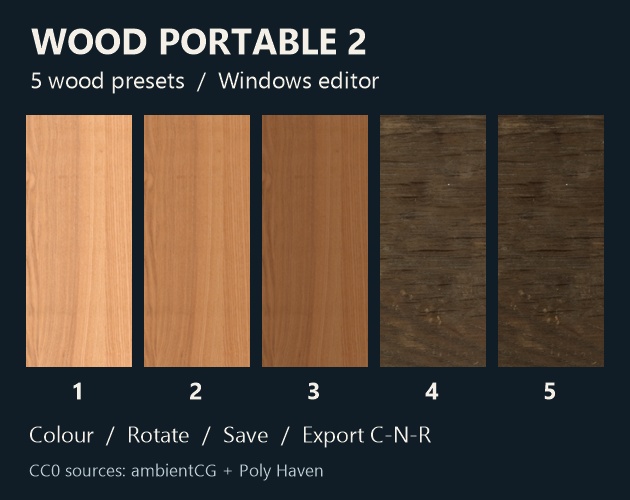
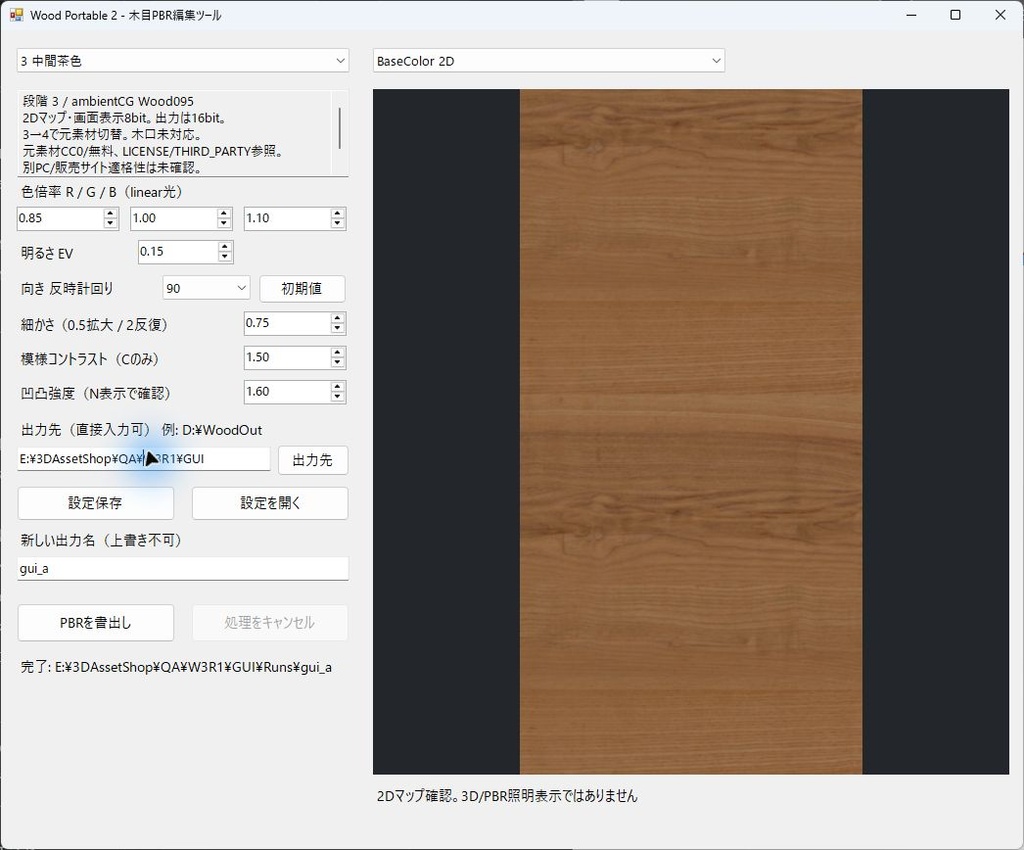
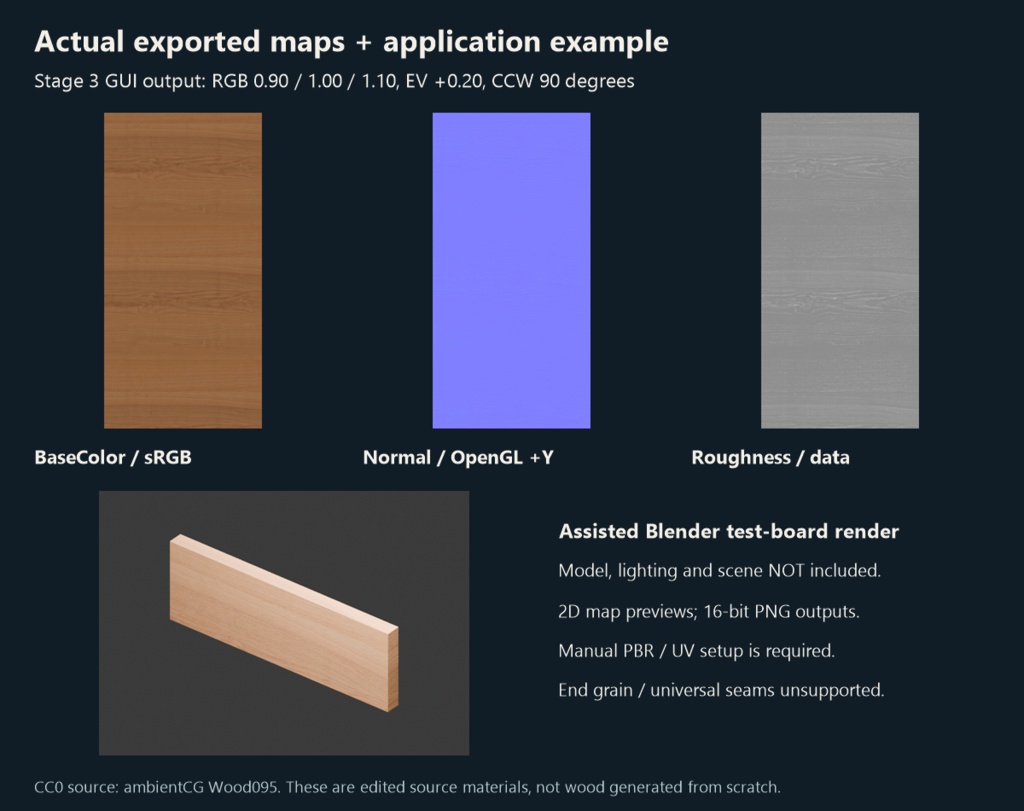


Wood Portable 2|Windows 木目PBR編集ツール ダウンロード商品 / 500円 日本語 5つの木目プリセットを選び、色・明るさ・向き・模様を調整して、BaseColor、Normal、RoughnessのPNG画像を書き出す小さなWindows用ツールです。元の木肌を一から作る生成器ではありません。 できること ・5プリセット、RGB、明るさEV、90度単位の回転 ・木目の細かさ、BaseColorの模様の濃さ、接線法線の凹凸の強さを個別調整 ・2Dマッププレビュー、設定JSONの保存・読込、16bit C/N/R PNG出力 ・完成済み出力の上書き拒否、中断時の未完ステージの区別と再試行 プレビューは8bitの2D画像で、照明付き3D表示ではありません。凹凸は法線であり、モデルを変形しません。回転時はC/N/Rと法線の向きを対応させます。 向いている使い方と制限 最初は小さな板の表面など、UVを1枚の画像内に収める用途を推奨します。幅広い天板で何度も繰り返すと、模様の境目や反復が見える場合があります。木目の細かさを変えても継ぎ目のない画像になる保証はありません。自然な木口、任意の面取り・全周の連続性は未対応/非保証です。 モデル、UV、Unity材質・シーン・パッケージは非同梱。利用するモデルのコピーに、手動で画像とUV尺度を設定してください。Unity StandardではRoughnessを直接Smoothnessへ割り当てず、1-Rへ変換する必要があります。画像付き日英ガイドを同梱しています。 素材と権利 段階1〜3はambientCG Wood095(個別作者未確認)、4〜5はPoly Haven Fine Grained Wood / Rob TuytelのCC0素材に由来します。元画像は無料で入手可能です。 https://ambientcg.com/view?id=Wood095 https://polyhaven.com/a/fine_grained_wood 当店が元木肌を自作したとは表示しません。本ツールの価値は編集・設定管理・安全な画像出力の機能です。3→4で元素材が切り替わり、同じ木の物理的な経年変化を連続再現しません。Wood095の0.6×0.3mは設計上の仮定、Poly Haven公式幅0.6mと派生キャンバス0.66×0.66mは区別します。材種・スキャン・同一木の断面セットとは断定しません。 個人は購入者本人、法人は同一購入会社内で人数・PC台数の制限なし。商用制作、出力画像の作品利用・単体販売・納品が可能。外注先へ出力画像や使用モデルを共有できますが、本体は別途取得が必要です。ソースの内部改変可、本体・ソースの外部再配布/再販売不可。期限・売上による追加使用料なし。独立したCC0素材の権利をこれらの本体条件で制限しません。詳細は同梱LICENSEと技術対象名のSCOPEをご確認ください。 必要環境・確認範囲 Windows/.NET Frameworkが必要。確認PCは.NET Framework 4.8.10008(Release 534296)、ランタイム非同梱。Python、Blender、Unityは本体起動に不要です。フォルダ全体を展開してWP3c.exeを起動してください。 同一PCの別展開先で、以前の同じ編集処理による設定保存・再起動読込・PBR出力を確認。本版はタイトル表記だけを変更して再ビルドし、起動・代表設定の読込と保存・PBR書き出しを実GUIで再確認しました。 同じC/N/RはBlender5.2.2 LTS/CyclesとWindows/Unity6000.3.21f1/Built-in Standard/Linear/DX12でImport・表示・保存再読込を確認済み。本版の代表出力がその画像とバイト一致することを確認し、この範囲を引き継ぎます。今回Blender/Unityの再実行・Playは未実施。すべての設定、別PC、Player build、URP/HDRP、性能/FPS/VRAMを保証しません。 サポート 購入後90日間、Windowsでの起動・設定保存/読込・画像書き出しの不具合を対象とします。BOOTHのショップへのメッセージから、バージョン、Windows環境、症状と再現手順をご連絡ください。公開される場所に注文番号、購入リンク、氏名、メール等の個人情報を書かないでください。画面やログの個人情報も伏せてください。返信期限・解決期限を約束するものではありません。購入・支払い・ダウンロードリンク・アカウントの問題:https://booth.pixiv.help/hc/ 法令上の権利やプラットフォームの手続を制限しません。 GUIは日本語、説明書と利用条件は日英です。紹介画像の操作画面は、この版で設定保存とPBR書き出しを確認した実キャプチャです。画像のモデル・照明・シーンは非同梱です。コードと文書にはCodex支援を使用し、実行時は既存CC0画像をローカルで決定的に編集します。外部生成AIを呼び出しません。
English
Choose from five wood presets and edit colour, brightness, direction and pattern settings, then export BaseColor, Normal and Roughness PNG images. This is an image editor, not a generator of new underlying wood materials. Features • Five presets; RGB gains; brightness EV; 90-degree rotation • Independent apparent grain scale, BaseColor pattern contrast and tangent-normal strength • 2D map preview, settings JSON save/load and 16-bit C/N/R PNG export • Completed-output overwrite rejection, unfinished-stage identification and retry after cancellation The preview is an 8-bit 2D image, not a lit 3D renderer. Normal editing does not displace geometry. C/N/R and tangent-normal direction stay coordinated when rotated. Recommended uses and limits Start with a small board surface whose UVs fit inside one image. Repeated wide tabletops may show pattern resets and visible repetition. Changing grain scale does not guarantee seamless output. Natural end grain and arbitrary bevel/all-around continuity are unsupported or unguaranteed. Models, UVs, Unity materials, scenes and packages are not included. Apply images and physical UV scale manually to copies of your models. Unity Standard needs 1-R for smoothness rather than raw roughness. Illustrated Japanese/English guides are included. Sources and rights Stages 1–3 derive from ambientCG Wood095, individual author unconfirmed; stages 4–5 derive from Poly Haven Fine Grained Wood by Rob Tuytel. The original CC0 materials are available free: https://ambientcg.com/view?id=Wood095 https://polyhaven.com/a/fine_grained_wood We do not claim original authorship of those materials. The Tool's value is its editing, settings and safe-export functionality. Stage3→4 changes source; this is not continuous physical ageing of one wood. Wood095's 0.6×0.3m is a design assumption. Poly Haven's official 0.6m width is separate from the derived 0.66×0.66m canvas. No species, scan method or same-wood cross-section set is claimed. Individuals: the purchaser personally. Organizations: unlimited internal users/devices within the same purchasing company. Commercial production, work use and standalone sale/delivery of exported images are permitted. Share outputs and textured models with contractors; contractors operating the Tool obtain it separately. Internal source modification is permitted; external Tool/source redistribution and resale are prohibited. No time/revenue-based additional usage fees. These Tool terms do not narrow independent CC0 rights. See bundled LICENSE and component SCOPE for detail. Requirements and tested scope Windows/.NET Framework required. The test PC has .NET Framework4.8.10008, Release534296; runtime not bundled. Python, Blender and Unity are not application runtime dependencies. Extract the entire folder and launch WP3c.exe. Earlier GUI editing, settings save, restart/load and PBR export were verified from another extraction on the same PC. This version changes only the application title and was rebuilt; launch, representative settings load/save and PBR export were separately verified through its actual GUI. The same C/N/R outputs were previously imported, rendered and saved/reloaded using Blender5.2.2 LTS/Cycles and Windows/Unity6000.3.21f1/Built-in Standard/Linear/DX12. Representative exports from this version match those images byte-for-byte. This scope is inherited; Blender/Unity and Play were not rerun for this title revision. This does not guarantee every setting, another PC, Player builds, URP/HDRP or performance/FPS/VRAM. Support For 90 days after purchase, support covers defects in Windows startup, settings save/load and image export. Use the BOOTH shop message feature with the version, Windows environment, symptoms and reproduction steps. Do not post order numbers, purchase links, names, email or other personal information in public places; redact screenshots/logs. No response/resolution deadline is promised. Purchase, payment, download-link or account issues: https://booth.pixiv.help/hc/ Statutory rights and platform procedures remain intact. The GUI is Japanese; instructions and terms are Japanese and English. The GUI image is an actual capture of this version after settings save and PBR export. Models, lighting and scenes shown are not included. Code and documentation were developed with Codex assistance. Runtime editing deterministically processes local CC0 images without calling external generative AI.