

Tattoo Baker - Click to put any image on your avatar's skin as a tattoo [no cuts at UV seams]
- Tattoo Baker (main)Digital3,000 JPY
- Manual & License (free - read before you buy)Digital0 JPY
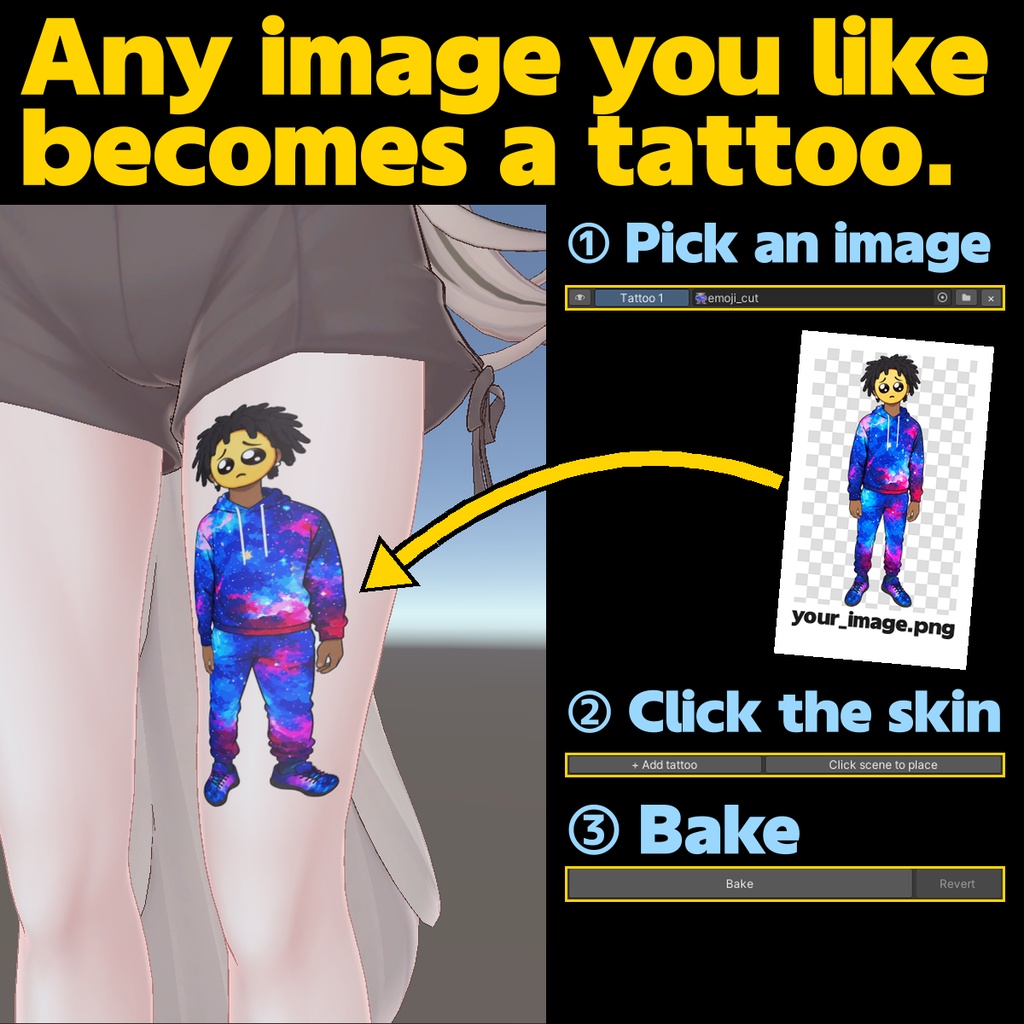


A Unity tool that puts tattoos on your avatar's skin and bakes them into the texture. ■ What it does - Click to place: click the skin in the Scene view and the tattoo goes there. Adjust it with just Width (cm) and Rotation. Both are also in the tattoo's Inspector (beta) - No cuts at UV seams: the design is spread along the skin before baking, so it stays joined across UV island borders and across the border between the body and face meshes. The margin outside the islands is painted too, so no seams show from a distance - No stretching when it wraps around: instead of projecting onto a plane, the tool measures distances on the skin, so large designs that wrap around arms, shoulders and thighs keep their shape - Pixel art stays sharp: image files are read before Unity compresses them, and only the edges between pixels are smoothed. Colors from transparent areas don't mix in, so there are no white or black fringes - Live preview: when you move or resize a tattoo, the scene updates as soon as you let go. Unity doesn't freeze even with large tattoos - Use images straight from your PC: pick a PNG / JPG with the folder button. It is imported into the project for you - Layer as many as you like: Opacity, Blend (Normal / Multiply) and Flip horizontally per tattoo. The eye button hides one for a while - Sharp thin lines (beta): choose "Apply as sticker" under "Mode" to put the image on the skin at its own resolution instead of baking it into the body texture. When the body texture is too coarse for thin lines at that size, the settings tell you. Follows bones and blendshapes - Raised tattoos: choose "Make raised" under "Mode" to make a tattoo that rises from the skin in the shape of the image. Choose the height and the rounding of the edges; it follows bones and blendshapes. Best for filled designs, bold lines and text; thin lines become low relief. "Plate from image" also makes a standalone plate from an image - Export tattoo-only images (beta): export transparent PNGs laid out like the body texture, at 1x, 2x or 4x. Use them in lilToon's Main Color 2nd and 3rd - Undo anything: baking makes new textures and materials and swaps them in. Your original textures and materials are never changed, and the Revert button and Ctrl+Z bring them back - Picks the body and face meshes for you (hair, eyes, eyelashes and similar materials are not painted) - If blendshapes shrink the body under clothes, tattoos still go on the unshrunk shape - On avatars whose head is inserted into the body, designs don't land on faces hidden inside the neck - Baked textures keep the compression and max size settings of the original texture - Japanese / English UI (switch at the top right of the window) ■ Requirements - Windows (the author only has Windows, so it is tested on Windows only) - Unity 2022.3 (a VRChat Creator Companion avatar project) - A shader that uses the main texture (_MainTex). Tested with lilToon - Tattoo images: PNG / JPG (transparent PNG recommended). PSD / TGA also work - No extra tools such as Modular Avatar are needed. Modular Avatar is needed only to make raised and sticker tattoos follow blendshapes - On avatars whose UVs overlap left and right (such as both sides of the face), a tattoo on one side also shows up on the other. The window warns you when this happens ■ If something goes wrong - Send me a message on BOOTH ■ Rights - Product images were taken with Manuka (©ジンゴ). The avatar is not included - Commercial use is OK. No extra license fee - You may distribute and sell textures with baked tattoos, meshes you made, exported tattoo images and avatars that use them. When you do, put a link to this product page (https://jesusclub.booth.pm/items/9226918) within the first 10 lines of the text of your distribution or sales page. No link is needed if you only use them on your own avatar and upload it. Do not include this product's files - Copying, transferring, uploading or reselling this product is prohibited - The author is not liable for any damage from using this product See the included LICENSE.txt for the full terms. ■ Update notes v1.4.0 English UI (switch with 日本語 / English at the top right of the window). Fixed the folder button in the image plate's Inspector stretching very tall v1.3.3 Fixed the preview not appearing on avatars with constraints on their bones. Tattoo previews now also show on bodies under a preview such as Modular Avatar's Shape Changer, plus other small fixes v1.3.2 Fixed Unity sometimes freezing when resizing a large tattoo. While you change the size or rotation, only the outline is shown, and the tattoo is rebuilt when you let go v1.3.1 Fixed baking sometimes overwriting the images and materials of another avatar with the same name. Each bake goes into a new folder, so Ctrl+Z takes you back to the previous look v1.3.0 Added Apply as sticker (beta), Export tattoo-only images (beta) and the size fields in the Inspector (beta). Thin lines in raised tattoos become low relief, and designs that are too heavy are flagged before they are made v1.2.0 Added raised tattoos and making a plate from an image v1.1.0 Added a show / hide button per tattoo and a button to pick images from a folder on your PC v1.0.0 First release