
【動く縦型配信背景】ゲーミングチェアのある夜のお部屋|ピンク・ライトブルー・パープル|デスク付き 36秒ループ MP4+PNG|Gaming Room – Animated Vertical Background for VTube Studio
- ピンク / PinkDigital500 JPY
- ライトブルー / Light BlueDigital500 JPY
- パープル / PurpleDigital500 JPY
- 3色セット / All 3Digital1,200 JPY
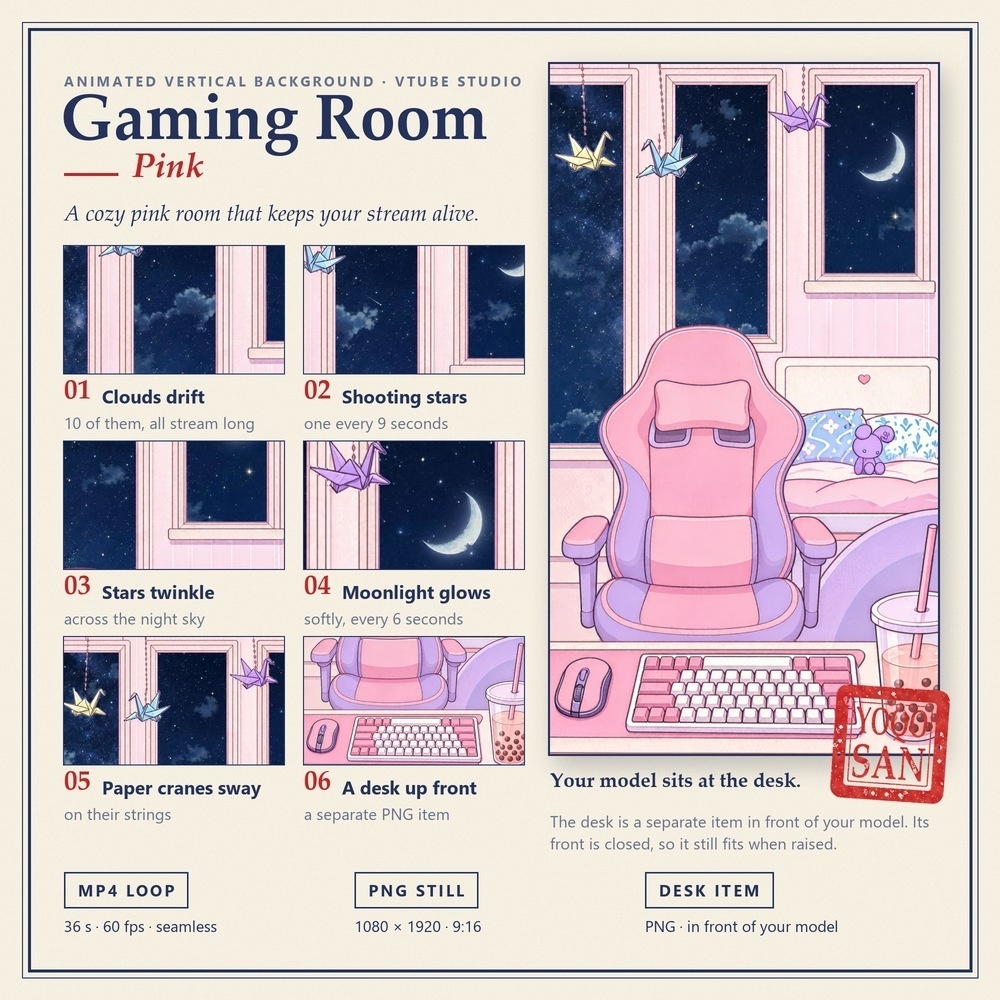
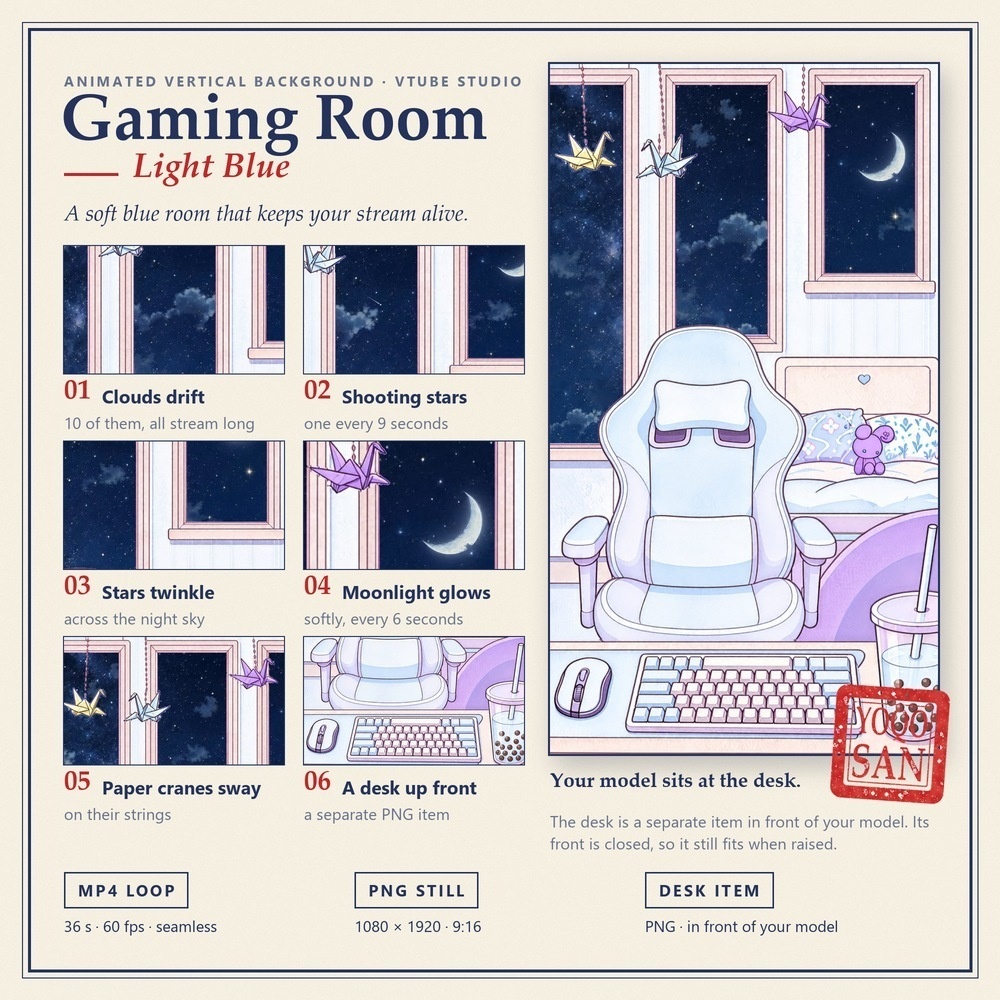
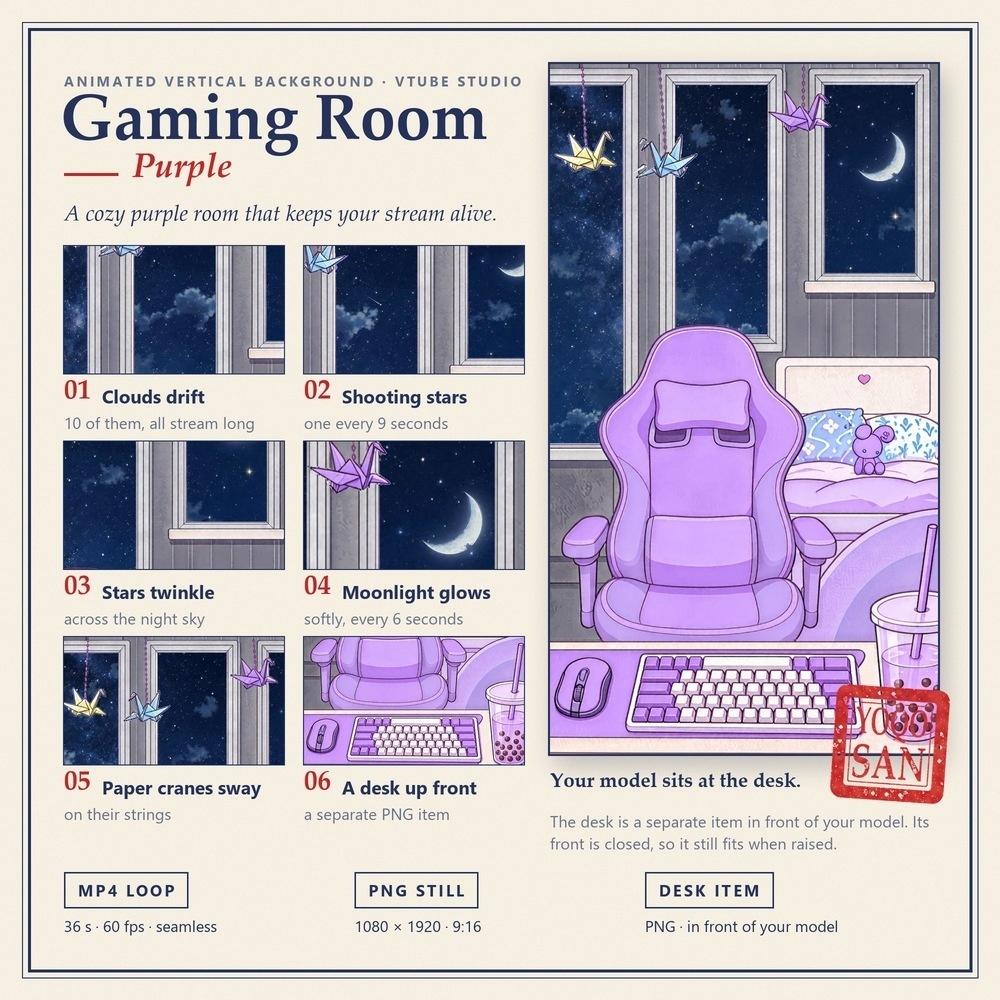
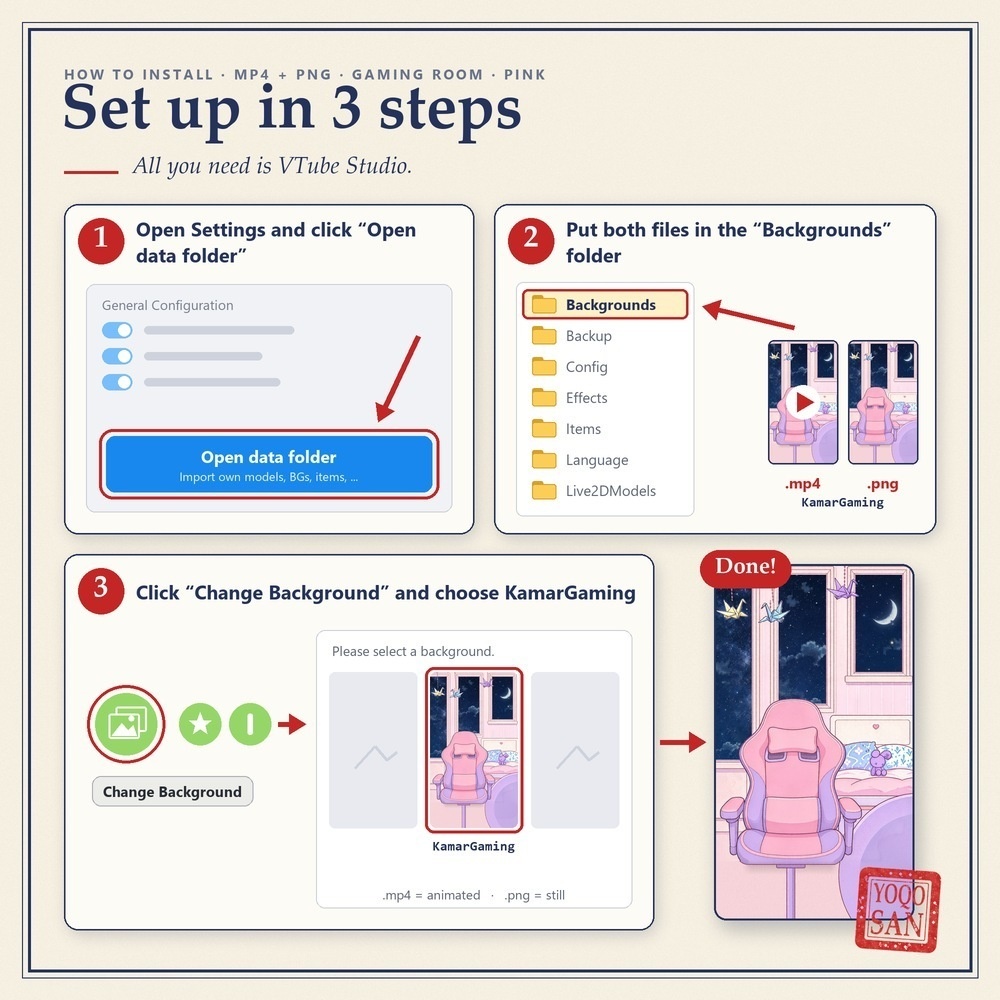
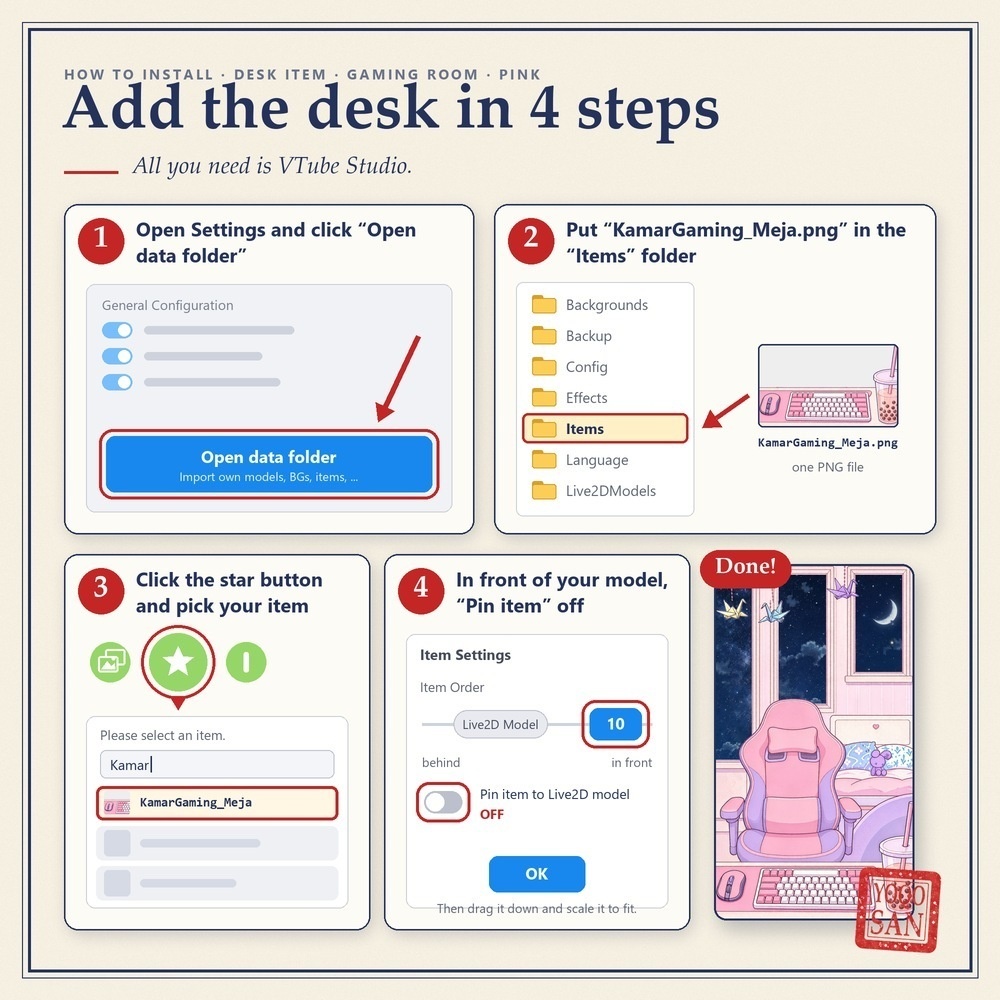


窓の外に夜空が広がる、ゲーミングチェアのお部屋の背景です。 雲が流れ、星がまたたき、ときどき流れ星――配信画面が「止まった絵」に見えません。 手前に置けるデスクのパーツ付きで、モデルがデスクに座っているように見せられます。 ■ この背景でできること ・VTube Studioの「背景を変更」で選ぶだけ。縦型(9:16)の配信にそのまま使えます ・36秒でつなぎ目なくループ。最後のフレームが最初のフレームにそのままつながります ・デスク(キーボード・マウス・タピオカ)は別のPNGアイテム。モデルの手前に置けます ・デスクの前面はパネルでふさがっているので、デスクを上にずらしてもモデルの体が透けません ・ピンク・ライトブルー・パープルの3色。お部屋の色とイスの色が変わります ■ 動くもの(3色とも同じ) 流れる雲(10個)/9秒に1回の流れ星/またたく星/6秒ごとにやわらかく光る月明かり/ゆれる折り鶴(3羽) ■ セット内容(1色につき) ・MP4動画:1080×1920(9:16)/60fps/36秒/シームレスループ ・PNG画像:1080×1920(同じ景色の静止画) ・デスクPNG:1080×1563(背景が透明なアイテム用画像) ※Live2Dアイテムは含まれません(顔の動きに合わせて背景が動く版ではありません)。 ■ 使い方:背景(3ステップ) 1. VTube Studioの設定で「データフォルダを開く」をクリック 2. MP4とPNGを「Backgrounds」フォルダに入れる 3. 「背景を変更」から選ぶ(.mp4=動く/.png=静止画) ■ 使い方:デスク(4ステップ) 1. 同じく「データフォルダを開く」をクリック 2. デスクのPNGを「Items」フォルダに入れる 3. メニューの★ボタンを押し、一覧からデスクを選ぶ 4. 「ソート順」をLive2Dモデルより手前(例:10)にし、「Live2Dモデルに付ける」をオフにしてOK あとはデスクを画面の下まで動かし、画面の幅に合わせて大きさを調整してください。 ■ ご利用について ・ご自身の配信・動画でご利用いただけます(収益化している配信もOK) ・再配布・転売・共有・譲渡は禁止です(購入者ご本人のみ使用可) ―――――――――――――――――――― A gaming room background with a night sky outside the window. Clouds drift, stars twinkle, a shooting star now and then — a backdrop that keeps your stream alive. Comes with a desk you place in front of your model, so your model sits at the desk. ■ What you can do with it - Pick it with "Change Background" in VTube Studio. Made for vertical (9:16) streams. - It loops seamlessly every 36 seconds: the last frame flows into the first. - The desk (keyboard, mouse, boba tea) is a separate PNG item you put in front of your model. - The front of the desk is closed with a panel, so you can raise the desk without your model showing through. - 3 colors: Pink, Light Blue and Purple. The room and the chair change color. ■ What moves (the same in all 3 colors) 10 drifting clouds / a shooting star every 9 seconds / twinkling stars / moonlight that glows softly every 6 seconds / 3 swaying paper cranes ■ What you get (per color) - MP4 video: 1080 × 1920 (9:16) / 60 fps / 36 s / seamless loop - PNG image: 1080 × 1920 (the same scene, without motion) - Desk PNG: 1080 × 1563 (transparent background, for use as an item) * No Live2D item is included (the background does not follow your head movement). ■ Setup: background (3 steps) 1. In VTube Studio settings, click "Open data folder". 2. Put the MP4 and the PNG in the "Backgrounds" folder. 3. Click "Change Background" and choose it (.mp4 = animated / .png = still). ■ Setup: desk (4 steps) 1. Click "Open data folder" again. 2. Put the desk PNG in the "Items" folder. 3. Click the star button in the menu and pick the desk from the list. 4. Set "Item Order" in front of the Live2D model (for example 10), turn off "Pin item to Live2D model", then click OK. Then drag the desk to the bottom of your screen and scale it to fit the width. ■ Terms of use - Use it in your own streams and videos, including monetized ones. - No redistribution, resale, sharing or transfer. For use by the purchaser only.