

【YUMEKA対応】肌色6種・肌つやMatCap+体型に合わせた陰影|lilToon
- Digital700 JPY
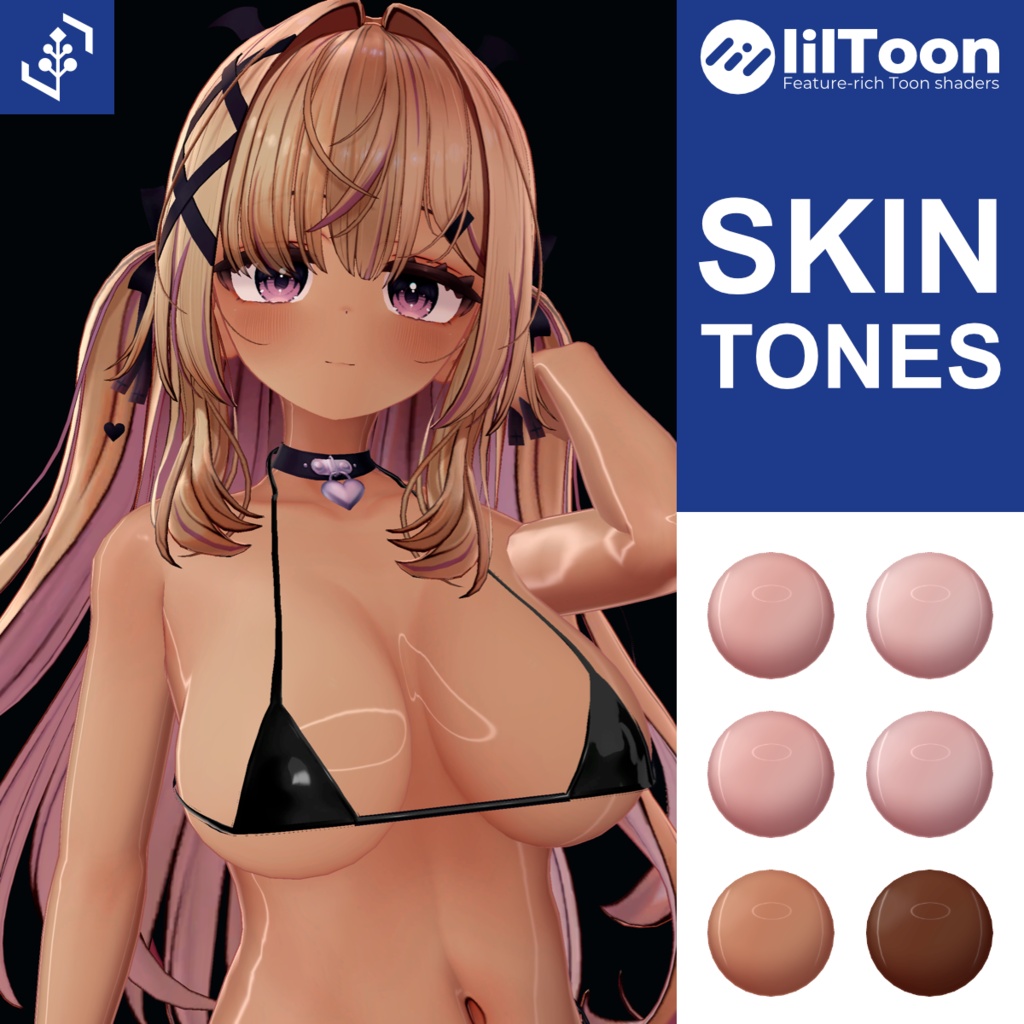
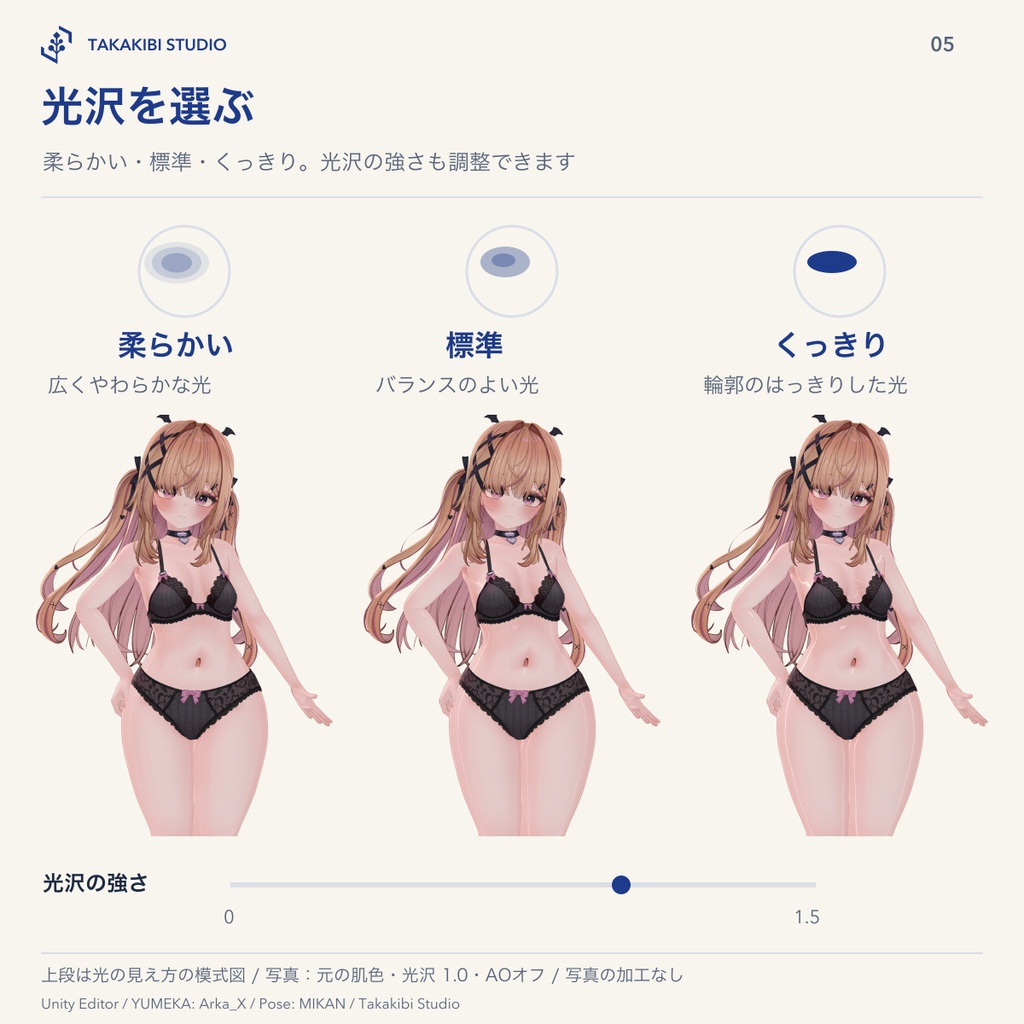


色白・小麦・褐色など、元の肌色を含む6種の色味と光沢3段階を選べる、YUMEKA(ゆめか)用の肌色・肌つや設定セットです。 Unityで選んで設定できます。v0.3.0から、今の体型に合わせて作る陰影(AO)と、体の丸みを見せる曲線の陰影を足せます。MatCap 3枚、光沢用lilToonプリセット6種、肌を複製して適用・復元するツールが入っています。
紹介動画
ポーセリン・ローズ・クール・ハニー(小麦)・カカオの5色を、標準の光沢で各10秒ずつ一周させています。 色味・光沢の強さは1.0、AOと曲線の陰影はオフです。カメラと照明は固定しています。
対応環境・掲載画像
YUMEKA v1.0.4 / lilToon 2.3.4 / Unity 2022.3.22f1向け。PC用です。 ※掲載画像・比較動画はMac版Unity Editorの実描画です。肌色・光沢の比較画像ではAOをオフにしています。各画像内の撮影条件もご確認ください。紹介動画は標準の光沢で肌色5種を一周ずつ見せるもので、AOと曲線の陰影はオフです。Windows版Unityでの操作、VRChat実クライアント、HMD両眼表示、実機負荷は未確認です。
肌色と肌つやを選ぶ
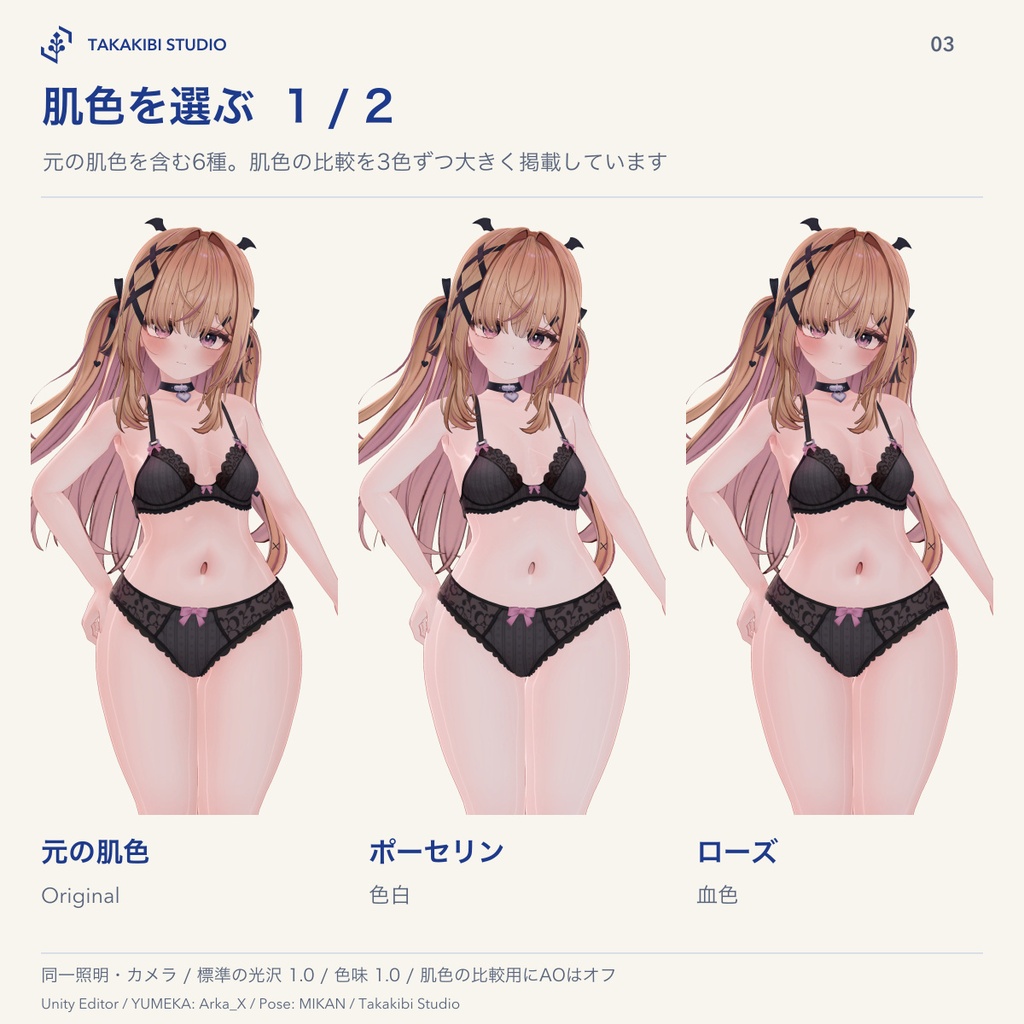
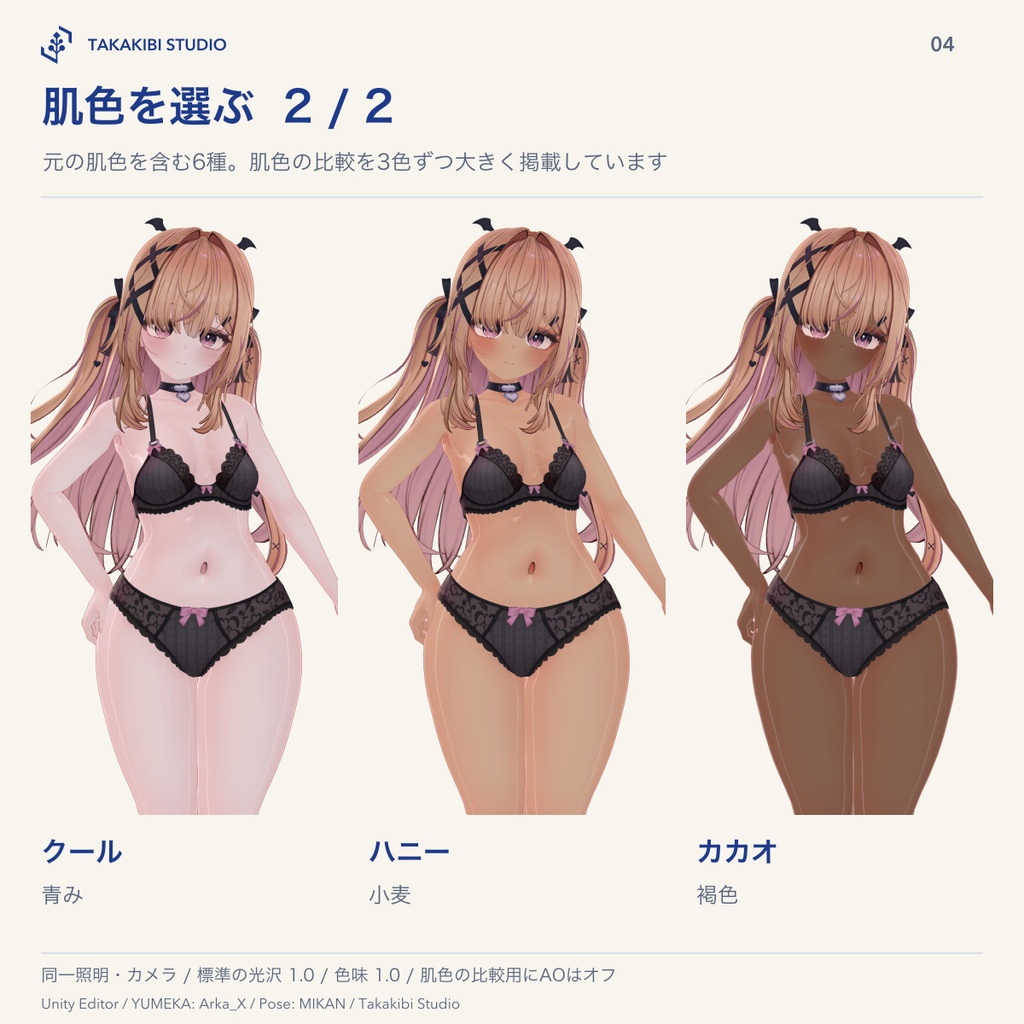
・元の肌色 ・ポーセリン:色白 ・ローズ:血色 ・クール:青み ・ハニー:小麦 ・カカオ:褐色 各色味に、柔らかい・標準・くっきりの光沢を選べます。元の肌色を含む6種×光沢3段階の18通りです。 色味の強さ0〜1と、光沢の強さ0〜1.5は別々に調整できます。色味は顔と身体へ一緒に設定します。 元の肌画像は差し替えません。色補正から目・口内・爪を外すマスクを導入時に作成します。顔の光沢には、目・口内・歯を除外する肌マスクも使います。色味の変更とマスクの設定はツールから行います。手動用のlilToonプリセット6種は、光沢だけの身体用3種・顔用3種です。顔用を手動で使う場合は、肌部分のマスクを別途設定してください。
体型に合わせた陰影(v0.3.0)
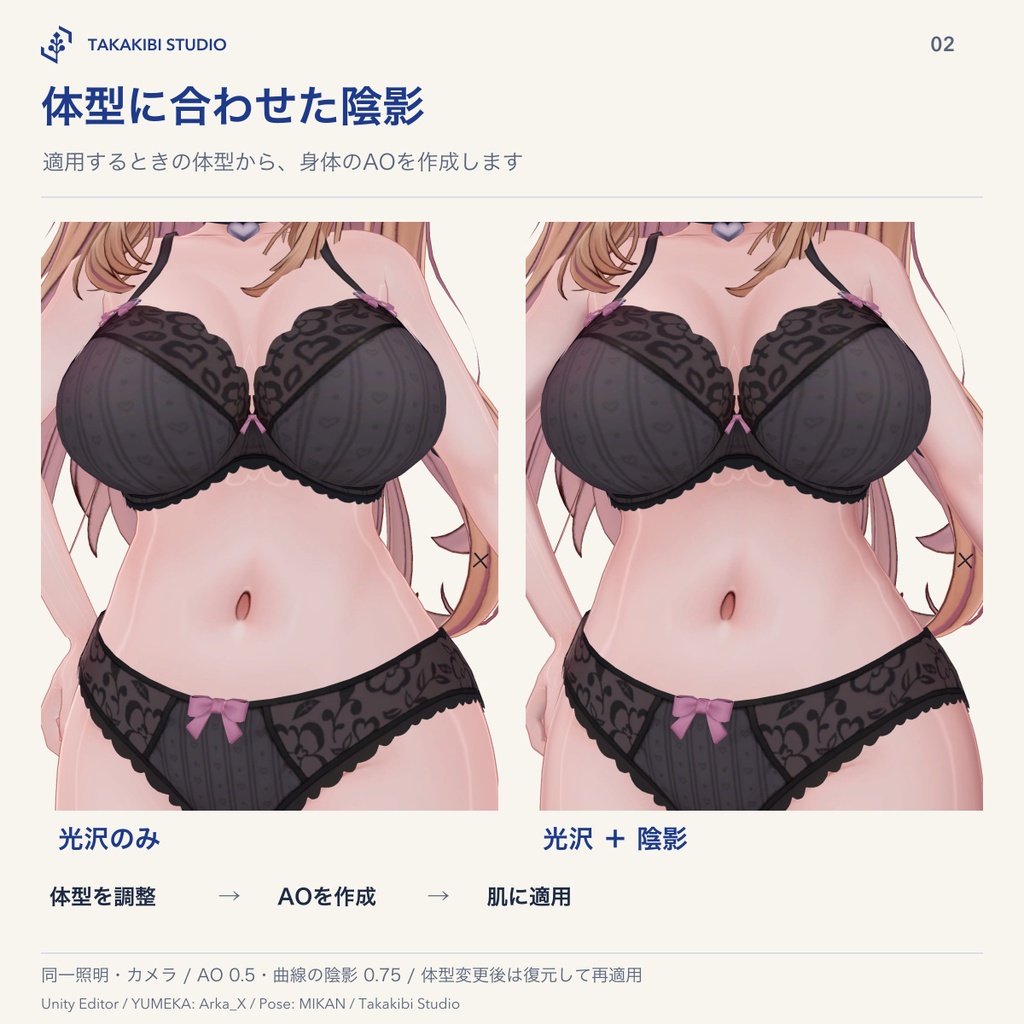
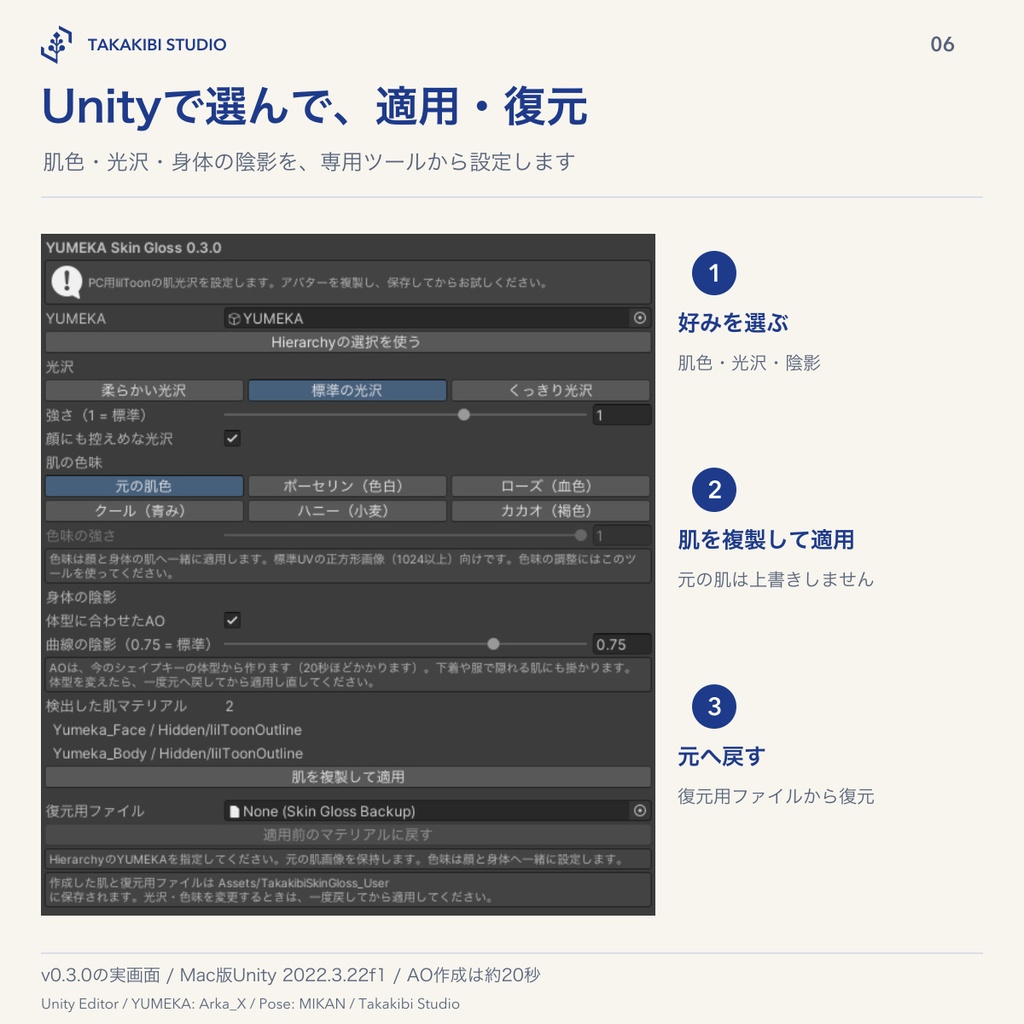
・体型に合わせたAO:適用するときに、今のシェイプキーの体型から陰影の画像を作ります。谷間・胸の下・脇・脚の付け根などのくぼみに、身体の影色(ピンク寄り)の陰が付きます。胸の周りは広くやわらかい陰にしています。胸の大きさを変えた体型でも、その形から作ります。 ・曲線の陰影:体の丸みを見せるMatCapです。強さは0〜1で、標準は0.75です。 ・服や下着は陰の計算に入れないため、下着や服で隠れる肌にも素肌の形で陰が付きます。 ・顔には陰影を付けません。AOを外したり、曲線の陰影を0にしたりもできます。 ・体型を変えた場合は、一度元へ戻してから適用し直してください。AOを作る間、20秒ほどかかります。 ・YUMEKAには胸の大きさに合わせたボディテクスチャが3種類あります。胸の大きさを変えた場合は、YUMEKAの説明書のとおり、合うテクスチャへ差し替えてからお使いください。本セットはテクスチャを差し替えません。
導入と復元
Hierarchy上のYUMEKAを指定し、色味・光沢・陰影とそれぞれの強さを選んで「肌を複製して適用」を押します。元の肌マテリアルは上書きしません。 保存したRestore.assetから元のマテリアル参照へ戻せます。ツールを開き直したときも、対応する復元用ファイルを探します。設定を変えるときは、一度戻してから再適用してください。 適用後に階層やマテリアル参照を変更すると、自動復元が止まることがあります。作業前にプロジェクトとシーンをバックアップしてください。
必要環境・対象範囲
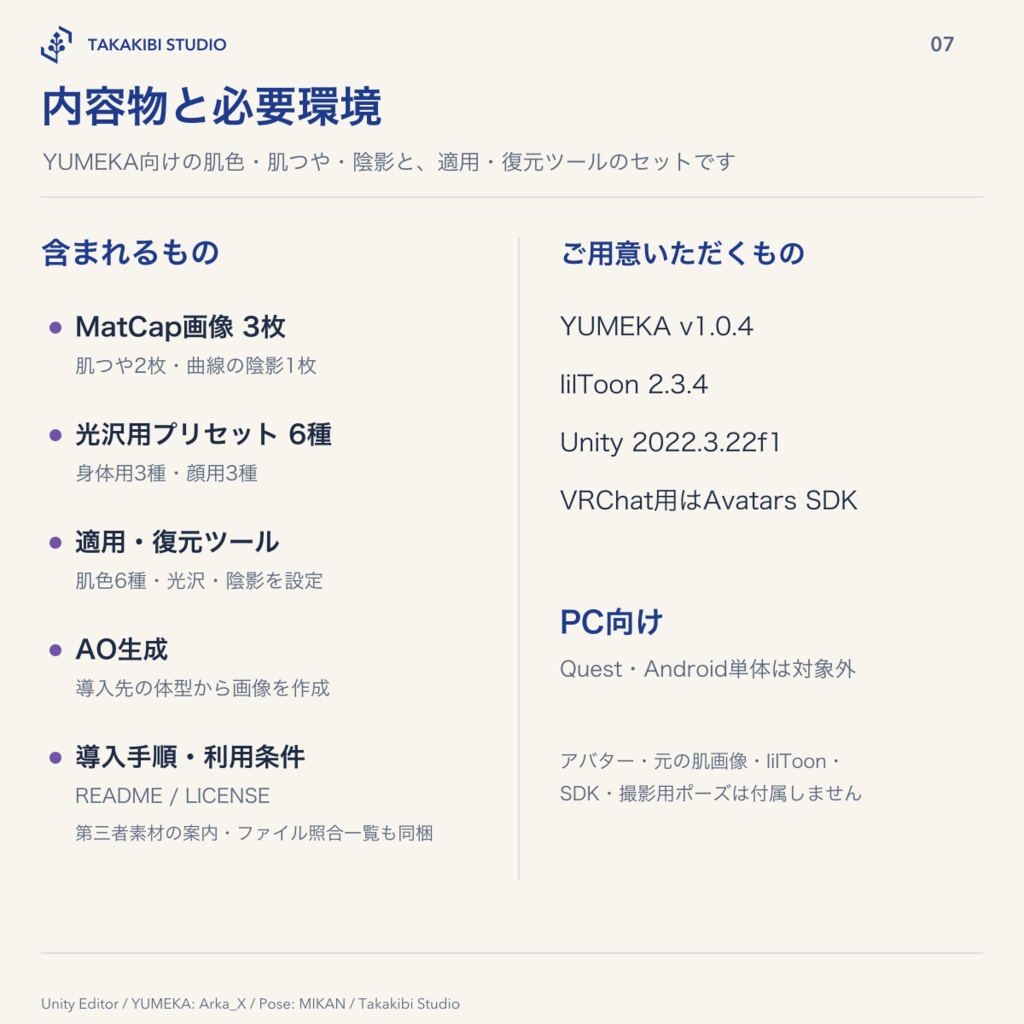
YUMEKA v1.0.4、通常版lilToon 2.3.4、Unity 2022.3.22f1を用意してください。VRChat用にはVCCのAvatarsプロジェクトを使います。 色味と顔の光沢はYUMEKAの標準UV、正方形で1024以上にインポートした肌画像向けです。UVや顔画像の透明領域を変えた状態は対象外です。色味の変更では、元の肌ですでに色調補正・色補正マスク・グラデーションマップ・メインカラー2ndを使っている状態も対象外です。AOはメインカラー2nd、曲線の陰影はメインカラー3rdを使うため、元の身体の肌でこれらを使っている場合は、陰影を外して適用してください。 YUMEKA本体、元の肌画像・マスク、lilToon、VRChat SDK、撮影用ポーズは付属しません。Quest・Android単体、Poiyomi、lilToon Lite、他アバターは対象外です。
内容物
・肌つやMatCap PNG 2枚(各1024×1024) ・曲線の陰影MatCap PNG 1枚(512×512) ・光沢用lilToonプリセット6種(身体用3種・顔用3種) ・肌色6種・光沢・陰影を選べる適用/復元ツール入りunitypackage ・導入手順、利用条件 UnityではMatCapを1024×1024、ミップマップありで使用します。顔の光沢には肌部分のマスク1枚を使います。色味も変える場合は顔・身体用の計2枚を導入先で作成し、顔のマスクは光沢と色味で共用します。各1024×1024です。AOを使う場合は、1024×1024のAO画像と身体のマスクを導入先で作成します。
利用条件
利用条件は、購入したZIPを展開したフォルダ内のLICENSE_JA.txtをご確認ください。 YUMEKA・lilToonなどの第三者素材には、各配布元の規約が別途適用されます。
クレジット
本商品はYUMEKA公式・lilToon公式の商品ではありません。 ゆめか Yumeka / Arka_X様 https://booth.pm/ja/items/8672657 lilToon / lilxyzw様 https://lilxyzw.github.io/lilToon/ 掲載写真のポーズ:みかん製ポーズ集 / みかんずめいど様 https://mikanhouse.booth.pm/items/3793632
制作・お問い合わせ
設定とEditorツールの制作にAIを利用しています。 お問い合わせフォーム https://forms.gle/1D6am64azk1L13MK7 購入前のご質問・導入のご相談・不具合のご報告は、上のフォームからお願いします。商品名・バージョン、利用環境、発生した状況をまとめてお送りいただけます。 フォームを利用できない場合は、BOOTHのショップメッセージをご利用ください。
English | Skin Tones, Gloss and Shading for YUMEKA
A skin-tone and gloss settings pack for YUMEKA, with six tones including the original skin tone, and three gloss styles. Choose pale, rosy, cool, honey-tanned or cocoa-brown skin in Unity. From v0.3.0, you can add ambient occlusion (AO) generated for your current body shape and a MatCap that emphasizes the body's curves. Includes three MatCaps, six lilToon gloss presets, and a tool that duplicates skin materials for application and restores the original references.
Preview video
The video shows Porcelain, Rose, Cool, Honey and Cocoa, each rotating through a full turn over ten seconds with the Standard gloss style. Tone and gloss strengths are both 1.0. AO and curve shading are off. The camera and lighting are fixed.
Supported setup and product images
For YUMEKA v1.0.4 / lilToon 2.3.4 / Unity 2022.3.22f1. PC use only. The product images and comparison videos are actual renders from Unity Editor on macOS. AO is off in the skin-tone and gloss comparisons; see the conditions noted in each image. The preview video shows five skin tones with Standard gloss, with AO and curve shading off. Operation in Unity on Windows, the VRChat client, stereoscopic HMD viewing and device performance have not been verified for this listing's stated scope.
Choose skin tone and gloss
• Original skin tone • Porcelain: pale • Rose: rosy • Cool: cool-toned • Honey: tanned • Cocoa: brown Each tone has Soft, Standard and Defined gloss styles: six tones including the original, multiplied by three gloss styles, for 18 combinations. Tone strength (0–1) and gloss strength (0–1.5) can be adjusted separately. Tone settings are applied to both face and body. The original skin textures are not replaced. During setup, the tool creates masks that exclude the eyes, inside of the mouth and nails from color correction. Facial gloss also uses a skin mask that excludes the eyes, inside of the mouth and teeth. Use the tool to apply tone and mask settings. The six presets for manual lilToon use affect gloss only: three body presets and three face presets. When applying a face preset manually, set up a separate skin-area mask.
Shading for your body shape — v0.3.0
• Body-shape AO: at application time, the tool generates an AO texture from the current shape-key settings. Recesses around the cleavage, under the breasts, armpits and groin receive shading tinted toward the body's pinkish shadow color. Shading around the chest is broad and soft. If breast size has been changed, AO is generated from that shape. • Curve shading: a MatCap that emphasizes the body's curves. Strength ranges from 0 to 1, with a default of 0.75. • Clothing and underwear are excluded from the shading calculation, so covered skin is shaded according to the unclothed body shape. • Shading is not applied to the face. You can disable AO or set curve shading to 0. • If you change the body shape, restore the original materials and apply the settings again. AO generation takes approximately 20 seconds. • YUMEKA includes three body textures for different breast sizes. If you change breast size, first select the appropriate texture as described in YUMEKA's manual. This pack does not replace those textures.
Apply and restore
Select the YUMEKA instance in the Hierarchy, choose the skin tone, gloss, shading and their strengths, then press 肌を複製して適用 (Duplicate skin and apply). Original skin materials are not overwritten. Use the saved Restore.asset to restore the original material references. When reopened, the tool also looks for the corresponding restore file. To change settings, restore first, then apply again. Changing the hierarchy or material references after application may prevent automatic restoration. Back up your project and scene before working.
Requirements and scope
Requires YUMEKA v1.0.4, the standard version of lilToon 2.3.4, and Unity 2022.3.22f1. For VRChat, use a VCC Avatars project. Skin-tone settings and facial gloss require YUMEKA's standard UVs and square skin textures imported at 1024 × 1024 or higher. Modified UVs or altered transparent areas in the face texture are outside the supported scope. For tone changes, source skin materials already using color correction, color-correction masks, gradient maps or Main Color 2nd are also outside scope. AO uses Main Color 2nd and curve shading uses Main Color 3rd. If your original body-skin material already uses these layers, disable the corresponding shading features before applying. YUMEKA itself, original skin textures and masks, lilToon, the VRChat SDK and photography poses are not included. Standalone Quest/Android, Poiyomi, lilToon Lite and other avatars are not supported.
Contents
• Two skin-gloss MatCap PNGs, 1024 × 1024 each • One curve-shading MatCap PNG, 512 × 512 • Six lilToon gloss presets: three for the body and three for the face • A unitypackage containing a tool for skin tones, gloss, shading, application and restoration • Setup instructions and terms of use In Unity, the MatCaps are used at 1024 × 1024 with mipmaps. Facial gloss uses one skin-area mask. If skin tone is also changed, two masks are generated in your project, one for the face and one for the body; the face mask is shared between gloss and tone settings. Each is 1024 × 1024. With AO enabled, a 1024 × 1024 AO texture and a body mask are also generated in your project.
Terms of use
Please read LICENSE_JA.txt in the folder extracted from your purchased ZIP for the terms of use. Third-party assets, including YUMEKA and lilToon, remain subject to their respective creators' terms.
Credits
This is not an official YUMEKA or lilToon product. Yumeka / Arka_X https://booth.pm/ja/items/8672657 lilToon / lilxyzw https://lilxyzw.github.io/lilToon/ Poses used in product images: みかん製ポーズ集 / みかんずめいど https://mikanhouse.booth.pm/items/3793632
Production and support
AI was used in the production of this product. Contact form https://forms.gle/1D6am64azk1L13MK7 Use the form for questions before purchase, setup questions and bug reports. Please include the product name and version, your environment, and what happened. If you cannot use the form, contact the shop through BOOTH messages.