
CSV突合帳|注文CSVと出荷CSVの数量差・片側のみ・重複を照合(無料体験あり)
- 製品版|左右各10,000行・CSV/JSON保存Digital980 JPY
- 無料体験|左右各100行・出力も試せますDigital0 JPY
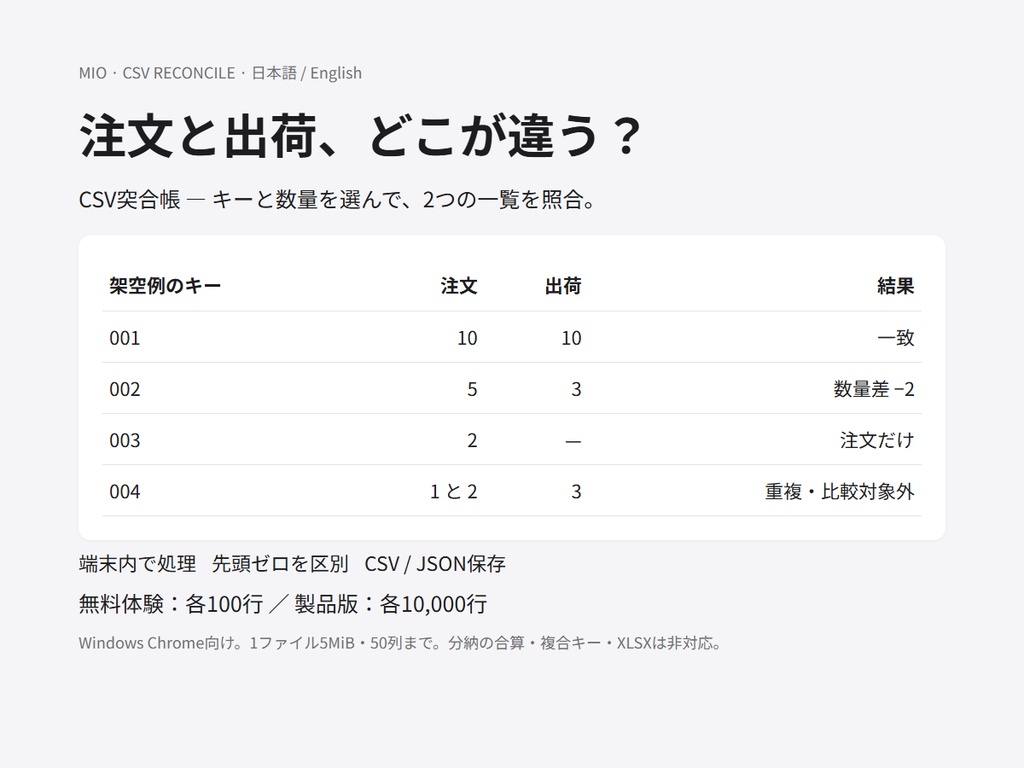

注文一覧と出荷一覧で、合っていない行を確認する道具です。二つのCSVを選び、キー列と数量列を指定すると、「一致」「数量差」「左のみ」「右のみ」「重複キー」に分けて表示します。キーは文字列の完全一致です(001と1は別物)。重複は合算しません。推測での補完や、会計・出荷の正当性の判定はしません。 【まず無料体験】(Windows版Chrome) 1. 無料の「mio_csv_reconcile_trial_v1.0.4.zip」だけを受け取る(旧版は不要。ログインを求められたら pixiv アカウントでログイン)。 2. ZIPをすべて展開し、index.html を開く。 3. 自分のCSVの前に「架空の注文・出荷で試す」を押し、画面の分け方を見る。 4. 左右それぞれ最大100データ件まで、自分のCSVでも試せる(見出しは件数に含まない。101件以上は途中まで処理せず停止)。人数や利用回数の制限ではない。 文字コード・列・数量のルールが合うことを、無料版で確認してから製品版を検討してください。 【列名が違っても使えます】 突合前に、選んだキー列の先頭3件までを元の行と一緒に確認できます。 左(注文):キー=注文番号「002」、数量=注文数「5」/右(出荷):キー=受注ID「002」、数量=出荷数「3」。それぞれの画面でキー列と数量列を選ぶと、この例の数量差は −2(右−左)です。キー「002」と「2」は一致しません。 注文・出荷が各100件以内なら、無料版(0円)で全件の照合と結果保存ができます。たとえば注文120件・出荷95件なら、購入前に各100件以内のコピーで列と数量の読み取りを確認してください。全120件を一度に照合するには製品版(980円・各10,000件まで)を選びます。件数に見出しは含みません。 【動画と同じファイルで列選択を練習する(任意の補足)】 無料欄の「mio_csv_reconcile_column_practice_ja_en_v2.zip」は練習用CSV4本と日英手順です。本体ではありません。先に無料本体v1.0.4を展開し、補足も別フォルダへ展開してください。 日本語:左orders-ja.csv、右shipments-ja.csvをファイル選択で読み込みます。左はキー「注文番号」・数量「注文数」、右はキー「受注ID」・数量「出荷数」。右の列順は数量→キーなので選択を確認してください。結果は002の左5・右3・差−2が1件。内蔵サンプルボタンとは別の練習です。 【製品版】 左右それぞれ10,000データ件まで。画面は100件ごとのページ表示、保存は絞り込みに関係なく全結果です。 内容:本体index.html、説明書、利用条件、架空の注文/出荷CSV、練習の正解。ZIP展開後にWindows版Chromeで開きます。外部ライブラリ・アカウント不要。入力は端末内で処理し、原本を書き換えません。 【できること】 ・単一キーの完全一致 ・数量 0〜10億・小数6桁まで ・UTF-8・Shift_JISの手動選択 ・結果のCSV・JSON保存 ・日本語・英語UI 【できないこと・含まないもの】 ・複合キー ・あいまい一致 ・分納の合算 ・返品の負数量 ・XLSX ・システム接続 ・設定の保存 ・特定サービス専用連携 ・入力CSV全体のバックアップ 【結果の読み方】 ・数量差は右−左です。 ・空欄キーや数量不正は処理を止めます。 ・重複は比較対象外として表示します。 ・結果だけでミスや不正を断定せず、原本を確認してください。 ・CSVは表計算で式と誤認されやすい値の先頭にアポストロフィを付けます。 ・正確な値の確認・機械処理にはJSONを使ってください。 ・詳細なExcel表示の検証メモは、下の「結果CSVをExcelで開くとき」をご覧ください。 【結果CSVをExcelで開くとき】 Windows Excel 16.0 build 20527で結果CSVを直接開いた検証では、コード002は '002、数量差−2は '-2 と表示され、両方が文字列でした。差分列をそのままSUMすると負の差が合計から漏れる場合があります。表の確認にはCSV、保護文字の付かない元のキーと結果値の確認・機械処理にはJSONを使ってください。JSON内の数量と差も文字列です。再計算する場合は対応する状態と数量を確認し、処理側で型を指定してください。Excelの別バージョンや取り込み方法による表示は未確認です。 【その他の確認】 画面・CSV読込の詳細エラーは日本語/英語に対応。言語を切り替えると、表示中のエラーも切り替わります。各CSV5MiB・50列まで(復号後UTF-8換算も5MiB以内)。Windows Chromeで検証。他OS・Edge・スマートフォンの実ファイル操作は未検証です。Excel/Power Queryでも表の結合・照合ができます。そちらで足りる方は無料体験で必要性を比較してください。特定サービスの公式/専用ツールではありません。終了・再読込で未保存の作業は消えます。 【利用条件】 購入者本人または一法人の内部業務で利用・改変可。出力結果の業務利用・納品可。本体・改変本体の再配布、転売、公開は禁止。 無料体験版も本人または一法人内で利用可、出力の利用・納品可。本体の再配布・転売・公開は禁止。 個別改造・即時対応・無期限更新は含みません。不具合連絡はBOOTHメッセージへ、版番号と個人情報を除いた再現例をお送りください。 制作にAIを使用。v1.0.4 / 2026-11-03。 最新版:無料体験は mio_csv_reconcile_trial_v1.0.4.zip、製品版は mio_csv_reconcile_full_v1.0.4.zip。旧版も履歴として残しています。 【ダウンロード】無料体験:mio_csv_reconcile_trial_v1.0.4.zip のみ(旧版不要)/製品版:mio_csv_reconcile_full_v1.0.4.zip。履歴の旧ZIPは使わないでください。 【あわせて使える道具】 列の並びや列名が違うCSVを、社内の見出し順に並べ替えてから出力する「列マッピング転記帳」です。無料で100行まで試せます。数量の突合の前に、列だけそろえたいときに使えます。効果は保証しません。買い切りです。 https://mio-ai-teiji.booth.pm/items/9091261 請求一覧と入金一覧の金額差・片側のみ・重複を分けて見る「請求入金突合帳」です。無料で左右各100行まで試せます。まとめ入金の自動割り当てや、消込の確定はしません。効果は保証しません。買い切りです。 https://mio-ai-teiji.booth.pm/items/9091382 発注一覧と入荷一覧の数量差・片側のみ・重複を分けて見る「発注入荷突合帳」です。無料で左右各100行まで試せます。分納の自動合算や、欠品の断定はしません。効果は保証しません。買い切りです。 https://mio-ai-teiji.booth.pm/items/9091872 【English】 CSV Match Book — compare two CSV files by a key column and a quantity column. Offline in your browser. Your files are not uploaded. What it does - Before comparing, preview up to three source rows and the selected keys. - You choose a key column and a quantity column on each file. - Rows are grouped into: Match / Quantity mismatch / Left only / Right only / Duplicate key. - Keys are compared as exact strings (001 and 1 stay different). Duplicate keys are listed; they are not merged. - Quantity difference = right quantity − left quantity. - Optional fictional sample button so you can try before your own files. What it does not do - No composite or fuzzy keys in this version. - No automatic split-shipment aggregation. - No guesswork, no accounting or shipping decisions, no result guarantees. - No XLSX required input, no system APIs, no cloud save of your settings. Free trial (¥0) - Up to 100 data rows per side (header not counted). Saving results is included. - Download only the latest trial ZIP named on the product page (example: mio_csv_reconcile_trial_v1.0.4.zip). Older trial ZIPs are history. - Extract all files, open index.html in Google Chrome on Windows, press the fictional sample button first. - If BOOTH asks you to log in for the free download, use a pixiv account login. Full version (¥980) - Up to 10,000 data rows per side. - Same features as the trial. Buy once. This is not a subscription. Privacy and limits - Processing stays on your computer. No fetch to external hosts for matching. - Each CSV up to 5 MiB and 50 columns. UTF-8 or Shift_JIS (manual choice). - Empty keys or invalid quantities stop the run and show where. - Results alone do not prove errors or fraud; check source documents. - Verified on Windows Chrome. Other OS / Edge / phones: not verified with real files. USD note (reference only, not a checkout price) - Similar offline CSV compare tools listed in English markets around US$2.99–19 (2026-11-03 public pages). Spreadsheet-style reconciliation kits often sit around US$7–28. This product is sold in JPY on BOOTH. License (summary) - For you or one organization’s internal work. You may use outputs in your business. - Do not redistribute or resell the tool itself. - Custom work, consulting, and unlimited support are not included.
【月末の受注・出荷担当の方へ:一部出荷と「出荷表にない行」を分ける】
先に両表の対象期間・対象注文・抽出基準をそろえます。「当月受注」と「当月出荷」だけを並べると、前月受注の出荷などが片側に現れます。共通の一意な注文番号がある表で確認してください。 まず無料本体mio_csv_reconcile_trial_v1.0.4.zipを展開し、index.htmlで「架空の注文・出荷で試す」を押します。 ・002:注文5/出荷3/差−2は「数量差」。一部出荷の確認候補です。分納中か、抽出範囲のずれか、入力誤りかは原票へ戻って確認します。 ・003:注文2/出荷側に行なしは「左のみ」。出荷表にない番号の確認候補です。「未出荷確定」ではありません。出荷数量0の行がある場合も、行があるだけで出荷済みとは判断しません。 ・004:重複キーは比較対象外。分納明細を自動合算せず、注文単位にまとめてよいか人が確認します。 結果CSVを保存して確認する行を残せます。Excelの保護文字・文字列型は下の既存案内をご確認ください。 自分の表も左右各100データ件以内なら無料版で全件・保存まで試せます。手作業やExcelで終わる方は購入不要です。対応形式と単位を無料版で確認し、100件を超える表をこの道具で一度に比較したい場合に製品版(各10,000件まで・980円)をご検討ください。効果や未出荷の判定は保証しません。 Month-end order/shipment review Align the period, order population and extraction rules first; orders received this month and shipments made this month may cover different orders. Use a common unique order key. In the free app, select “Try fictional orders and shipments”. Key002 has5 ordered/3 shipped/delta−2: review a possible partial shipment, then check source records for scope or input differences. Key003 has2 ordered and no shipment row: Left only, not proof that nothing shipped. An existing zero-quantity shipment row is not proof of shipment either. Key004 is a duplicate and is not aggregated or compared. The free edition handles100 records per side with export. No purchase is needed if manual work or Excel completes the job. After checking your format and units free, consider the full edition (10,000 per side, JPY980) only if you want to compare a larger eligible list in this tool. No shipping-status or performance guarantee.