
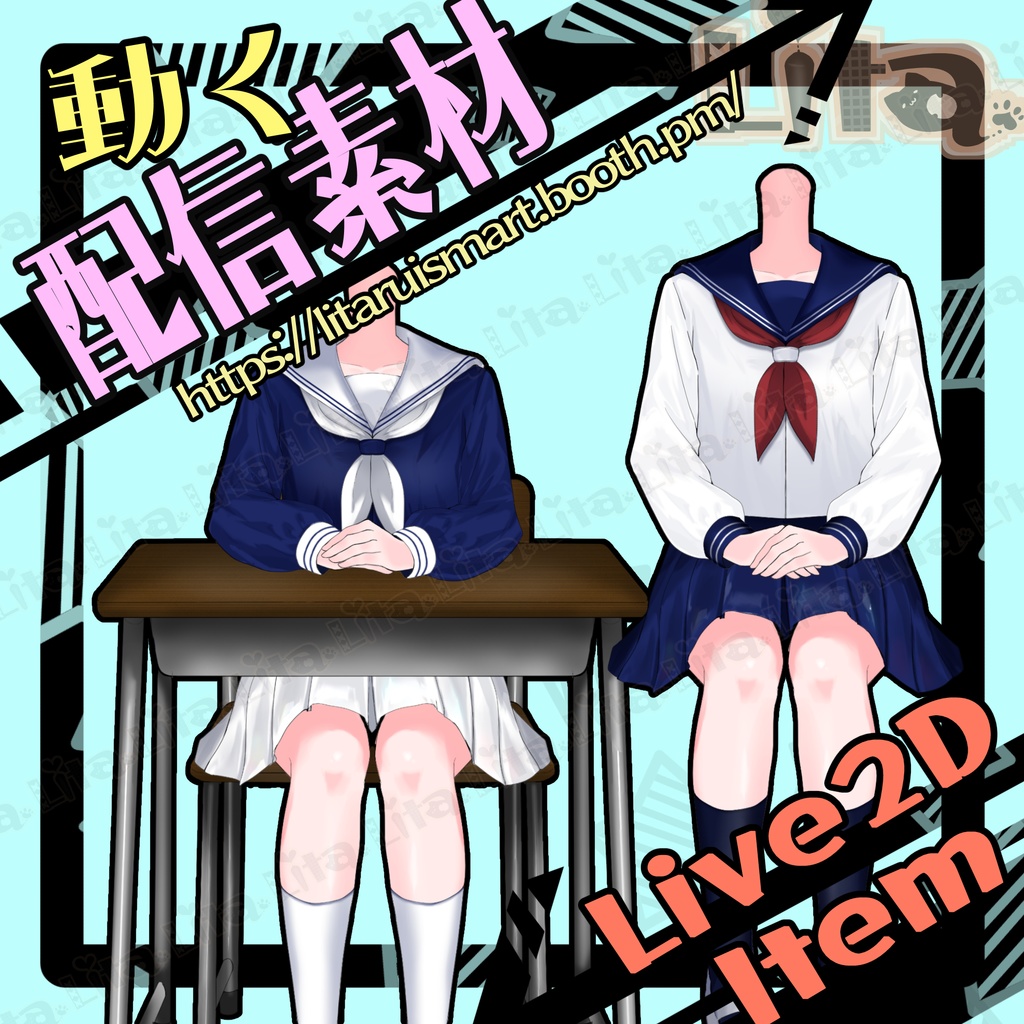
【VTubeStudio対応】動くセーラー服アイテム!配信を可愛く演出🎀
- Digital800 JPY

毎週腕素材をリリースしている腕素材屋さんです。 ぜひ配信のネタにしてください! ⭐︎Lita公式サイト⭐︎ https://lita-art.net/
VtubeStudioで使える素材です。//Assets for VtubeStudio
☆★☆★☆★☆★☆★☆★☆★☆★☆ キーバインド設定//Keybind setting 🎮 【Ctrl+1】制服カラー1//Uniform Color 1 🎮 【Ctrl+2】制服カラー2//Uniform Color 2 🎮 【Ctrl+3】制服カラー3//Uniform Color 3 🎮 【Q+1】腕を下げる//Lower Arms 🎮 【Q+2】机OFF//Desk OFF 🎮 【Q+3】椅子OFF//Chair OFF 🎮 【Q+4】靴下OFF//Socks OFF 🎮 【Q+5】グリーンバックON(表情ファイルからグリーンの形を変更できます)//Green Screen ON (You can adjust its shape from the expression file) 🎮 【Q+6】首のサイズ変更(表情ファイルから首のサイズを変更できます)//Neck Size Change (Adjustable from the expression file) 🎮 【Q+7】首OFF//Neck OFF 🎮 【W+1】襟色_青//Collar Color – Blue 🎮 【W+2】リボン色_青//Ribbon Color – Blue 🎮 【W+3】リボン色_白//Ribbon Color – White 🎮 【W+4】リボン止め色_青//Ribbon Clip Color – Blue 🎮 【W+5】上半身服色_青//Top Color – Blue 🎮 【W+6】袖_白//Sleeves – White 🎮 【W+7】スカート_白//Skirt – White 🎮 【W+8】靴下_白//Socks – White 🎮 【W+9】タイツON(表情ファイルからタイツの濃さを変更できます)//Tights ON (You can adjust opacity in the expression file) 🎮 【W+0】タイツの穴ON(タイツをONにしていないと見えません。)//Tights Tear ON (Visible only if tights are ON) 🎮 【E+1】膝の血//Knee Blood 🎮 【E+2】バンドエード//Band-Aid 🎮 【E+3】上履き_青//Indoor Shoes – Blue 🎮 【E+4】上履き_白//Indoor Shoes – White 🎮 【Ctrl+0】キーバインドクリア//Reset Keybinds ーーーーーーーーーーーー
✅ 商用利用・編集可能ですが、著作権は放棄していません。 ✅ クレジット表記は任意です。 ✅ ご利用の際は、下記URL記載の 利用規約 に同意したものとみなします。 🔗 https://lita-art.net/terms-and-condition/ ⚠️ 成人向けコンテンツへの使用規制はしていません。 常識の範囲内でご使用ください。 ーーーーーーーーーーーー Litaのアイテムは、表情ファイルエディター、またはアートメッシュでの色調整が可能です。(表情ファイルエディタからは一部できないものもあります。初期の作品のほとんどはアートメッシュからの色変更になります!) 説明書→ https://note.com/litaruismart/n/n120985de98c0 表情ファイルエディタから可能な場合は、colorと書いてあるパラメータが存在します。そのパラメータをいじって色変更して遊んでみてください! 色変更パラメータ: Color1 – 乗算明暗 Color2 – 乗算カラー Color3 – スクリーン明暗 Color4 – スクリーンカラー 設定方法の詳細はこちらをご覧ください! 日本語 🔗 https://lita-art.net/2026/01/26/how-to-change-color/ English 🔗 https://lita-art.net/2026/01/26/how-to-chage-color/ ーーーーーーーーーーーー 質問・ご相談はDMにて受付中! お気軽にご連絡ください✨ 🔹 LitaのX(Twitter): https://x.com/LitaVtuber 🔹 Litaのホームページ: https://lita-art.net/ ーーーーーーーーーーーー ✅ Commercial use and editing are permitted, but I do not waive my copyright. ✅ Credit notation is optional. ✅ By using this product, you are deemed to have agreed to the Terms of Sale listed at the URL below. 🔗https://lita-art.net/terms-and-condition/ ⚠️ There are no restrictions on use in adult-oriented (NSFW) content. Please use within the bounds of common sense. ーーーーーーーーーーーー ※Lita’s items can be color-adjusted either through the Expression File Editor or directly via ArtMesh. Some items cannot be adjusted from the Expression File Editor. Most early works require color changes through ArtMesh. → https://note.com/litaruismart/n/n60f0aea213c7 If the item supports adjustment in the Expression File Editor, there will be a parameter labeled “Color.” Try modifying that parameter to change the colors and have fun experimenting! Color change parameters: Color1 – Multiply Brightness Color2 – Multiply Color Color3 – Screen Brightness Color4 – Screen Color For more details on the setup method, please check here! Japanese 🔗 https://lita-art.net/2026/01/26/how-to-change-color/ English 🔗 https://lita-art.net/2026/01/26/how-to-chage-color/ ーーーーーーーーーーーー Questions and consultations are accepted via DM! Feel free to contact me ✨ 🔹 Lita's X (Twitter): https://x.com/LitaVtuber 🔹 Lita's Website: https://lita-art.net/