

らめんちゃん-ramenchan- FaceTrackingAddon
- Digital1,400 JPY
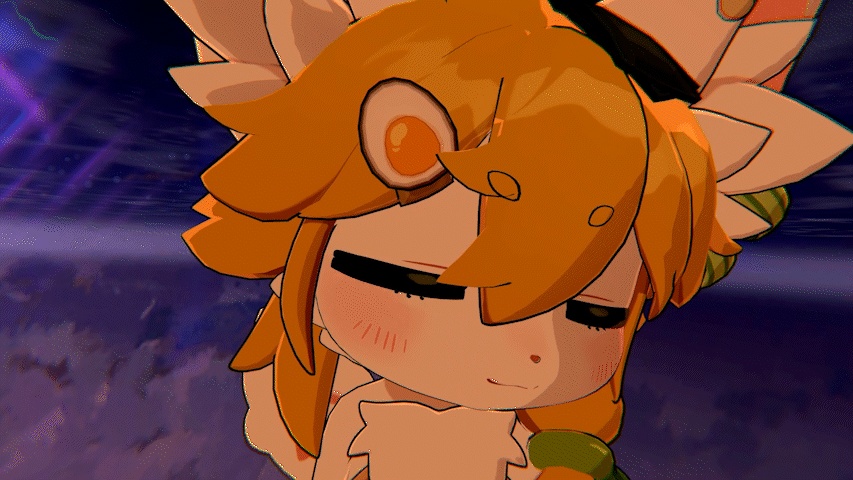


- オリジナルアバター らめんちゃん-ramenchan- , 2025/11/05, 20:45 Unitypackage 基準 https://mofumofumotimoti.booth.pm/items/5670229 【注意】 ※動画はありませんが、画像をクリックするとGIFアニメーションが表示されます。 ※No video available, but you can click on the images to view animated GIFs. ※没有视频,但您可以点击图片查看动态GIF。
らめんちゃん-ramenchan- FaceTrackingAddon
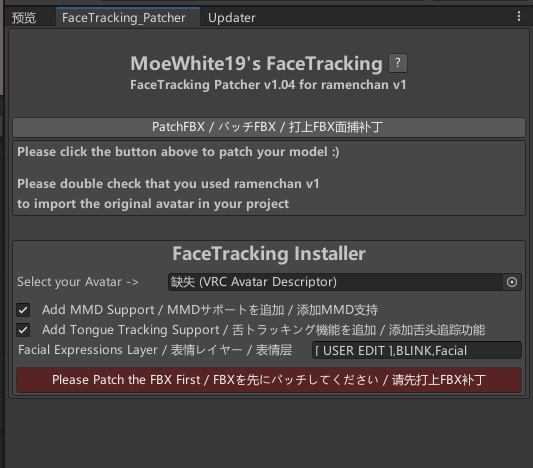
🇯🇵 日本語 / Japanese 🎯 概要 / Overview これは らめんちゃん-ramenchan- モデル向けに開発されたフェイストラッキング拡張プラグインです。 すべての顔面トラッキング標準に対応!(ARKit、FACS、SRanipalなど)。Quest Pro向けにテスト・開発され、「Unified Expressions」システムで目、眉、あご、唇、舌をカバー! ✨ 主な機能 / Features ✔ OSC スムージングアルゴリズムによる揺れ・ノイズの軽減 ✔ VRCFT v5.0 対応 ✔ ワンクリック導入・コード不要 🛠 対応環境 / Requirements ・VRChat Avatar SDK 3.0 ・VRCFT v5.0 ・ModularAvatar: https://modular-avatar.nadena.dev/ja ・VRCFury: https://vrcfury.com 📝 使い方 / How to Use UnityPackage ファイルを Unity にインポートします。 メニューから Tools → MoeWhite19 → ramenchanFaceTracking Patcher を開きます。 「PatchFBX」ボタンをクリックしてモデルをパッチします。 シーン内のご自身のアバターモデルを、下の「FaceTracking Installer」パネル内の「Select your Avatar」オプションボックスにドラッグ&ドロップし、「Install」ボタンをクリックしてインストールします。 設定が完了したら、VRChat へアップロードしてご利用いただけます。 ⚠ 注意事項 / Notes 本商品は アドオンであり、アバター本体は含まれません 再配布・転売は禁止です 商用利用(配信 / 収録 / 企業VTuber)可能 不具合や質問はお気軽にお問い合わせください 🇨🇳 中文 / Chinese 🎯 简介 这模型是为 ramenchan 制作的面部捕捉扩展插件。 兼容所有面部追踪标准!(ARKit、SRanipal等)。以Quest Pro为基准制作,支持「Unified Expressions」,涵盖眼部、眉毛、下颌、嘴唇与舌头! ✨ 主要功能 ✔ OSC 平滑算法减少抖动 ✔ 适配 VRCFT v5.0 ✔ 一键安装,无需编程 🛠 适用环境 ・VRChat Avatar SDK 3.0 ・VRCFT v5.0 ・ModularAvatar: https://modular-avatar.nadena.dev/ja ・VRCFury: https://vrcfury.com 📝 使用方法 将 UnityPackage 文件导入 Unity。 打开菜单栏的 Tools → MoeWhite19 → ramenchanFaceTracking Patcher 点击 “PatchFBX” 按钮进行模型修补。 将场景中的您的模型拖拽至下方 “FaceTracking Installer” 板块的 “Select your Avatar” 选项框中,然后点击 “Install” 按钮进行安装。 完成后,即可将模型上传至 VRChat 使用。 ⚠ 注意事项 / Notes 本商品为 功能扩展插件,不包含模型本体 严禁二次分发、倒卖、重新上传 可用于商业直播 / 视频制作 / 企业 VTuber 如遇问题欢迎随时联系 🇺🇸 English / English 🎯 Overview This is a facial tracking extension plugin developed for the ramenchan model. Compatible with all face tracking standards! (ARKit, FACS, SRanipal, etc). Tested and made for the Quest Pro with "Unified Expressions", eyes, eyebrows, jaw, lips and tongue! ✨ Features ✔ OSC smoothing algorithm reduces jitter ✔ Compatible with VRCFT v5.0 ✔ One-click installation, no coding required 🛠 Requirements ・VRChat Avatar SDK 3.0 ・VRCFT v5.0 ・ModularAvatar: https://modular-avatar.nadena.dev/ja ・VRCFury: https://vrcfury.com 📝 How to Use Import the UnityPackage file into Unity. Open the menu: Tools → MoeWhite19 → ramenchanFaceTracking Patcher. Click the "PatchFBX" button to patch the model. Drag and drop your avatar model from the scene into the "Select your Avatar" option box in the "FaceTracking Installer" panel below, then click the "Install" button. Once completed, you can upload the avatar to VRChat for use.Defaults error. ⚠ Notes This add-on does NOT include avatar models Redistribution and reselling are prohibited Commercial use (streaming / recording / corporate VTuber) allowed Feel free to contact for any issues or questions
🔧 更新内容 / Update Notes / 更新内容
🇯🇵 日本語 (Japanese) 2025.12.2 — v1.02e 初回リリース 2025.12.2 — v1.03b モデルFXをプロシージャルに変更 スマイルのシェイプを最適化 チークパフ(頬膨らませ)シェイプを追加 2025.12.9 — v1.04 舌追跡(Tongue Tracking)のインストールオプションが正常に動作しない問題を修正しました。 頬吸い込み(CheekSuck)トラッキングが利用可能になりました。 瞳孔補助追跡(Pupil Auxiliary Tracking)機能を最適化しました。 🇨🇳 中文 (Chinese) 2025.12.2 — v1.02e 首次发布 2025.12.2 — v1.03b 现在使用程序化修改模型FX 优化微笑形态键 添加CheekPuff形态键 2025.12.9 — v1.04 修复了舌头追踪安装选项无法正常工作的问题。 CheekSuck(脸颊凹陷)追踪功能现已可用。 优化了瞳孔辅助追踪功能。 🇬🇧 English 2025.12.2 — v1.02e Initial Release 2025.12.2 — v1.03b Model FX is now modified procedurally Optimized the smile shape Added CheekPuff shape 2025.12.9 — v1.04 Fixed an issue where the Tongue Tracking installation option was not working properly. CheekSuck tracking is now available and functional. Optimized the pupil auxiliary tracking functionality.
📮 Support / 支持 / サポート
如在使用中遇到任何问题、兼容性需求或功能建议,请通过 Booth 消息联系。 ご不明点があれば Booth メッセージよりお問い合わせください。 For questions or support, feel free to contact via Booth messages.
🙌 Credit
Hash https://github.com/HashEdits/EditDistributionTools VRCFaceTracking https://github.com/benaclejames/VRCFaceTracking Adjerry91 https://github.com/Adjerry91 OSCmooth https://github.com/regzo2/OSCmooth