

Ultimate Toggle Studio
- Digital0 JPY
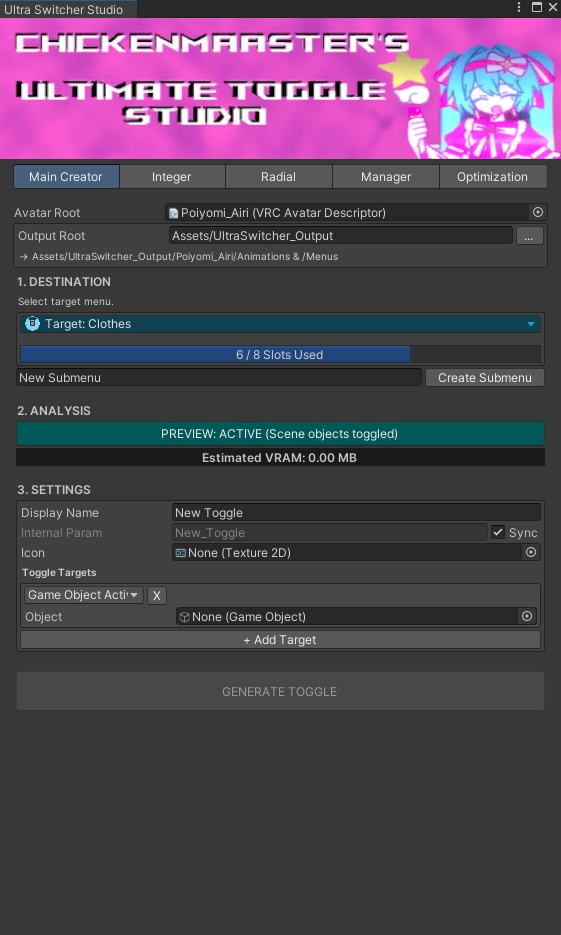
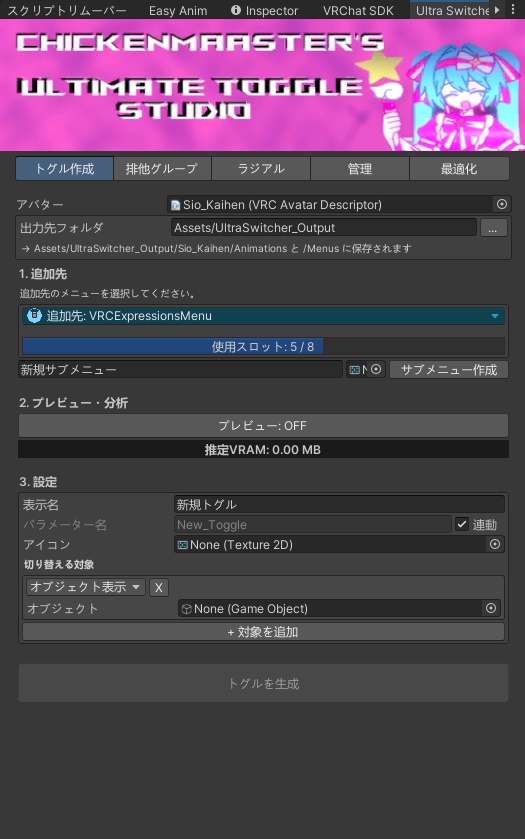


✦ ChickenMaaster's Ultra Switcher Studio v2(日本語版)✦ VRChatアバターのトグル・排他切替・ラジアルを Unity上でかんたんに作成・管理できるエディタ拡張です。 アニメーション、FXレイヤー、Expression Parameters、 Expressions Menu をボタンひとつで自動設定します。 ━━━━━━━━━━━━━━━━━━━━ ◆ 主な機能 ━━━━━━━━━━━━━━━━━━━━ ■ トグル作成 ・オブジェクトの表示/非表示をワンボタンで作成 ・マテリアル切替、シェイプキーにも対応 ・1つのトグルで複数の対象をまとめて切り替え ・生成前にシーン上でプレビュー確認 ・メニューから直接サブメニューを作成 ■ 排他グループ ・「1つだけON」の切り替えを作成(髪型・衣装の着せ替えなど) ・Intパラメーター1つで管理するのでパラメーターを節約 ・項目ごとに名前とアイコンを設定 ■ ラジアルパペット ・0〜1のスライダーを作成 ・シェイプキーは滑らかに変化 ・スライダーでリアルタイムプレビュー ■ 管理 ・整合性チェック:壊れたパラメーター参照、存在しないオブジェクト、 メニューの上限超過、Write Defaultsの混在、大きすぎるアイコンを検出 ・メニューエクスプローラー:名前・アイコン変更、並べ替え、削除 ・作成済みのトグル/グループ/ラジアルを読み込んで再編集 ・トグルが動かしているオブジェクトをワンクリックで選択 ■ 最適化 ・推定VRAMとパラメーター使用量(256 bits)を表示 ・FXコントローラーのバックアップ ・BoolトグルをDirect Blend Treeに統合してレイヤー数を削減 ・重複クリップの統合、不要なキーフレームの削除 ・テクスチャの検査・修正(2のべき乗 / ミップマップ) ■ その他 ・メニューの空きスロット(8枠)を常に表示 ・Write Defaultsを自動検出 ・アバターごとに出力フォルダを自動で整理 ・英語版と同じプロジェクトで併用可能 ━━━━━━━━━━━━━━━━━━━━ ◆ 動作環境 ━━━━━━━━━━━━━━━━━━━━ ・Unity 2022.3 ・VRChat SDK3 - Avatars ━━━━━━━━━━━━━━━━━━━━ ◆ 内容物 ━━━━━━━━━━━━━━━━━━━━ ・Ultra Switcher Studio 本体(日本語版) ・はじめにお読みください.txt ━━━━━━━━━━━━━━━━━━━━ ◆ 導入方法 ━━━━━━━━━━━━━━━━━━━━ 1. zipを展開 2. 「ChickensUltraSwitcherJP」フォルダをAssetsにドラッグ&ドロップ 3. メニュー「ChickenMaaster」→「Ultra Switcher Studio (日本語)」を開く ━━━━━━━━━━━━━━━━━━━━ ◆ ご注意 ━━━━━━━━━━━━━━━━━━━━ ・作業前にプロジェクトのバックアップをおすすめします。 ・最適化機能はFXコントローラーを書き換えます。 必ずバックアップを取ってから実行してください。 ・本ツールの使用によって生じた損害について、作者は責任を負いません。 不具合報告・ご質問はBOOTHのメッセージからどうぞ! ✦ ChickenMaaster's Ultra Switcher Studio v2 ✦ A Unity editor tool for making and managing VRChat avatar toggles, exclusive groups and radial sliders in one window. It builds your animations, FX layers, Expression Parameters and Expressions Menu for you in one click. ━━━━━━━━━━━━━━━━━━━━ ◆ FEATURES ━━━━━━━━━━━━━━━━━━━━ ■ Toggle Creator ・One-click object on/off toggles ・Material swaps and blend shapes supported too ・Toggle multiple targets with a single toggle ・Preview in the scene before you generate ・Create submenus right from the window ■ Exclusive Groups ・"Only one on at a time" switches (hairstyles, outfits, etc.) ・Uses a single Int parameter to save parameter space ・Custom name and icon for every option ■ Radial Puppets ・Create 0–1 slider controls ・Blend shapes blend smoothly ・Live preview with a slider ■ Manager ・Integrity scanner: finds broken parameter references, missing objects, overfull menus, mixed Write Defaults and oversized icons ・Menu explorer: rename, re-icon, reorder and delete controls ・Load existing toggles, groups and radials back in to edit them ・Select the objects a toggle controls in one click ■ Optimization ・Estimated VRAM and parameter usage (out of 256 bits) ・One-click FX Controller backup ・Merge bool toggles into a Direct Blend Tree to cut layer count ・Deduplicate clips and remove redundant keyframes ・Texture audit and fix (power of 2 / mipmaps) ■ Quality of Life ・Always shows free menu slots (out of 8) ・Auto-detects Write Defaults ・Keeps output organized in a folder per avatar ・Japanese version available, and both can be installed together ━━━━━━━━━━━━━━━━━━━━ ◆ REQUIREMENTS ━━━━━━━━━━━━━━━━━━━━ ・Unity 2022.3 ・VRChat SDK3 - Avatars ━━━━━━━━━━━━━━━━━━━━ ◆ INSTALLATION ━━━━━━━━━━━━━━━━━━━━ 1. Unzip the download 2. Drag the "ChickensUltraSwitcher" folder into Assets 3. Open ChickenMaaster → Ultra Switcher Studio ━━━━━━━━━━━━━━━━━━━━ ◆ NOTES ━━━━━━━━━━━━━━━━━━━━ ・Back up your project before use. ・Optimization tools rewrite your FX Controller. Always back it up first. ・The author is not responsible for any damage caused by using this tool. Bug reports and questions are welcome via Booth messages!