
Photoshop用 高機能レイヤーパネルプラグイン「DLLP」無料体験版
- Digital0 JPY
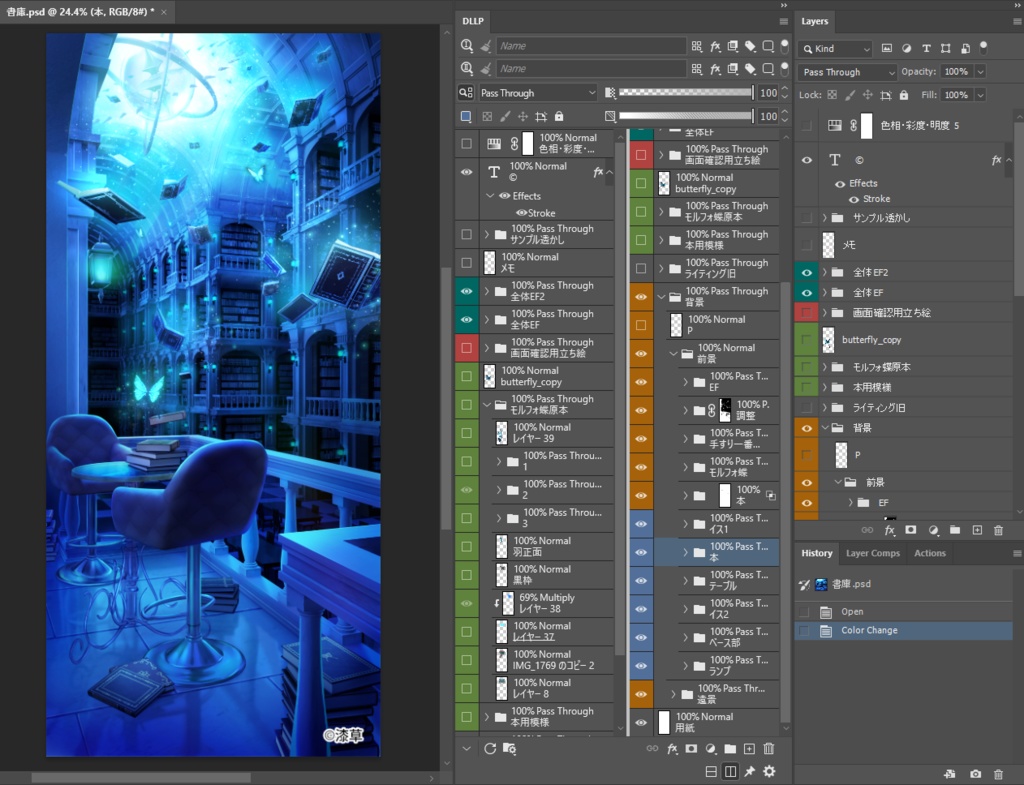
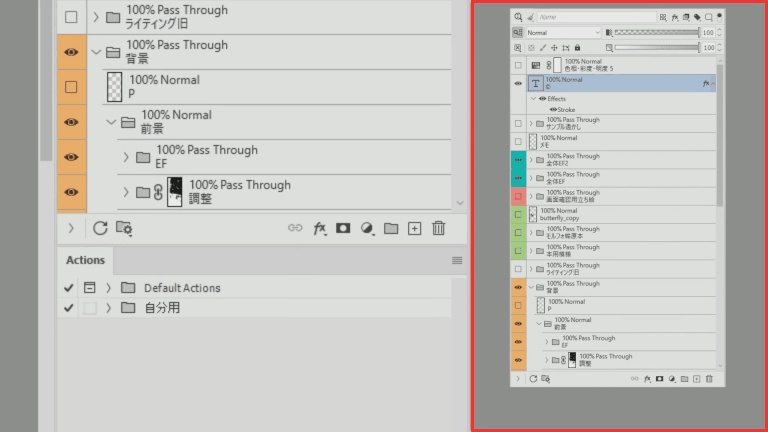
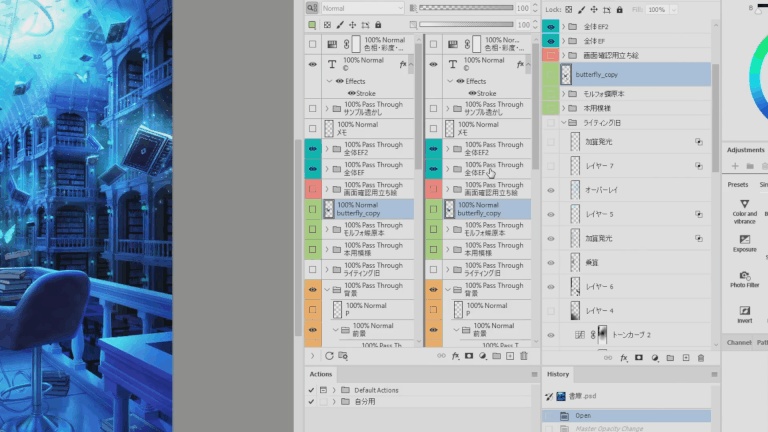
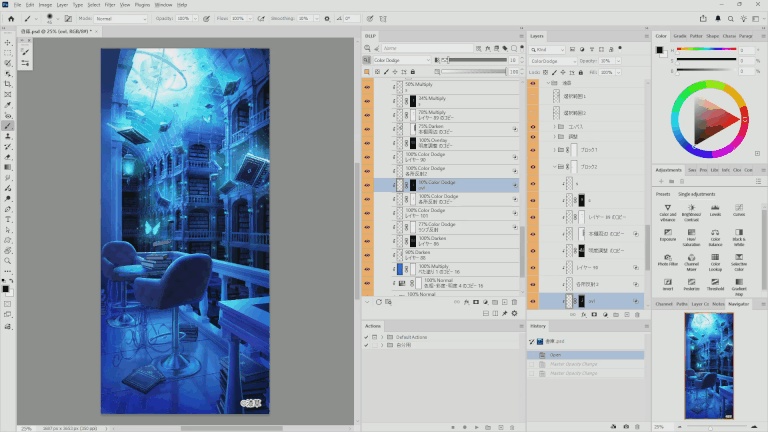
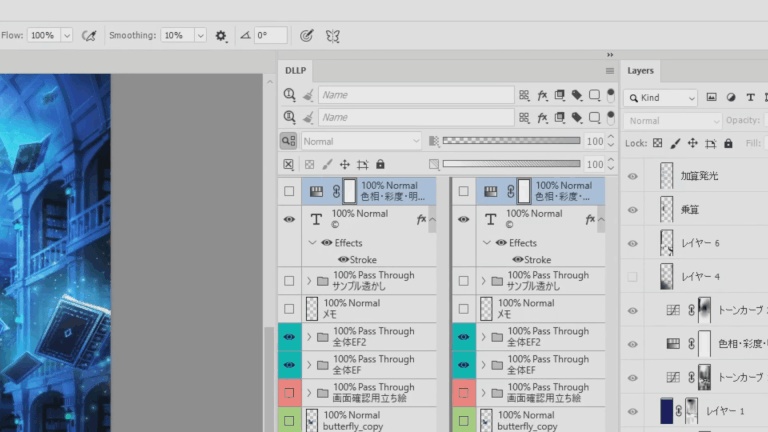
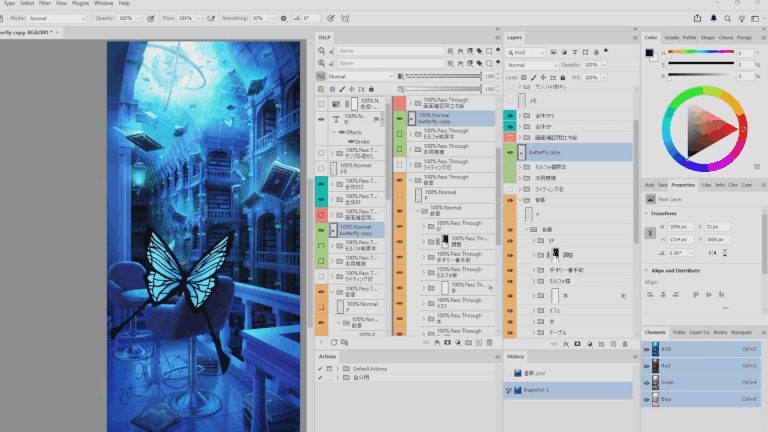


「描くリズム」を止めない、レイヤー管理の革新。 プロの背景イラストレーターが贈る、Photoshop用次世代レイヤー管理パネル。 DLLP (Dual Linked Layer Panel) は、プロの背景イラストレーターが自身の業務上の痛切な課題を解消するために開発した、Adobe Photoshop用の強力な拡張プラグインです。 大規模なPSDファイルで、数百から千枚におよぶレイヤーに埋もれて時間を浪費していませんか? 「どこにあるかわからない」「細すぎて掴めないスクロールバー」「設定を確認するためだけの繰り返されるクリック」。 DLLPはこれらのストレスを徹底的に排除し、最先端のUXであなたの「描くリズム」を守ります。
■ 主な機能
DLLPは、標準機能を大幅に拡張する「第二のレイヤーパネル」として機能します。 🖥️ デュアルビュー: パネルを上下・左右に2分割。異なる箇所を同時に表示・確認できます。ビュー間でのレイヤードラッグ&ドロップも可能で、整理のスピードが飛躍的に向上します。 🔍 強力なフィルタリング: 各ビューごとに独立した検索・フィルタリングが可能。「キャラ」と「背景」を別々に抽出表示するなど、これまでにないワークフローを提供します。 📊 パラメータの常時表示: 不透明度や描画モードを各レイヤーに常時表示。他者のデータを確認する際のコストを大幅に削減します。 👆 スワイプスクロール: Shift+ドラッグで、スマホのように直感的にリストをスクロール。ペンタブレット操作に最適化されており、細いスクロールバーを狙う必要がグッと減ります。 🔗 高精度の標準連携: Photoshopにおける2,000以上の標準操作に堅牢に対応。標準のパネルと共存・同期し、どちらを使っても矛盾なく作業を続けられます。
■ 無料体験について
本商品を購入(無料)すると、以下のファイルを含むZIPパッケージをダウンロードいただけます。 ・インストーラー(.ccx) ・スタートガイド(.txt) ・利用規約、プライバシーポリシー(.txt) インストール後、全機能を制限なく30日間お試しいただけます。実際にあなたのワークフローでその真価を確認し、納得してから購入を判断いただけます。
■ 各種リンク
公式サイト: https://urushigusa.com 利用規約: https://urushigusa.com/terms プライバシーポリシー: https://urushigusa.com/privacy お問い合わせ: https://urushigusa.com/contact
■ 動作環境
対応OS: Windows 11 / macOS 対応アプリケーション: Adobe Photoshop 2026 (v26.8) 以降 開発・動作確認環境: 本プラグインは、以下の環境において快適かつ安定して動作することを確認しています。 OS: Windows 11 Pro CPU: Intel Core i7-12700K (Max 4.9GHz) RAM: 64GB GPU: NVIDIA GeForce RTX 3070 Ti (8GB VRAM) ※ 開発環境での検証結果であり、すべての環境での動作を保証するものではありません。独自の仮想リストエンジンにより、数百〜千枚規模のPSDでも軽快な動作を維持するよう設計されています。
■ アップデート履歴
■ v1.0.6 (2026/08/07) ・Photoshop 27.9以降で、UXPパネルの表示、スクロール、マウス入力に影響する重大な問題を確認したため、これらのバージョンではDLLPの通常機能を一時的に停止しました。 ・対象バージョンでは、通常のパネル画面に代わり、使用中のPhotoshopバージョンと推奨バージョンを案内する画面を表示します。 ・Photoshop 26.8から27.8までは従来どおり利用できます。安定性とパフォーマンスの観点から、Photoshop 26.8から27.3.1までの使用を推奨します。 ・Adobeによる問題の修正を確認し、DLLPの動作検証が完了し次第、Photoshop 27.9以降への対応を再開します。 ■ v1.0.5 (2026/07/18) ・レイヤーリストのスクロールおよび表示更新のパフォーマンスを改善しました。 ・可視性の切り替えやレイヤー選択を繰り返す操作の応答性を改善しました。 ・多数のレイヤーサムネイル、マスク、効果などが表示される複雑なPSDで、表示負荷を軽減しました。 ・DLLPからフィルレイヤーまたはシェイプレイヤーを編集した後、サムネイルが更新されないことがある問題を修正しました。 ・DLLPでレイヤーをドラッグ&ドロップ削除した後、Photoshopの選択状態がDLLPに正しく反映されないことがある問題を修正しました。 ■ v1.0.4 (2026/07/07) ・レイヤー一覧で繰り返し表示される行・サブ項目まわりの描画負荷を軽減しました。 ・レイヤー数、レイヤー効果、スマートフィルター、ステータス表示、サブ項目が多いPSDで、スクロール時の引っかかりやパネル更新負荷の低減が期待できます。 ・スワイプスクロール中のパフォーマンス最適化設定を整理しました。 ・既知の問題として、v1.0.4以降ではグループ開閉などアイコンの状態が変わる操作時に、一部のアイコンが一瞬ちらつく場合があります。 ・Photoshop v27.4以降のプラグインパネル再描画性能低下は、v27.7およびv27.8での確認を含め、Photoshop v27.8まで継続確認済みです。 ■ v1.0.3 (2026/07/01) ・レイヤー情報表示を1つのテキスト要素に統合し、DLLP本体のパフォーマンスを向上しました。 ・Photoshop v27.4 以降向けの性能警告を追加しました。 ・検証環境では、Photoshop v27.4 以降において、以前のPhotoshopバージョンよりもDLLP本体の再描画性能が低下することを確認しています。 ・性能警告には永続化設定を追加しており、内容を確認した後に非表示にできます。 ■ v1.0.2 (2026/04/30) ・Photoshop 27.6 互換性対応を追加しました。 ・Photoshop 27.6 の「反射を削除」「オブジェクトを回転」「レイヤーのクリーンアップ」に対応しました。 ・Photoshop 27.6 の新アクションパネルと、拡張されたダイナミックテキストメニュー状態に対応しました。 ・既知の問題として、復元パネルで Adobe User ID を取得できない問題と、Photoshop v27.4以降のパネル再描画性能低下は、Photoshop 27.6でも継続確認済みです。復元パネル問題には v1.0.1 の復旧手順が引き続き有効です。 ■ v1.0.1 (2026/04/03) ・DLLPを開いたままPhotoshopを終了し、再起動すると Adobe User ID を取得できず認証に失敗する問題に対し、暫定的な復旧案内を追加しました。 ・Shift+ドラッグによるスワイプスクロールのパフォーマンスを改善しました。 ■ v1.0.0 (2026/03/24) ベータ版でのテストを経て、本バージョンを正式版(v1.0.0)としてリリースいたしました。今回はフィルターの柔軟性と安定性の向上に焦点を当てています。 ・フィルター機能の強化: フィルターの「カテゴリ間」、および特定の「カテゴリ内(効果・属性)」で個別にAND/OR条件を設定可能になり、より柔軟な抽出を実現しました。また、フィルターに一致したグループの子レイヤーを含めるオプションを追加しました。 ・安定性向上: ライセンス認証およびトライアル登録処理の堅牢性を高めました。 ・不具合修正: 初回起動時のウェルカム表示に関する軽微な不具合を修正しました。 ■ v0.9.0 (2026/02/25) DLLP クローズドベータ版 初回リリース ・2画面分割(デュアルビュー)機能 ・Shift+ドラッグによるスワイプスクロール ・レイヤーごとのパラメータ(不透明度・描画モード)常時表示 ・高精度な標準レイヤーパネル同期システム ・23言語の多言語サポート ■ 既知の問題 Photoshop v27.4以降で、パネル再描画のパフォーマンス低下を確認しています。新規レイヤー作成時やスクロール時に重くなることがあります。これはPhotoshop / UXP側のバージョン依存の問題であり、v27.3.1以前では発生しません。
■ 権利表記・免責事項
(C) 2026 漆草 (Urushigusa) All rights reserved. 本製品および同梱ドキュメントの著作権は「漆草」に帰属し、すべての権利を保持しています。 有償・無償を問わず、本製品の無断転載、複製、再配布、および販売・商用利用を固く禁じます。 本製品の使用、または使用不能から生じるいかなる損害についても、開発者は一切の責任を負いません。 詳細は、製品に同梱されている「利用規約」および「プライバシーポリシー」を必ずご確認ください。 本紹介文は日本語を正本とします。翻訳との間に矛盾がある場合は、日本語の記述が優先されます。
--- English follows ---
Layer Management, Reimagined. Don't stop the creative rhythm. A next-generation layer management panel designed by a professional background artist. DLLP (Dual Linked Layer Panel) is a powerful extension plugin for Adobe Photoshop, developed by a professional illustrator to solve the real-world frustrations of production. Are you wasting precious minutes managing and locating layers in massive PSDs? DLLP eliminates the friction of "lost layers", "thin scrollbars", and "endless clicks to check blend modes", giving you back an environment where you can focus on drawing.
■ Key Features
DLLP functions as a high-performance secondary layer panel that enhances your native workflow. 🖥️ Dual View & Drag-and-Drop: Split your panel vertically or horizontally. Keep reference layers and active workspaces visible at the same time. Move layers between views with seamless drag-and-drop. 🔍 Powerful Filtering: Each view has its own independent search and filter. Isolate "Characters" in one view and "Background" in the other—a professional workflow realized for the first time. 📊 Always-On Parameters: Opacity and Blend Modes are always visible inline for every layer. No more clicking just to check a value. 👆 Swipe Scroll: Shift+Drag to scroll intuitively, just like a smartphone. Built for pen tablet users, significantly reducing the need to chase down a tiny scrollbar. 🔗 Native Sync: Supports over 2,000 native Photoshop operations. Works in harmony with the standard panel as you draw.
■ About the Free Trial
By purchasing (free) this product, you can download a ZIP package containing: Installer (.ccx) Start Guide (.txt) Terms of Service & Privacy Policy (.txt) Evaluate DLLP in your actual workflow with a risk-free 30-day Free Trial. All features are unrestricted during the trial period.
■ Links
Please review the following documents before use: Official Website: https://urushigusa.com Terms of Service: https://urushigusa.com/terms Privacy Policy: https://urushigusa.com/privacy Contact: https://urushigusa.com/contact
■ System Requirements
OS: Windows 11 / macOS Application: Adobe Photoshop 2026 (v26.8) or later Verified Environment (Developer's Specs): This plugin has been verified to run smoothly and stably in the following environment: OS: Windows 11 Pro CPU: Intel Core i7-12700K (Max 4.9GHz) RAM: 64GB DDR5 GPU: NVIDIA GeForce RTX 3070 Ti (8GB VRAM) This represents the developer's environment and does not guarantee performance in all cases. It is designed to maintain responsive performance even with professional-scale documents containing 500-1,000 layers.
■ Update History
■ v1.0.6 (2026/08/07) ・Serious issues affecting UXP panel display, scrolling, and mouse input were identified in Photoshop 27.9 and later. DLLP's normal functions are temporarily disabled on these versions. ・A compatibility notice now appears on affected versions, showing the current and recommended Photoshop versions. ・DLLP remains available on Photoshop 26.8 through 27.8. For stability and performance, versions 26.8 through 27.3.1 are recommended. ・Support for Photoshop 27.9 and later will resume after Adobe releases fixes and DLLP compatibility testing is complete. ■ v1.0.5 (2026/07/18) ・Improved scrolling and display-update performance in the layer list. ・Improved responsiveness during repeated visibility and layer-selection operations. ・Reduced display load in complex PSD files, especially where many layer thumbnails, masks, effects, or other layer-list items are visible. ・Fixed an issue where the thumbnail of a fill layer or shape layer might not refresh after editing it from DLLP. ・Fixed an issue where DLLP might not reflect the resulting Photoshop selection after deleting layers by drag and drop. ■ v1.0.4 (2026/07/07) ・Improved layer-list rendering performance by reducing the rendering cost of frequently repeated row and sub-item UI elements. ・Helps reduce scrolling stutter and panel refresh load, especially in PSD files with many layers, layer effects, Smart Filters, status indicators, or sub-items. ・Refined the performance optimization settings used during swipe scrolling. ・Known issue: In v1.0.4 and later, some icons may briefly flicker when their state changes, such as when opening or closing groups. ・The Photoshop v27.4+ plugin panel redraw performance issue remains confirmed through Photoshop v27.8, including checks in v27.7 and v27.8. ■ v1.0.3 (2026/07/01) ・Consolidated the layer information display into a single text element to enhance DLLP performance. ・Added a performance warning for Photoshop v27.4 and later. ・In our verification environment, DLLP redraw performance in Photoshop v27.4 and later is lower than in earlier Photoshop versions. ・The performance warning includes a persistent setting, so users can hide it after reading it. ■ v1.0.2 (2026/04/30) ・Added Photoshop 27.6 compatibility updates. ・Added support for Photoshop 27.6 operations: Remove Reflections, Rotate Object, and Layer Cleanup. ・Added support for the new Actions panel and expanded Dynamic Text menu states in Photoshop 27.6. ・Known issue: the restored panel Adobe User ID issue and the Photoshop v27.4+ panel redraw performance issue are both still reproducible in Photoshop 27.6. The v1.0.1 recovery guidance still applies for the restored panel issue. ■ v1.0.1 (2026/04/03) ・Added temporary recovery guidance for an issue where, if DLLP is left open when Photoshop closes and Photoshop is launched again, Adobe User ID may not be retrieved and authentication may fail. ・Improved swipe scroll performance inside the panel. ■ v1.0.0 (2026/03/24) Following beta testing, this version is now officially released as v1.0.0. This release focuses on improved filter flexibility and overall stability. ・Enhanced Filter Options: You can now set AND/OR conditions independently between filter categories and within specific categories (Effects & Attributes), enabling more precise layer extraction. An option to include child layers of matched groups has also been added. ・Stability Improvements: Reinforced the robustness of license authentication and trial registration processes. ・Bug Fix: Fixed a minor issue with the welcome screen display on first launch. ■ v0.9.0 (2026/02/25) ・DLLP Initial Private Beta Release ・Dual View (Vertical/Horizontal split) ・Swipe Scroll (Shift+Drag) ・In-line parameters (Opacity/Blend Mode) ・Advanced native sync system (2,000+ operations) ・Support for 23 languages ■ Known Issues We have confirmed a panel redraw performance drop in Photoshop v27.4 and later. Operations such as creating new layers and scrolling may feel slower. This is a version-dependent issue on the Photoshop / UXP side and does not occur in v27.3.1 or earlier.
■ Copyright & Disclaimer
(C) 2026 Urushigusa. All rights reserved. The Provider retains all rights to this product and its included documents. Unauthorized reproduction, duplication, redistribution, or resale of this product is strictly prohibited, regardless of commercial or non-commercial intent. The developer shall not be liable for any damages arising from the use or inability to use this product. Please ensure you read the "Terms of Use" and "Privacy Policy" included in the download for full details. The Japanese version of this description is the governing version. In the event of any conflict between the Japanese version and any translation, the Japanese version shall prevail.
