
【MA対応】アバター複数オブジェクト一発非表示ExMenu作成ツール「ObjectMate」
- Digital500 JPY
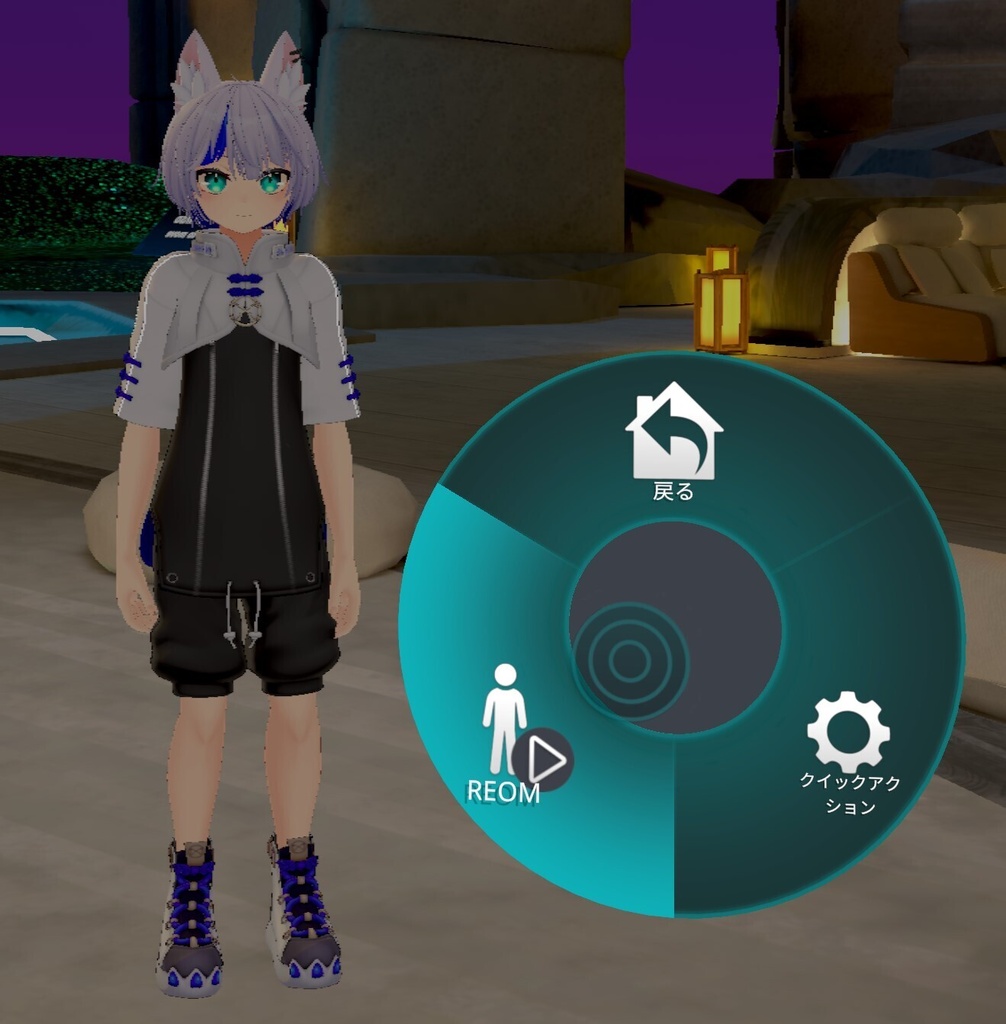
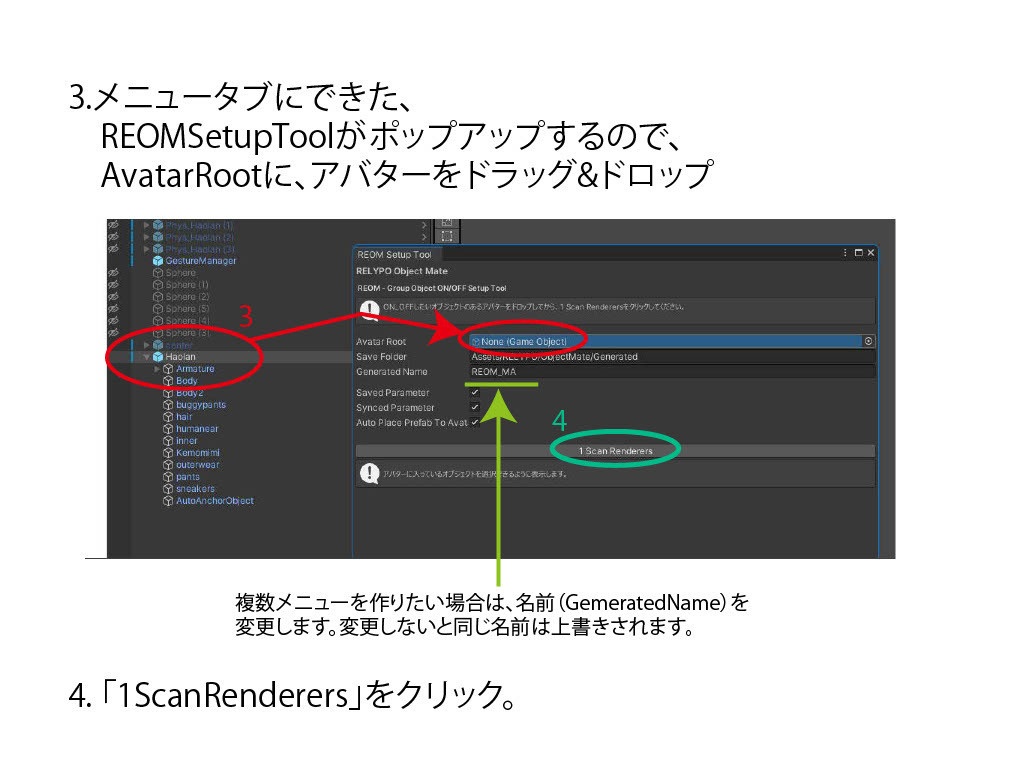
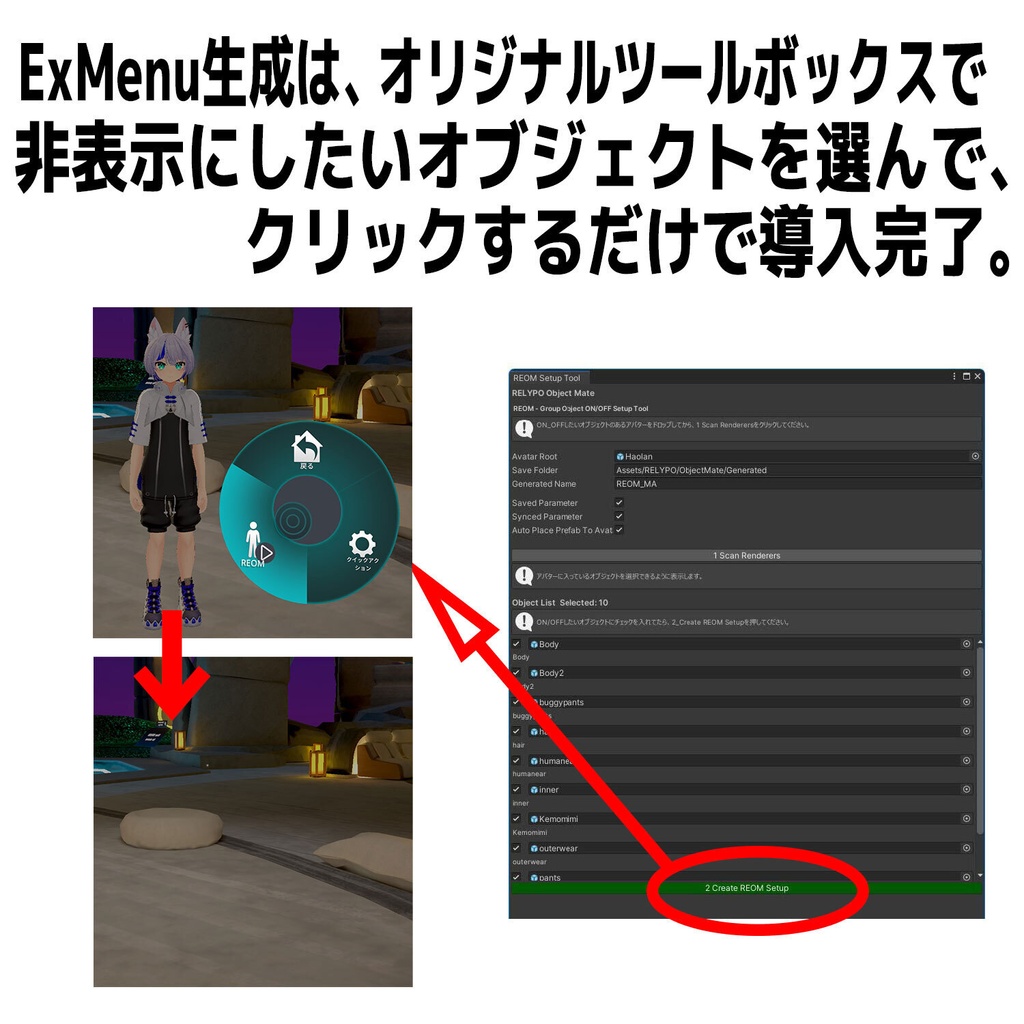
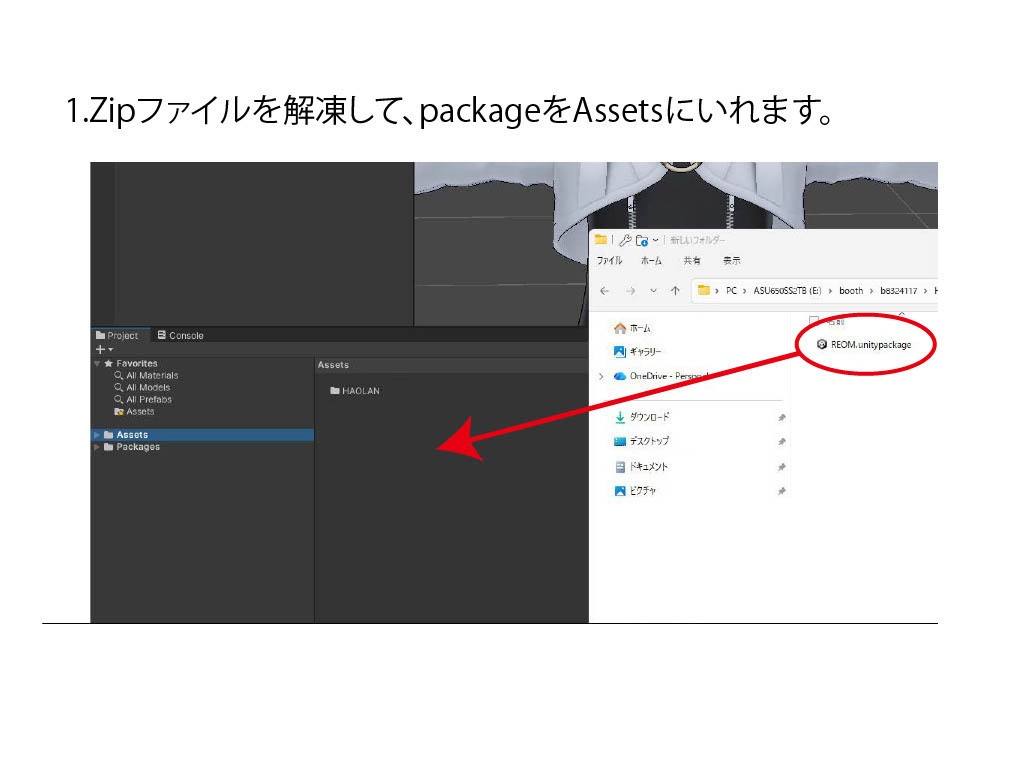
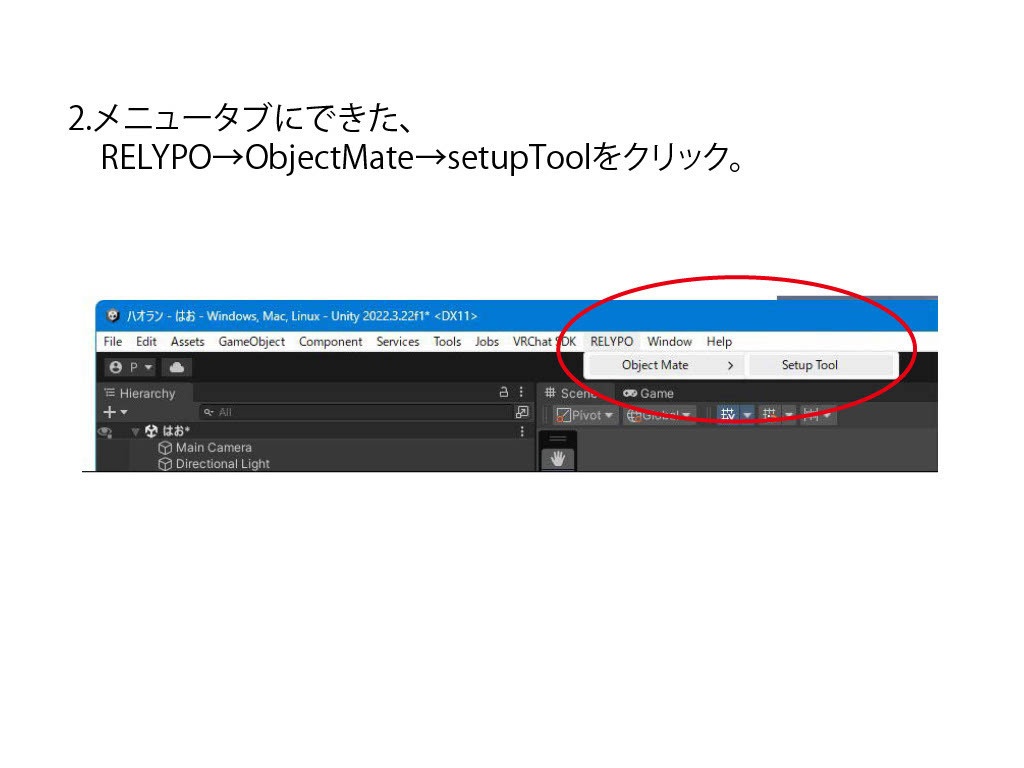
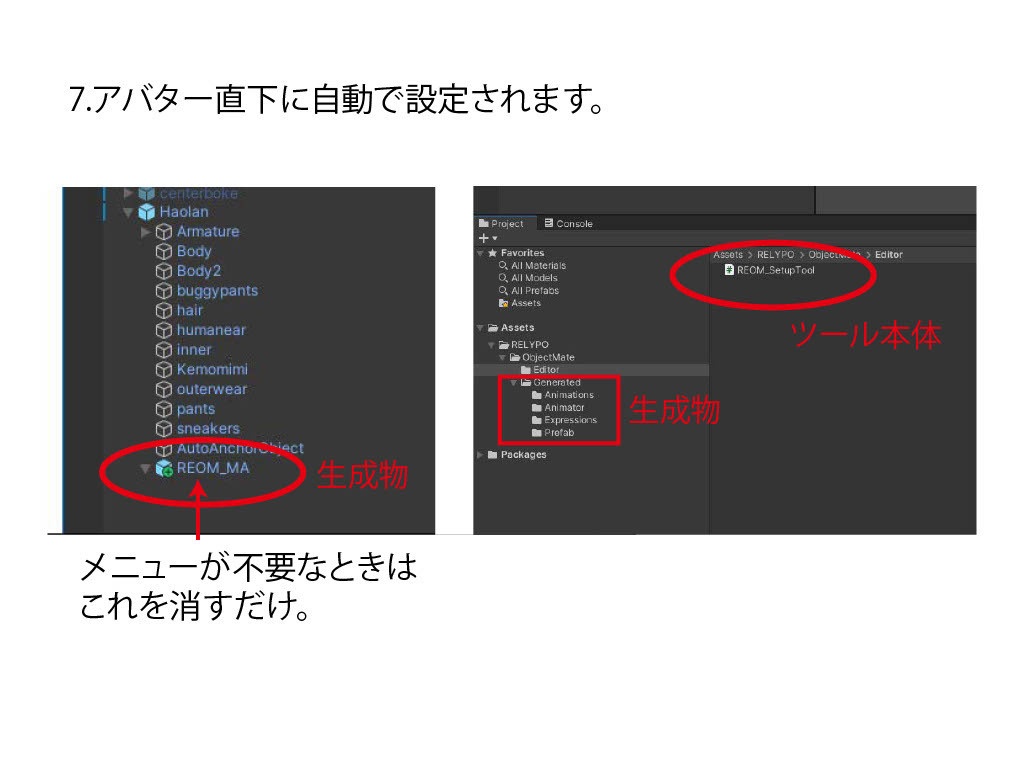
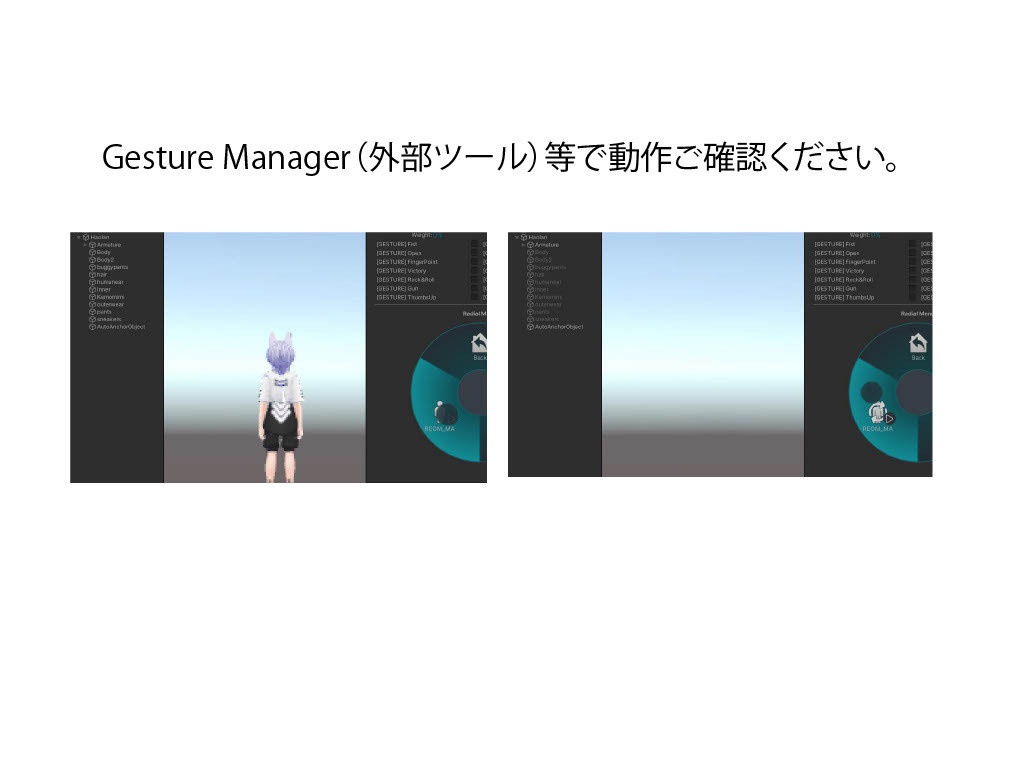


RELYPO Object Mate(REOM) 販売記念セール 2026/5/17-5/22まで 無料 2026/5/23から、通常価格500円 2026/5/25 V1_01 オブジェクト選択時に「全解除」ボタンを追加しました。 ワンタップで、 選択したアバターの複数の任意のオブジェクトを、 一括ON/OFFできるExMenuを作成する VRChat向けUnityエディタ拡張ツールです。 想定される使い方 ■複数の衣装オブジェクトを一括で非表示。 早脱ぎ・高速着替え演出に。 ■手にボールや鳥などを配置し、アバター本体だけを非表示。 小物だけが動いているような動画撮影に。 ■エフェクトを配置し、アバター本体の表示・非表示を切り替えることで、 瞬間移動のようなショーケース演出に。 ■カメラギミックと組み合わせ、アバターだけを非表示。 ギミックの効いた背景のみを撮影したい場面に。 ■アバター全体を非表示にして透明化演出 幽霊・浮遊・透明人間のような演出に。 ■本体だけを非表示にし、衣装を残して表示 衣装販売時の紹介動画・撮影用途に。 使い方(説明書参照) 1.Zipファイルを解凍して、packageをAssetsにいれます。 2.メニュータブにできた、 RELYPO→ObjectMate→setupToolをクリック。 3.REOMSetupToolがポップアップするので、 AvatarRootに、アバターをドラッグ&ドロップ。 ※複数メニューを作りたい場合は、名前(GemeratedName)を異なる名前にします。 変更しないで同じ名前だと上書きされます。 4. 「1ScanRenderers」をクリック。 5. Objectリストがでるので、非表示・表示を切り替えたい オブジェクトを、チェック✓する。 6. 「2CreateREON Setup」をクリック。 7.アバター直下に自動で設定されます。 8.メニュー完成。 自動生成されるもの FX Animator Expression Menu Expression Parameters MA対応Prefab ON/OFF Animation 対応環境 Unity2022.3.6f1 VRChat SDK 3.0 (Avatars) Modular Avatar (必須) 免責事項 本製品の使用により発生したトラブル・損害について、製作者は一切の責任を負いません。 大切なデータは、事前にバックアップを取ったうえでご利用ください。 導入方法や改変方法など、不具合対応以外のサポートは行っておりません。 一部アバター構造では、手動調整が必要になる場合があります。 本商品は Unityツールのみの販売です。 アバター・衣装・アクセサリー等は付属しておりません。 モデルアバター:ラスク( https://booth.pm/ja/items/2559783 ) RELYPO Object Mate (REOM) A VRChat Unity Editor extension tool that creates an Expression Menu for instantly toggling multiple selected avatar objects ON/OFF with a single tap. You can freely choose any objects on your avatar and control them all at once. Intended Use Cases ■ Hide multiple outfit objects at once For quick outfit removal and fast costume-change effects. ■ Attach objects such as balls or birds to the hands, while hiding the avatar body Useful for creating videos where only the props appear to move. ■ Combine with effects and toggle the avatar body visibility Create showcase effects such as teleportation or instant appearance/disappearance. ■ Use together with camera gimmicks to hide only the avatar Perfect for recording backgrounds or stage effects without the avatar visible. ■ Hide the entire avatar for transparency effects Great for ghost, floating, or invisible-person style performances. ■ Hide only the avatar body while keeping outfits visible Useful for outfit showcase videos and promotional recordings. How to Use (See Manual for Details) Extract the ZIP file and import the package into your Assets folder. Open: RELYPO → ObjectMate → setupTool The REOMSetupTool window will appear. Drag & drop your avatar into AvatarRoot. ※ If you want to create multiple menus, set a different name in GeneratedName. Using the same name will overwrite existing data. Click 1 Scan Renderers A list of objects will appear. Check ✓ the objects you want to toggle ON/OFF. Click 2 Create REOM Setup The setup will automatically be generated under the avatar root. Done. Automatically Generated FX Animator Expression Menu Expression Parameters MA-Compatible Prefab ON/OFF Animations Supported Environment Unity 2022.3.6f1 VRChat SDK 3.0 (Avatars) Modular Avatar (Required) Disclaimer The creator is not responsible for any issues, damages, or data loss caused by the use of this product. Please back up your project before use. Support is only provided for bugs and defects. Installation help or modification support is not included. Some avatar structures may require manual adjustments. This product contains Unity tools only. Avatars, outfits, and accessories are not included. Model Avatar: Rusk https://booth.pm/ja/items/2559783
