
RageForge - GLB/OBJ/FBX → ydr
- Digital3,500 JPY
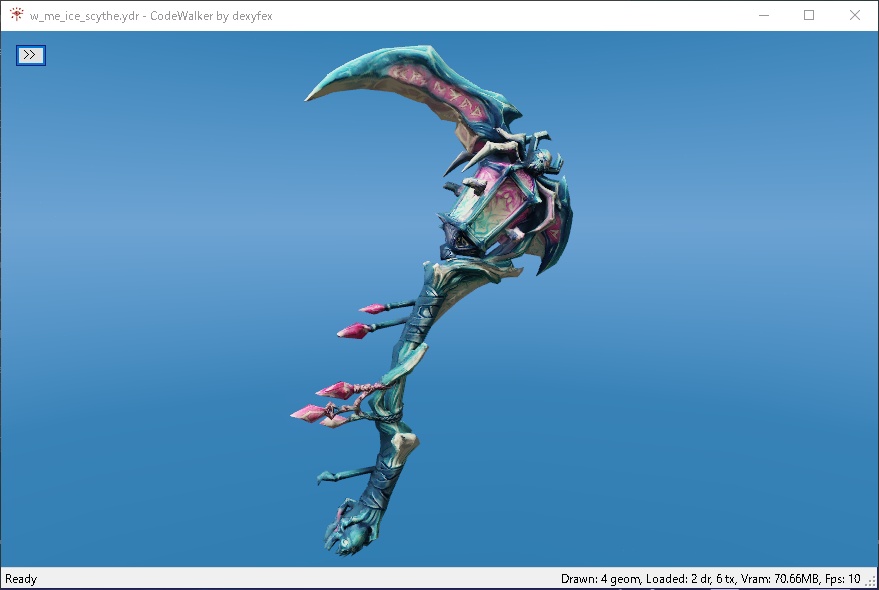



Scroll down for English 「Sollumz の導入で挫折した」「.ydr が出力できない」「武器を追加したいのに meta の書き方が分からない」——その時間、もう終わりにしませんか。 RageForge は、Blender で作った 3D モデルを FiveM / GTA5 がそのまま読めるファイルへ ボタン一つ で変換する Blender アドオンです。Sollumz のインストールもセットアップも不要。モデルを選んで「Forge」を押すだけ。 GLB / OBJ / FBX を読み込み、.ydr(モデル本体)・.ytd(テクスチャ)・ytyp(プロップ登録)・.ymap(マップ配置)・カスタム武器セット一式 を出力します。武器追加では武器 ID と表示名を入れるだけで、サーバーにそのまま置けるリソースが完成。プロップ化すれば CreateObject での召喚やマップ配置もできます。 複雑な変換パイプラインも、謎のエラーとの格闘も不要。作る ことだけに集中できます。
できること
✅ .ydr 出力 — モデルを GTA5 の Drawable バイナリへ変換 ✅ テクスチャ自動変換 — GLB / OBJ 内の PNG / JPG を DDS(DXT 圧縮)へ自動変換し .ydr / .ytd に埋め込み(手動の DDS 準備は不要) ✅ .ytd 出力 — テクスチャをまとめた Texture Dictionary を生成(複数モデルでテクスチャを共有したい上級用途向け) ✅ プロップ登録(ytyp) — Drawable をプロップとして登録。CreateObject で召喚・マップ配置が可能に ✅ マップ配置(.ymap) — オブジェクトの座標・回転を含む配置データを生成 ✅ 武器セット生成 — カスタム近接武器を FiveM へ追加する meta 一式(weapons.meta / weaponarchetypes.meta / weaponanimations.meta / pedpersonality.meta + fxmanifest.lua + 名前ローカライズ)を自動生成 ✅ 出力名の指定 — 「オブジェクト名」フィールドで指定(空なら入力ファイル名 / 武器セット時は Weapon ID が優先) ✅ クリーンライセンス — Sollumz(GPL)コード一切不使用。商用制作物にも安心して利用できます ✅ N パネル統合 — Blender のサイドバーから直感的に操作
使い方のヒント
■ テクスチャと .ytd について .ydr ファイルにはテクスチャが embedded(埋め込み)で含まれます。通常用途では .ytd ファイルは不要です。.ytd チェックボックスは、複数モデル間でテクスチャを共有したい上級用途のためのオプションです。 ■ プロップとして配置したいとき .ydr 単体だと武器や手持ちアイテムとしては動作しますが、マップ上にオブジェクト(プロップ)として配置するには ytyp の出力が必要です。プロップ化したい場合は ytyp チェックボックスも ON にしてください。
こんな人におすすめ
・Sollumz で詰まった人 — 導入・設定・エラーで時間を溶かした方 ・FiveM の MOD 制作者 — 自作モデル・武器をサーバーに入れたい方 ・RP サーバー管理者 — サーバー独自のアセットを手早く用意したい方 ・3D は作れるが「ゲームに入れる工程」で止まっている方
動作環境
・Blender 5.1 で動作確認済み ※ Blender 4.x 対応は v1.5 で無料アップデート予定 ・Windows 10 / 11(64bit) ・追加の外部ツール・ランタイム不要(必要な依存は同梱済み)
インストール
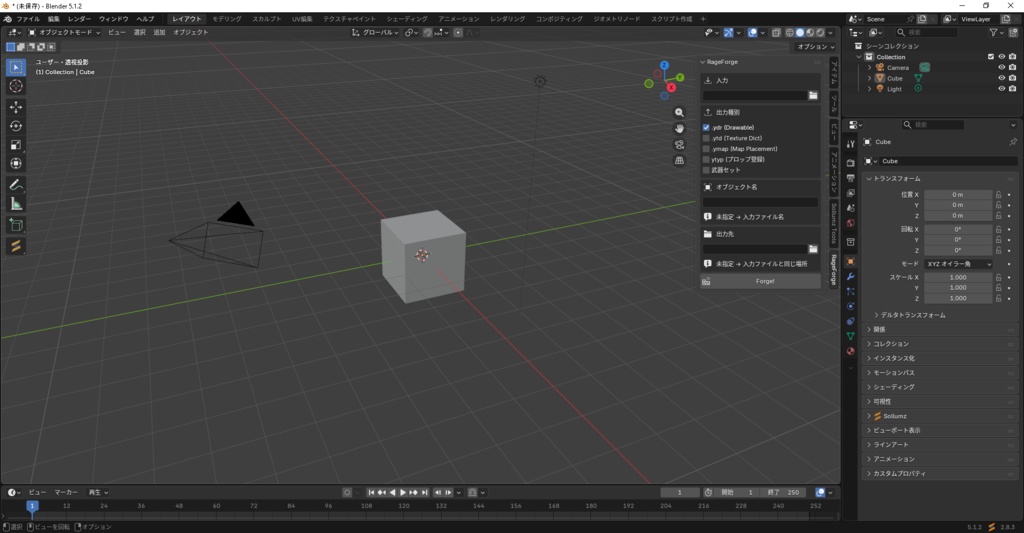
1. 購入後にダウンロードできる zip を 解凍せず に保存します。 2. Blender 5.1 の Edit > Preferences > Get Extensions を開きます。 3. 右上 ▼ > Install from Disk... から zip を選択(拡張機能として読込)。 4. 一覧の RageForge が有効になっていることを確認。 5. 3D ビューで N キー →「RageForge」タブから利用開始。
アップデート・アンインストール
すべて Blender の GUI で完結します(フォルダ操作は不要)。 ■ アンインストール Edit > Preferences > Get Extensions で RageForge を検索 → 項目をクリックして展開 → Uninstall。 ■ アップデート版の入手 アップデートは BOOTH のマイライブラリ(購入履歴)から無償で再ダウンロードできます(同一購入者は追加費用なし)。更新は商品ページでお知らせします。 ■ アップデートの適用 「Install from Disk」での導入は自動更新されないため、再ダウンロードした新しい zip を一度 Uninstall してから Install from Disk で入れ直してください(確実に最新版へ置き換わります)。
サポート
メールサポート: 購入後 30 日以内 のセットアップ・初期不具合に関するメールサポートに対応します。 ※ サポートは導入と動作に関するものに限ります。個別の MOD 制作代行・モデリング指導は含みません(代行が必要な場合は下記 Pro Agency License をご検討ください)。
ライセンス条項
ご購入で以下の条件に同意したものとみなします(正式な条文は同梱の LICENSE が優先します)。 ■ 個人・小規模の商用利用 OK ご自身の制作物(FiveM mod / RP サーバー素材 / 3D 作品など)への利用、およびご自身の RP サーバー運営での利用ができます。 ■ 購入者ご本人に限定 本ソフトウェアの利用は購入者ご本人に限ります。 ■ 1 人 1 ライセンス 1 ライセンスにつき 1 名。組織内を含む複数人での共有は禁止です。チーム利用は人数分のご購入が必要です。 ■ 出力ファイルの権利は購入者に帰属 RageForge で生成した成果物(.ydr / .ytd / 武器セットファイル等)の権利はすべて購入者に帰属し、利用は購入者の自由です。 ■ 再配布・転売・サブスク・代行 禁止 アドオン本体(部分または全体 / zip・ソース)の再配布・転売・譲渡、本ソフトウェアを使ったサブスクリプションサービスや第三者向け代行サービスの提供(Coconala・CrowdWorks 等での「FiveM 武器化代行」など)、およびリバースエンジニアリング・改変を禁止します。 ■ 制作代行・組織利用 代行業利用および組織内共有を希望する場合は、別途 Pro Agency License(¥30,000〜)が必要です。ご希望の場合はお問い合わせください。 ■ ライセンス違反時 本ライセンスに違反した場合、購入時点に遡及して使用権が失効します(返金は行いません)。 バイナリ I/O 実装は CodeWalker(MIT License, by dexyfex)を Python へ移植したものです。このほか pythonnet(MIT)/ numpy(BSD)/ pygltflib(MIT)/ SharpDX(MIT)を同梱し、各ライセンスの著作権・許諾表示の全文を製品内の vendor/LICENSES.md に収録しています。
注意事項
・本製品はデジタルコンテンツの性質上、ご購入後の返金はお受けできません。動作環境を必ずご確認のうえご購入ください。 ・アップデートが提供された場合、同一購入者は無償で入手できます。
English
Below is the English description of this product.
Stuck installing Sollumz? Tired of fighting with .ydr exports and weapon meta files? Let's end that struggle. RageForge is a Blender add-on that converts your 3D models into ready-to-use FiveM / GTA5 assets with one click. No Sollumz, no setup hell. Just pick your model and press "Forge". Load GLB / OBJ / FBX, and get .ydr (model) + .ytd (textures) + .ytyp (prop registration) + .ymap (map placement) + a complete custom weapon resource. Add weapons with just a Weapon ID and display name — the output drops straight into your server. Make props with one extra click for CreateObject spawning and map placement. No complex pipelines. No mysterious errors. Just create.
Features
✅ .ydr export — Convert your model into GTA5 Drawable binary ✅ Auto texture conversion — PNG / JPG embedded in GLB / OBJ are automatically converted to DDS (DXT compressed) and embedded into .ydr / .ytd (no manual DDS prep) ✅ .ytd export — Generate a standalone Texture Dictionary (for advanced cases where you share textures across multiple models) ✅ Prop registration (ytyp) — Register Drawable as a prop. Enables CreateObject spawning and map placement ✅ Map placement (.ymap) — Generate placement data with position and rotation ✅ Weapon resource generation — Auto-generate the full meta set (weapons.meta / weaponarchetypes.meta / weaponanimations.meta / pedpersonality.meta + fxmanifest.lua + name localization) for adding custom melee weapons to FiveM ✅ Custom output naming — Specify via the "Object Name" field (defaults to input filename / Weapon ID for weapon sets) ✅ Clean licensing — No Sollumz (GPL) code included. Safe for commercial projects ✅ N-Panel integration — Operate intuitively from Blender's sidebar
Usage Notes
■ About textures and .ytd The .ydr file contains textures as embedded data. For typical use cases, the .ytd file is NOT required. The .ytd checkbox is an option for advanced users who want to share textures across multiple models. ■ Using as a Prop A .ydr file alone works for weapons or hand-held items, but to place it as a prop on the map, you also need to output the ytyp. Enable the ytyp checkbox when you want prop functionality.
Who is this for?
・Anyone stuck with Sollumz — If you've burned hours on installation, setup, or errors ・FiveM mod creators — Wanting to add custom models / weapons to your server ・RP server admins — Needing to quickly prepare server-specific assets ・3D artists who can model but get stuck at "how do I get this into the game?"
System Requirements
・Blender 5.1 (verified working) ※ Blender 4.x support coming in v1.5 as a free update ・Windows 10 / 11 (64-bit) ・No additional external tools or runtimes required (all dependencies bundled)
Installation
1. Save the downloaded zip file WITHOUT extracting it. 2. In Blender 5.1, open Edit > Preferences > Get Extensions. 3. From the top right ▼ > Install from Disk..., select the zip (load as extension). 4. Confirm RageForge is enabled in the list. 5. Press N in the 3D view, and start using from the "RageForge" tab.
Updates & Uninstallation
Everything is done through Blender's GUI (no folder operations needed). ■ Uninstallation Edit > Preferences > Get Extensions, search RageForge → click the entry to expand → Uninstall. ■ Getting updates Updates are FREE for existing purchasers. Re-download the new zip from your BOOTH library (no extra cost). Updates will be announced on this product page. ■ Applying updates Since "Install from Disk" doesn't auto-update, please Uninstall the old version first, then Install from Disk with the new zip (this ensures a clean replacement).
Support
Email support: We respond to setup and initial bug-related questions via email within 30 days of purchase. ※ Support is limited to installation and operational matters. Mod creation services and modeling tutorials are NOT included (please consider the Pro Agency License below if you need such services). ※ Support language: Japanese / English (please be patient with English responses)
License Terms
By purchasing, you agree to the following terms (the LICENSE file included in the product is authoritative): ■ Personal & small-scale commercial use OK You may use this for your own creations (FiveM mods / RP server assets / 3D works) and your own RP server operations. ■ Per-purchaser only Use of this software is limited to the purchaser only. ■ One license per person 1 license = 1 person. Organization-wide sharing is prohibited. Team usage requires purchasing one license per member. ■ Output files belong to the purchaser Files generated by RageForge (.ydr / .ytd / weapon resource files etc.) are entirely owned by the purchaser, free for any use. ■ No redistribution / resale / subscription / service provision You may NOT redistribute, resell, or transfer the add-on itself (whole or partial / zip or source). You may NOT use it to provide subscription services or third-party services (e.g. "FiveM weapon conversion services" on Fiverr / Upwork etc.). Reverse engineering and modification are prohibited. ■ Service & organization use For commercial service use or organization-wide sharing, please contact us for the Pro Agency License (¥30,000~). ■ License violations Violating this license invalidates your usage right retroactively from the purchase point (no refund). The binary I/O implementation is a Python port of CodeWalker (MIT License, by dexyfex). This product also bundles pythonnet (MIT) / numpy (BSD) / pygltflib (MIT) / SharpDX (MIT), with full copyright and permission notices included in vendor/LICENSES.md.
Notes
・Due to the nature of digital content, refunds are not available after purchase. Please verify system requirements before buying. ・Existing purchasers can obtain future updates for free. Price reference: ¥5,000 ≈ $32 USD ≈ €30 EUR (rates vary)