
【赤・青・白で差分を可視化】プロンプト色分け比較&抽出ツール「SD Prompt Manager」
- Windows版Digital500 JPY
- Mac版Digital500 JPY
- Win/Mac両対応版Digital700 JPY
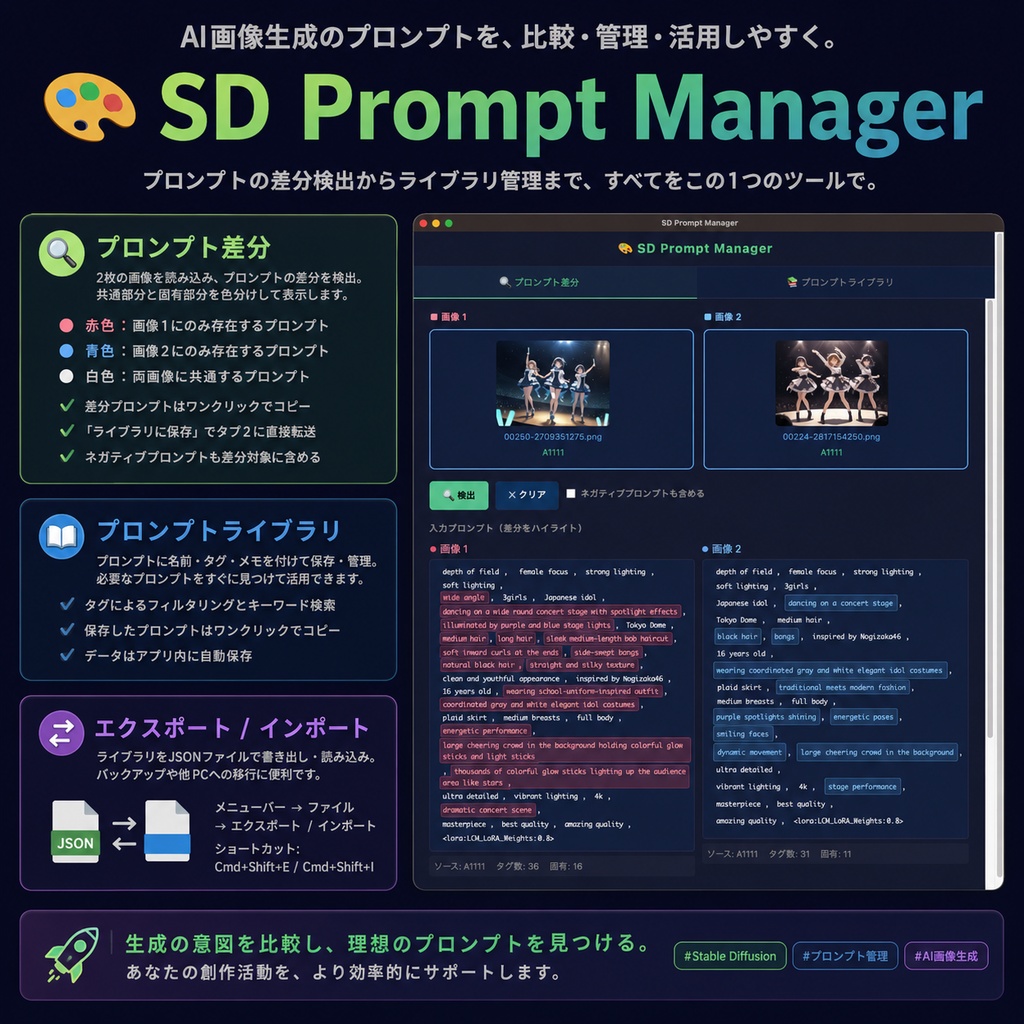


Stable DiffusionやComfyUIなどで画像生成をしているとき、「微妙に設定を変えた2枚の画像、どこを変更したっけ…?」と迷ったり、お気に入りのプロンプト管理に手間取ったりしていませんか? 「SD Prompt Manager」は、そんな画像生成AIユーザーの作業効率を劇的に向上させるためのデスクトップアプリケーションです 。生成した画像からプロンプトを読み込み、差分の比較からタグ付け保存まで、このアプリひとつで完結します。
主な機能
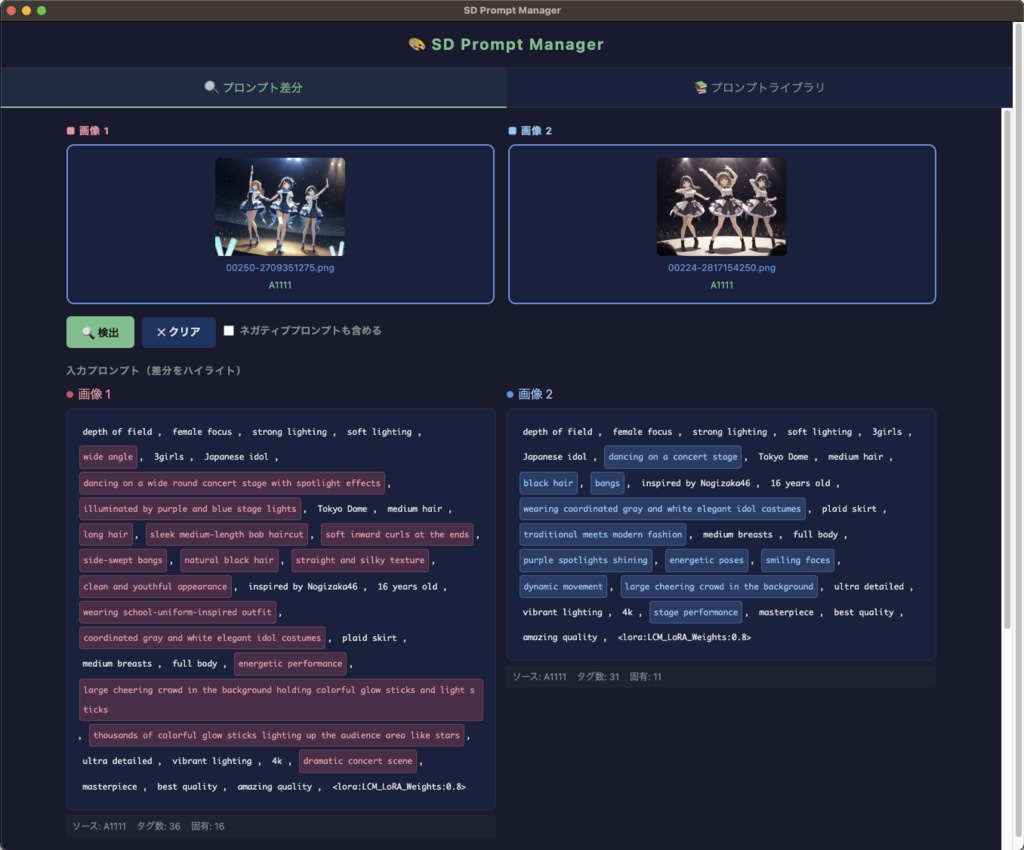
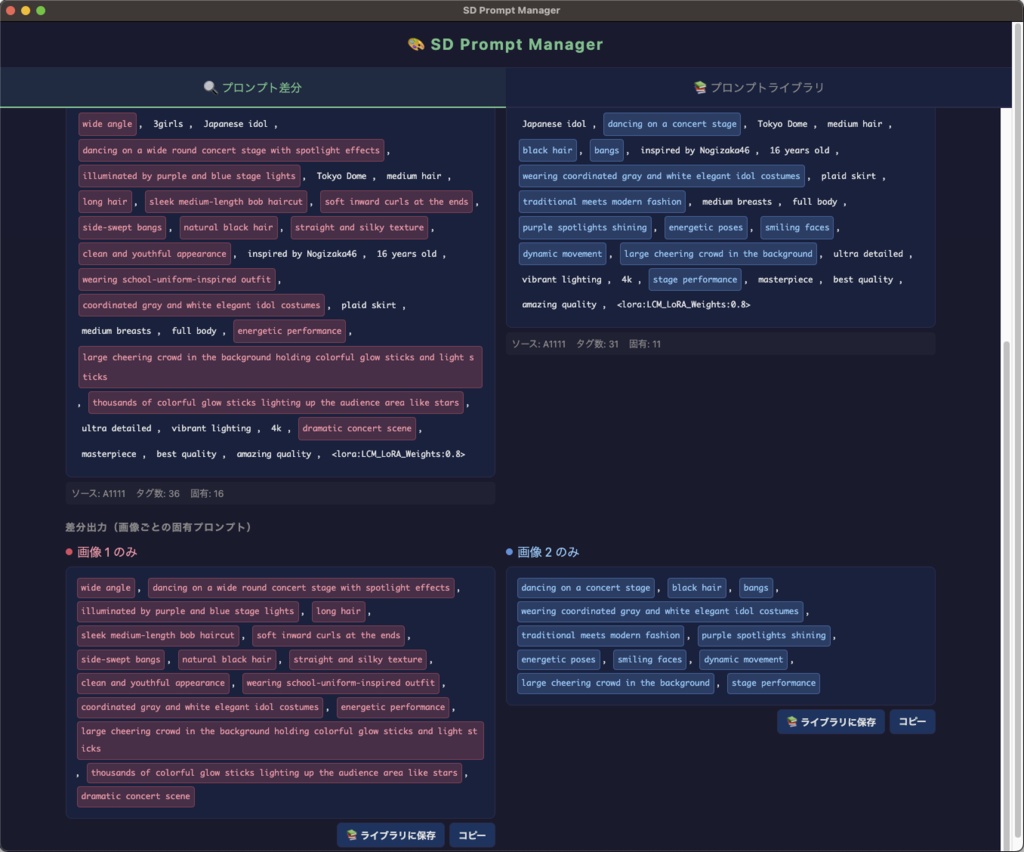
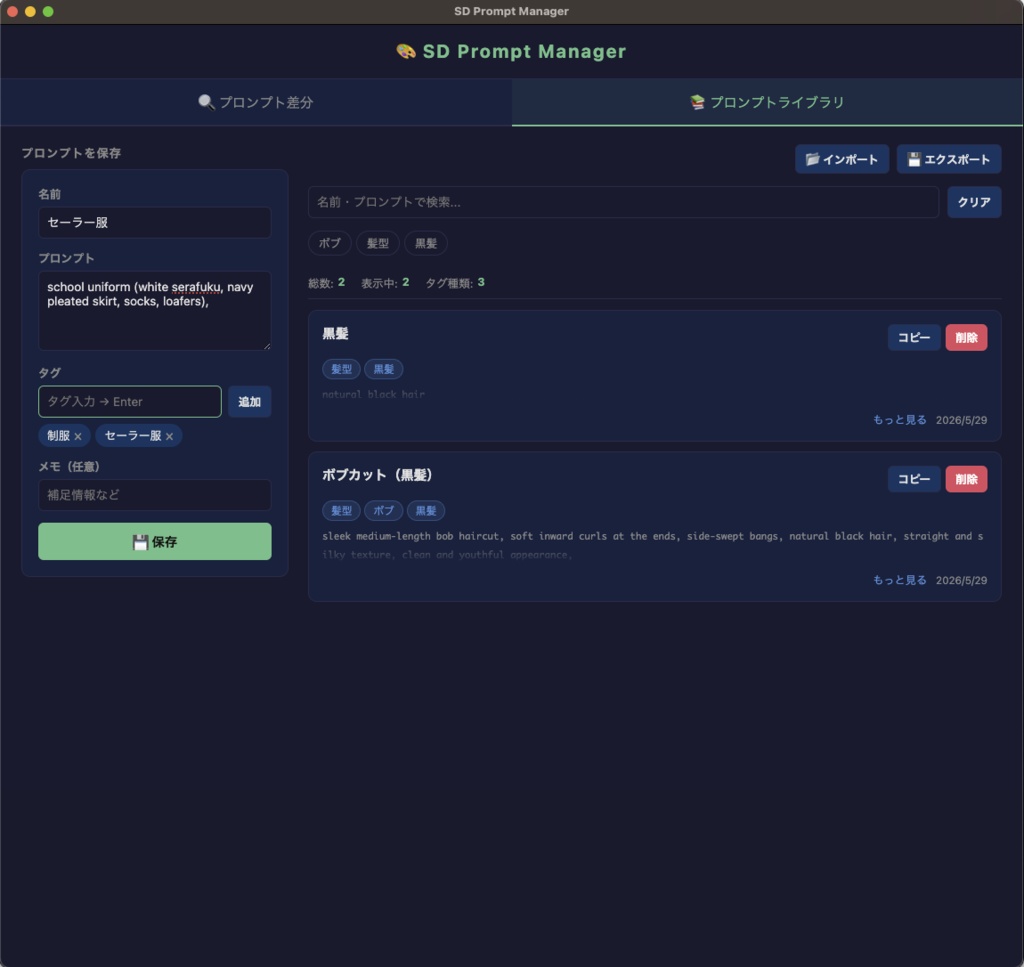
1. 画像からプロンプトの「差分」を瞬間抽出 ・ 2枚の画像を読み込み、プロンプトの差分を検出します。 ・ 共通するプロンプトは「白色」、画像1のみに存在するプロンプトは「赤色」、画像2のみに存在するプロンプトは「青色」で色分けして表示します。 ・ どこを変更したかが一目でわかり、ネガティブプロンプトを差分対象に含めることも可能です。 ・ 抽出した差分プロンプトはワンクリックでコピー可能です。 ・ 抽出後、「ライブラリに保存」ボタンからそのまま直接登録することもできます。 2. 自分だけのプロンプト辞典を作れる「ライブラリ機能」 ・プロンプトに任意の名前や「髪型」「服装」「場所」などのタグ、メモを追加して保存できます。 ・登録したデータはタグによるフィルタリングやキーワード検索が可能です。 ・保存したプロンプトもワンクリックで簡単にコピーできます。 ・データはアプリ内に自動保存されるため、手間がかかりません。 3. バックアップや移行に便利なエクスポート機能 ・保存したライブラリデータをJSONファイルとして書き出し・読み込みできます。 ・バックアップ目的だけでなく、別のPCへ環境を移行する際にも非常に便利です。
動作環境
【Mac 版】 ・macOS 12 Monterey 以降 ・SD Prompt Manager-1.0.0-arm64.dmg:Apple Silicon(M1/M2/M3) ・SD Prompt Manager-1.0.0.dmg :Intel Mac 【Windows 版】 ・Windows 10 / 11(64bit) ・SD Prompt Manager Setup 1.0.0.exe
起動時のセキュリティ警告について(重要)
初回起動時にOSのセキュリティ機能によって警告が表示される場合があります。 * Macをご利用の場合: 「開発元を検証できません...」という警告が出た場合は、アプリアイコンを右クリック(またはControl+クリック)して「開く」を選択し、再度警告画面が出たらそのまま「開く」をクリックしてください。 アプリが壊れていると出た場合は、隔離属性が原因ですので解除(xattrコマンド)を実施して下さい。 * Windowsをご利用の場合: 「WindowsによってPCが保護されました」という青い画面が出た場合は、画面内の「詳細情報」をクリックし、表示される「実行」ボタンを押してください。
アップデート履歴
[2026-05-29: v1.0] Ver.1.0公開
English
■ Overview ────────────────────────────────────────────── This is a desktop application for managing prompts for images generated with Stable Diffusion WebUI, ComfyUI, and NovelAI. ■ Main Features ──────────────────────────────────────────────── 【Tab 1: Prompt Difference】 ・Loads two images and detects the difference in prompts. * Pressing the "Detect" button displays common and unique prompts in different colors. Red: Prompts present only in Image 1 Blue: Prompts present only in Image 2 White: Prompts common to both images * Differential prompts can be copied with one click. * You can transfer them directly to Tab 2 using the "Save to Library" button. * There is an option to include negative prompts in the differential analysis. [Tab 2: Prompt Library] * You can save prompts with names, tags, and notes. (Example: Tags "Hairstyle," "Clothing," "Location," etc.) * Filtering by tags and keyword search are possible. * Saved prompts can be copied with one click. * Data is automatically saved within the app. [Export / Import] * You can export and import the saved library as a JSON file. This is convenient for backups and migration to other PCs. Menu Bar → File → Export/Import (Shortcut: Cmd+Shift+E / Cmd+Shift+I) ■ Operating Environment ──────────────────────────────────────────────── 【Mac Version】 ・macOS 12 Monterey or later ・SD Prompt Manager-1.0.0-arm64.dmg: Apple Silicon (M1/M2/M3) ・SD Prompt Manager-1.0.0.dmg: Intel Mac 【Windows Version】 ・Windows 10 / 11 (64-bit) ・SD Prompt Manager Setup 1.0.0.exe ■Security Warnings at Startup (Important) ──────────────────────────────────────────────── A warning may appear on the first launch due to the OS's security features. * If you are using a Mac: If you see a warning that says "The developer cannot be verified...", right-click (or Control-click) the app icon and select "Open". If the warning screen reappears, click "Open" again. If it says the app is corrupted, this is due to the quarantine attribute, so please remove it (using the xattr command). * If you are using Windows: If you see a blue screen that says "Windows protected your PC", click "More information" on the screen and then click the "Run" button that appears.