
MarchenStream 製品版 / MarchenStream Lite 無料版 |配信用オールインワン・ボイスプロセッサー
- 【個数限定セール価格!】MarchenStream製品版【通常価格1,980円】Digital1,000 JPY
- 【Liteモードのみのお試し】MarchenStream Lite無料版Digital0 JPY


1,000個限定セール価格!MarchenStream製品版【通常価格1,980円】
MarchenStream
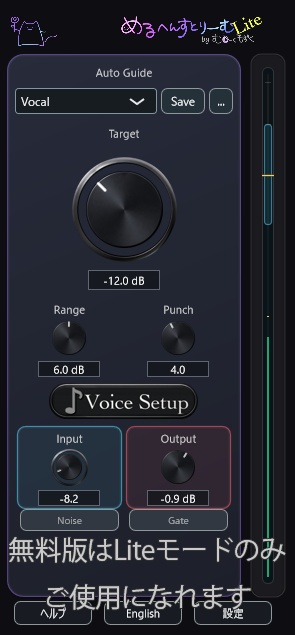
ーーーーーーーーーーーーーーーーーーーーーーーーーーーー 配信の声を整える、ボイスプロセッサー ※無料版は画像4枚目のLiteモードのみご使用できます。 まず無料版で起動確認などお試しください。内部のAutoSetup機能は製品版と同じアルゴリズムを使ってます。 MarchenStream は、配信・動画・歌ってみたなどで使う声を整えるためのボイスプロセッサーです。 マイクの音量、ノイズ、ゲート、音質補正、コンプレッサー、リミッター、最終出力まで、声に必要な処理をひとつにまとめました。 音声処理に詳しくない方でも使いやすいように、ガイドに沿って声を読み上げるだけで設定を作れる **Voice Setup** を搭載しています。
MarchenStream 製品版について
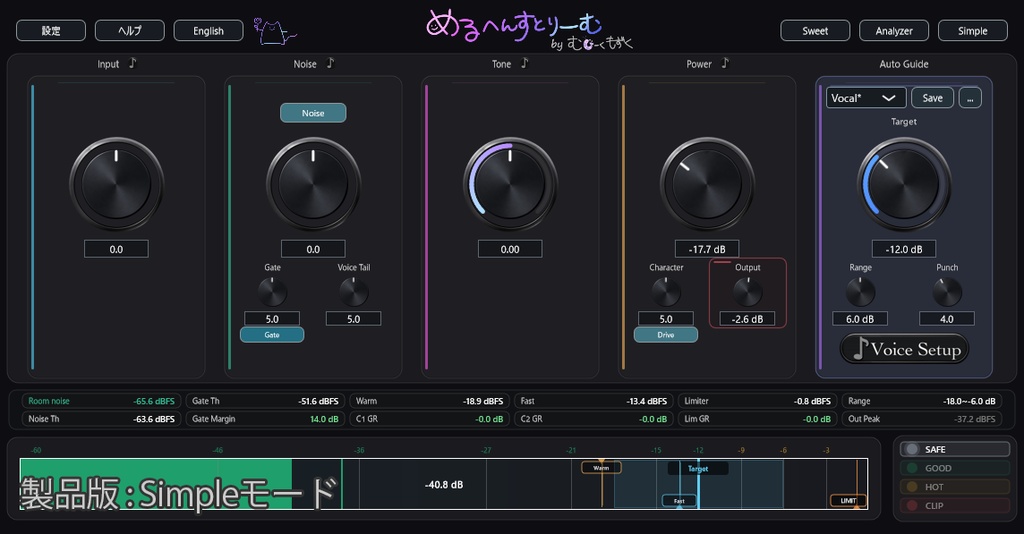
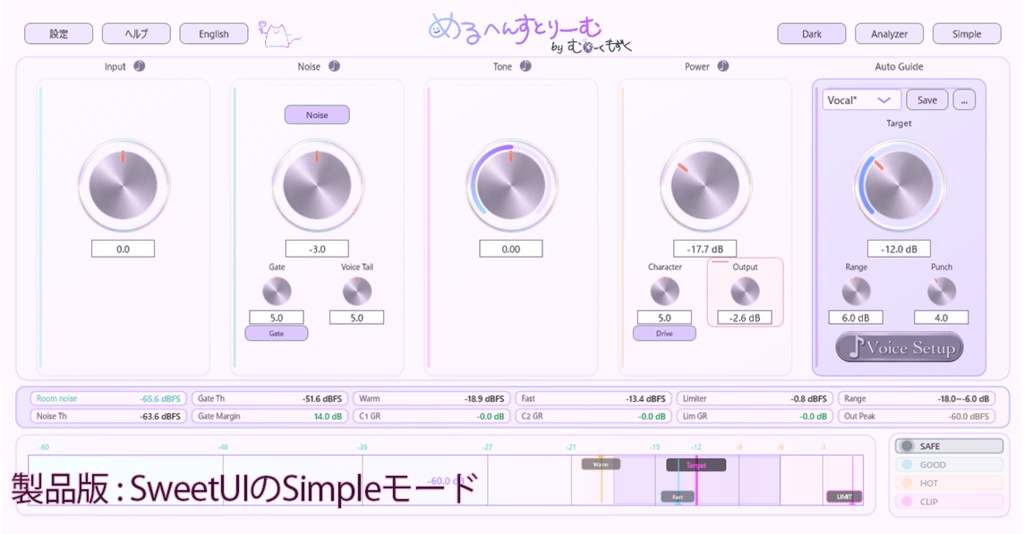
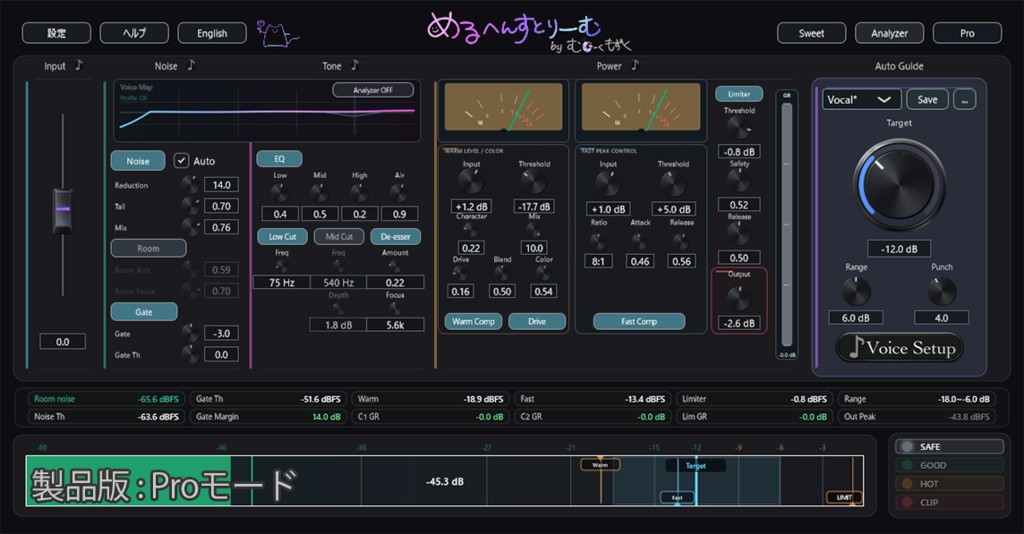
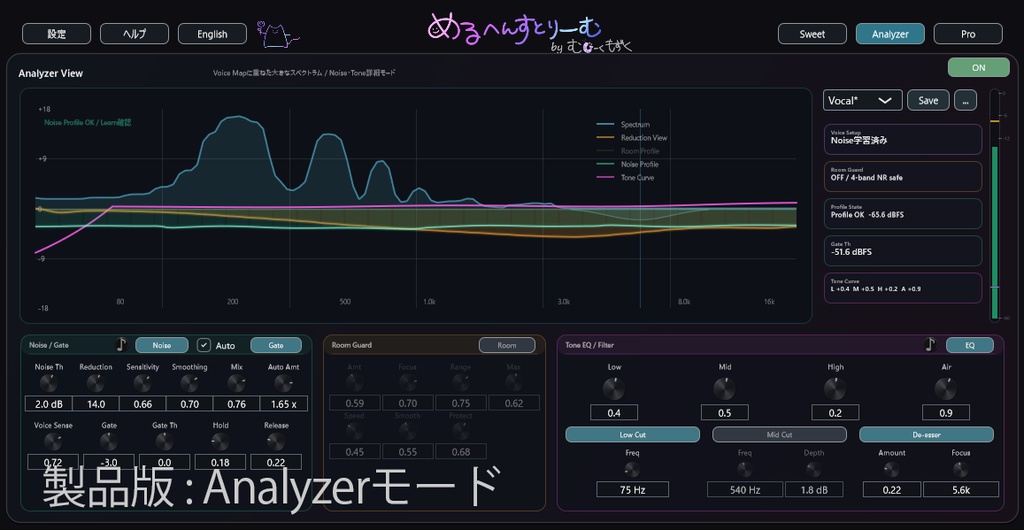
MarchenStream製品版は、配信者向けに作られたフル機能版のボイスプロセッサーです。 Voice Setupで声の基準を作り、Simpleモードでわかりやすく調整し、必要に応じてProモードやAnalyzerモードでさらに細かく確認できます。 主な機能 ・Voice Setupによる音声設定 ・Simple / Pro / Analyzer / Lite の4モード ・Input / Outputによる音量調整 ・Noise / Gateによるノイズ・無音部分の調整 ・Tone / EQによる声質調整 ・Warm Comp / Fast Compによる声の安定化 ・Limiterによるピーク保護 ・Analyzer表示による音の確認 ・Styleの保存・読み込み ・marchenstyle形式によるスタイルプリセットの共有 ・VST3プラグイン ・Standaloneアプリ 「まずは簡単に整えたい」 「でも必要になったら細かく調整したい」 「配信で使いやすい音量と聞きやすさを作りたい」 そんな方向けの製品です。
MarchenStream Lite 無料版について
MarchenStream Liteは、製品版MarchenStreamのLiteモードのみを切り抜いた無料版です。 ※内部のAutoSetupアルゴリズムは同じです。 製品版と同じ考え方の音声処理を、より小さく、シンプルな画面で使えるようにした無料製品です。 Lite版でできること ・Voice Setupによる音声設定 ・Target / Range / Punchによる声の方向性調整 ・Input / Outputによる音量調整 ・Noise ON/OFF ・Gate ON/OFF ・右側VUメーターによる音量確認 ・スタイルプリセットの保存・読み込み ・MarchenStream製品版とのスタイルプリセットの互換あり ・VST3プラグイン ・Standaloneアプリ Lite版には、製品版の Simple / Pro / Analyzer モードはありません。 Tone / EQ、Warm Comp、Fast Comp、Limiterの詳細編集、Analyzer表示などを細かく操作したい場合は、製品版MarchenStreamをご利用ください。 無料版ですが、単なる体験版ではありません。 「まずは無料で、配信の声を整える」ための実用的なLite版です。
★収録内容
ーーーーーーーーーーーーーーーーーーーーーーーーーーーー 【個数限定セール価格!】MarchenStream製品版【通常価格1,980円】MarchenStream ーーーーーーーーーーーーーーーーーーーーーーーーーーーー こちらは有料フル機能の製品版です。 Simple / Pro / Analyzer / Lite の4つのモードを搭載し、かんたんに使いたい方から、細かく音を追い込みたい方まで使える構成です。 ーーーーーーーーーーーーーーーーーーーーーーーーーーーー 【Liteモードのみのお試し】MarchenStream Lite無料版 ーーーーーーーーーーーーーーーーーーーーーーーーーーーー こちらは無料版です。 MarchenStreamのLiteモードのみの縮小機能版です。 ※画像にあるProモードやスペクトラムアナライザーモード、5ノブで音を整えられるSimpleモードは同梱されません。 無料で使えるコンパクトなボイスプロセッサーとして、まず声を整えるところから始めたい方向けに用意しています。
Style互換について
MarchenStream と MarchenStream Lite は、同じ `.marchenstyle` 形式に対応しています。 MarchenStream Liteで作ったStyleを製品版MarchenStreamで使ったり、製品版で作った互換StyleをLite版で読み込むことができます。 製品版で細かく作った音をベースにしたり、Lite版で作った設定を製品版でさらに調整したりできます。 その場合は、VST3対応ホストや音声ルーティング用ソフトを介して使用する方法をご検討ください。 詳しい使い方や注意点は、公式ヘルプページをご確認ください。
Voice Setupについて
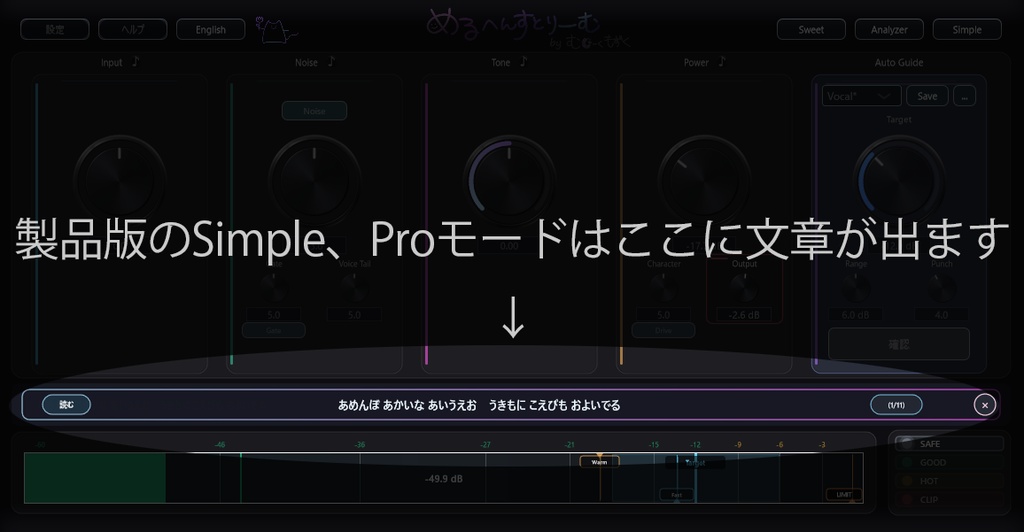
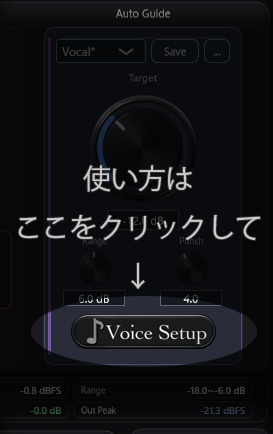
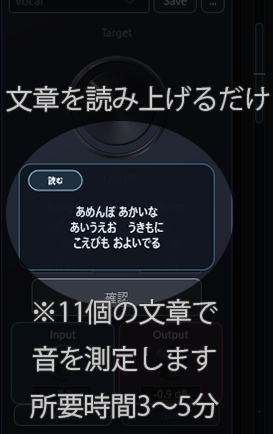
MarchenStream / MarchenStream Lite には、声の設定を作るための **Voice Setup** を搭載しています。 画面のガイドに沿って声を読み上げることで、マイクの音量、声の大きさ、ノイズ、ピークなどを確認し、配信向けの音声設定を作成します。 音声処理に詳しくない方でも、まずはVoice Setupから始めることで、使いやすい状態を作りやすくなります。
使い方の流れ
1. MarchenStream または MarchenStream Lite を起動します 2. マイク入力を確認します 3. Voice Setupを押します 4. 画面のガイドに沿って声を読み上げます 5. 必要に応じてInput / Outputなどを調整します 6. 配信ソフト側のメーターでも音量を確認します 製品版では、必要に応じてProモードやAnalyzerモードでさらに細かく調整できます。
注意事項・免責・利用条件
注意事項 本ソフトはWindows専用です。 VST3版を使用する場合は、VST3対応ホストアプリケーションが必要です。 使用するDAW、配信ソフト、VSTホスト、オーディオデバイス、ドライバー環境によって動作が異なる場合があります。 OBSなど一部の配信環境では、VST3を直接読み込めない場合があります。 環境によっては、別途VSTホストや音声ルーティング用ソフトが必要になる場合があります。 インストールや設定作業は、ご自身の環境に合わせて行ってください。 本ソフトの使用前に、音量が大きくなりすぎていないか必ず確認してください。 ヘッドホンやスピーカーの音量を上げすぎた状態で使用しないでください。 免責事項 本ソフトの使用により発生した、音量設定ミス、配信トラブル、録音トラブル、音声ルーティング設定の問題、ホストアプリケーション側の不具合、その他使用環境に起因する問題について、制作者は責任を負いかねます。 本ソフトは、すべての環境での動作を保証するものではありません。 本ソフトの使用によって、必ず特定の音質改善・ノイズ除去・音量安定化が得られることを保証するものではありません。 ご使用前に、ご自身の環境で十分にテストを行ってください。 利用条件 本ソフトは、個人利用・配信・動画制作・音楽制作などに使用できます。 本ソフトを使用して制作・配信された音声、動画、楽曲などの権利は、各制作者・配信者に帰属します。 本ソフト自体の再配布、無断転載、販売、改変したものの配布は禁止します。 インストーラー、プラグイン本体、Standaloneアプリ、付属ファイルを第三者に再配布しないでください。 必ず公式配布ページから入手してください。 不具合報告やお問い合わせの際は、使用環境、使用ソフト、発生した状況をできるだけ具体的にお知らせください。 MarchenStream Liteについて MarchenStream Liteは無料で使用できますが、著作権および配布権は制作者に帰属します。 無料版であっても、無断再配布、転載、改変配布は禁止します。 クレジット MarchenStream / MarchenStream Lite by MusikMozuku / Märchen mozuku 公式ページ・ヘルプ 詳しい使い方やトラブル時の確認ポイントは、公式ページとヘルプをご確認ください。 公式ページ https://marchen-mozuku.com/MusikMozuku/MarchenStream/ ヘルプ https://marchen-mozuku.com/MusikMozuku/MarchenStream/help.html お問い合わせ https://marchen-mozuku.com/contact.html MarchenStream | MusikMozuku MarchenStream は、配信に必要な音声処理をひとつにまとめた、MusikMozuku のオールインワン・ボイスプロセッサーです。
# Feature Overview
## MarchenStream Full Version MarchenStream is a voice processor designed for streamers, video creators, singers, and anyone who wants to shape and stabilize spoken or vocal audio. It brings together the essential tools for voice processing, including microphone level control, noise reduction support, gate processing, tone shaping, compression, limiting, and final output adjustment. ### Main Features ・Voice Setup for guided voice configuration ・Four modes: Simple / Pro / Analyzer / Lite ・Input / Output level control ・Noise / Gate processing for unwanted noise and silent ・sections ・Room processing for room-related sound control ・Tone / EQ for voice shaping ・Warm Comp / Fast Comp for voice stabilization ・Limiter for peak protection ・Analyzer display for checking the audio state ・Style save and load ・Style sharing using the `.marchenstyle` format ・VST3 plug-in ・Standalone application ### Four Modes **Simple** A basic mode designed for everyday use. It provides the main controls in an easy-to-understand layout. **Pro** A detailed mode that allows fine adjustment of Noise / Gate / Room / Tone / EQ / Comp / Limiter / Output. **Analyzer** A mode for checking the spectrum and processing status while adjusting your sound. Useful for sound design and troubleshooting. **Lite** A compact mode focused on Voice Setup and Auto Guide. This mode is also the base of the free MarchenStream Lite version. --- ## MarchenStream Lite Free Version MarchenStream Lite is the free version based on the Lite mode of the full MarchenStream product. It uses a dedicated Lite interface and focuses on making it easy to set up a voice sound for streaming. ### What You Can Do with the Lite Version ・Voice Setup for guided voice configuration ・Voice direction control with Target / Range / Punch ・Input / Output level control ・Noise ON/OFF ・Gate ON/OFF ・Right-side VU meter for checking levels ・Style save and load ・Style compatibility with the full MarchenStream version ・VST3 plug-in ・Standalone application ### Difference from the Full Version MarchenStream Lite is a compact Lite-only version. It does not include the full version’s Simple / Pro / Analyzer modes. If you want detailed control over Tone / EQ, Warm Comp, Fast Comp, Limiter, Analyzer display, and deeper sound shaping, please use the full MarchenStream version. Although it is free, it is not just a trial version. It is a practical Lite version made for starting voice processing for streaming.
# Please Read Before Purchase
## Supported Environment This software is for Windows. Supported formats: * VST3 * Standalone To use the VST3 version, you need a DAW, streaming software, VST host, or other host application that supports VST3 plug-ins. The Standalone version can be launched as a separate application, but behavior and latency may vary depending on your audio device and driver settings. ## Using with OBS Depending on your environment, OBS may not be able to load VST3 plug-ins directly. In that case, you may need to use a VST3-compatible host or audio routing software. If you plan to use MarchenStream with OBS, please check the OBS-related information on the official help page before purchase. ## About MarchenStream and MarchenStream Lite The full version of MarchenStream and the free MarchenStream Lite version are installed as separate products. MarchenStream Lite is a free Lite-only compact version. The full version of MarchenStream includes Simple / Pro / Analyzer / Lite modes. Both products can be installed and used on the same PC. ## About Sound Quality and Results This software is a voice processing tool designed to help shape and stabilize voice audio. However, the result depends on your microphone, audio interface, room environment, voice volume, microphone distance, and streaming software settings. If the background noise is very loud or the input signal is already distorted, this software may not be able to completely solve the issue. Even after running Voice Setup, please check the final level using your streaming software meter and actual recorded or streamed audio. ## Official Page / Help Detailed instructions and troubleshooting information are available on the official page and help page. Official Page: https://marchen-mozuku.com/MusikMozuku/MarchenStream/ Help: https://marchen-mozuku.com/MusikMozuku/MarchenStream/help.html Contact: https://marchen-mozuku.com/contact.html