

「Minase」 Facial Tracking Add-on for Minase_v1.4.1
- Digital2,400 JPY
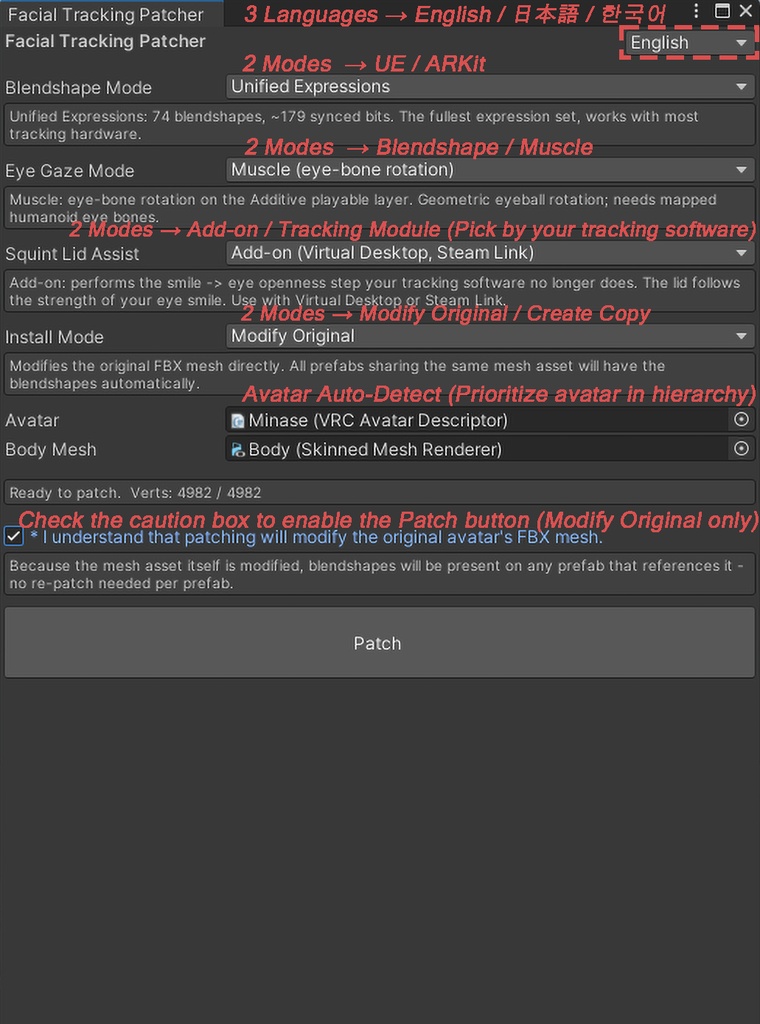
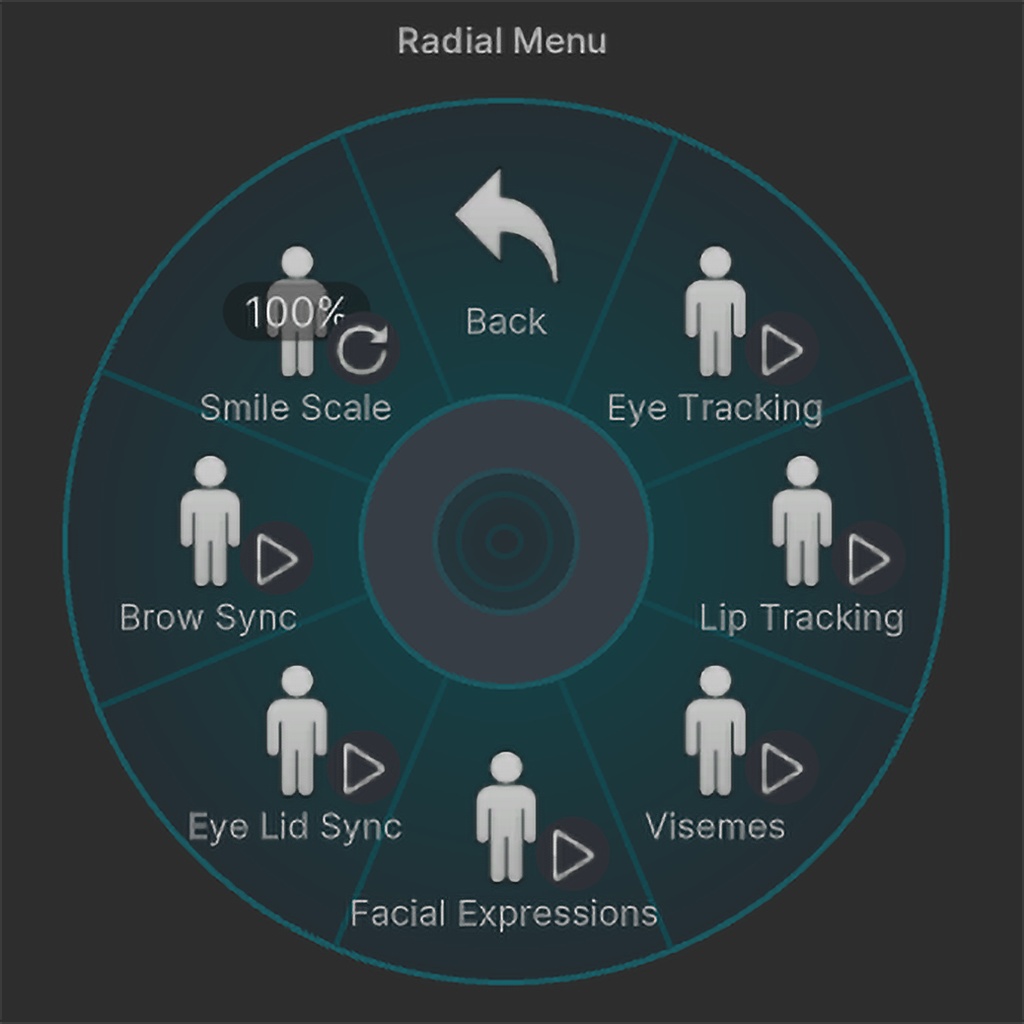
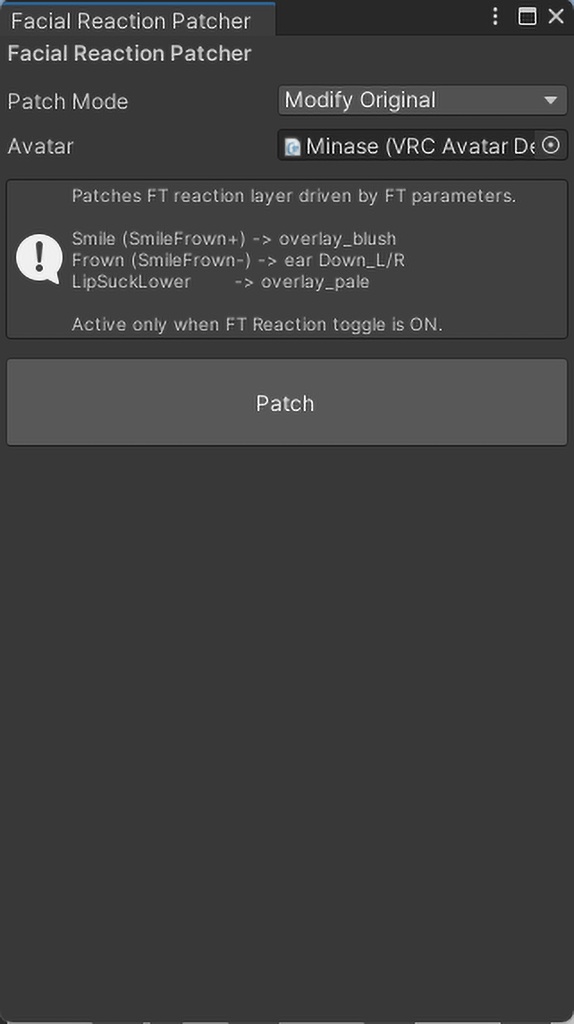
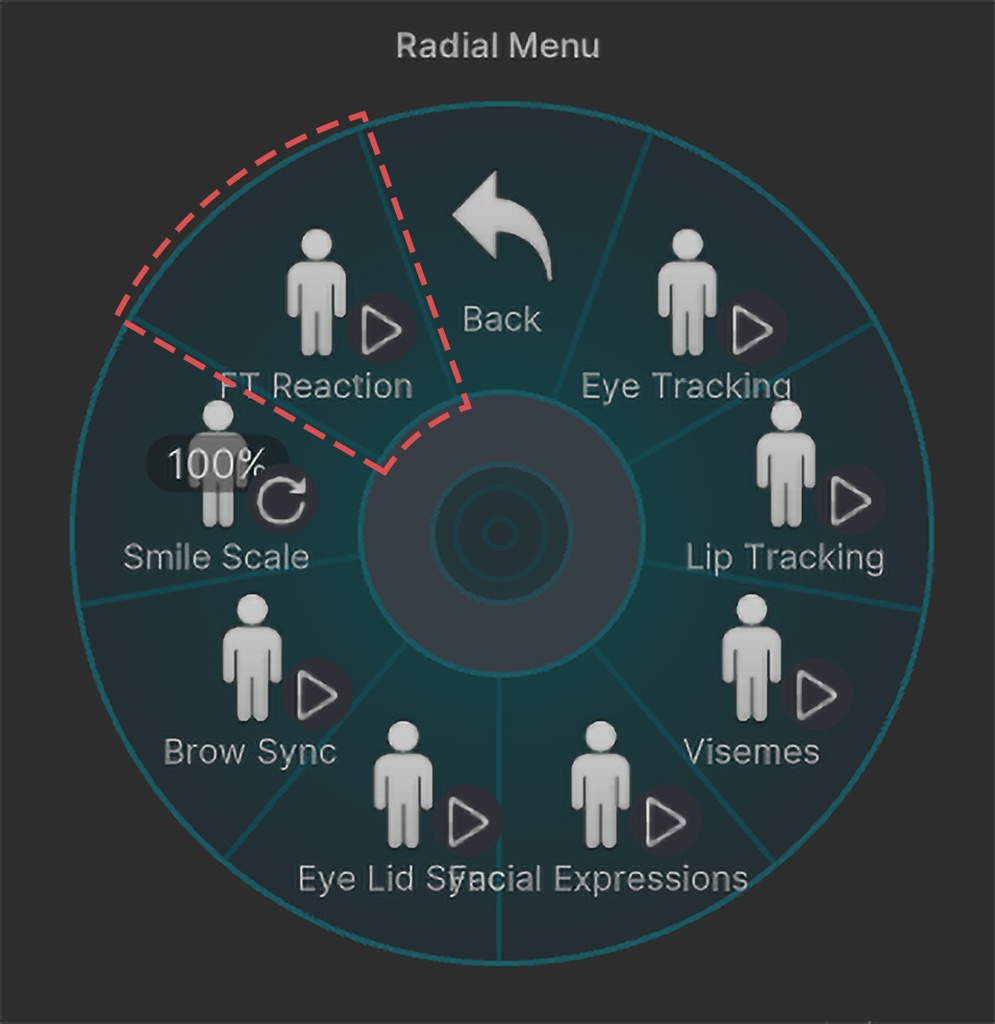


◆ Notice / 안내 / ご案内 *Textures in the preview are not included. *영상의 텍스처는 포함되지 않습니다. *紹介動画のテクスチャは含まれません。 --------------------------------- ◆ What's new in v2.4.7 ※ Eye smile (EyeSquint) fix — the Add-on now supplies the lid motion some tracking software stopped providing. ※ New option "Squint Lid Assist" — Add-on (VD, Steam Link) / Tracking module (Quest Link, AirLink). ◆ Update History Earlier versions: Modify Original permanent FBX application, improved eye / eyebrow motion, tongue blendshape, and MMD world compatibility. ◆ v2.4.7 개선사항 ※ 눈웃음(EyeSquint) 수정 — 일부 트래킹 소프트웨어가 중단한 눈꺼풀 처리를 Add-on이 대신 수행. ※ 신규 옵션 "Squint Lid Assist" — Add-on (VD, Steam Link) / Tracking module (Quest Link, AirLink). ◆ 업데이트 히스토리 이전 버전: Modify Original 원본 FBX 영구 적용, 눈동자·눈썹 움직임, 혀 블렌드쉐이프, MMD 월드 호환성 개선. ◆ v2.4.7 更新内容 ※ 目元の笑み(EyeSquint)を修正 — 一部トラッキングソフトが停止したまぶた処理を Add-on が代行。 ※ 新規オプション「Squint Lid Assist」— Add-on (VD, Steam Link) / Tracking module (Quest Link, AirLink). ◆ 更新履歴 以前のバージョン: Modify Original の元FBXへの永久適用、視線・眉の動き、舌のブレンドシェイプ、MMDワールド互換性を改善。 --------------------------------- Facial tracking add-on for mio3io's Minase (VRChat SDK3). Adds eye gaze, blink, eyebrow, cheek, jaw, lip, tongue and more. UE & ARKit modes. Choose Blendshape or Muscle eye-gaze when patching (Muscle rotates the eye bones for a wider range). FrameTime-adaptive smoothing for consistent response at any fps. ◆ In-game menu Eye Tracking — gaze, blink, eyebrow Lip Tracking — mouth & lip Facial Expressions — face/hand gesture layers Visemes — VRChat lipsync Eye Lid Sync — average both eyelids (L/R) Brow Sync — average both eyebrows (L/R) Smile Scale — radial (0~1); lower for larger base mouths FT Reaction — blush / ear droop / pale overlay (optional add-on) ◆ Requirements mio3io Minase (sold separately) — https://mio3io.booth.pm/ VRCFaceTracking 5.0+ / Unity 2022.3 LTS + VRChat SDK3 ◆ What's included FX Controllers (UE & ARKit, Blendshape & Muscle), Expression Parameters & Menu, Patcher, FT Sync Selector *Minase avatar is not included. ◆ Parameter budget Unified Expressions: ~200 / 256 bits ARKit: ~169 / 256 bits (incl. Minase original ~21) ◆ Optional Add-on FT Reaction Addon (separate) — FT-driven overlay reactions (blush/ear droop/pale). Adds 1 bit. *Requires this package first. ◆ How to install See the included PATCHING.txt. FT setup: https://docs.vrcft.io/docs/intro/getting-started VRCFT Discord: https://discord.com/invite/vrcft Inquiries: DM on Booth. ◆ Terms Unauthorized distribution/resale and AI-training use are prohibited, and the user bears full responsibility for any violations. Purchase implies agreement to these terms. --------------------------------- mio3io 미나세 (VRChat SDK3) 전용 페이셜 트래킹 애드온입니다. 시선·깜빡임·눈썹·볼·턱·입·혀 등 지원. UE / ARKit 모드. 패치 시 시선 방식을 Blendshape / Muscle 중 선택 (Muscle은 눈 본을 회전해 더 넓은 시선 범위). FrameTime 적응형 스무딩으로 fps 무관 일관된 반응. ◆ 인게임 메뉴 Eye Tracking — 시선, 눈 깜빡임, 눈썹 Lip Tracking — 입·입술 Facial Expressions — 표정/핸드 레이어 Visemes — VRChat 립싱크 Eye Lid Sync — 좌우 눈꺼풀 평균 동기화 Brow Sync — 좌우 눈썹 평균 동기화 Smile Scale — 래디얼 (0~1). 기본 입이 큰 아바타는 낮춰서 조정 FT Reaction — 볼 홍조 / 귀 처짐 / 창백함 오버레이 (별도 애드온) ◆ 필수항목 mio3io 미나세 (별도 구매) — https://mio3io.booth.pm/ VRCFaceTracking 5.0 이상 / Unity 2022.3 LTS + VRChat SDK3 ◆ 구성항목 FX Controller (UE & ARKit, Blendshape & Muscle), Expression Parameters & Menu, Patcher, FT Sync Selector *미나세 아바타는 포함되어 있지 않습니다. ◆ 파라미터 비트 Unified Expressions: ~200 / 256bit ARKit: ~169 / 256bit (미나세 원본 ~21 포함) ◆ 선택 애드온 FT Reaction Addon (별도) — FT 파라미터 기반 오버레이 리액션(볼 홍조/귀 처짐/창백함). 1bit 추가. *본 패키지가 먼저 설치되어 있어야 합니다. ◆ 설치 방법 동봉된 적용방법.txt 참고. FT 세팅: https://docs.vrcft.io/docs/intro/getting-started VRCFT Discord: https://discord.com/invite/vrcft 문의는 Booth DM으로 부탁드립니다. ◆ 이용 약관 무단 배포·재판매 및 AI 학습 목적 사용을 금지하며, 위반 책임은 사용자에게 있습니다. 구매 시 본 약관에 동의한 것으로 간주합니다. --------------------------------- mio3ioさんのアバター「Minase」(VRChat SDK3) 向けフェイストラッキングアドオンです。 視線・まばたき・眉・頬・顎・口・舌などに対応。UE / ARKitモード。 パッチ時に視線方式をBlendshape / Muscleから選択 (Muscleは目ボーンを回転させて広い視線範囲)。 FrameTime適応型スムージングでfps問わず一定のレスポンス。 ◆ インゲームメニュー Eye Tracking — 視線、まばたき、眉毛 Lip Tracking — 口・唇 Facial Expressions — 表情・ハンドレイヤー Visemes — VRChatリップシンク Eye Lid Sync — 左右まぶたを平均同期 Brow Sync — 左右眉毛を平均同期 Smile Scale — ラジアル (0~1)。口が大きいアバターは下げて調整 FT Reaction — 頬の赤み / 耳垂れ / 青ざめオーバーレイ (別途アドオン) ◆ 必要なもの mio3ioさんの Minase (別途購入) — https://mio3io.booth.pm/ VRCFaceTracking 5.0以降 / Unity 2022.3 LTS + VRChat SDK3 ◆ 同梱内容 FX Controller (UE & ARKit、Blendshape & Muscle)、Expression Parameters & Menu、Patcher、FT Sync Selector *Minaseアバターは含まれておりません。 ◆ パラメータービット数 Unified Expressions: ~200 / 256bit ARKit: ~169 / 256bit (Minaseオリジナル ~21含む) ◆ オプションアドオン FT Reaction Addon (別) — FTパラメーター連動のオーバーレイリアクション(頬の赤み/耳垂れ/青ざめ)。1bit追加。 *本パッケージの先行インストールが必要です。 ◆ 導入方法 同梱の 適用方法.txt をご確認ください。 顔トラ設定: https://docs.vrcft.io/docs/intro/getting-started VRCFT Discord: https://discord.com/invite/vrcft お問い合わせはBoothのDMにてお願いします。 ◆ 利用規約 無断配布・再販およびAI学習目的での使用を禁止し、違反により生じた問題は利用者本人の責任とします。 購入時点で本規約に同意したものとみなします。 --------------------------------- ◆ Featured Items / 연출 아이템 / 演出アイテム [Texture] https://jinly.booth.pm/items/7263741