

クイズダイス / Quiz Dice【VRChatワールド用・UdonSharp・6言語対応】
- Digital800 JPY
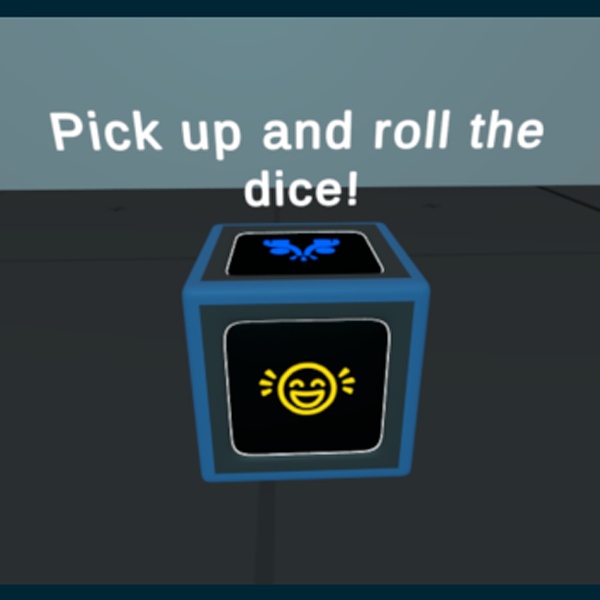

# クイズダイス – VRChat用パーティーゲームダイス **ライブデモワールド:** https://vrchat.com/home/launch?worldId=wrld_dfdde4cd-3027-41bb-b62b-de9bdb59888a * 「あなたのワールドで新たな定番アイスブレイクを — 3Dで。」 * 「ダイスを振るたびに、あなたのワールドにもっと笑いと会話を。」 * 「大きな会話を生み出す、最もシンプルな方法。」 楽しくインタラクティブなクイズダイスで、どんなVRChatワールドも交流の場に変えましょう。プレイヤーがダイスを持って振ると、ダイスが止まったときにランダムな質問がダイスの上に浮かぶCanvasに表示されます。 パーティーワールド、ラウンジエリア、デート/交流スペース、ゲームナイト、コミュニティイベントに最適です。 --- ## ✨ 機能 * **6つの質問テーマ** — 各面に1つずつ: * 友情 * 面白い質問 * 恋愛 * クレイジーな仮説 * 秘密 * 完全カオス * **各言語60問**(各テーマ10問)。質問は順番に循環するため、自然な形で繰り返されます * **6言語のPrefabを収録:** * 英語 * ポルトガル語(ブラジル) * スペイン語 * 中国語(簡体字) * 韓国語 * 日本語 * **VR&Desktop対応** * VRとDesktopの両方でVRC Pickupに対応 * Desktop専用の投擲スピン機能で、より気持ちの良いダイスロールを実現 * **スマートなゲームプレイ** * ダイスを持っている間、または動いている間は質問Canvasを非表示 * ダイスが停止すると質問を自動表示 * 上面の判定によって正しい質問テーマを選択 * **完全カスタマイズ可能** * Unity Inspectorですべての質問を編集可能 * 各面のテクスチャやマテリアルを変更可能 * 物理設定、停止判定時間、Canvasの高さなどを調整可能 * **簡単導入** * Prefabをシーンにドラッグ * UdonSharpをコンパイル * ビルド&アップロード --- ## 📦 収録内容 * すぐに使える6言語のPrefab * UdonSharpスクリプト(ソース + コンパイル済みアセット) * `QuizDiceController` * `DesktopDiceThrowSpin` * 3Dダイスモデル(FBX) * 6つのテーマ別フェイスマテリアル + 元テクスチャ * TextMeshPro質問Canvas * `ReadMe.txt` — セットアップ&カスタマイズガイド * `License.txt` — 利用規約 --- ## 🛠 必要環境 * **VRChat SDK(Worlds)**が導入されたUnityプロジェクト * **UdonSharp** * VRChatワールドへのアセット導入に関する基本的な知識 --- ## 🎮 使い方 1. 使用したい言語のPrefabをシーンに配置 2. **UdonSharp → Compile All UdonSharp Programs**を実行 3. VRChatでビルド&テスト 4. プレイヤーがダイスを持って振ると、表示された質問に答えて楽しめます! --- ## 📝 カスタマイズ 基本的な編集にコーディングは必要ありません: * `QuizDiceController`コンポーネントから質問を変更 * TMPテキストオブジェクトから開始メッセージを編集 * 付属のマテリアルを使用して各面の画像を変更 詳しい手順は`ReadMe.txt`に記載されています。 --- ## 📜 ライセンス **VRChatワールド内**での個人利用および商用利用が可能です。 このパッケージを単体のアセットとして**再販売または再配布することは禁止されています**。 完全な利用規約については`License.txt`をご確認ください。 --- ## 💬 サポート ご質問がありますか?購入後、Gumroadからお問い合わせください。 --- ## FAQ Q: Udonの知識は必要ですか? A: いいえ。Prefabを配置し、UdonSharpをコンパイルするだけで使用できます。スクリプトの知識が必要なのは、高度な変更を行う場合のみです。 Q: 商用ワールド / VRChat+ワールドで使用できますか? A: はい。ライセンスの範囲内でVRChatワールド内にて使用できます。 Q: 質問を変更できますか? A: はい。すべての質問をInspectorから編集できます。 Q: どの言語を使用すればいいですか? A: ダイス1つにつき、使用したい言語のPrefabを1つ選択してください。6言語が収録されています。 Q: Quest / Androidでも動作しますか? A: はい。ワールド用プロップとして動作します。 Q: このアセットを再販売できますか? A: いいえ。VRChatワールド内での使用のみ許可されています。詳しくは`License.txt`をご確認ください。 --- eng --- **Live Demo World:** https://vrchat.com/home/launch?worldId=wrld_dfdde4cd-3027-41bb-b62b-de9bdb59888a - "Your world’s new favorite icebreaker — in 3D." - "Bring more laughter and conversation to your world — one roll at a time." - "The simplest way to spark big conversations." Turn any VRChat world into a social hangout with a fun, interactive quiz dice. Players pick up the dice, roll it, and when it stops a random question appears on a floating canvas above the dice. Perfect for party worlds, lounge areas, dating/social spaces, game nights, and community events. --- ## ✨ Features - **6 question themes** — one per face: - Friendship - Funny - Love - Wild Hypotheses - Secrets - Total Chaos - **60 questions per language** (10 per theme), with cycling so repeats feel natural - **6 language prefabs included:** - English - Portuguese (Brazil) - Spanish - Chinese (Simplified) - Korean - Japanese - **VR & Desktop support** - Works with VRC Pickup in VR and on desktop - Desktop-only throw spin for more satisfying rolls - **Smart gameplay** - Question canvas hides while the dice is held or moving - Question reveals automatically when the dice settles - Face detection picks the correct theme from the top face - **Fully customizable** - Edit all questions in the Unity Inspector - Change face textures and materials - Adjust physics, settle time, canvas height, and more - **Plug & play** - Drag a prefab into your scene - Compile UdonSharp - Build and upload --- ## 📦 What's Included - 6 ready-to-use language prefabs - UdonSharp scripts (source + compiled assets) - `QuizDiceController` - `DesktopDiceThrowSpin` - 3D dice model (FBX) - 6 themed face materials + source textures - TextMeshPro question canvas - `ReadMe.txt` — setup & customization guide - `License.txt` — usage terms --- ## 🛠 Requirements - Unity project with **VRChat SDK (Worlds)** - **UdonSharp** - Basic familiarity with importing assets into a VRChat world --- ## 🎮 How It Works 1. Place one language prefab in your scene 2. Run **UdonSharp → Compile All UdonSharp Programs** 3. Build & test in VRChat 4. Players pick up the dice, roll it, and answer the question that appears! --- ## 📝 Customization No coding required for basic edits: - Change questions on the `QuizDiceController` component - Edit the start message on the TMP text object - Swap face images via the included materials Full instructions included in `ReadMe.txt`. --- ## 📜 License Personal & commercial use **inside VRChat worlds** is allowed. **You may NOT** resell or redistribute this package as a standalone asset. See `License.txt` for full terms. --- ## 💬 Support Questions? Contact me through Gumroad after purchase. --- ## FAQ Q: Do I need to know Udon? A: No. Drag the prefab, compile UdonSharp, and you're done. Script knowledge is only needed for advanced changes. Q: Can I use this in commercial / VRChat+ worlds? A: Yes, inside VRChat worlds per the license. Q: Can I change the questions? A: Yes. All questions are editable in the Inspector. Q: Which language should I use? A: Pick one prefab per dice instance. Six languages are included. Q: Does it work on Quest / Android? A: Yes, as a world prop. Q: Can I resell this asset? A: No. World use only. See License.txt.