
【OBS対応】歌枠・カラオケ配信向け簡単音作りVST3プラグイン|VST3 Plugin for Singing Streams & Karaoke Audio Shaping|NT-U GLOSS LITE(Windows Only)
- Digital500 JPY
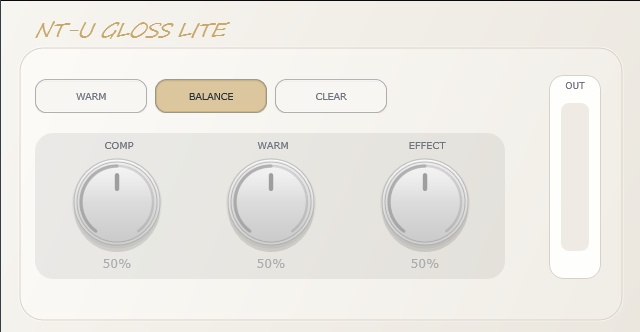
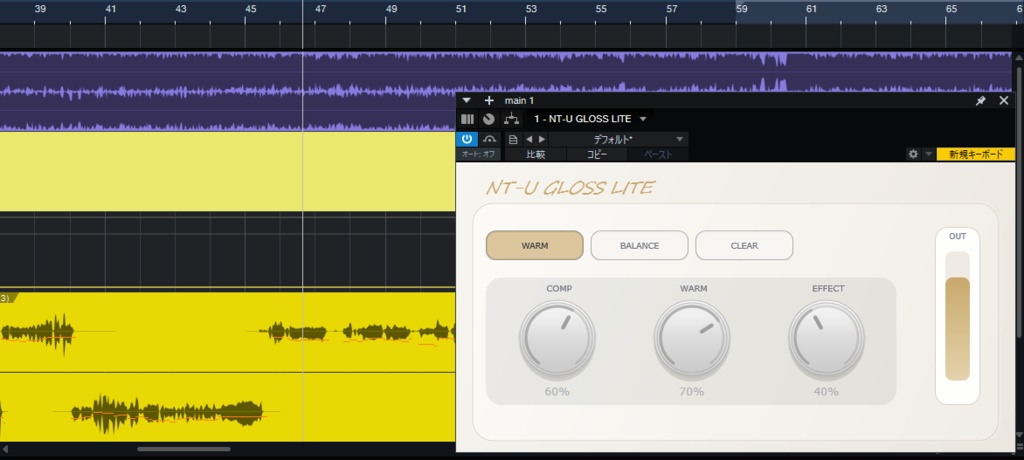


NT-U GLOSS Lite は、歌枠・カラオケ配信向けに作られた、Windows専用VST3プラグインです。 製品版「NT-U GLOSS」の雰囲気を、よりシンプルに体験できるライト版です。 難しい設定は不要。3つのスタイルから選ぶだけで、歌声に少しだけ“配信用の質感”を加えられます。 「細かい調整はよく分からない」 「とりあえずOBSで歌声をそれっぽく整えたい」 「製品版を買う前に、NT-U GLOSSの雰囲気を試したい」 そんな人向けの、かなり簡単なバージョンです。 ※本製品は Windows 専用です。macOS には対応していません。 ※比較動画は製品版を使用しています。 LITE版でも同じ3スタイル(WARM / BALANCE / CLEAR)の音の方向性をご確認いただけますが、ノブ調整など一部仕様は製品版と異なります。 ご購入前に商品説明をご確認ください。 _____________________________ NT-U GLOSS Lite is a simple VST3 plugin for singing streams and karaoke streams. It is the lightweight version of NT-U GLOSS, designed for users who want an easier way to add character to their vocal sound without adjusting multiple knobs. No complicated settings. Just choose one of three fixed styles and start using it. This version is made for streamers who want a simple vocal sound tool for OBS, karaoke streams, and casual singing streams. ※This product is Windows-only. macOS is not supported. ※The comparison video was made using the full version of NT-U GLOSS. The LITE version lets you check the sound direction of the same 3 styles: WARM / BALANCE / CLEAR, but some specifications, including knob adjustment, are different from the full version. Please read the product description carefully before purchasing.
主な機能
3つのスタイルを選ぶだけ NT-U GLOSS Liteには、3つの固定スタイルが入っています。 WARM あたたかく、やわらかい印象の歌声に BALANCE 自然で扱いやすい、バランス重視の音に CLEAR 少し明るく、前に出るような歌声に ノブ調整はありません。 スタイルを選ぶだけで使えるようにしています。
こんな人におすすめ
・OBSで歌枠・カラオケ配信をしている ・難しい音響設定が苦手 ・歌声に少しだけ質感を足したい ・まずは安く試してみたい ・製品版を買う前に、NT-U GLOSSの雰囲気を知りたい
製品版との違い
NT-U GLOSS Liteは、製品版「NT-U GLOSS」をよりシンプルにしたライト版です。 Lite版では、WARM / BALANCE / CLEAR の3つのスタイルから選ぶだけで使用できます。 ノブ調整はできませんが、その分、迷わず簡単に使えるようにしています。 製品版「NT-U GLOSS」では、COMP / WARM / EFFECT の各ノブを使って、自分の声やマイク環境に合わせた細かい調整ができます。 Lite版がおすすめの方 ・難しい設定なしで使いたい ・まずはNT-U GLOSSの雰囲気を試したい ・WARM / BALANCE / CLEAR の3スタイルだけで十分 ・OBSの歌枠・カラオケ配信で手軽に使いたい 製品版がおすすめの方 ・自分の声に合わせて細かく調整したい ・COMP / WARM / EFFECT のノブを使いたい ・マイクや配信環境に合わせて音を追い込みたい ・より自由に音作りをしたい Lite版は「選ぶだけで使える簡単版」、製品版は「自分の声に合わせて調整できる通常版」です。
動作環境
・対応OS:Windows 11(Windows 10 での動作確認は行っておりません) ・対応形式:VST3(x64) ・OBSで使用する場合は「VST対応プラグイン(例:atkAudioPlugin for OBS)」が必要です ・本製品は Windows 専用です。macOS には対応していません。
免責事項・注意事項
動作・環境について ・本製品は Windows x64 / VST3 専用です。 ・本製品は OBS での使用を想定して制作していますが、すべての環境での動作を保証するものではありません。 ・ご利用のPC環境やOBSの設定状況により、動作や表示に差が出る場合があります。 ・他のプラグインやソフトウェアとの組み合わせによって生じる不具合・競合については、動作を保証しません。 ・将来の OS アップデートや関連ソフトウェアのアップデートにより、一時的に動作しなくなる場合があります。 ・声質や録音環境により、効果の出方には個人差があります。 ・導入前に、atkAudioPlugin for OBS等のVST3対応プラグインをご利用の環境で使用できるかをご確認ください。 利用範囲について ・本製品のライセンスは購入者1名に対する個人利用です(営利目的の配信での使用を含みます)。 ・法人・事務所等での複数名利用は禁止します。 ・再配布、転載、再販売、改変物の配布は禁止します。 ・購入データは購入者本人による利用を前提としています。 ・本製品のリバースエンジニアリング、逆コンパイル、逆アセンブル、およびそれに類する解析行為を禁止します。 返金・不具合対応について ・デジタルコンテンツの性質上、返金・返品の可否は、法令、BOOTHの利用規約その他の適用されるルールに従って個別に判断します。 ・本製品に不具合がある場合は、購入履歴またはショップへのお問い合わせからご連絡ください。状況を確認のうえ、法令およびBOOTHの利用規約に従って対応します。 責任について ・本製品の使用または使用不能に関連する責任については、適用される法令およびBOOTHの利用規約に従って取り扱います。 ・本項の記載は、消費者契約法その他の法令により認められる購入者の権利を制限するものではありません。
導入方法
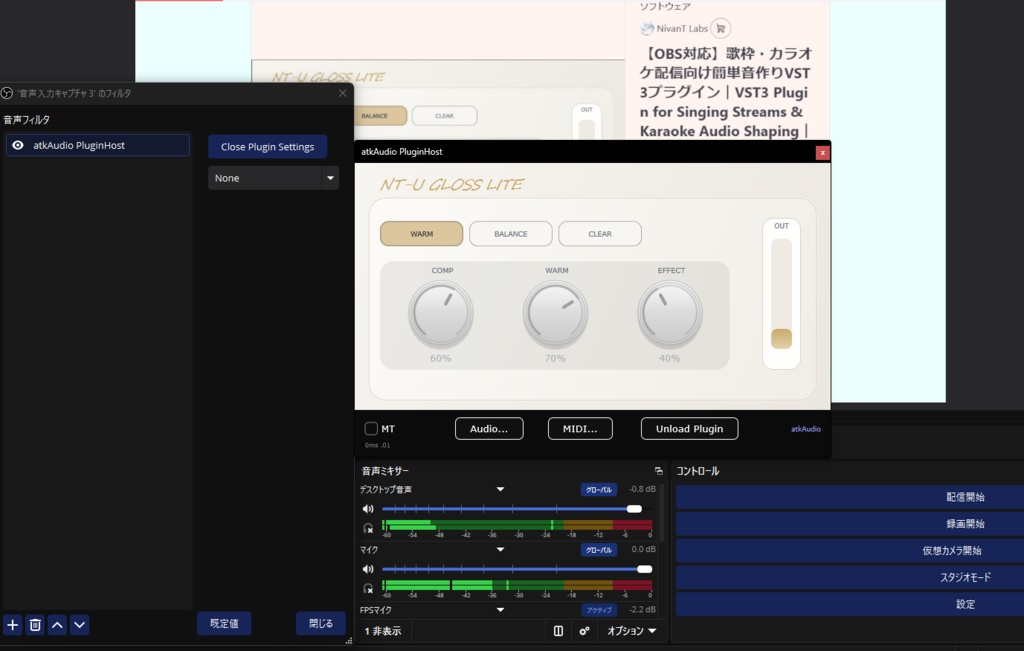
NT-U GLOSS Liteは、VST3形式のプラグインです。 OBS Studioで使用する場合は、別途 atkAudio Plugin for OBS等のVST3ホスト系プラグインを使用する想定です。 1. NT-U GLOSS Liteを配置する ダウンロードしたファイルを解凍し、VST3ファイルを以下のフォルダに配置してください。 C:\Program Files\Common Files\VST3 ※配置時に管理者権限が必要になる場合があります。 ※すでにVST3フォルダがある場合は、その中に入れてください。 2. atkAudio Plugin for OBSを導入する OBSでVST3プラグインを読み込むために、atkAudio Plugin for OBS をインストールしてください。 インストール後、OBS Studioを開いている場合は一度終了し、再起動してください。 ※atkAudio Plugin for OBSは、NT-U GLOSS Liteとは別の外部プラグインです。 ※atkAudio Plugin for OBSの導入方法や仕様は、配布元の説明をご確認ください。 3. OBSでマイクにフィルターを追加する OBS Studioを開き、使用したいマイク音声ソースを右クリックします。 フィルタ を開き、+ ボタンから atkAudio Plugin Host を追加してください。 その後、プラグイン設定画面を開きます。 4. VST3プラグインをスキャンする atkAudio Plugin Hostの設定画面で、VST3プラグインをスキャンしてください。 NT-U GLOSS Liteが一覧に表示されたら選択し、読み込んでください。 表示されない場合は、以下を確認してください。 VST3ファイルを正しいフォルダに配置しているか OBS Studioを再起動したか atkAudio Plugin for OBSが正しくインストールされているか VST3のスキャンを実行したか
製品版について
より細かく音を作りたい場合は、製品版「NT-U GLOSS」がおすすめです。 製品版では、COMP / WARM / EFFECT のノブを使って、自分の声や配信環境に合わせた調整ができます。 Lite版で気に入った方は、ぜひ製品版もチェックしてみてください。 製品版はこちら: https://nt-u-studio.booth.pm/items/8245653
Main Features
Choose from 3 fixed styles NT-U GLOSS Lite includes three fixed vocal styles. WARM Adds a warmer and softer character to your vocal sound. BALANCE A natural and balanced style for general singing streams. CLEAR Adds a brighter and more forward vocal character. There are no adjustable knobs in the Lite version. Simply choose a style and use it.
Recommended For
Streamers who sing on OBS VTubers and creators who do karaoke streams Users who want a simple vocal sound tool Beginners who do not want complicated audio settings Users who want to try the NT-U GLOSS sound before buying the full version
Difference from the Full Version
NT-U GLOSS Lite is a simpler version of the full NT-U GLOSS plugin. In the Lite version, you can choose from three fixed styles: WARM, BALANCE, and CLEAR. There are no adjustable knobs, so it is designed to be easy and simple to use. The full version of NT-U GLOSS includes adjustable COMP / WARM / EFFECT knobs, allowing you to fine-tune the sound for your own voice, microphone, and streaming setup. Lite Version is recommended for users who: Want a simple plugin with no complicated settings Want to try the NT-U GLOSS sound first Only need the WARM / BALANCE / CLEAR styles Want an easy tool for OBS singing streams or karaoke streams Full Version is recommended for users who: Want to adjust the sound for their own voice Want to use the COMP / WARM / EFFECT knobs Want more control for different microphones and streaming environments Want more flexible vocal sound shaping The Lite version is the simple “choose and use” version. The full version is the adjustable version for more detailed sound control.
System Requirements
・Supported OS: Windows 11 (operation on Windows 10 has not been verified) ・This product is Windows-only. macOS is not supported. ・Supported format: VST3 (x64) ・Using this plugin in OBS requires a separate VST3-compatible plugin such as atkAudioPlugin for OBS
Disclaimer & Terms of Use
Operation & Compatibility ・This product is exclusive to Windows x64 / VST3. ・While designed for use with OBS, operation in all environments is not guaranteed. ・Performance and display may vary depending on your PC environment and OBS configuration. ・Compatibility issues arising from use alongside other plugins or software are not covered under any guarantee. ・Future OS or software updates may temporarily affect operation. ・Results may vary depending on your voice type and recording environment. ・Please confirm that a VST3-compatible plugin such as atkAudioPlugin for OBS can be used in your environment before purchasing. License & Usage ・This license is granted to one individual purchaser and includes use for commercial streaming. ・Use by multiple people within a company or talent agency is prohibited. ・Redistribution, reposting, resale, and distribution of modified versions are prohibited. ・The purchased files are intended solely for use by the purchaser. ・Reverse engineering, decompiling, disassembling, or any similar analysis of this product is prohibited. Refunds & Defect Support ・Because this is digital content, eligibility for refunds or returns will be determined on a case-by-case basis in accordance with applicable laws, BOOTH's Terms of Use, and other applicable rules. ・If you believe the product has a defect, please contact us through your purchase history or the shop contact form. We will review the situation and respond in accordance with applicable laws and BOOTH's Terms of Use. Liability ・Any liability related to the use of, or inability to use, this product will be handled in accordance with applicable laws and BOOTH's Terms of Use. ・Nothing in this section limits any rights granted to purchasers under the Consumer Contract Act or other applicable laws.
Installation Guide
NT-U GLOSS Lite is provided as a VST3 plugin. When using it with OBS Studio, it is intended to be used with atkAudio Plugin for OBS. 1. Place NT-U GLOSS Lite in your VST3 folder After downloading the product, unzip the file and place the VST3 file in the following folder: C:\Program Files\Common Files\VST3 Administrator permission may be required. If the VST3 folder already exists, place the plugin file inside that folder. 2. Install atkAudio Plugin for OBS To load VST3 plugins in OBS Studio, please install atkAudio Plugin for OBS. After installing atkAudio Plugin for OBS, restart OBS Studio if it is already running. Please note that atkAudio Plugin for OBS is a separate third-party OBS plugin and is not included with NT-U GLOSS Lite. For details about atkAudio Plugin for OBS, please refer to the official information from its developer. 3. Add the plugin host to your microphone source in OBS Open OBS Studio and right-click the microphone audio source you want to use. Open Filters, click the + button, and add atkAudio Plugin Host. Then open the plugin settings. 4. Scan for VST3 plugins In the atkAudio Plugin Host settings, scan for VST3 plugins. When NT-U GLOSS Lite appears in the plugin list, select it and load it. If NT-U GLOSS Lite does not appear, please check the following: The VST3 file is placed in the correct folder OBS Studio has been restarted atkAudio Plugin for OBS is installed correctly VST3 plugin scanning has been performed
About the Full Version
If you want more detailed control over your vocal sound, please check out the full version of NT-U GLOSS. The full version includes adjustable COMP / WARM / EFFECT knobs, allowing you to fine-tune the sound for your own voice and streaming setup. If you like NT-U GLOSS Lite, the full version is recommended for more flexible sound control.
