

【OBS対応】配信・通話マイク音量安定化VST3|Voice Level Stabilizer|NT-S VOICE BALANCE
- Digital980 JPY
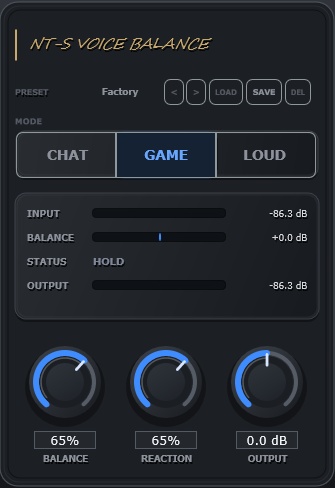
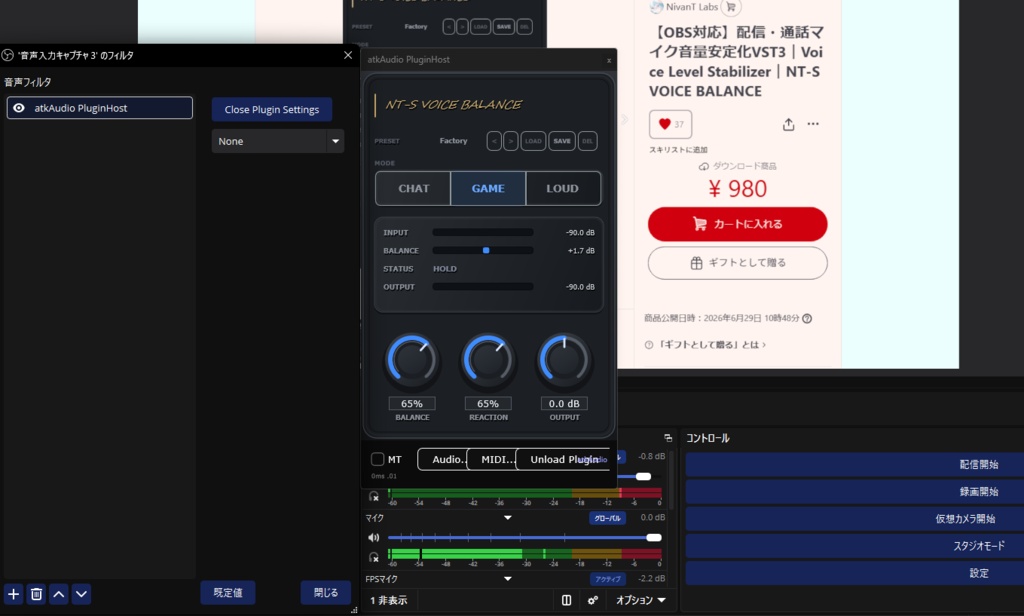


NT-S VOICE BALANCE は、配信・通話向けに作ったマイク音声専用のVST3プラグインです。 雑談中に声が小さくなったり、ゲーム中に急に大きな声が出たりすると、視聴者側では「聞こえにくい」「急にうるさい」と感じることがあります。 このプラグインは、そうしたマイク音声の音量差を自動で整えるためのツールです。 小さい声を聞き取りやすく持ち上げ、 急に大きくなった声や叫び声を自然に抑えます。 OBSでの配信、ゲーム配信、Discord通話、雑談配信など、 声量差が出やすい場面で使いやすいように設計しています。 Discord通話・ゲーム内VCでも使用できます。 ただしDiscord本体にVST3を直接読み込ませることはできないため、Wave Link、DAW、Voicemeeter、OBS + 仮想オーディオなどで処理後のマイク音声をDiscordへ入力する必要があります。 詳しくは同梱の「通話用導入方法.pdf」を参照してください。 ※本製品は Windows 専用です。macOS には対応していません。 ______________________________ NT-S VOICE BALANCE is a VST3 plugin designed specifically for microphone voice audio in streaming and voice calls. During casual streams, your voice may sometimes become too quiet. During gaming, you may suddenly speak louder or shout. For viewers, these volume changes can feel hard to hear or suddenly too loud. This plugin is designed to automatically even out those volume differences in microphone audio. It helps lift quieter voices so they are easier to hear, while naturally reducing sudden loud voices or shouting. It is designed to be easy to use in situations where voice volume tends to fluctuate, such as OBS streaming, gaming streams, Discord calls, and chatting streams. It can also be used for Discord calls and in-game voice chat. However, Discord itself cannot load VST3 plugins directly. To use it with Discord, you will need to process your microphone audio through Wave Link, a DAW, Voicemeeter, OBS + virtual audio, or a similar setup, then send the processed microphone audio to Discord. For more details, please refer to the included “Call Setup Guide.pdf”. ※ This product is for Windows only. macOS is not supported.
主な特徴
・マイク音声専用の音量安定化VST3 ・小さい声を聞き取りやすく補正 ・急な大声や叫び声を自然に抑制 ・CHAT / GAME / LOUD の3モード ・BALANCE / REACTION / OUTPUT のシンプル操作 ・プリセット保存・読み込み対応 ・Mono / Stereo I/O対応 ・Windows x64 / VST3対応 ・日本語 / English マニュアル同梱
こんな人におすすめ
・ゲーム配信中に声量差が出やすい ・小さい声が聞き取りにくいと言われる ・急な大声や叫び声で音量が跳ねる ・OBSでマイク音声をもう少し安定させたい ・コンプレッサーの細かい設定が苦手 ・シンプルな3ノブで整えたい ・Discord通話やゲーム内VCで、自分の声量差を整えたい方 ・Wave Linkなどで通話用マイク音声を整えたい方
動作環境
OS: Windows 11(Windows 10 での動作確認は行っておりません) 形式: VST3 対応: 64bit 想定ホスト: OBS Studio / VST3対応DAW / Wave Link OBSで使用する場合: atkaudio-pluginforobs / atkAudio Plugin Host を使用してください。
免責事項・注意事項
動作・環境について ・本製品は Windows x64 / VST3 専用です。 ・本製品は OBS や Wave Link での使用を想定して制作していますが、すべての環境での動作を保証するものではありません。 ・ご利用のPC環境やOBS Wave Link等の設定状況により、動作や表示に差が出る場合があります。 ・他のプラグインやソフトウェアとの組み合わせによって生じる不具合・競合については、動作を保証しません。 ・将来の OS アップデートや関連ソフトウェアのアップデートにより、一時的に動作しなくなる場合があります。 ・声質や録音環境により、効果の出方には個人差があります。 ・導入前に、atkAudioPlugin for OBS等のVST3対応プラグインをご利用の環境で使用できるかをご確認ください。 ・Discord本体にVST3を直接読み込ませることはできません。 ・Discord通話で使用する場合は、Wave Link、DAW、Voicemeeter、OBS + 仮想オーディオなどでマイク音声を処理し、処理後の音声をDiscordの入力デバイスとして選択してください。 利用範囲について ・本製品のライセンスは購入者1名に対する個人利用です(営利目的の配信での使用を含みます)。 ・法人・事務所等での複数名利用は禁止します。 ・再配布、転載、再販売、改変物の配布は禁止します。 ・購入データは購入者本人による利用を前提としています。 ・本製品のリバースエンジニアリング、逆コンパイル、逆アセンブル、およびそれに類する解析行為を禁止します。 返金について ・デジタルコンテンツの性質上、原則として返金・返品には対応しておりません。 ・ただし、製作者の故意または過失によりご購入者のPC環境に不具合が生じた場合に限り、本製品の販売価格を上限として返金対応いたします。 損害について ・本製品の使用または使用不能によって生じた損害、配信トラブル、データ消失等について、製作者は(上記返金対応の範囲を除き)責任を負いかねます。
Main Features
- Stabilizes microphone voice volume for streaming and voice chat - Makes quiet speech easier to hear - Reduces sudden loud voices and shouting - Simple controls: BALANCE, REACTION, OUTPUT - Three voice modes: CHAT, GAME, LOUD - Preset save/load support - Mono and stereo I/O support - Windows VST3 64-bit plugin - Japanese and English manuals included
Recommended For
- Streamers whose voice volume changes a lot - Gaming streams and voice chat - Users who are told their mic is too quiet or suddenly too loud - OBS users who want simple voice level control - People who do not want to adjust detailed compressor settings
Not Recommended For
- Singing streams - Vocal mixing - Music production - Game audio, BGM, or desktop audio - Mastering or final mix processing
System Requirements
OS: Windows 11 Operation on Windows 10 has not been tested. Format: VST3 Architecture: 64-bit Supported Hosts: OBS Studio / VST3-compatible DAWs / Wave Link When using with OBS: Please use atkaudio-pluginforobs / atkAudio Plugin Host.
Disclaimer & Terms of Use
About Compatibility and System Requirements ・This product is for Windows x64 / VST3 only. ・This product is designed for use with OBS and Wave Link, but operation is not guaranteed in all environments. ・Behavior and display may vary depending on your PC environment and the settings of OBS, Wave Link, or other related software. ・We do not guarantee operation or provide support for issues or conflicts caused by combinations with other plugins or software. ・Future OS updates or updates to related software may temporarily cause this product to stop working. ・The effect may vary depending on your voice, microphone, and recording environment. ・Before installation, please make sure that your environment can use VST3-compatible plugins, such as atkAudioPlugin for OBS. ・Discord itself cannot load VST3 plugins directly. ・To use this product for Discord calls, process your microphone audio through Wave Link, a DAW, Voicemeeter, OBS + virtual audio, or a similar setup, then select the processed audio as your input device in Discord. License & Usage ・This license is granted to one individual purchaser and includes use for commercial streaming. ・Use by multiple people within a company or talent agency is prohibited. ・Redistribution, reposting, resale, and distribution of modified versions are prohibited. ・Reverse engineering, decompiling, disassembling, or any similar analysis of this product is prohibited. ・The purchased files are intended solely for use by the purchaser. Refunds ・As a digital product, refunds and returns are not accepted as a general rule. ・However, if a defect caused by the developer's intentional misconduct or negligence results in damage to the purchaser's PC environment, a refund of up to the purchase price of this product will be provided. Liability ・The developer is not liable for any damages, streaming disruptions, data loss, or other issues arising from the use or inability to use this product, except as described in the refund policy above.