

Material Replacer - Unity Editor Extension|マテリアル一括置換・プリセット管理ツール
- Digital300 JPY
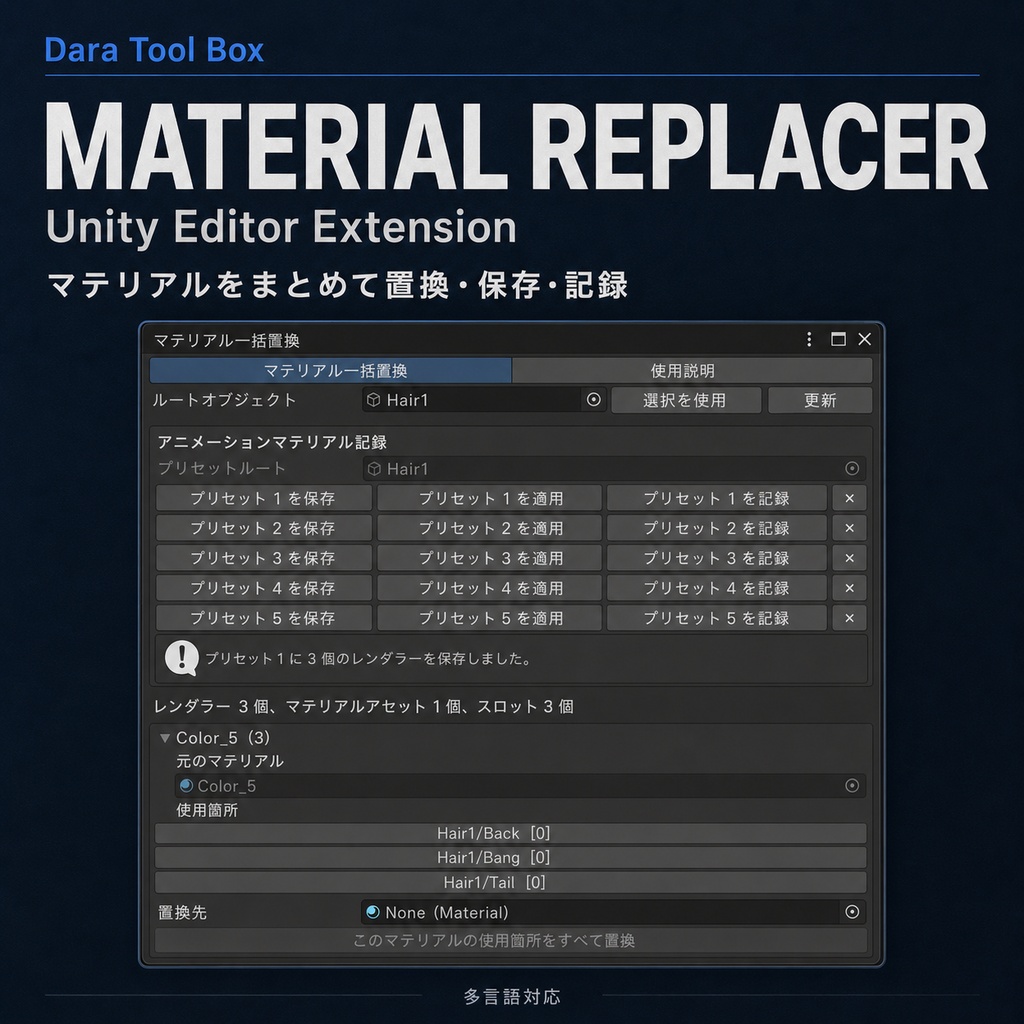

【商品説明】 マテリアルを変更する際、同じマテリアルが複数の子オブジェクトや異なるマテリアルスロットで使用されていることがあります。 手動で置き換える場合は、キャラクターの階層を展開し、対象オブジェクトを一つずつ探して、各マテリアルスロットを確認する必要があります。 オブジェクト数が多い場合は時間がかかるだけでなく、一部の置き換えを見落としやすくなります。 衣装切り替えやマテリアル切り替え用のアニメーションを作成する場合は、状態ごとにマテリアルの組み合わせを用意し、それぞれをアニメーションへ登録する必要があります。 マテリアル数が多いほど、同じ作業の繰り返しが増えて煩雑になります。 【このプラグインでできること】 Material Replacerは、選択したルートオブジェクト配下のすべてのSkinnedMeshRendererをスキャンし、現在使用されているマテリアルと使用位置を一覧表示します。 同じマテリアルは自動的にグループ化されるため、置き換え先を一度指定するだけで、すべての使用位置をまとめて変更できます。 各ルートオブジェクトには最大5セットのマテリアル構成を保存でき、セット全体をワンクリックで切り替えられます。 保存したプリセットを現在のアニメーションの指定時間へ登録し、マテリアル切り替え用のキーフレームをすばやく作成することもできます。 【主な機能】 ・選択したルートオブジェクト配下のすべてのSkinnedMeshRendererをスキャン ・現在使用されているマテリアルと使用位置を一覧表示 ・同じマテリアルの使用位置を自動的にグループ化 ・置き換え先を一度指定し、すべての使用位置を一括変更 ・オブジェクトの階層パスとマテリアルスロット位置を表示 ・使用位置をクリックしてHierarchy内の対象オブジェクトを選択 ・各ルートオブジェクトに最大5セットのマテリアル構成を保存 ・マテリアルプリセット全体をワンクリックで適用 ・指定したプリセットを個別にクリア ・マテリアルプリセットを現在のアニメーションの指定時間へ登録 ・マテリアル切り替え用キーフレームを自動作成 ・多言語対応 【動作確認環境】 Unity 2022.3.22f1 Windows 上記環境で制作・動作確認を行っています。 その他のUnity 2022.3 LTSバージョンでも使用できる可能性がありますが、すべてのバージョンや環境での動作を保証するものではありません。 【バージョン】 Version 1.1.1 不具合やご要望がありましたら、BOOTHのメッセージからご連絡ください。 ご購入済みの方は、今後のアップデートを無料でご利用いただけます。
Material Replacer - Unity Editor Extension
【Product Description】 When changing materials, the same material may be used by multiple child objects or in different material slots. Replacing them manually usually requires expanding the character hierarchy, finding each object one by one, and checking every material slot. When a project contains many objects, this can take a long time and makes it easy to miss some locations. Creating outfit-switching or material-switching animations also requires preparing complete material combinations for each state and recording them into the animation. As the number of materials increases, the amount of repetitive work quickly becomes difficult to manage. 【What This Plugin Does】 Material Replacer scans all SkinnedMeshRenderers under the selected root object and lists the materials currently in use together with their locations. Identical materials are grouped automatically, so you only need to assign a replacement once to update every location where that material is used. Each root object can store up to five complete material combinations, allowing you to switch an entire set with one click. Saved presets can also be recorded directly at a specified time in the current animation, making it easier to create material-switching keyframes. 【Main Features】 ・Scan all SkinnedMeshRenderers under the selected root object ・List all materials currently in use and their locations ・Automatically group all locations using the same material ・Assign a replacement once and update every matching location ・Display object hierarchy paths and material slot positions ・Click a usage location to select the corresponding object in the Hierarchy ・Save up to five material combinations for each root object ・Apply a complete material preset with one click ・Clear an individual preset ・Record a material preset at a specified time in the current animation ・Automatically create material-switching keyframes ・Multilingual support 【Tested Environment】 Unity 2022.3.22f1 Windows The tool was developed and tested in the environment listed above. It may also work with other Unity 2022.3 LTS versions, but compatibility with every version and environment is not guaranteed. 【Version】 Version 1.1.1 Please contact me through BOOTH messages if you find a bug or have a feature request. Customers who have already purchased the product will receive future updates for free.