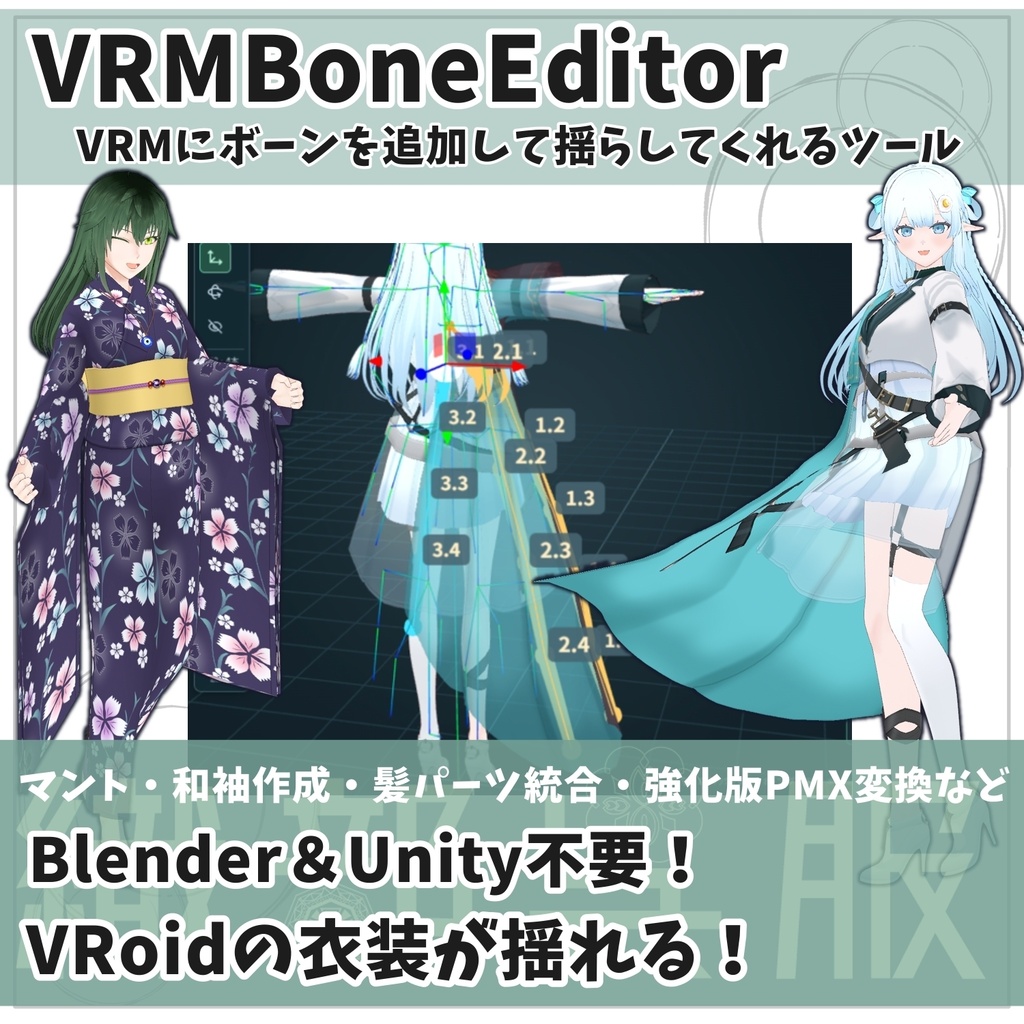
【VRM改変ツール】VRMBoneEditor~VRMにボーンを追加して揺らしてくれるツール~
- 試用版ver.1.15.0(全ファイル書き出し不可)Digital0 JPY
- 有料版 / Standard(ver.1.15.0 Windows・HTML同梱)Digital2,000 JPY


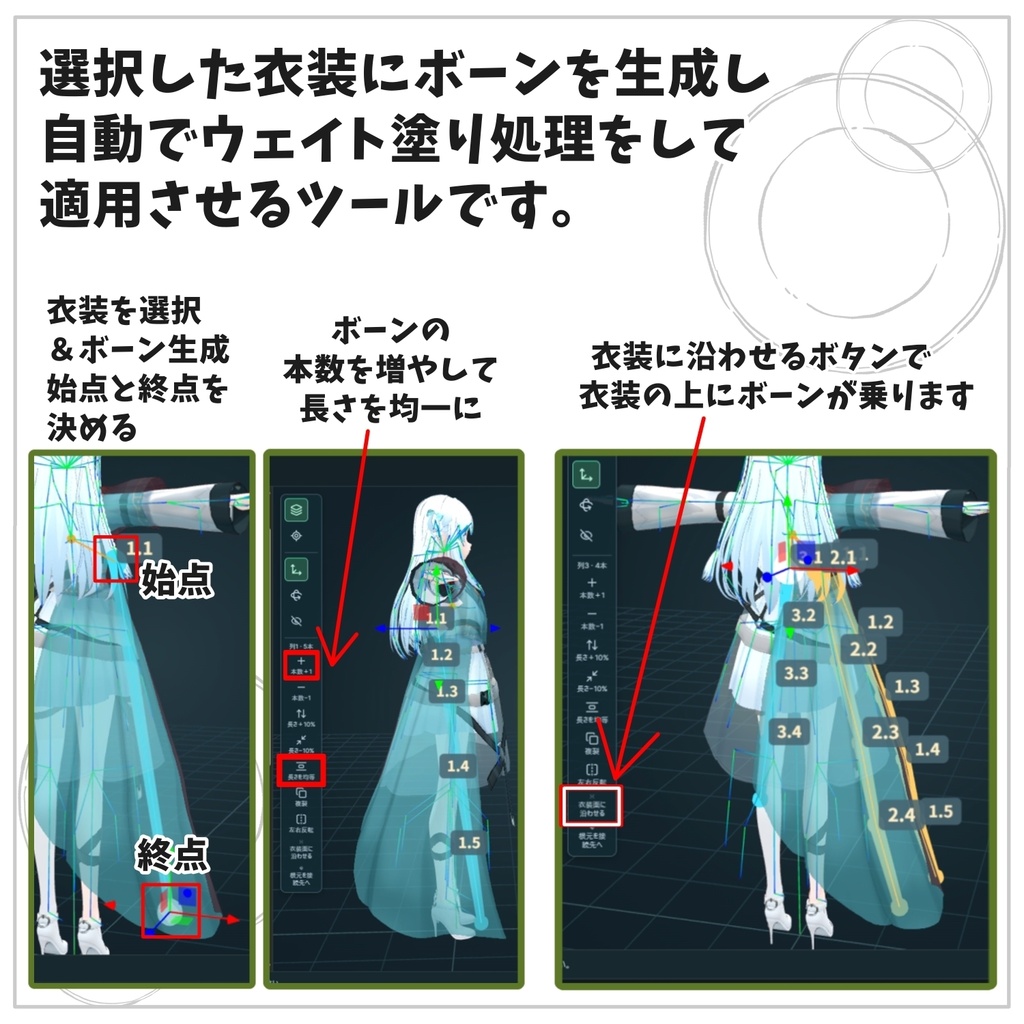
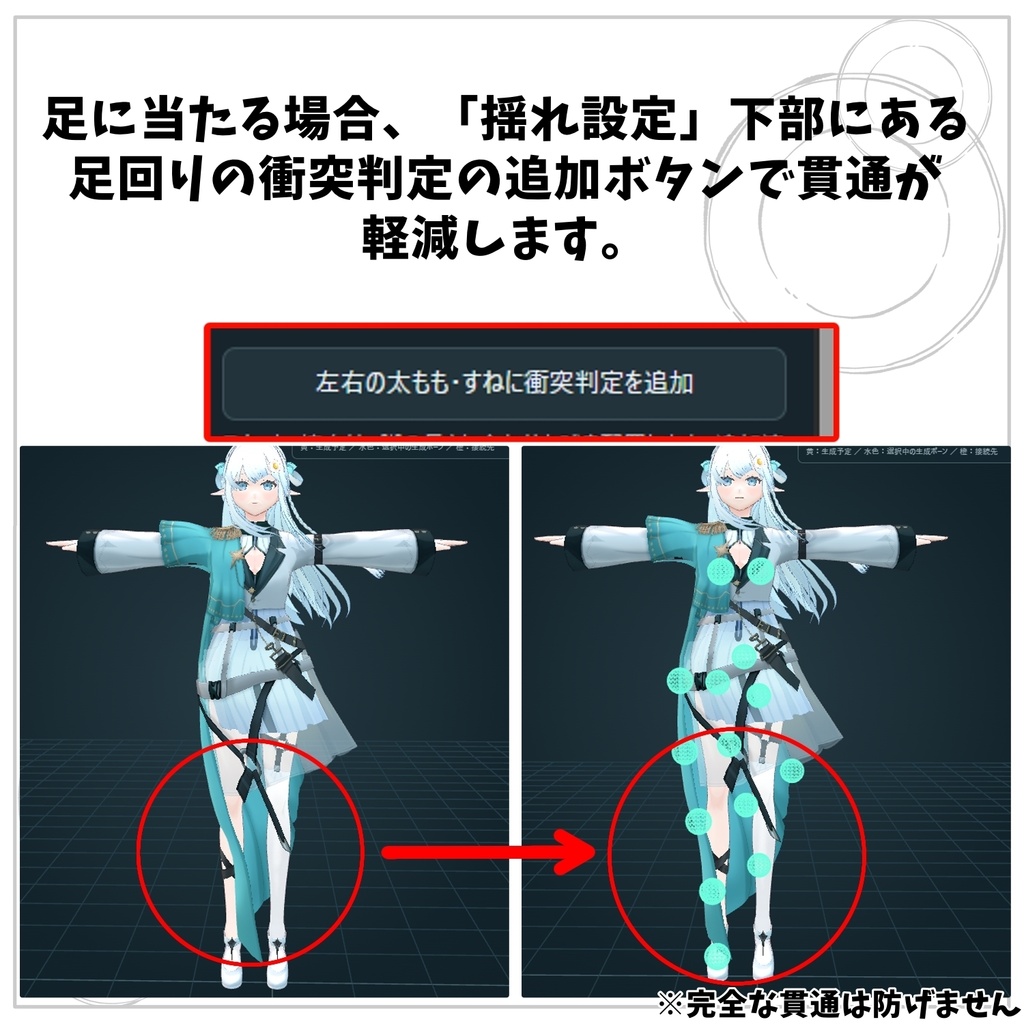
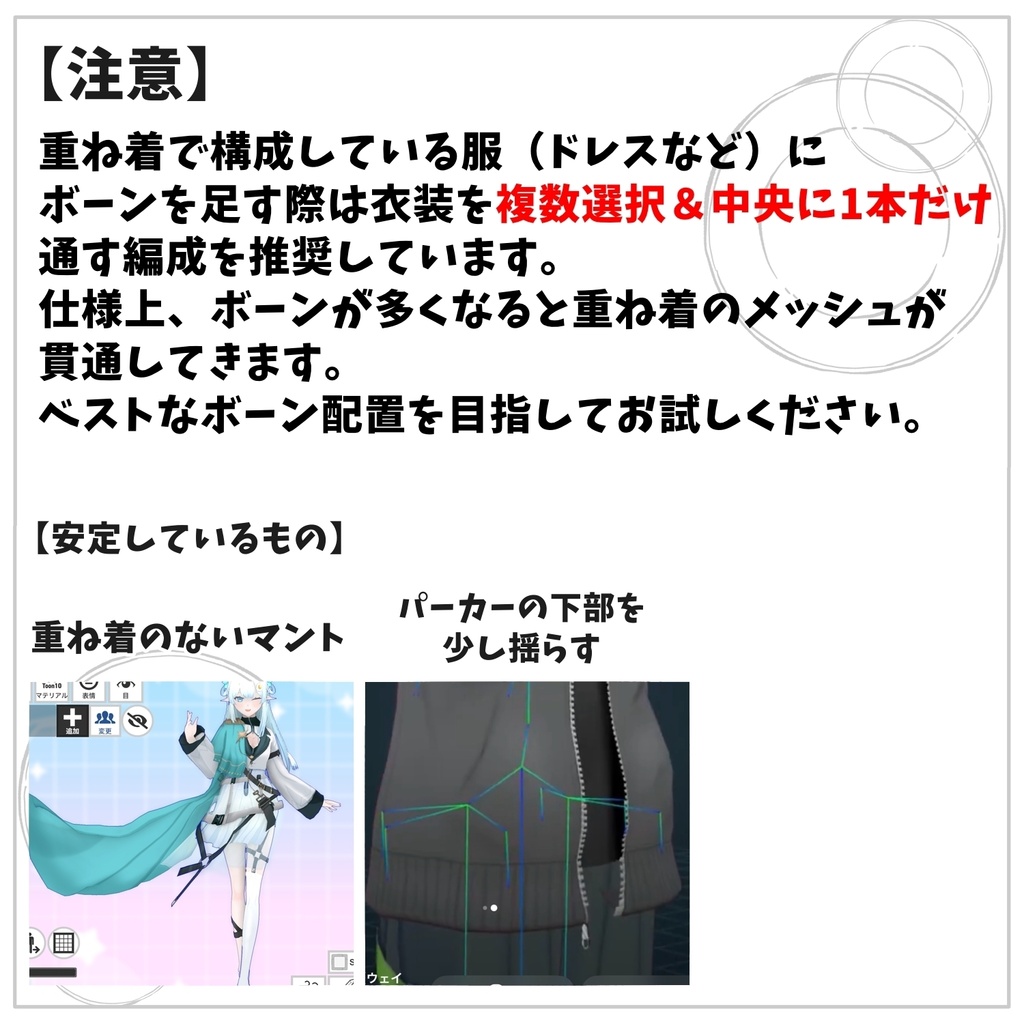
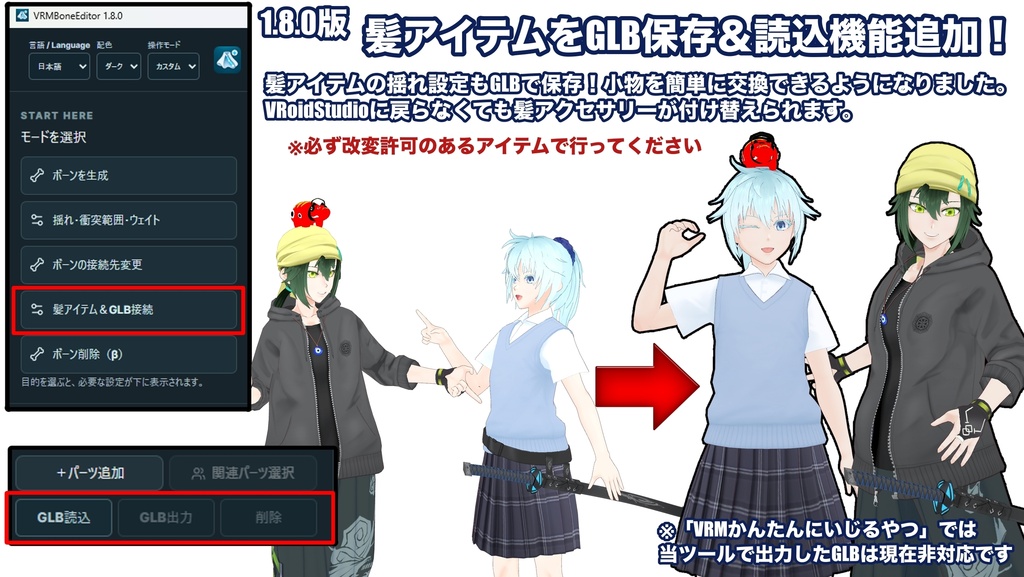
【商品紹介|VRMBoneEditor】 VRMBoneEditorは、衣装・髪・小物にボーンを追加し、揺れや変形を調整できるVRM編集ツールです。 「簡単/カスタム」のモードを選んで、ボーンの配置からウェイト・揺れの調整まで行えます。 対応形式はVRM 0.0/1.0です。表示言語は日本語・英語・簡体字中国語、画面はライト・ダークを切り替えられます。 ■ 2026/10/6 1.15.0 ・和袖の形状とUV:ロングコート・ボディースーツ・ワンピースの袖面を整理。下端とパス端点のずれを修正し、左右対称に編集しやすいUV配置、作画用見本、少ない面数に対応しました。 ・袖の処理:通常/特殊:左の通常が初期選択で、最終採用時に衣装と袖を1材質へベイクします。右の特殊は袖の透過・個別材質を保持します。片袖だけの生成と反対側の追加編集にも対応しました。 ・処理の進行表示と軽量化:ボーン設定・ベイクの進捗を数字とバーで表示。パス編集やタッチ操作を改善し、UV検査の失敗から編集へ戻れるようにしました。 ・アイテム管理と取り付け:サムネイルからGLBを呼び出し、名前・順序・初期接続先を管理できます。親ボーンを変更/衣装へ接続/ウェイト保持の順に整理し、説明を折りたたみました。 ・GLBの作者名:出力時に作者名を保存できます。作者名付きアイテムの読み込み・再出力では元の作者名を保持します。出力と同時のアイテム登録にも対応しました。 ・衣装への接続と比較:取り付け先の切り替えと選択を修正。「優先する追従」の体の動き/衣装の動きを初期オフにし、体の動きのオン・オフを2画面で比較できます。 ・VRM 1.0と生成ボーン:袖生成のVRM 1.0一律制限を解除し、揺れ・衝突・ウェイトから過去に生成したボーンも参照できます。衣装へ接続はVRM 0.x限定です。 ・配布版ごとの保存:Windows版は出力から保存画面へ進みます。HTML版は準備後に「保存する」を押します。試供版は全ファイル出力不可です。説明書と利用条件も更新しました。 ・PMXの横ジョイント:日本語の名前と左右の接続を整理。スカート・マントの横ジョイントは初期オフの試験機能です。出力後はMMDで確認してください。 ※マント作成は今回の正式版には含みません。VRM 1.0の袖生成は検証入力で確認しており、すべての実モデルでの動作を保証しません。 ■ 主な機能 ・並列/台形/円形でのまとめて配置、1本ずつのボーン追加 ・ボーン配置データ(.vbe)の保存・読み込み ・ボーンの接続先変更、髪・アクセサリーの取り付け、GLBの読み込み・出力 ・取り付けやボーン削除の適用前プレビュー(1画面/2画面) ・揺れ・衝突範囲の調整、腰・太腿・膝・すね・足の衝突範囲の追加 ・生成ボーン/既存ボーンのウェイト編集、手塗り・ぼかし・左右ミラー・なめらか調整・コピー&ペースト ・CoatSkirt/skirt/生成ボーンなどの削除、全ボーンを除いた造形のGLB保存 ・IKやVRMAのループ再生による動作確認 ・生成ボーンの揺らす範囲「全体/一部/追従」の比較プレビュー ・VRM 0.0/1.0からPMX 2.0への変換、VMDによる動作確認 ・移動減衰/回転減衰/回転ばねの調整、物理設定のJSON保存 ■ 動作環境・ご購入前に Windows版はWindows 10/11(64bit)に対応しています。WebView2 RuntimeとWebGL2が動く環境が必要です。初回インストール時には、インターネット接続が必要になる場合があります。 動作の快適さは、PCの性能やモデルの複雑さによって異なります。ご購入前に無料試用版を使い、お使いのPCでモデルの表示と操作をご確認ください。 試用版はChrome/Edgeで開くブラウザ版です。PMX変換のプレビューは利用できますが、VRM・各種GLB・VBE配置・PMX ZIP・物理JSONの保存/共有はできません。モデルは別途ご用意ください。 ■ これまでの出力で動作確認したアプリ・コンテンツ VRoid Hub/VRChat/cluster/VRM Posing Desktop/VRM Live Viewer ※袖のUV拡張テストについてVRoid Hub/cluster/ポージングでの読み込み報告を受けています。すべての出力条件で確認済みという意味ではありません。すべてのモデル・環境での互換性を保証するものではなく、使用先でも動作をご確認ください。 ■ 内容物(1.15.0) Windowsフォルダー:Setup.exe、導入案内 Mac-iPad-HTMLフォルダー:単体HTML、環境別の起動・保存案内 日・英・中の取扱説明書、不具合報告案内、更新履歴、LICENSE、third-party-notices.txt ■ MacのHTML版 Macでは通常、追加のHTMLリーダーを使わずに、保存したHTMLをSafariで開けます。 ただし、本ツールの起動・編集・保存はMac実機では検証していません。Macでの動作を保証するものではありません。 ■ iPad版の使い方と注意 JavaScript・WebGLに対応したHTMLリーダー系アプリが必要です。「ファイル」アプリでHTMLをタップするだけでは動作しません。 HTMLeditor/HTMLViewerでの動作報告はありますが、同名のアプリを含め、すべての環境での動作を保証するものではありません。 ZIPを展開し、Mac-iPad-HTMLフォルダー内のHTMLを対応アプリで開いてください。 書き出し用ファイルの準備後に「保存する」を押します。共有に対応する環境では「ファイルに保存」を選び、共有できない場合はダウンロードをご利用ください。実機での保存先・拡張子・再読み込みをご確認ください。 アプリを閉じると編集状態が失われる場合があるため、こまめに保存してください。大きなモデルでは、メモリ不足でアプリが終了する場合があります。詳しくは同梱の案内をご確認ください。 ■ 起動・更新 Windows版をインストールするには、ZIPを展開してSetup.exeを実行してください。インストール後はスタートメニューから起動できます。 更新時はアプリを終了し、最新版のSetup.exeを実行してください。 ■ 保存データについて .vbeには、ボーンの配置と自動ウェイト計算用の設定を保存します。VRM本体や手塗りした頂点ウェイトは含みません。 すべてのボーンを除いた造形は、GLBで保存します。マテリアルは、MToonを保持するか、標準マテリアルへ変換するかを選べます。 読み込んだVRMAは動作確認用で、VRMには保存されません。元のモデルを保管し、編集・書き出し後の動作をご確認ください。 PMXはテクスチャを含むZIPで保存します。ZIPを展開してからMMDで読み込んでください。 VRMの見た目や物理の完全な再現は保証しません。モデルやモーションによっては、スカートの細かな振動や、透過部分・輪郭の違いが残る場合があります。PMXの出力後はMMDでもご確認ください。 読み込んだVMDは動作確認用で、PMXには含まれません。 ■ サポート 不具合やご質問は、BOOTHメッセージでご連絡ください。使用バージョン、操作手順、エラー文や画像を添えていただけると助かります。 個別のモデル・衣装そのもののサポートは対象外です。 エラー文や提供可能なモデルをChatGPT等で調べると、原因の手がかりが得られる場合があります。この方法の利用は任意で、解析結果だけでは原因を断定できません。 モデルの利用規約や権利、個人情報の有無、提供先の条件を確認し、共有する範囲はご自身の責任で判断してください。 お問い合わせに再現手順や解析結果も添えていただけると、より的確な修正に役立ちます。モデルを提供できない場合もご相談いただけます。
【10/6更新】次回アプデ情報
マント作成は独立した試作で検証を継続します。正式版への追加時期は未定です。個人用オンライン版の更新経路は復旧待ちです。
VRMBoneEditor 1.15.0
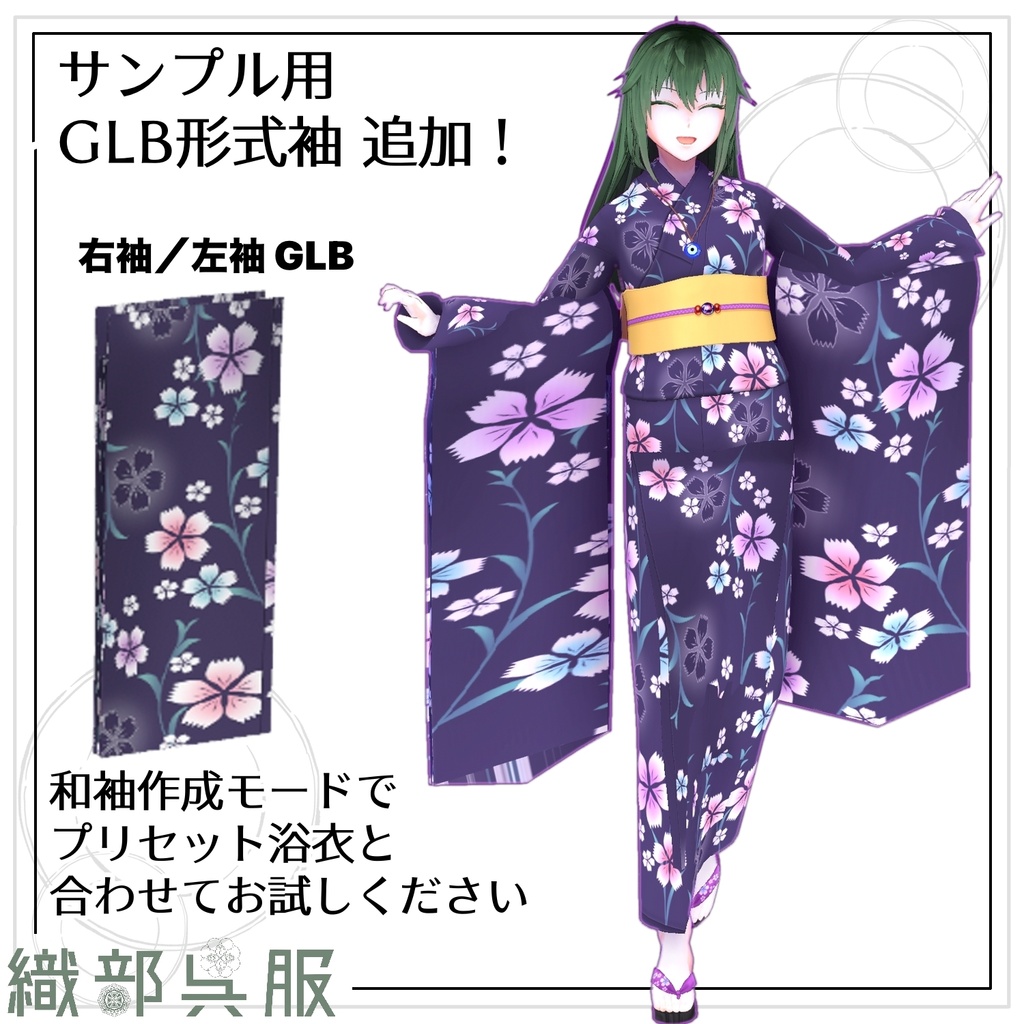
Version 1.15.0 — 2026/10/06 [1.15.0: Extend sleeves] Select and confirm the garment before editing. Confirm selection is also required for spring, collision and weight editing. Both sleeves is the default; choose a single side to edit asymmetric outfits. Adding the opposite sleeve later preserves the previously adopted shape and pattern-fill region. Sleeve processing: Normal is on the left and selected by default. It bakes the selected garment, original arms and generated sleeves into one material on final adoption. Special is on the right and keeps separate sleeve materials, transparency and sleeve-only outline colors. Use Special for translucent textures. Normal shares the outline color across the selected garment. Adjust width, length, preserved cuff, flattened lower region and lower thickness, then edit the hem path. The hem is straight with slightly rounded corners. Endpoint alignment and cuff notches have been corrected. Fit one image is the default pattern-fill choice on the left; Repeat is on the right. Large front/back UV regions are rectangular, with sleeve faces toward the center and side regions outside. Long coats and patterned kimono place these below the original arms beside the torso; dresses and bodysuits also use upper blank regions. Symmetric source patterns use mirrored placement; asymmetric shapes unwrap independently. Unedited torso appearance is retained. The atlas expands only when needed, with a maximum of 4096 pixels per edge. Special mode also organizes supported sleeve UVs; connections and sides prioritize shape preservation. Drawing guides use fewer lines and named region boundaries without altering actual UVs. UV/material checks precede Bone settings. Bone processing and final baking display numeric and bar progress. Failed operations do not commit changes; return to shape editing or choose Special while retaining settings. Back returns to sleeve shape editing. Morphs, non-flat normal maps and animated UVs can limit processing. VRM 0.x and 1.0 are supported. VRM 1.0 generation, baking and reload were tested with three garment templates converted into VRM 1.0 test inputs, not every native VRM 1.0 sleeve model. Device testing of the iCloud candidate has been reported. Viewer support and performance vary; verify exported appearance and motion in the destination application. [Item and GLB attachment] Import a GLB, recall it from Item management, or confirm an existing hair/accessory part. Candidates show short names and thumbnails; hover to see original names. Attachment choices are Change parent bone, Connect to clothing, then Keep weights. Use the adjacent arrow to expand help in either Simple or Custom mode. Change parent bone preserves internal bones while transferring body-side weights. Connect to clothing clears the bone target and requires selecting and confirming a garment from the list or preview. Keep weights retains existing painting and body-bone influences. Select the method and target before previewing or applying. Preferred following offers Body movement and Clothing movement, both off by default. Body movement follows garment weights/deformation and may deform the item itself. Clothing movement replaces the item's spring settings with the garment's spring, gravity and collision settings. Hover for help and compare Body movement off/on side by side. Connect to clothing supports VRM 0.x only; Change parent bone and Keep weights also support VRM 1.0. Simple mode offers GLB export and deletion. Custom position sliders open beside Item management. [Item management and creator names] Open Item management below GLB import. Use + to register a GLB name and suggested initial bone, the pencil to edit, arrows to reorder and the bin to remove a library record. Recalled items can use another attachment target. Removing a record does not remove attached parts. Records are stored in the current viewer; clearing browsing data removes them. Viewers without storage may only offer the bundled sample. The sample ナザルネックレス(おまけ) is made by 織部呉服 and suggests Upper chest, falling back to Chest. Thumbnails preserve original materials and transparency. Register GLB item during export adds the exported file with a temporary GLBアイテム name and Head suggestion. Edit these later in management. Registration failure does not prevent file export. Creator name accepts up to 80 characters and is embedded even when registration is unchecked. Enter your own creator name for your items sold commercially. Imported creator names are display-only and retained on re-export; multiple creators remain credited. This tool does not offer an overwrite and does not prevent other software from editing GLB metadata. [Saving and compatibility] Windows opens its save dialog directly from export. Standalone HTML prepares the file first; press Save to use the available share, destination-picker or download flow. Select Save to Files when a share sheet opens. Cancellation allows retry; download fallback appears only after a saving failure. Verify the destination, extension and exported file by reloading. The trial disables all VRM, GLB, VBE, PMX ZIP and physics JSON exports, saves and shares. Generated-bone references also recognize previously generated and sleeve-generated bones after reload. PMX lateral-joint Japanese names end with connected rigid-body indices; added counts appear in conversion-report.txt. Cape creation remains a separate prototype and is not included in this release.
【更新状況】
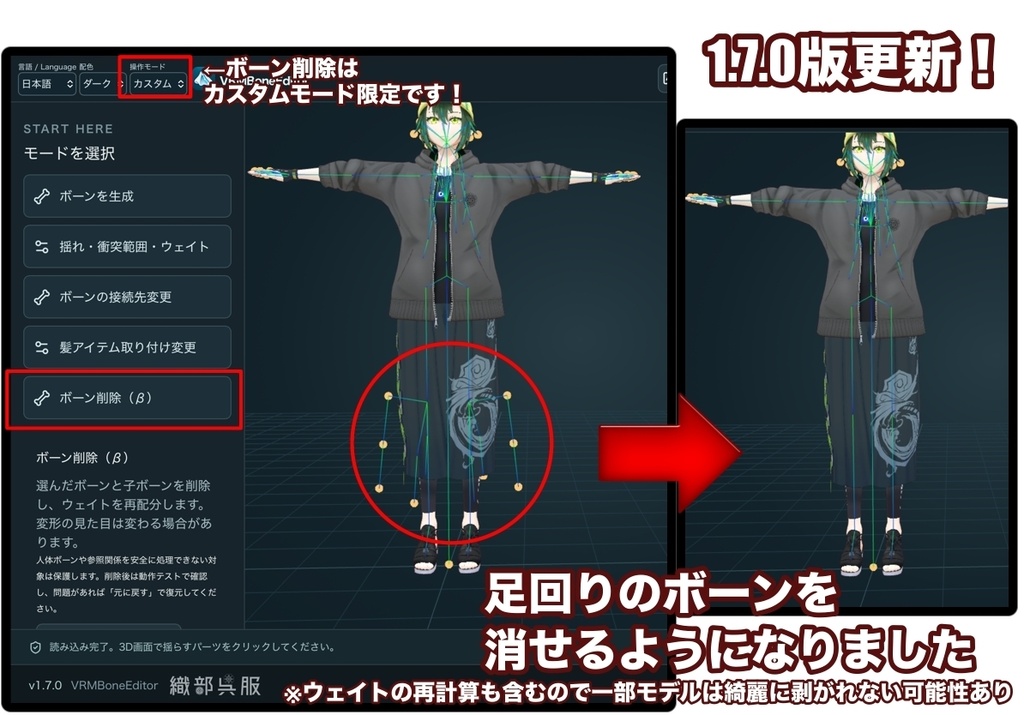
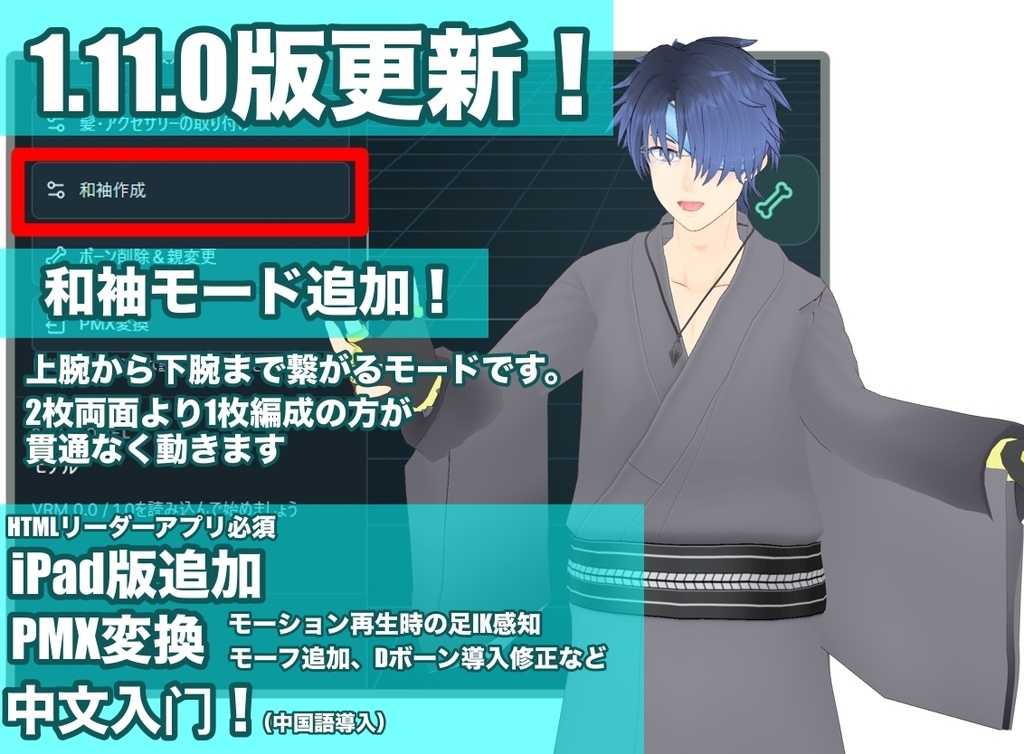
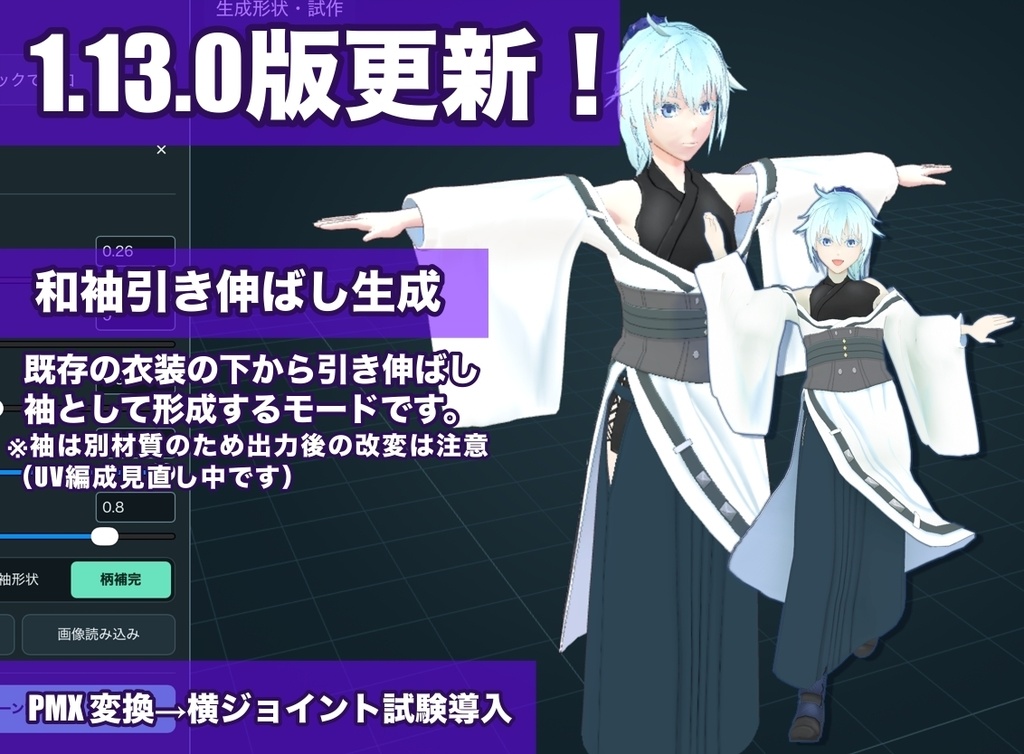
1.15.0(2026/10/06) ・1.15.0:和袖の形状とUV:ロングコート・ボディースーツ・ワンピースの袖面を整理。下端とパス端点のずれを修正し、左右対称に編集しやすいUV配置、作画用見本、少ない面数に対応しました。 ・袖の処理:通常/特殊:左の通常が初期選択で、最終採用時に衣装と袖を1材質へベイクします。右の特殊は袖の透過・個別材質を保持します。片袖だけの生成と反対側の追加編集にも対応しました。 ・処理の進行表示と軽量化:ボーン設定・ベイクの進捗を数字とバーで表示。パス編集やタッチ操作を改善し、UV検査の失敗から編集へ戻れるようにしました。 ・アイテム管理と取り付け:サムネイルからGLBを呼び出し、名前・順序・初期接続先を管理できます。親ボーンを変更/衣装へ接続/ウェイト保持の順に整理し、説明を折りたたみました。 ・GLBの作者名:出力時に作者名を保存できます。作者名付きアイテムの読み込み・再出力では元の作者名を保持します。出力と同時のアイテム登録にも対応しました。 ・衣装への接続と比較:取り付け先の切り替えと選択を修正。「優先する追従」の体の動き/衣装の動きを初期オフにし、体の動きのオン・オフを2画面で比較できます。 ・VRM 1.0と生成ボーン:袖生成のVRM 1.0一律制限を解除し、揺れ・衝突・ウェイトから過去に生成したボーンも参照できます。衣装へ接続はVRM 0.x限定です。 ・配布版ごとの保存:Windows版は出力から保存画面へ進みます。HTML版は準備後に「保存する」を押します。試供版は全ファイル出力不可です。説明書と利用条件も更新しました。 ・PMXの横ジョイント:日本語の名前と左右の接続を整理。スカート・マントの横ジョイントは初期オフの試験機能です。出力後はMMDで確認してください。 ■ 2026/10/3 1.14.0 ・袖引き延ばしに「通常/改変向け」を追加。改変向けは採用時に衣装と袖を1材質にまとめ、片袖1パーツ・左右対称UVへ整理します。 ・柄のベイク画質を改善。必要な場合は各辺4096pxを上限に高解像度化し、袖全体がぼける問題を軽減しました。 ・パーツ選択確定後に編集を開始し、再選択で停止。タッチ操作、選択解除、ボタンの重なりを改善しました。 ・VRM/各種GLB/VBE/PMX ZIP/物理JSONの保存方法を整理。試供版ではこれらすべての出力ができません。 ・日英中の説明書とMac/iPadの案内を更新しました。 ※通常モードは袖の透過・個別の輪郭線に対応。改変向けは半透明非対応で、輪郭線色が衣装全体に適用されます。処理時のメモリ使用量が増える場合があります。改変向け出力のVRoid Hub・Blender等での検証は継続中です。 ■ 2026/10/2 1.13.0 ・「袖を伸ばして作る」を追加・改善。柄補完、PNG画像読み込み、輪郭線色、袖口を残す調整などを整理しました。 ・髪1枚で作った和袖の既存ボーン整理を修正。袖パーツの輪郭線色を変更できます。 ・PMX変換画面、比較プレビュー、横ジョイント設定と注意・最新情報を更新しました。PMXの詳細はツール内のPMX変換モードからご確認ください。 ・日英中の説明書、Mac/iPadのHTML起動・保存案内、不具合報告の案内を更新しました。 ※現行の生成袖UVはペイント向けの一枚展開ではありません。接続部の伸び・分割にご注意ください。改変向けUVは検証中で、今回の更新には含みません。 ■ 2026/9/28 同日修正版(1.12.0のまま差し替え) ・和袖の適用後に表示・動作テストが停止する不具合を修正 ・位置調整中もかんたん配置・裾寄せを使用可能に ・反対袖とのサイズ・角度合わせに左右対称の位置合わせを追加 本日先にダウンロードされた方は、再ダウンロードして更新してください。 2026/9/28 1.12.0 ■ 1.12.0の主な更新 ・和袖に「通常/肘対策」と2面比較を追加。幅の長い袖の肘曲げを改善 ・長い袖用の小型脚コライダー、左右の赤青表示、腕下へのかんたん配置、反対袖とのサイズ・角度合わせ ・袖GLBの配置位置と左右の復元、静止ポーズVRMAの読み込みに対応 ・脚に追従する揺れ、膝の衝突判定、PMX表情の分類を改善 ・操作画面、iPadの操作・保存、日英中の取扱説明書を更新 ※和袖PMXは試験段階です。モデルやモーションによって貫通・変形や揺れの崩れが残るため、使用先でもご確認ください。 過去の主な更新 1.11.0:和袖作成、衣装への接着、コライダー一括調整、PMX変換改善、簡体字中国語、iPad用HTML同梱。 1.10.0:PMX変換・テクスチャ同梱ZIP、VMDプレビュー、物理数値調整とJSON設定保存。 1.9.0〜1.9.1:ウェイト編集、取り付け・削除の比較、造形GLB保存、VRMA再生。 1.7.0〜1.8.1:簡単/カスタム、配置ファイル、IK、GLB小物取り付け。 1.6.0:Windowsインストーラー。 詳しい操作方法と更新内容は同梱の取扱説明書・更新履歴をご確認ください。元モデルを保管し、書き出し後は使用先でも動作をご確認ください。
【利用規約・Terms of Use】
■ 作成したデータ 本ツールで編集したVRMや、自作のボーン配置データ(.vbe)は、個人・商用利用、配布・販売に利用できます。元のモデル・衣装・素材・他者の配置データの利用規約を守ってください。 出力したGLBアイテムを販売できるのは、元のアイテムを制作した本人に限ります。販売用のGLBを出力する際は、ご自身の製作者名を記入してください。 製作者名の有無にかかわらず、他人が制作したアイテムを自作と偽り、製作者名を記載して販売・再配布することは禁止します。 他者のアイテムや配置データを、元データの利用規約に反して販売・再配布することは禁止します。本ツールでの編集・出力や製作者名の記載によって、第三者のデータを販売・再配布する権利が得られるわけではありません。 作品への本ツールのクレジット表記は任意です。 ■ ツール本体 本バージョンには、同梱のMIT Licenseが適用されます。 利用・改変・再配布・販売等は、その条件に従って行えます。再配布時は所定の著作権表示とライセンス文を保持してください。 本案内はMIT Licenseによる許可を制限するものではありません。 ■ 第三者製のプログラム等 第三者製ライブラリ等には、それぞれのライセンスが適用されます。 同梱のthird-party-notices.txtおよび各ライセンスをご確認ください。 ■ 動作・免責 本ツールはOpenAIのCodexを用いて制作しています。開発環境やサービスの変更等により、開発・更新を停止する場合があります。継続的な更新や機能追加を保証するものではありません。 すべてのモデル・環境での動作や、他アプリとの互換性を保証するものではありません。元データを保管し、出力したファイルは使用先でも動作を確認してください。 出力データの権利、販売・再配布に関するトラブルは、出力・販売・再配布を行った利用者の責任で対応してください。法令で認められる範囲で、これらのトラブルおよび本ツールの使用による損害について、ツールの提供者は責任を負いません。詳細は同梱のLICENSEをご確認ください。 ■ Created Data VRMs edited with this tool and original bone-placement files (.vbe) may be used, distributed or sold for personal or commercial purposes. Follow the terms of the original models, outfits, assets and any third-party placement data. Only the person who created the original item may sell an exported GLB item. When exporting a GLB for sale, please enter your own creator name. Whether or not an item already has a creator name, falsely claiming another person's item as your own, adding a false creator name and selling or redistributing it is prohibited. Selling or redistributing third-party items or placement data in violation of their original terms is prohibited. Editing, exporting or adding a creator name with this tool does not grant rights to sell or redistribute third-party data. Credit to this tool in your creations is optional. ■ Software This version is provided under the included MIT License. Use, modification, redistribution and sale are permitted subject to its conditions. Retain the required copyright and license notices when redistributing. This notice does not restrict permissions granted by the MIT License. ■ Third-Party Components Third-party libraries and other components remain subject to their respective licenses. Please refer to third-party-notices.txt and the included license documents. ■ Compatibility & Disclaimer This tool was developed using OpenAI's Codex. Development and updates may stop due to changes in the development environment or services. Continued updates and new features are not guaranteed. Operation with every model or environment, and compatibility with other applications, are not guaranteed. Keep the original data and test exported files in the applications where you intend to use them. Users who export, sell or redistribute data are responsible for resolving disputes concerning its rights, sale or redistribution. To the extent permitted by law, the tool provider is not liable for such disputes or damages arising from use of this tool. See the included LICENSE for details.