
Rustbound Padlock|開閉南京錠と鍵|FBX / Unity / Blender
- Digital500 JPY
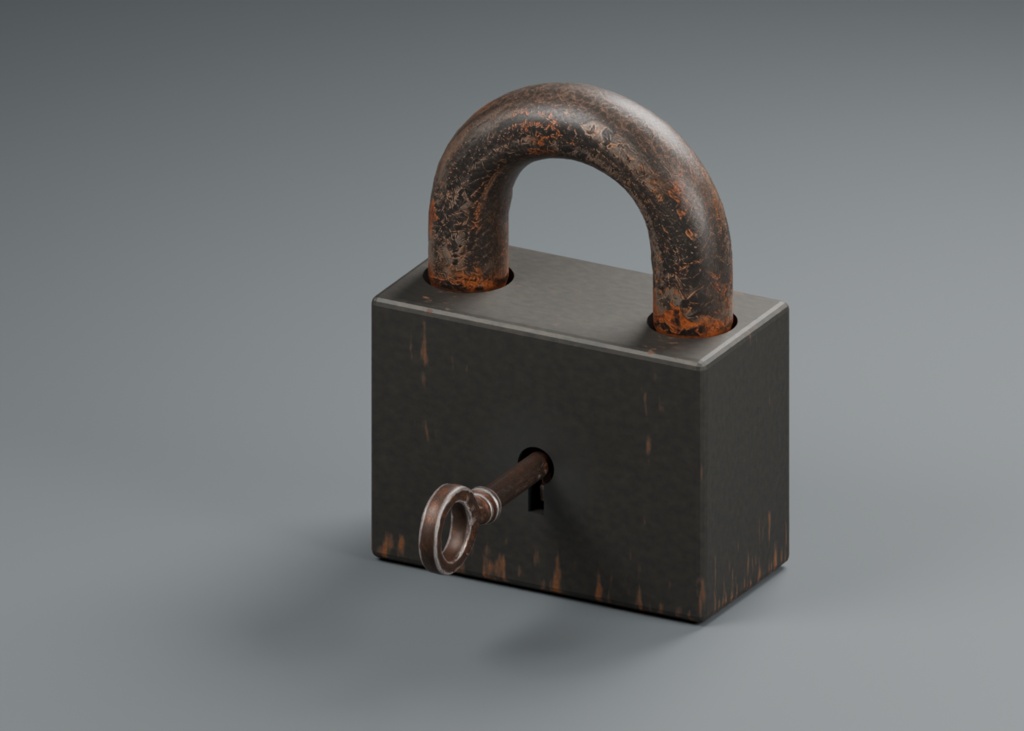
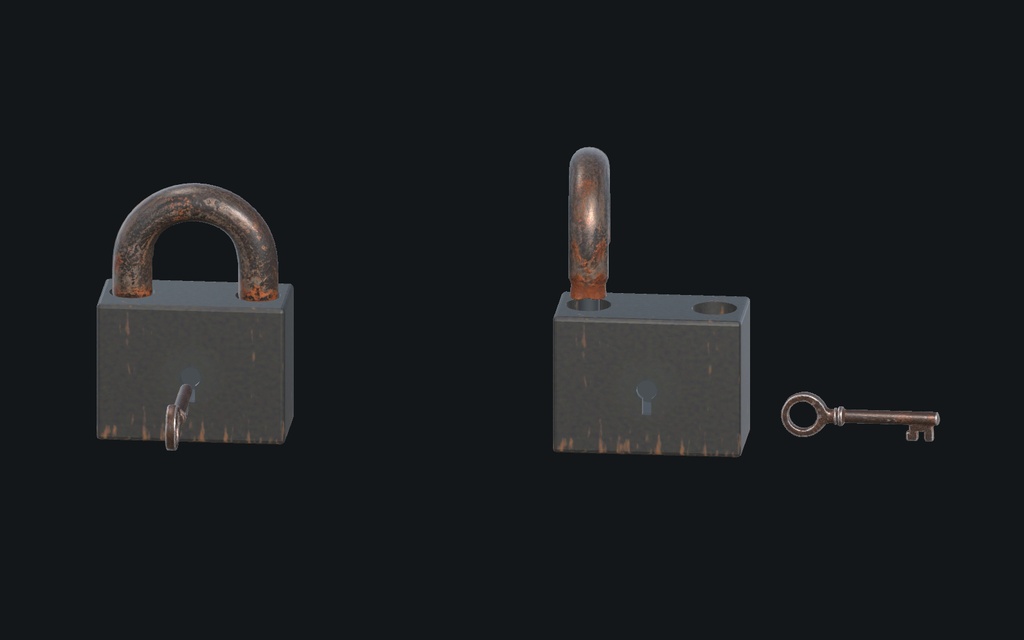


開閉する南京錠と古い鍵。脱出・ホラー・探索ゲームの小道具に。 500円で、南京錠と鍵の2点、Unity開閉C#、鍵を使うアニメーション、編集可能なBlender原本、2Kテクスチャを収録。直接FBX版も追加料金なしで含みます。 確認済み環境:Unity 2022.3.22f1 Built-in/Apple Silicon Mac。UE・VRChat・Windows・URP/HDRPは未検証です。 【実際のUnity再生映像:11秒】 https://www.instagram.com/p/DemLE5Dto5-/ 物理演算・自動鍵照合ではありません。 【どのファイルを使う?】 1. Unityで使う/Blenderで編集する Rustbound_Padlock_v1_0.zip 設定済みUnityPackage、独立Prefab、見本シーン、C#ソース、Blender原本、2K PNG10枚、実商品のプレビュー、英語説明書・利用条件を収録。 UnityではUnity/Rustbound_Padlock.unitypackageを読み込み、Assets/Padlock/Scenes/Rustbound_Showcase.unityを開いて再生。独立PrefabはAssets/Padlock/Prefabsにあります。 2. Unityを開かずFBXを取り出す Rustbound_Padlock_FBX_Companion_v1_0.zip(約43MiB) 同じ2点のFBX、隣接2K PNG10枚、英語の材質接続表を収録。FBXとPNGは同じフォルダのまま使用してください。ソフトごとの材質接続・調整が必要です。設定済みUnity素材やBlender原本は1のZIPにあります。 3. Unityでキー操作を試す(任意の追加見本) Rustbound_Padlock_Controls_Example_v1_0.zip 先に1のUnityPackageを読み込み、その後この追加UnityPackageをインポート。Assets/RustboundExamples/PadlockControls.unityを開き、Game画面を選んでOで開く・Cで閉じる・Eで切替。Legacy Input ManagerまたはBothと標準IMGUIモジュールが必要です。 3つのZIPは同じ南京錠・鍵の別形式と操作見本です。追加モデルではありません。すべて500円の購入に含まれます。 【仕様と開閉機能】 ・独立小物2点/メッシュ3個(本体・金具・鍵)。 ・合計6,948三角面:本体1,328、金具3,514、鍵2,106。 ・閉じた南京錠の高さ12cm、鍵の最大寸法7.5cm。 ・Unityは4材質・使用マップ9枚。元PNGは2K、初期インポートは1K・Mip Streaming有効・CPU Read/Write無効。 ・開閉C#:Open/Close/Toggle/SetOpen(bool)、開閉到達イベント、中断反転・無効化後の再開。時間はゲーム内のTime Scaleに従います。 ・別用途の約8.958秒サンプル:鍵の挿入→回転→金具の開閉→鍵の復帰・引き抜き。制御PrefabにサンプルのAnimationを重ねないでください。 【検査範囲】 Unity 2022.3.22f1 Built-in/Apple Silicon Macの空の別プロジェクトへのインポート、材質、開閉・反転・停止再開、アニメーションを検査。Mac Developmentビルドを実行して描画と開閉も確認しています。追加キーボード見本は別プロジェクトへのインポート、Macビルド、自動往復・イベント検査に加え、実キーO/C/Eで開閉と表示を確認しました。既存モデルと本体C#は変更していません。 Blender 5.2.1 LTS:原本の再読込・パック済み画像を検査。追加FBXも寸法・UV・画像参照・動き・復帰を検査しています。FBXの材質自動変換は保証しません。原本は24fps・1〜216フレーム、BlenderへのFBX再読込では2〜217フレームです。 【含まれないもの・購入前の注意】 物理的な錠機構、当たり判定・Rigidbody、拾う操作、インベントリ、ゲーム固有の入力割当、鍵照合、通信、音は含みません。鍵を近づけただけでは解錠しません。任意の追加見本にはO/C/Eのキーボード入力がありますが、近接操作やゲーム側の判定は購入者が組み込む部品素材です。 UE・VRChat・Windows・URP/HDRP・他のバージョン・負スケール/非等方スケールは未検証。静止画1枚目は同梱原本のBlenderレンダー、2枚目はMac実行画面です。繰り返し配置や撮影用の床・照明は商品点数に含めません。 【制作・利用条件】 AIを活用した制作です。Meshy生成の金具・鍵をBlenderで修正し、本体・内部の鍵穴・UV・風化マップ・動きを調整しました。生成時の有料プラン・非公開生成は所有者に確認済みです。 非独占。個人・商用利用、改変、完成ゲームや映像への組込み可。素材や改変素材そのものの再配布・再販売、公開素材ライブラリへの掲載は禁止。詳細は同梱LICENSE_EN.md。無欠陥・全環境への互換性・性能を保証するものではありません。不具合はエンジン版・描画方式・再現手順を添えてショップへお願いします。 ----- English ----- RUSTBOUND PADLOCK & SKELETON KEY — JPY 500 Two worn props for exploration, horror and dungeon games. Includes Unity opening/closing C#, a separate key-use animation, Blender source and 2K source textures. Direct FBX companion included at no extra charge. ACTUAL UNITY ANIMATION (11s) https://www.instagram.com/p/DemLE5Dto5-/ Not physical simulation or automatic key matching. CHOOSE YOUR DOWNLOAD 1. Rustbound_Padlock_v1_0.zip: configured UnityPackage, independent prefabs, showcase scene, editable C#, Blender source, ten 2K PNGs, actual previews and English setup/license/validation docs. Import Unity/Rustbound_Padlock.unitypackage, then open Assets/Padlock/Scenes/Rustbound_Showcase.unity. Prefabs: Assets/Padlock/Prefabs. 2. Rustbound_Padlock_FBX_Companion_v1_0.zip (~43MiB): the SAME two designs as direct FBX with ten adjacent 2K PNGs and English material/channel table. Keep FBX and PNGs together. Target-specific material setup required; this is not automatic PBR conversion. Use download 1 for configured Unity materials and Blender source. 3. Optional Rustbound_Padlock_Controls_Example_v1_0.zip: import the main UnityPackage FIRST, then this add-on. Open Assets/RustboundExamples/PadlockControls.unity. Focus the Game view: O opens, C closes, E toggles. Requires Legacy Input Manager or Both and the built-in IMGUI module. All three downloads are included in one JPY500 purchase, using the same two prop designs; no extra models. SPECS / CONTROLS 6,948 triangles across three meshes: body 1,328, shackle 3,514, key 2,106. Closed lock height 12cm; key max dimension 7.5cm. Unity: four materials, nine maps, 2K sources with default 1K imports, mip streaming enabled and CPU read/write disabled. Open(), Close(), Toggle(), SetOpen(bool), endpoint events, interrupted reversal and disable/resume; scaled game time. Separate approximately 8.958s key insertion/turn/shackle open-close/return/withdraw sequence. Do not combine its Animation component with the controllable prefab on the same moving pivots. TESTED SCOPE / LIMITS Unity 2022.3.22f1 Built-in on Apple Silicon Mac: fresh import, materials, controller/animation tests and actual Mac Development player build/run. The optional keyboard example passed fresh import, a Mac player build, automatic command/event/return checks, and manual O/C/E keyboard open-close tests. Existing model and core controller payloads are unchanged. Blender 5.2.1 LTS source reopen/packed-image checks; direct FBX dimensions, UVs, image references, animation and return checked. Source frames 1–216 at 24fps; default Blender FBX reimport frames 2–217. Windows, Unreal, VRChat, URP/HDRP, other versions and mirrored/nonuniform scale UNTESTED. No production colliders/Rigidbodies, physical lock mechanism, inventory, pickup, game-specific input integration, key matching, multiplayer or sound. Only the optional example supplies O/C/E keyboard bindings; no mouse UI or proximity system. The independent key does not automatically unlock the controller. Game-specific integration remains your responsibility. Images are actual product source/player captures. Repeated instances and preview floor/lighting are not additional designs. No universal compatibility, zero-defect or performance guarantee. AI-ASSISTED PRODUCTION / LICENSE Meshy-derived shackle/key geometry and maps corrected in Blender; body, internal keyway, UVs, wear maps and animation worked on in Blender. Paid/private source generation confirmed by owner. Nonexclusive commercial use/modification and embedding in finished projects allowed. Standalone source redistribution/resale, including modified assets, prohibited; see LICENSE_EN.md. Report reproducible issues to the shop.