
【Windows / Mac】SilentCut|Premiere Pro 無音カットプラグイン Silence Cutter(自動検出・一括カット・復活機能)
- 通常購入Digital2,980 JPY
- 操作マニュアル (ご購入前の参考にしてください)Digital0 JPY
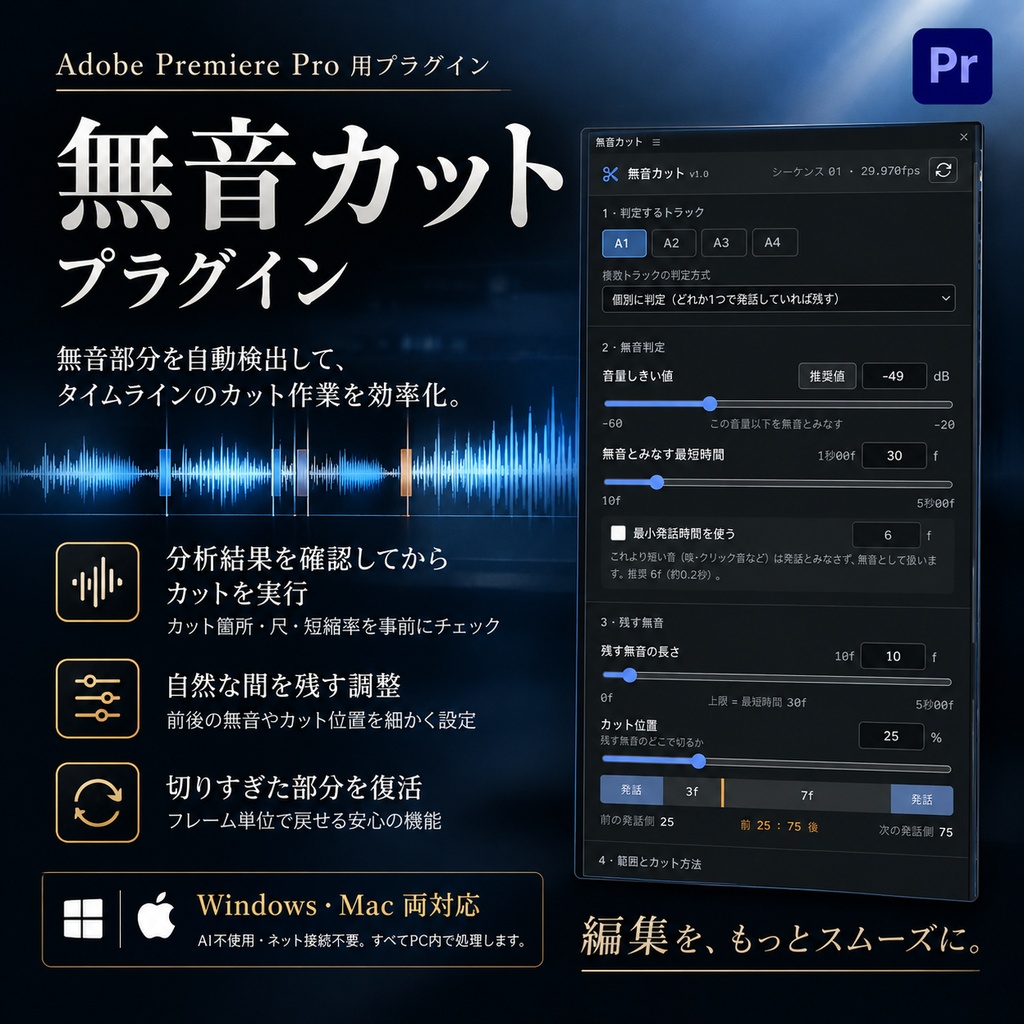
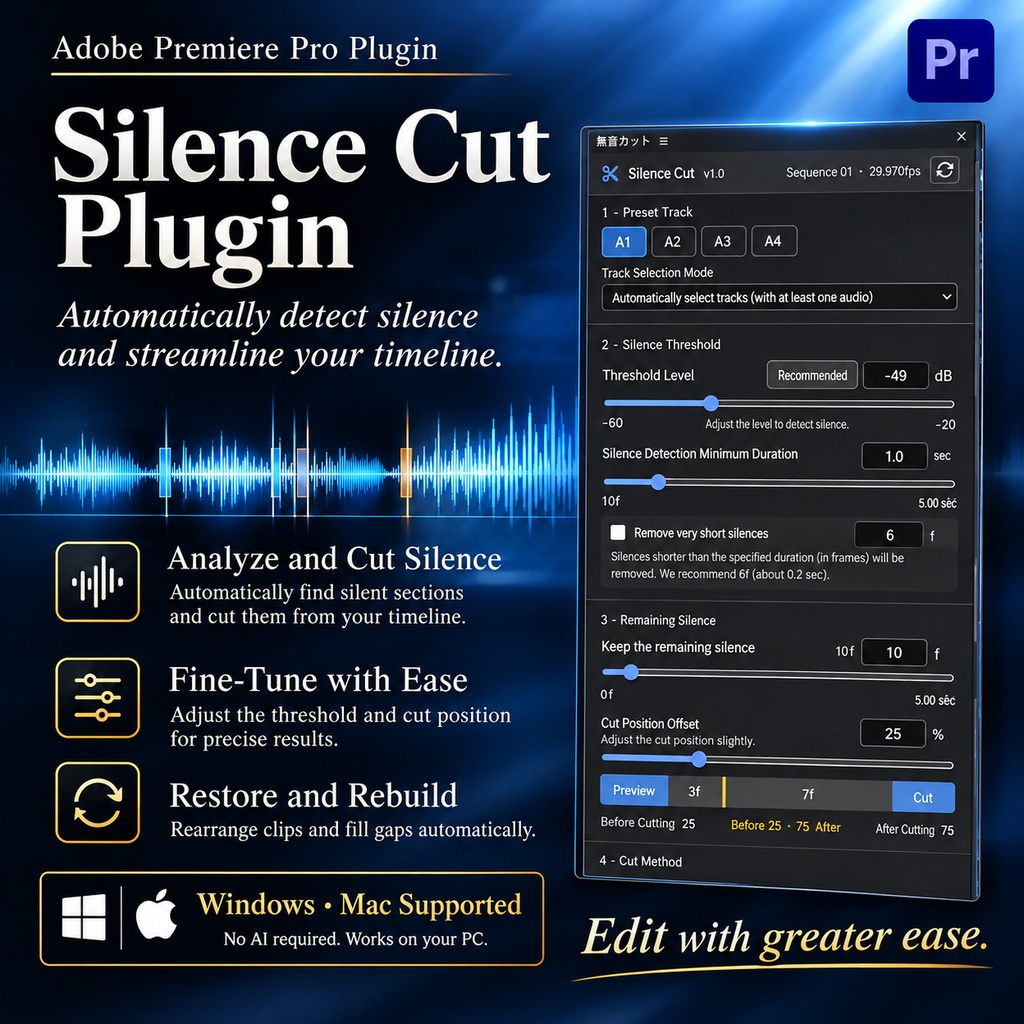
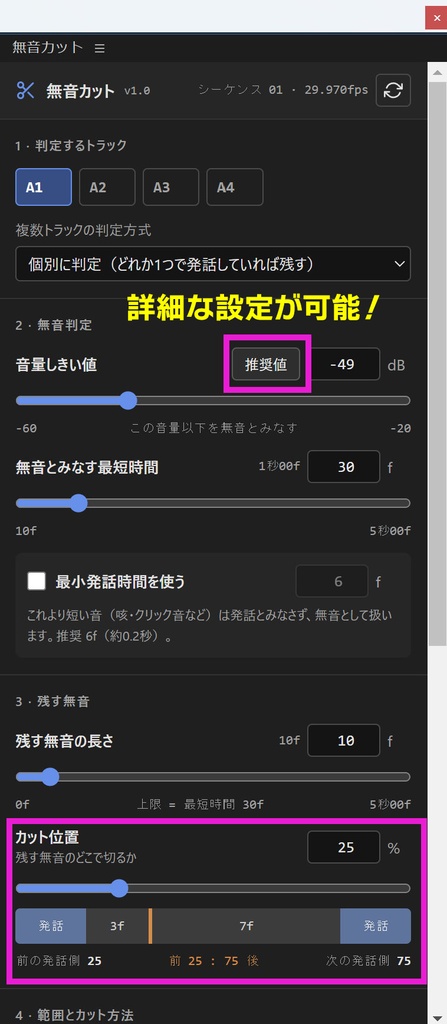
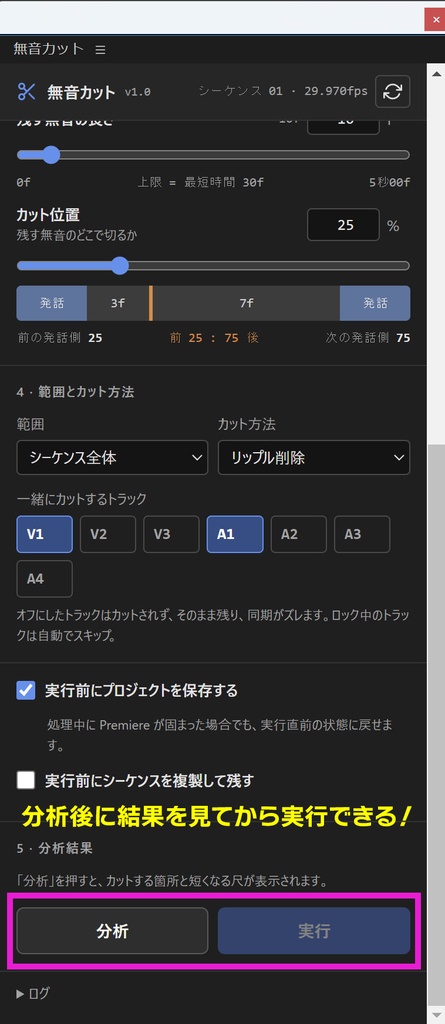
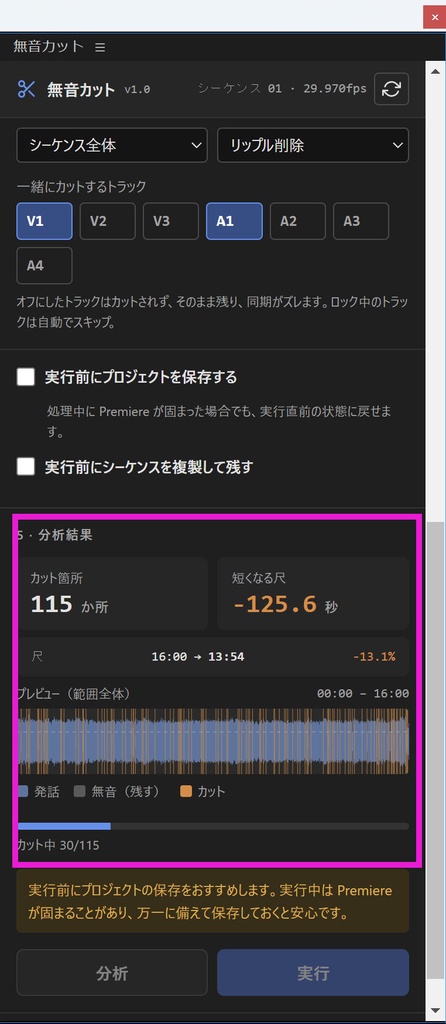
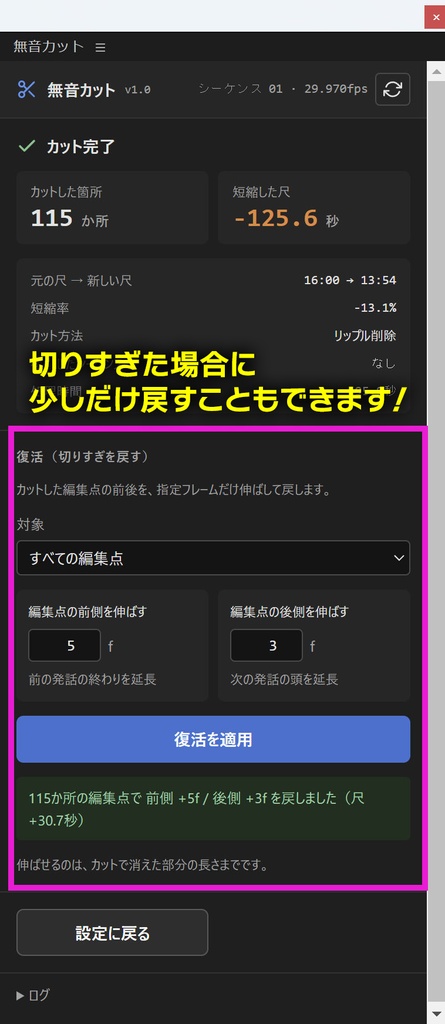
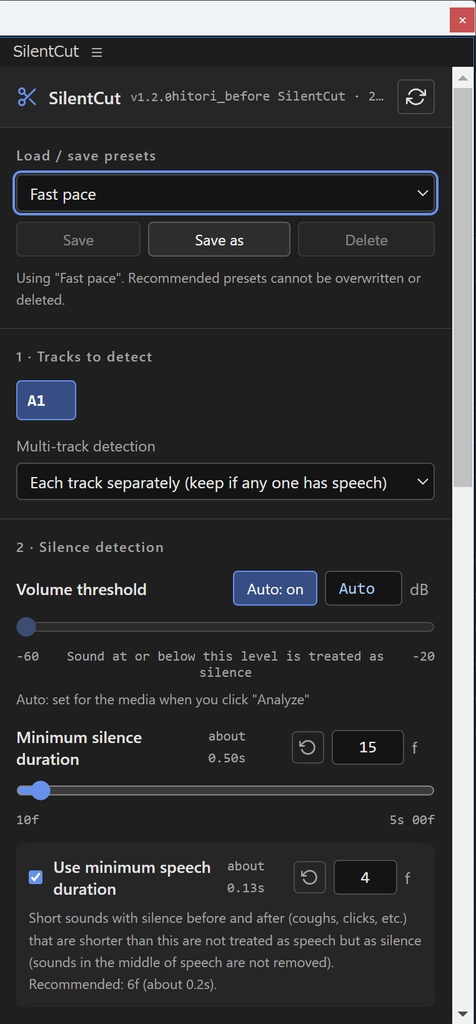


🎁【期間限定特典】ARAHEN β版 無料配布! 以下のいずれかをご購入いただいた方を対象に、AI自動編集プラグイン「ARAHEN」のβ版を期間限定で無料配布いたします! ・無音カットプラグイン「SilentCut」 ・自動スイッチングプラグイン「AutoSwitch」 ・レガシータイトル“ほぼ”復活プラグイン「TDL Studio」 購入ページからダウンロードしてください。 ARAHENは、対談・一人語りの編集作業を自動化するPremiere用プラグインです。 無音カットやカメラのスイッチングはもちろん、文字起こし・テロップ・整音・カラコレ・OPやEDの挿入など、編集工程全体をまとめて自動化できます。 すでに対象商品をお使いの方は、ぜひこの機会にARAHENもお試しください! ⚠️ 本商品は開発途中のβ版です。動作や編集結果に不具合が発生する場合があります。あらかじめご了承ください。 ━━━━━━━━━━━━━━━━━━━━━━━━━━━━━━━━ 🎬 Windows・Mac両対応!Premiere Pro 無音カットプラグイン SilentCut Adobe Premiere Pro用の無音カットプラグインです。音声の無音部分を自動検出し、タイムラインのカット作業を効率化します。 分析結果を確認してから実行でき、自然な間を残す調整や、切りすぎた部分をフレーム単位で戻す機能も搭載。 🤖 AI不使用・ネット接続不要・アカウント登録不要。音声はすべてPC内で処理します。 🌐 日本語・英語・繁体字・簡体字・韓国語に対応。 --- ✨ 主な機能 ① 🔍 無音部分を自動検出 音量しきい値と無音とみなす最短時間で、カット対象を細かく調整。素材の雑音と声の大きさから、しきい値を自動で決めることもできます。 ② 📊 分析結果を確認してから実行 カットする箇所の数・短縮時間・変更後の尺・短縮率を実行前に確認。波形プレビューで、声・残す無音・カットする部分を色分け表示します。 ③ 🎙️ 自然なテンポに仕上げる 残す無音の長さとカット位置を調整でき、会話の間を適度に残せます。 ④ 🎚️ 複数の音声トラックに対応 複数のトラックを選んで判定できます(個別に判定/ミックスして判定)。対談や複数マイクの映像にも。 ⑤ ✂️ 5種類の処理方法 リップル削除/削除(隙間を残す)/クリップを無効化/カットのみ/マーカーのみ。一緒にカットするトラックも選べるので、BGMなどを残したまま処理できます。 ⑥ ↩️ 切りすぎた部分をフレーム単位で復活 カットした編集点の前後を、フレーム単位で伸ばして戻せます(リップル削除・隙間を残す削除で使用可能)。 --- 🛡️ 安全機能 ・実行前にプロジェクトを自動保存し、シーケンスを自動複製 ・分析後にタイムラインが変更された場合や、想定外の動作を検知した場合は処理を停止 --- 💻 動作環境 ・Adobe Premiere Pro 2022(v22)以降 ・Windows 10 / 11、macOS 12 Monterey 以降(Appleシリコン / Intel) ・FFmpeg(無料。インストーラーから導入可能) --- ⚠️ 注意事項 ・解析は元の素材ファイルの音声で行います。クリップのゲイン・音量キーフレーム・エフェクトは反映されません。 ・ネストしたシーケンスは中の音声をすべてのチャンネルで判定します。逆再生のクリップは解析できないため、その部分はカットしません。 ・実行した処理は「取り消し」1回では戻せません。複製したシーケンスから復元してください。 ・処理中はPremiere Proを操作しないでください。 ========== 🎬 For Windows & Mac! Silence-cutting plugin for Premiere Pro: SilentCut A plugin for Adobe Premiere Pro that automatically detects silent parts of your audio and speeds up cutting on the timeline. Check the analysis result before running, keep natural pauses, and bring back over-cut parts frame by frame. 🤖 No AI, no internet connection, no account needed. All audio is processed on your computer. 🌐 Available in Japanese, English, Traditional Chinese, Simplified Chinese and Korean. --- ✨ Main features ① 🔍 Automatic silence detection Fine-tune what gets cut with the volume threshold and the minimum silence duration. The threshold can also be set automatically from the noise and voice levels of your media. ② 📊 Check the result before running See the number of cuts, time removed, new duration and reduction rate before running. The waveform preview shows speech, kept silence and cuts in different colors. ③ 🎙️ Natural pacing Adjust how much silence to keep and where to cut, to keep natural pauses in conversations. ④ 🎚️ Multiple audio tracks Select several tracks for detection (each track separately, or mixed). Great for interviews and multi-mic recordings. ⑤ ✂️ 5 cut methods Ripple delete / Delete (leave gaps) / Disable clips / Cut only / Markers only. You can choose which tracks are cut together, so music can stay untouched. ⑥ ↩️ Restore over-cut parts frame by frame Extend both sides of the cut edit points frame by frame (with Ripple delete and Delete (leave gaps)). --- 🛡️ Safety features ・Saves the project and duplicates the sequence automatically before running ・Stops if the timeline was changed after the analysis, or if anything unexpected happens --- 💻 System requirements ・Adobe Premiere Pro 2022 (v22) or later ・Windows 10 / 11, macOS 12 Monterey or later (Apple silicon / Intel) ・FFmpeg (free; can be installed from the installer) --- ⚠️ Notes ・Analysis uses the audio of the original media files. Clip gain, volume keyframes and effects are not reflected. ・Nested sequences are analyzed using all channels inside. Reversed clips cannot be analyzed, so those parts are not cut. ・A single "Undo" cannot undo the whole process. Please restore from the duplicated sequence. ・Please do not operate Premiere Pro while processing.
アップデート履歴
【お知らせ】v1.2.0 にアップデートしました(2026/11/12) 画面の表示言語を、日本語・English・繁體中文・简体中文・한국어 から選べるようになりました。設定のいちばん下の「Language / 言語」で切り替えられ、選んだ言語は次回も使われます。 これにあわせて、Premiere のメニューに出る名前を「SilentCut」に変更しました(ウィンドウ → エクステンション → SilentCut で開きます)。 あわせて、ネストしたシーケンスの音声が無音として扱われ、カットされてしまう不具合を修正しました。一部の録音機(ZOOM など)で録った WAV で、使っている音声を判別できないことがあった問題も直しています。 ご購入済みの方は、BOOTH のライブラリから最新版をダウンロードしてください(設定は引き継がれます)。