

【無料】Eukkbi_Soft アバター診断ツール(Avatar Diagnostics)
- Digital0 JPY
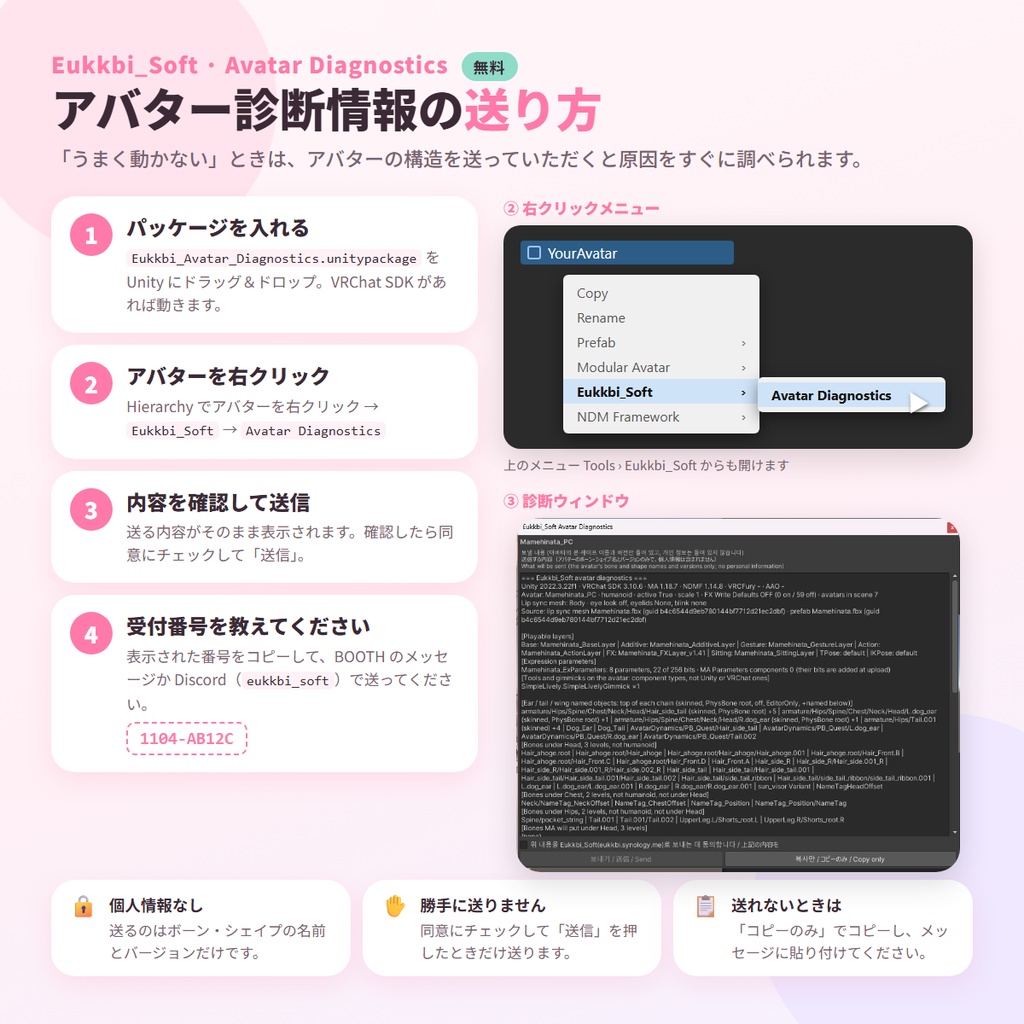
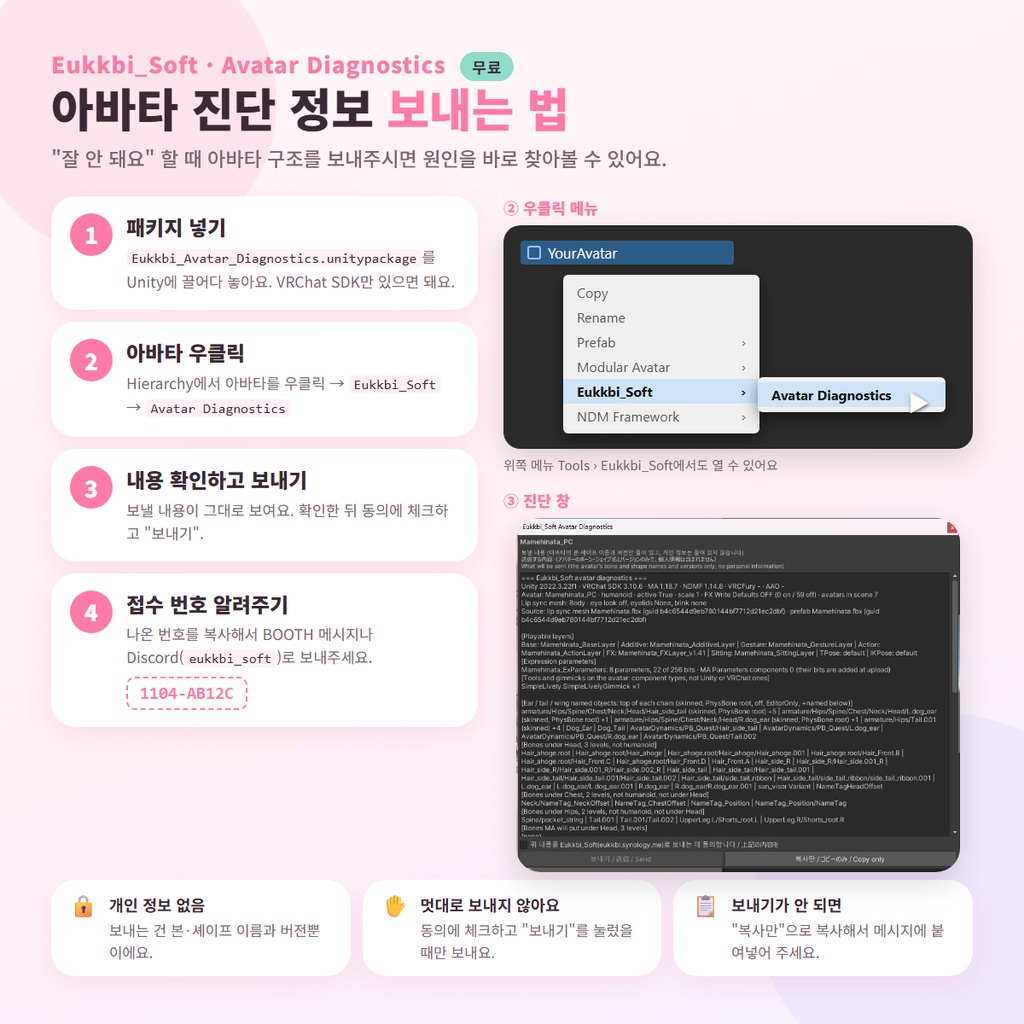
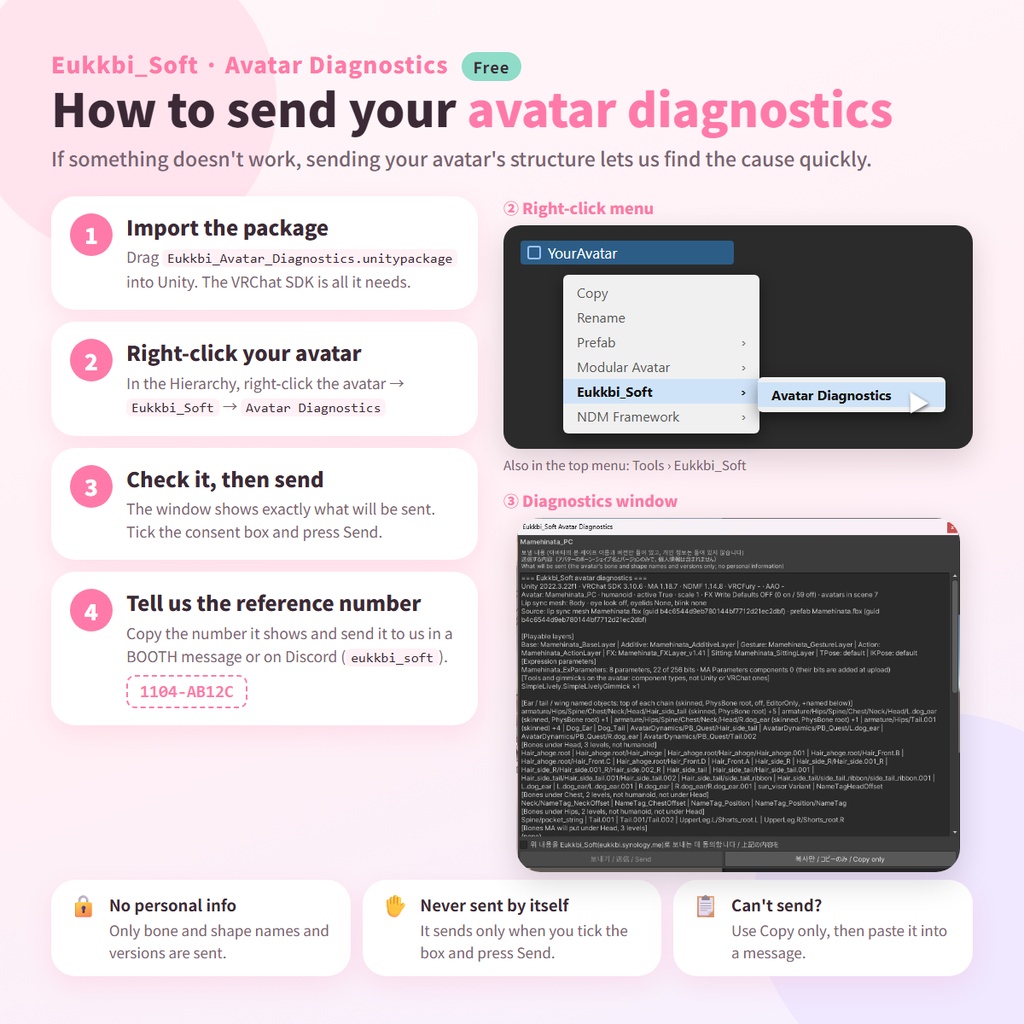


━━━━━━━━━━━━━━━━━━━━ ■ 日本語 ━━━━━━━━━━━━━━━━━━━━ ◆ こんなときに ・Eukkbi_Soft の商品を入れたのに、耳・しっぽ・表情などがうまく動かない ・改変が多いアバターで使えるか確認したい ・お問い合わせのときに、アバターの情報をまとめて伝えたい ◆ 使い方 1. unitypackage を Unity にドラッグ&ドロップ 2. Hierarchy でアバターを右クリック →「Eukkbi_Soft」→「Avatar Diagnostics」 (上のメニュー「Tools > Eukkbi_Soft > Avatar Diagnostics」からも開けます) 3. 送る内容がそのまま表示されます。確認したら同意にチェックして「送信」 4. 表示された受付番号を、BOOTH のメッセージか Discord(eukkbi_soft)で教えてください 送信したくない場合は「コピーのみ」で内容をコピーし、メッセージに貼り付けてください。 ◆ 送る内容 ・Unity / VRChat SDK / Modular Avatar などのバージョン ・アバターのボーン名、ブレンドシェイプ名、PhysBone の場所 ・使っているツール・ギミックの種類(コンポーネント名) ・アバターの元ファイル名と GUID(どのアバターかを見分けるため。フォルダの場所は含みません) ◆ 送らない内容 ・お名前、PC やアカウントの情報、フォルダの場所 ・メッシュ・テクスチャ・アニメーションなどのデータそのもの ・受信プログラムは送信元の IP アドレスを保存しません(送りすぎ防止のために一時的に使うだけです) ◆ 安心して使えるように ・同意にチェックして「送信」を押したときだけ送ります。自動で送ることはありません ・アバターを読み取るだけで、一切変更しません ・不要になったら Assets/Eukkbi_Soft/Avatar_Diagnostics フォルダを削除するだけです ◆ 受け取った情報の取り扱い ・使い道は、Eukkbi_Soft の商品がより多くのアバターで動くようにする確認・改善だけです ・受け取った内容を公開・再配布することはありません ・販売者の NAS に保存され、受信のお知らせのため Discord(販売者のみが見るチャンネル)にも転送されます ・内容の分析に AI ツールを使うことがあります ・削除をご希望の場合は、受付番号を添えて BOOTH のメッセージか Discord でご連絡ください。すぐに削除します ◆ 動作環境 Unity 2022.3 / VRChat SDK Avatars(Modular Avatar はなくても動きます) ◆ 利用について 無料です。Eukkbi_Soft の商品をお持ちでなくても使えます。 再配布はご遠慮ください(このページのリンクを共有するのは大歓迎です)。 ━━━━━━━━━━━━━━━━━━━━ ■ English ━━━━━━━━━━━━━━━━━━━━ A free support tool for when an Eukkbi_Soft product doesn't work as expected. It reads your avatar's structure (bone names, shape names and so on) so we can find the cause quickly. ◆ When to use it - You added an Eukkbi_Soft product, but ears, tail or facial movement don't work right - You want to check whether a heavily customised avatar is supported - You want to send your avatar's details all at once when asking for help ◆ How to use 1. Drag the unitypackage into Unity 2. In the Hierarchy, right-click your avatar → "Eukkbi_Soft" → "Avatar Diagnostics" (also in the top menu: Tools > Eukkbi_Soft > Avatar Diagnostics) 3. The window shows exactly what will be sent. Tick the consent box and press "Send" 4. Tell us the reference number it shows, in a BOOTH message or on Discord (eukkbi_soft) Rather not send it? Use "Copy only" and paste the text into a message. ◆ What is sent - Versions of Unity, the VRChat SDK, Modular Avatar and so on - The avatar's bone names, blendshape names and where its PhysBones are - Which tools and gimmicks it uses (component types) - The avatar's original file names and GUIDs (to tell which avatar it is; no folder locations) ◆ What is not sent - Your name, PC or account details, or folder locations - Meshes, textures, animations or any other asset data - The receiving program does not store your IP address (it is only used briefly to limit how often reports can be sent) ◆ Peace of mind - It sends only when you tick the consent box and press "Send", never on its own - It only reads the avatar and never changes it - To remove it, just delete the Assets/Eukkbi_Soft/Avatar_Diagnostics folder ◆ How we handle what you send - It is used only to check and improve how Eukkbi_Soft products work with more avatars - What you send is never published or redistributed - It is stored on the seller's own NAS and, as a notice that it arrived, forwarded to Discord (a channel only the seller sees) - AI tools may be used to analyse it - Want it deleted? Send us the reference number in a BOOTH message or on Discord, and we will delete it right away ◆ Requirements Unity 2022.3 / VRChat SDK Avatars (works without Modular Avatar) ◆ Terms Free, and usable without owning an Eukkbi_Soft product. Please don't redistribute the file (sharing a link to this page is very welcome). ━━━━━━━━━━━━━━━━━━━━ ■ 한국어 ━━━━━━━━━━━━━━━━━━━━ Eukkbi_Soft 상품이 잘 동작하지 않을 때 쓰는 무료 지원 도구예요. 아바타 구조(본 이름·셰이프 이름 등)를 읽어서 보내주시면 원인을 바로 찾아볼 수 있어요. ◆ 이럴 때 써 주세요 - Eukkbi_Soft 상품을 넣었는데 귀·꼬리·표정 등이 제대로 움직이지 않을 때 - 개조를 많이 한 아바타에서도 쓸 수 있는지 확인하고 싶을 때 - 문의할 때 아바타 정보를 한 번에 전하고 싶을 때 ◆ 사용법 1. unitypackage를 Unity에 끌어다 놓아요 2. Hierarchy에서 아바타를 우클릭 → "Eukkbi_Soft" → "Avatar Diagnostics" (위쪽 메뉴 "Tools > Eukkbi_Soft > Avatar Diagnostics"에서도 열 수 있어요) 3. 보낼 내용이 그대로 보여요. 확인한 뒤 동의에 체크하고 "보내기" 4. 나온 접수 번호를 BOOTH 메시지나 Discord(eukkbi_soft)로 알려주세요 보내기 싫으면 "복사만"으로 내용을 복사해서 메시지에 붙여넣어 주세요. ◆ 보내는 내용 - Unity / VRChat SDK / Modular Avatar 등의 버전 - 아바타의 본 이름, 블렌드셰이프 이름, PhysBone 위치 - 쓰고 있는 도구·기믹 종류(컴포넌트 이름) - 아바타 원본 파일 이름과 GUID(어떤 아바타인지 구별하기 위해서예요. 폴더 위치는 들어가지 않아요) ◆ 보내지 않는 내용 - 이름, PC·계정 정보, 폴더 위치 - 메시·텍스처·애니메이션 같은 데이터 자체 - 받는 프로그램은 보낸 사람의 IP 주소를 저장하지 않아요(너무 많이 보내는 걸 막는 데 잠깐 쓰기만 해요) ◆ 안심하고 쓸 수 있게 - 동의에 체크하고 "보내기"를 눌렀을 때만 보내요. 저절로 보내는 일은 없어요 - 아바타를 읽기만 하고 전혀 바꾸지 않아요 - 필요 없어지면 Assets/Eukkbi_Soft/Avatar_Diagnostics 폴더를 지우기만 하면 돼요 ◆ 받은 정보의 취급 - Eukkbi_Soft 상품이 더 많은 아바타에서 동작하도록 확인하고 개선하는 데만 써요 - 받은 내용은 공개하거나 재배포하지 않아요 - 판매자의 NAS에 저장되고, 접수 알림을 위해 Discord(판매자만 보는 채널)에도 전달돼요 - 내용 분석에 AI 도구를 쓸 수 있어요 - 삭제를 원하시면 접수 번호와 함께 BOOTH 메시지나 Discord로 알려주세요. 바로 삭제해 드려요 ◆ 동작 환경 Unity 2022.3 / VRChat SDK Avatars (Modular Avatar가 없어도 동작해요) ◆ 이용 안내 무료예요. Eukkbi_Soft 상품이 없어도 쓸 수 있어요. 파일 재배포는 삼가 주세요(이 페이지 링크를 공유하는 건 대환영이에요).