
【VRChat向け】Fire Torch|手持ち&設置できるたいまつ【VRCFury対応】
- Digital600 JPY
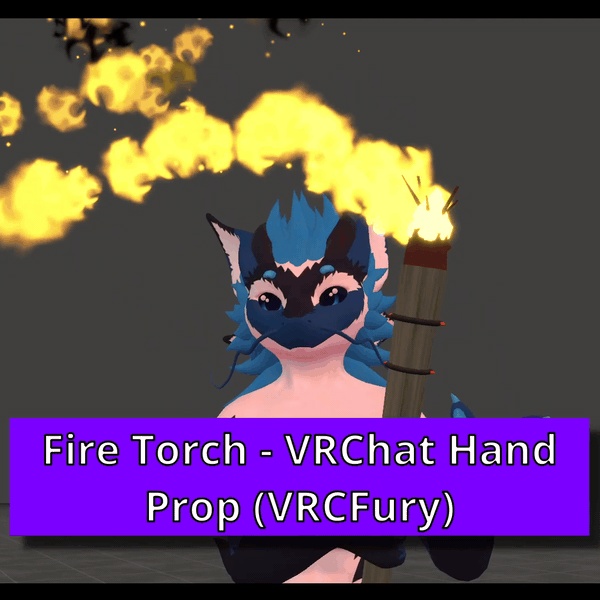
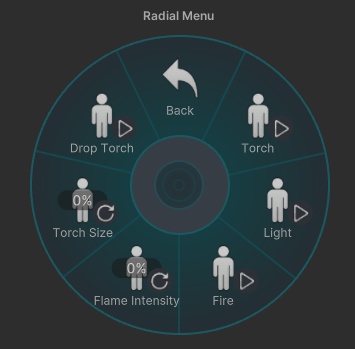


炎と火の粉が舞い、暖かなオレンジ色の光で周囲を照らす木製のたいまつです。右手に持って暗いワールドを探索したり、World Dropで地面に置いて雰囲気を演出したりできます。 中世・ファンタジー風のアバターや、ダンジョン探索、キャンプ、ホラーワールドでの撮影やロールプレイにぴったり。VRCFury設定済みのPrefabをアバターに追加すれば、VRChat内のExpressions Menuから炎・ライトのオン/オフ、明るさ、サイズを調整できます。 ■ 特徴 - 右手に持てるたいまつ — VRCFuryのArmature Linkで右手に連動し、スケールも自動調整されます。 - 炎と火の粉のパーティクル — 揺らめく炎と舞い上がる火の粉を表現します。 - 暖色のポイントライト — 炎のエフェクトとは別にオン/オフを切り替えられます。 - 明るさ調整 — スライダーで、ほのかな灯りから明るい光まで調整できます。 - サイズ調整 — たいまつ本体と炎のエフェクトをまとめて拡大・縮小できます。 - World Drop対応 — たいまつをワールド内に設置でき、アバターが移動してもその場に残ります。 - トグル設定の保存 — オン/オフの設定は次回のログイン時にも引き継がれます。 - 木目のPBRマテリアル — ノーマルマップとハイトマップで、木製の持ち手の質感を表現しています。 ■ 操作方法(Expressions Menu) `Fire_Torch` メニューから操作できます。 - Torch — たいまつ全体の表示・非表示を切り替えます。 - Light — ポイントライトのみをオン/オフにします。 - Fire — 炎と火の粉のエフェクトを表示・非表示にします。 - Flame Intensity — スライダーでポイントライトの明るさを調整します。 - Torch Size — スライダーでたいまつ本体と炎のエフェクトのサイズをまとめて調整します。 - Drop Torch — World Dropでたいまつをその場に設置します。 火を消した状態で持ち歩いたり、ライトだけを点けたり、炎とライトを両方オンにしたりと、シーンに合わせて使い分けられます。 ■ 導入方法 1. VRChat用のUnityプロジェクトに本商品をインポートします。 2. `Fire_Torch.prefab` をアバターのルート直下にドラッグ&ドロップします。 3. `Torch_Handle` の `Armature Link` のリンク先が `Right Hand` になっていることを確認します。 4. 必要に応じて、アバターの右手に合わせてたいまつの位置を調整します。 5. VRCFuryを導入した状態で、アバターをビルドしてアップロードします。 ■ 同梱内容 - `Fire_Torch.prefab`(設定済み) - FBXメッシュ(`Tocha_SemFogo`) - 木目のPBRマテリアル・テクスチャ - パーティクル用マテリアル(フレア・炎) - アニメーションクリップ(明るさ・サイズ調整用) - `ReadMe.txt`、`License.txt` ■ 必要環境 - Unity - VRChat SDK(Avatars) - VRCFury - Humanoidアバター ■ 利用規約 - 個人利用・商用利用が可能です。 - VRChatへのアップロード、コミッション(有償依頼)での使用、本商品を組み込んだアバターの販売が可能です。 - 改変が可能です。 - 詳細は同梱の `License.txt` をご確認ください。 -------- English -------- A wooden torch with real fire particles, dynamic light, and World Drop — hold it, light it, drop it. VRChat hand prop: wooden torch with particle fire, point light, and World Drop. VRCFury toggles and sliders for fire, light, intensity, and size. Armature Link to Right Hand. Personal + commercial license. Fire Torch — VRChat Avatar Prop Carry a realistic wooden torch on your avatar. Built for VRChat with VRCFury — drag onto your avatar, build, and control everything from the Expressions Menu. Perfect for medieval, fantasy, dungeon, camping, horror, and adventure avatars. Light your way through dark worlds or leave the torch on the ground for atmosphere. Features - Hand-held torch — links to Right Hand (Armature Link + auto scale) - Particle fire VFX — flame + spark/ember particles - Point light — warm orange glow (toggle independently) - Flame Intensity slider — dim campfire to bright blaze - Torch Size slider — scale the whole prop and VFX together - World Drop — place the torch in the world and walk away - Saved toggles — your settings persist between sessions - PBR wood materials — detailed handle with normal/height maps Controls (Expressions Menu) `Fire_Torch/` - Torch (Toggle) — Show / hide the entire torch - Light (Toggle) — Show / hide the point light only - Fire (Toggle) — Show / hide the flame + particle VFX - Flame Intensity (Slider) — Adjust the light brightness - Torch Size (Slider) — Scale the torch + fire together - Drop Torch (Toggle) — World Drop — leave the torch in the scene Mix and match: torch on with fire off, light only, full blaze, or dropped on the ground. Setup 1. Import into your Unity VRChat project 2. Drag Fire_Torch.prefab under your avatar root 3. Confirm Armature Link → Right Hand on `Torch_Handle` 4. Tweak position if needed for your avatar’s hand 5. Build with VRCFury and upload Plug & play — main manual step is hand position on different avatars. Included - `Fire_Torch.prefab` (fully configured) - FBX mesh (`Tocha_SemFogo`) - Wood PBR materials + textures - Particle materials (flare / flame) - Animation clips (intensity + scale sliders) - ReadMe.txt + License.txt Requirements - Unity + VRChat SDK (Avatars) - VRCFury - Humanoid avatar License - Personal and commercial use allowed - VRChat upload, commissions, and avatar sales allowed - Modification allowed
