

AvatarShadingTool
- Digital100 JPY
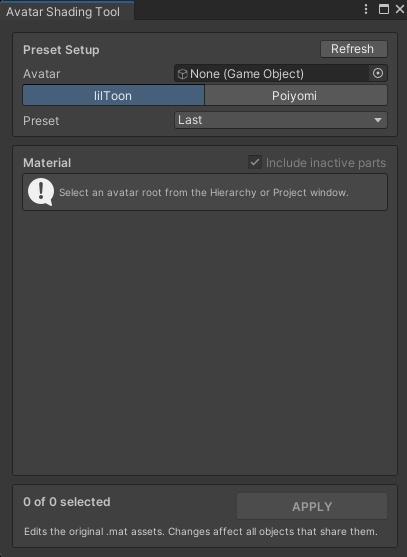

한국어 Avatar Shading Tool 아바타의 여러 머티리얼에 같은 셰이딩 프리셋을 적용하는 Unity 에디터 툴입니다. lilToon과 Poiyomi의 커스텀 프리셋을 사용해 그림자, 림라이트, 백라이트 등의 스타일을 한 번에 맞출 수 있습니다. .unitypackage를 임포트한 뒤 Ria → Avatar Shading Tool을 열어 주세요. 아바타와 프리셋을 선택하고, 적용할 머티리얼을 체크한 뒤 Apply를 누르면 됩니다. - 구성품 · Avatar Shading Tool .unitypackage - 테스트 환경 · Unity 2022.3.22f1, lilToon 2.3.4, Poiyomi Pro 10.0 - 적용 시 참고 · Apply는 원본 머티리얼을 수정합니다. 체크한 Poiyomi 머티리얼이 잠겨 있으면 잠금을 풀고 적용합니다. Undo는 셰이딩 값만 되돌립니다. 이용약관 - 정식으로 취득한 사용자는 개인 작업, 상업 작업, 유료 커미션에 사용할 수 있습니다. 본인 작업을 위한 소스 코드 수정도 가능합니다. - 작업 결과물은 공개하거나 판매할 수 있습니다. 함께 사용한 아바타, 셰이더 및 기타 에셋의 이용약관을 따라 주세요. - 툴과 소스 코드의 재배포, 재판매 및 다른 상품에 동봉하는 행위를 금지합니다. 수정본에도 같은 조건이 적용됩니다. - 다운로드 상품은 주문 확정 후 취소·환불이 원칙적으로 제한됩니다. 관련 법령에 따른 예외는 해당 규정을 따릅니다. BOOTH 취소·환불 안내 English Avatar Shading Tool A Unity Editor tool that applies a shared shading preset to multiple materials on an avatar. Use custom lilToon and Poiyomi presets to give shadows, rim lighting, and backlighting a consistent look across your avatar. Import the .unitypackage and open Ria → Avatar Shading Tool. Choose your avatar and preset, check the materials you want to update, then click Apply. - Included · Avatar Shading Tool .unitypackage - Tested with · Unity 2022.3.22f1, lilToon 2.3.4, Poiyomi Pro 10.0 - Applying presets · Apply edits the original material assets. Any checked Poiyomi materials that are locked are unlocked before the preset is applied. Undo restores shading values only. Terms of Use - Users who lawfully obtain the tool may use it for personal projects, commercial projects, and paid commissions. You may modify the source code for your own work. - You may share or sell work created using the tool. Please follow the licenses of any avatars, shaders, and other assets used in your work. - Redistribution, resale, and bundling of the tool or its source code with another product are prohibited. These conditions also apply to modified versions. - Confirmed orders for downloadable products are generally ineligible for cancellation or refunds. Exceptions required by applicable law apply. BOOTH cancellation and refund policy 日本語 Avatar Shading Tool アバターの複数のマテリアルに、同じシェーディングプリセットをまとめて適用できるUnityエディターツールです。lilToonやPoiyomiのカスタムプリセットを使って、影やリムライト、バックライトなどの見た目に統一感を持たせられます。 .unitypackageをインポートし、Ria → Avatar Shading Toolを開いてください。アバターとプリセットを選び、適用したいマテリアルにチェックを入れて Apply を押します。 - 同梱内容 · Avatar Shading Toolの .unitypackage - 動作確認環境 · Unity 2022.3.22f1、lilToon 2.3.4、Poiyomi Pro 10.0 - 適用時の注意 · Applyを押すと、元のマテリアルアセットが変更されます。チェックしたPoiyomiマテリアルがロックされている場合は、ロックを解除してから適用します。Undoで戻せるのはシェーディング設定のみです。 利用規約 - 正規に入手した方は、個人制作、商用制作、有償依頼でご利用いただけます。ご自身の制作に使用するためのソースコードの改変も可能です。 - 本ツールを使用して制作した成果物は、公開・販売できます。併用したアバター、シェーダー、その他のアセットの利用規約に従ってください。 - ツールやソースコードの再配布・再販売、他の商品への同梱を禁止します。改変版にも同じ条件が適用されます。 - ダウンロード商品の注文確定後のキャンセル・返金は、原則としてお受けできません。法令に基づく例外については、該当する法令に従います。BOOTHのキャンセル・返金に関する案内 BOOTH 취소·환불 안내 / Cancellation and refunds / キャンセル・返金のご案内 https://booth.pixiv.help/hc/ja/articles/115002295113