
PhysBoneIKGrab Tool
- Normalダウンロード商品¥ 500
- Support (same content)ダウンロード商品¥ 1,000

VRChatのPhysBoneを使って、アバターの手・足・頭を他の人や自分がつかんで動かし、離した後もポーズを保てるようにする非破壊ツールです。(NDMF / Modular Avatar 必須) ==================== A non-destructive tool that uses VRChat PhysBones to let others (or yourself) grab and move your avatar's hands, feet or head, and keep the pose after letting go. (NDMF / Modular Avatar required) ==================== VRChat의 PhysBone을 사용해서 다른 사람이나 자신이 아바타의 손, 발, 머리를 잡아 움직이고, 놓은 뒤에도 포즈를 유지할 수 있게 하는 비파괴 툴입니다. (NDMF / Modular Avatar 필수)
ドキュメント / Documentation
https://kamyu1537.github.io/ik-grab/
動作環境 / Requirements
- Unity 2022.3 - VRChat SDK (Avatars) 3.7.0 以上 - NDMF 1.6.0 以上 2.0 未満 - Modular Avatar 1.11.0 以上 2.0 未満 - VRC Avatar Descriptor に FX コントローラーが設定されていること ※ Avatar Optimizer は任意です。入っている場合は IKGrab のコンポーネントを認識します。 ==================== - Unity 2022.3 - VRChat SDK (Avatars) 3.7.0 or later - NDMF 1.6.0 or later (below 2.0) - Modular Avatar 1.11.0 or later (below 2.0) - An FX controller set in the VRC Avatar Descriptor ※ Avatar Optimizer is optional. If it's installed, it recognizes the IKGrab component. ==================== - Unity 2022.3 - VRChat SDK (Avatars) 3.7.0 이상 - NDMF 1.6.0 이상 2.0 미만 - Modular Avatar 1.11.0 이상 2.0 미만 - VRC Avatar Descriptor에 FX 컨트롤러가 지정되어 있어야 합니다 ※ Avatar Optimizer는 선택 사항입니다. 설치되어 있으면 IKGrab 컴포넌트를 인식합니다.
導入方法 / How to install
1. VRChat SDK / NDMF / Modular Avatar を先にプロジェクトに入れておきます。(VCC / ALCOM で追加できます。NDMF / Modular Avatar のリポジトリ: https://vpm.nadena.dev/vpm.json) 2. IKGrab-2.3.0.zip を解凍します。 3. Unity で Assets > Import Package > Custom Package を選び、me.kamyu.ik-grab-2.3.0.unitypackage をインポートします。(ファイルを Project ウィンドウにドラッグしても構いません) 4. Packages/me.kamyu.ik-grab に IKGrab.prefab があればインストール完了です。 ※ 以前のバージョン(Assets/kamyu_/IKGrab.NDMF フォルダ)を使っている場合は、インポートする前にそのフォルダを削除してください。設定済みのコンポーネントとプレハブはそのまま引き継がれます。 ==================== 1. Add VRChat SDK / NDMF / Modular Avatar to your project first. (You can add them with VCC / ALCOM. NDMF / Modular Avatar repository: https://vpm.nadena.dev/vpm.json) 2. Unzip IKGrab-2.3.0.zip. 3. In Unity, choose Assets > Import Package > Custom Package and import me.kamyu.ik-grab-2.3.0.unitypackage. (You can also drag the file into the Project window.) 4. The install worked when IKGrab.prefab is in Packages/me.kamyu.ik-grab. ※ If you used an older version (the Assets/kamyu_/IKGrab.NDMF folder), delete that folder before you import. Your existing components and prefabs are kept. ==================== 1. VRChat SDK / NDMF / Modular Avatar를 먼저 프로젝트에 추가합니다. (VCC / ALCOM으로 추가할 수 있습니다. NDMF / Modular Avatar 저장소: https://vpm.nadena.dev/vpm.json) 2. IKGrab-2.3.0.zip 압축을 풉니다. 3. Unity에서 Assets > Import Package > Custom Package를 선택하고 me.kamyu.ik-grab-2.3.0.unitypackage를 가져옵니다. (파일을 Project 창에 끌어다 놓아도 됩니다) 4. Packages/me.kamyu.ik-grab 안에 IKGrab.prefab이 있으면 설치된 것입니다. ※ 이전 버전(Assets/kamyu_/IKGrab.NDMF 폴더)을 쓰고 있었다면 가져오기 전에 그 폴더를 지워주세요. 이미 세팅한 컴포넌트와 프리팹은 그대로 유지됩니다.
使い方 / How to use
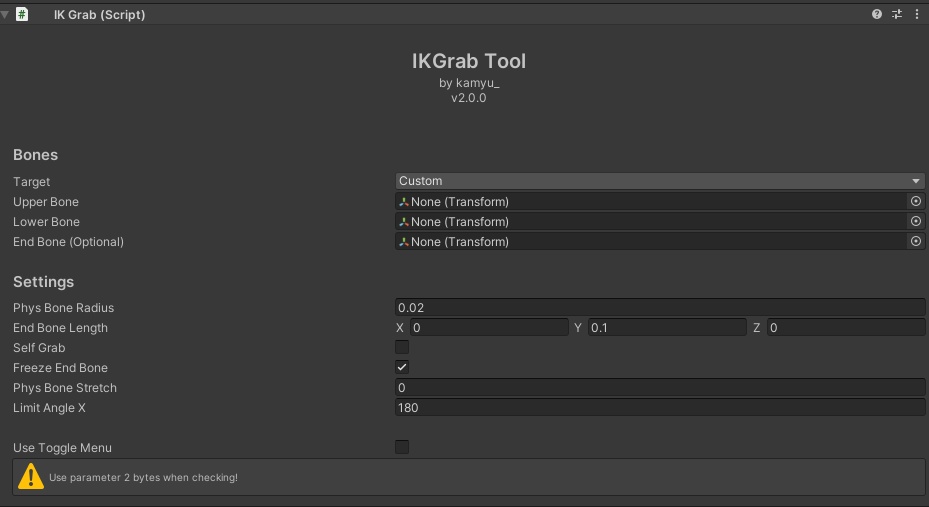
1. Hierarchy でアバターを右クリックし、IKGrab > Add IKGrab を選びます。(GameObject > IKGrab > Add IKGrab でも同じです。Packages/me.kamyu.ik-grab/IKGrab.prefab をアバターのルートオブジェクトの下に入れても構いません) 2. 追加された IKGrab オブジェクトを選び、Bones の Preset で Left Hand / Right Hand / Left Leg / Right Leg / Head のどれかを選びます。ボーンを自分で選ぶ場合は Custom のまま指定します。 3. Settings は初期値のままでも使えます。 4. アバターをアップロード(または Build & Test)します。ゲーム内のメニューに IKGrab サブメニューができ、Grab と Pose のトグルが使えます。 ※ 部位を増やすときは、部位ごとに IKGrab.prefab をもう 1 つ置いて別の Preset を選びます。Toggle Parameter Prefix が同じコンポーネントはメニューを共有します。 ==================== 1. Right-click your avatar in the Hierarchy and choose IKGrab > Add IKGrab. (GameObject > IKGrab > Add IKGrab does the same. You can also drag Packages/me.kamyu.ik-grab/IKGrab.prefab under the avatar's root object.) 2. Select the new IKGrab object and choose Left Hand / Right Hand / Left Leg / Right Leg / Head in Bones > Preset. To pick the bones yourself, leave Custom and set them by hand. 3. The Settings defaults work as they are. 4. Upload your avatar (or use Build & Test). In game, the menu has an IKGrab submenu with Grab and Pose toggles. ※ For more parts, place one more IKGrab.prefab per part and choose a different Preset. Components with the same Toggle Parameter Prefix share one menu. ==================== 1. Hierarchy에서 아바타를 우클릭하고 IKGrab > Add IKGrab 을 선택합니다. (GameObject > IKGrab > Add IKGrab 도 같습니다. Packages/me.kamyu.ik-grab/IKGrab.prefab 을 아바타 루트 오브젝트 아래에 넣어도 됩니다) 2. 추가된 IKGrab 오브젝트를 선택하고, 본 설정의 자동 선택에서 왼손 / 오른손 / 왼발 / 오른발 / 머리 중 하나를 고릅니다. 본을 직접 고르려면 직접 지정으로 두고 넣습니다. 3. 기능 설정은 기본값 그대로 써도 됩니다. 4. 아바타를 업로드(또는 Build & Test)합니다. 게임 안 메뉴에 IKGrab 서브메뉴가 생기고 Grab과 Pose 토글을 쓸 수 있습니다. ※ 부위를 늘리려면 부위마다 IKGrab.prefab 을 하나씩 더 놓고 다른 프리셋을 고릅니다. 토글 파라미터 접두사가 같은 컴포넌트는 메뉴를 함께 씁니다.
注意事項 / Notes
- Add Component でコンポーネントだけを付けた場合はメニューができません。プレハブを使ってください。 - 設定に問題があるコンポーネントは、ビルド時に NDMF のエラーにコンポーネント名が表示され、アップロードと Build & Test は失敗します。 - 既知の問題:APS で固定した後にアバターを動かすと、つかむ範囲が見た目の手足とずれます。IKGrab を使うときは APS の固定を解除してください。 ==================== - A component added with Add Component alone has no menu. Use the prefab. - If a component's setup has a problem, the build shows an NDMF error naming it, and upload and Build & Test fail. - Known issue: after APS fixation, moving the avatar separates the grab area from the visible limb. Release APS fixation while you use IKGrab. ==================== - Add Component로 컴포넌트만 추가하면 메뉴가 생기지 않습니다. 프리팹을 사용해주세요. - 설정에 문제가 있는 컴포넌트는 빌드할 때 NDMF 오류에 컴포넌트 이름이 표시되고, 업로드와 Build & Test가 실패합니다. - 알려진 문제: APS로 고정한 뒤 아바타를 움직이면 잡는 범위가 보이는 팔다리와 어긋납니다. IKGrab을 쓸 때는 APS 고정을 해제해주세요.
バリエーション / Options
※ 支援版は通常版と内容は同じです。応援していただける方向けです。 ==================== ※ The Support option has the same content as the Normal option. It's for those who'd like to support me. ==================== ※ 서포트 옵션은 일반 옵션과 내용이 같으며, 후원을 원하시는 분을 위한 옵션입니다.
利用規約 / Terms of Use
本商品を購入(ダウンロード)した時点で、以下の利用規約に同意したものとみなします。 ✅ ご自身のアバター(パブリックアバターを含む)に導入して使用できます ❌ 再販売・再配布 ❌ スクリプトの全部または一部をご自身の商品に含めること ❌ ファイルを他人と共有すること ❌ コードをコピー・改変して自分の制作物として公開・販売すること ※ コードを参考にした商品を販売したい場合は、事前に BOOTH のメッセージ、または X(@kamyu1537)の DM でご連絡ください。 ※ 利用規約は予告なく変更される場合があります。 ==================== By purchasing (downloading) this product, you agree to the following Terms of Use. ✅ You may use it in your own avatars, including public avatars ❌ Resale or redistribution ❌ Including all or part of the script in your own products ❌ Sharing the files with others ❌ Copying or modifying the code and presenting it as your own work ※ If you would like to sell a product that references this code, please contact me first via BOOTH message or X (@kamyu1537) DM. ※ These terms are subject to change at any time. ==================== 본 상품을 구매(다운로드)한 시점부터 아래 이용약관에 동의한 것으로 간주합니다. ✅ 본인의 아바타(퍼블릭 아바타 포함)에 적용하여 사용할 수 있습니다 ❌ 재판매·재배포 ❌ 스크립트의 전부 또는 일부를 본인의 상품에 포함하는 행위 ❌ 파일을 다른 사람과 공유하는 행위 ❌ 코드를 복사·수정하여 본인의 창작물로 공개·판매하는 행위 ※ 코드를 참고한 상품을 판매하려면 먼저 BOOTH 메시지 또는 X(@kamyu1537) DM으로 연락해주세요. ※ 이용약관은 언제든지 변경될 수 있습니다.
更新履歴 / Changelog
2026-10-21 v2.3.0 - Added: Hierarchy right-click menu IKGrab > Add IKGrab (also in the GameObject menu) - Changed: Grab and Pose share one toggle layer, and their FX parameters start with the same values as the menu - Changed: generated FX states follow the avatar's Write Defaults setting - Changed: an unused IsLocal parameter is no longer added to the FX controller - Changed: the Preset and Language drop-downs show options in the selected language - Fixed: with Pose off, mouse grabs in the editor no longer fix the pose; turning Pose off clears an existing pose - Fixed: missing, duplicated or overlapping bones, duplicate end bone names, parent constraints on chain bones, non-Bool FX parameters and PhysBone parameter conflicts now show an NDMF error naming the component (other IKGrab components still apply in Play mode) - Fixed: works with Modular Avatar parameter renames, Menu Groups, Menu Assets, Platform Filter, Bone Proxy and Merge Armature - Fixed: works with Avatar Optimizer Trace and Optimize (IKGrab was removed with 1.6 to 1.8) - Fixed: when a component can't be applied, its Grab and Pose toggles and unused parameters are removed from the built avatar; other menu controls stay - Fixed: an avatar without an FX controller shows an NDMF error instead of a NullReferenceException - Fixed: copied components (Paste Component Values / Paste Component As New) no longer break the build - Fixed: inspector errors with non-humanoid avatars, Undo / Revert Prefab / Paste, bones outside the avatar, and out-of-range Preset or Language values - Known issue: after APS fixation, moving the avatar separates the grab area from the visible limb (release APS fixation while you use IKGrab) 2026-10-08 v2.2.3 - Changed: installs to Packages/me.kamyu.ik-grab instead of Assets/kamyu_/IKGrab.NDMF (delete the old folder before importing; existing components and prefabs keep working)