

VRCマーカープロ【VRCMarker Pro】
- Personal Licenseダウンロード商品¥ 1,800
- Commercial License (同じ内容)ダウンロード商品¥ 6,000
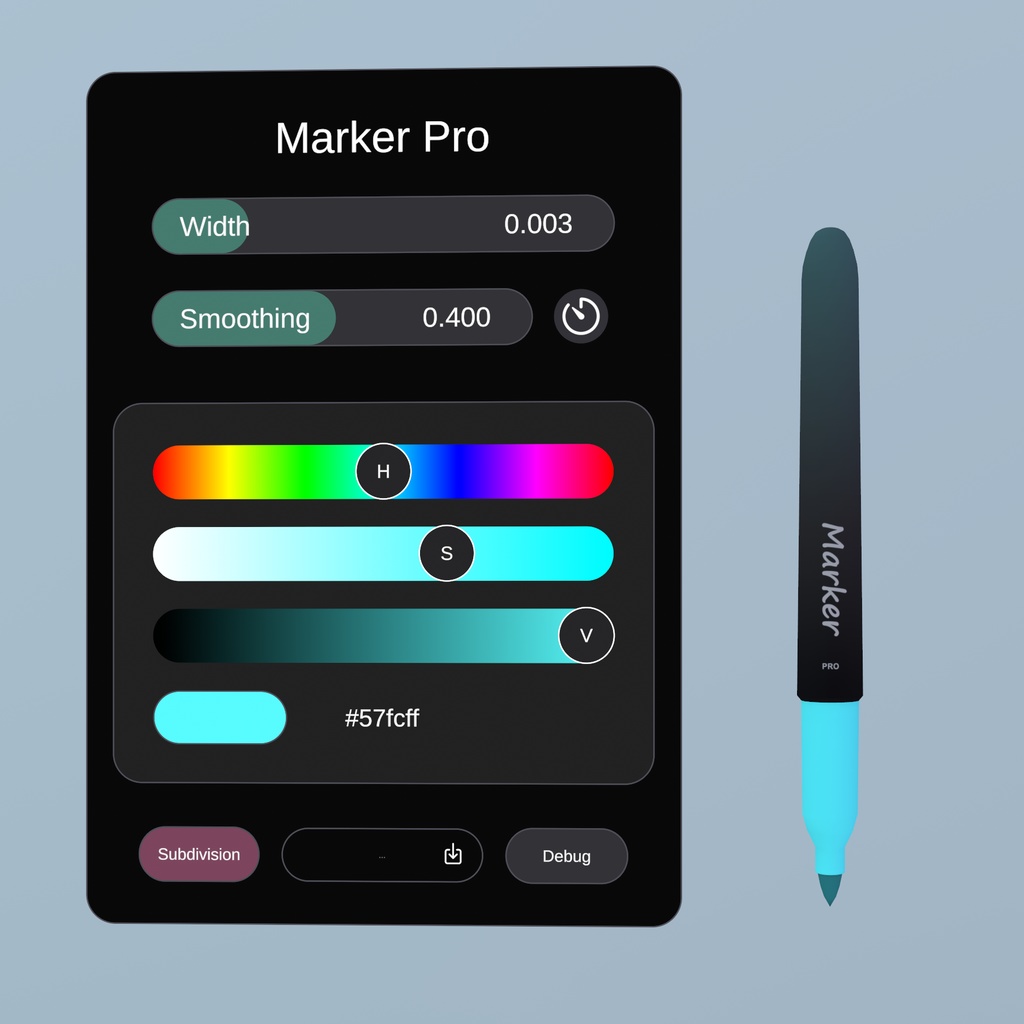
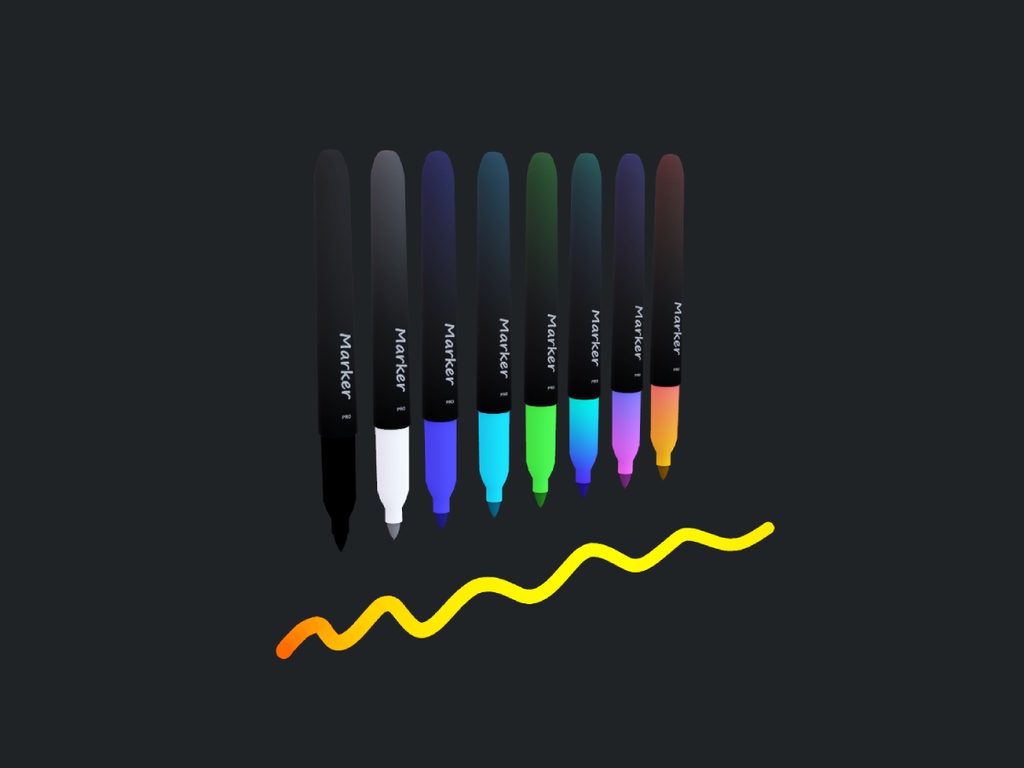


VRChat ワールド用のカスタマイズ可能な描画プレハブ ▪ Customizable Drawing Prefab for VRChat Worlds
日本語
■VRCマーカープロ VRChat ワールド用のカスタマイズ可能な描画プレハブ ▪ 🔗 VRChat で試してみる: https://vrchat.com/home/world/wrld_bd718520-e6ab-434b-a070-ee35b42f0d5f ▪ ✨ 特徴 - 調整可能な色、半径、スムージング - トリガー圧力に基づく動的ライン半径 - PC、Quest、IOS 用のカスタム 3D ライン レンダラー - 光量 - 遅延参加同期 - 線分ごとの消しゴム - 元に戻す - ラインサブビジョニング (すべてのプラットフォームで利用可能になりました) - グラデーション - 表面に書き込みます - デスクトップのホットキー - Json エクスポート ▪ 📝 セットアップ - Unity パッケージをダウンロードしてインポートします。インポートされたアセットは最終的に Packages フォルダーに保存されます (アセットではありません)。 - TMP Essential Resources をまだインポートしていない場合はインポートします (メニュー項目「Window > TextMeshPro > Import TMP Essential Resources」を開きます)。 - マーカー プレハブをシーンにドラッグ アンド ドロップし、設定を調整します 表面に描画する - マーカー上の「衝突レイヤー」を新しい特別なレイヤーに設定します - そのレイヤーに設定されたプリミティブ コライダー (Sphere、Box、Capsule、または Convex Mesh Collider) を持つゲームオブジェクトを作成し、「Is Trigger」を有効にします - マーカーがコライダーに入ると、それをターゲットとして設定し、その表面上の最も近い点に描画します - マーカーが範囲外に移動しても、通常通り描画を続けます - 詳細については、付属のサンプルシーンを参照してください。 ▪ 🛠️ 変更履歴 [4.1.2] - 2026-6-25 - 色と半径がポイントごとに保存されるようになりました。設定で調整すると、前の行の既存の色と半径が維持されます。 - 描画中に色や半径を変更することも可能 - トリガー圧力に基づく動的半径 - サブディビジョンがすべてのプラットフォームで利用可能になりました - ビルボアリング計算がわずかに改善されたライン レンダラ シェーダをリファクタリングしました。 - ラインレンダラーのライトボリューム - UI でのその他の設定 - 調整可能なグラデーションの長さ - ライトボリュームの強度 - 右トリガーアップの UI に新しいトグルを追加しました - エクスポートされたデータ形式が変更されました。グローバルな色と半径がなくなったため、代わりにすべての位置が .w にビットパックされます。 - データは Vector3 ではなく 32 ビット Vector4 になりました - グラデーションはすぐに評価されてパックされるため、グラデーションと単色の違いがなくなりました。 [4.0.3] - 2026-5-30 - うどんシャープが適切なシェーダを適用できない場合に備えて、ライン レンダラにフォールバック シェーダを追加しました [4.0.2] - 2026-4-17 - マーカーインポート時の境界の最小文字列名と最大文字列名の不一致を修正 [4.0.1] - 2026-1-11 - 衝突検出とセットアップの改善 - マーカー ゲーム オブジェクトがデフォルトで無効になっている場合の null 例外を修正しました - エクスポートされた JSON に半径を追加しました [4.0.0] - 2025-12-25 - 完全な書き直し - ゲーム内のカスタマイズ - デスクトップホットキーの追加 - 頂点数の制限と上書きを削除しました - 詳細情報を含む色付きのツールチップ - ジオメトリ サブディビジョン シェーダーが 3 倍高速になりました - アンチエイリアシングの改善 - 画面への書き込みはどの FoV 設定でも機能するようになりました - VRAM の使用量が削減され、位置テクスチャが固定の一定サイズではなくリストのように動的にサイズ変更されるようになりました。 - ライン レンダラーに 1 つの 32 ビット サブメッシュの代わりに 16 ビット インデックスと複数のサブメッシュを使用することで、メッシュ メモリを削減しました。 - 消去を押し続けると持続時間の進行状況が表示されるようになりました - 距離カリングを追加しました - 霧がラインレンダラーに影響を与えるようになりました - 遅延参加同期がデフォルトでオンになりました - 図面をjsonでエクスポート ▪ 技術的な詳細 このプレハブは Unity ライン レンダラー コンポーネントを使用しません。これは、Udon と Shaders で構築されたカスタム ライン レンダラーです。これにより、より柔軟な対応が可能になり、動的なサブディビジョンやセグメントごとの消去などが可能になります。消しゴムは任意の点を消去でき、交差テストは GPU で実行されます。すべてのデータはテクスチャに保存され、一度消去されると空の未使用スペースが残ります。テクスチャを圧縮するために、デフラグメンテーション パスも実装されています。リモート スムージングは完全にシェーダー ベースであり、線分が表示されるときに事前に計算されたタイムスタンプを使用します。 Json Format - "version" Version number - "createdAt" ISO 8601 in UTC - "boundsMin", "boundsMax" Axis-aligned bounding box - "data" 32 bits per channel Vector4 array, bytes encoded as Base64 string, line breaks marked with (0,0,0,0). Position is stored in XYZ components while W stores bit packed color and radius Json Example --- JSON --- { "version": "4.1.2", "createdAt": "2026-06-16T19:13:47.5341250Z", "boundsMin": [ 0.1863171, 0.8104832, -0.2732814 ], "boundsMax": [ 0.4189235, 1.095035, -0.003031671 ], "data": "AAAAAAAAAAAAAAAAAAAAAJtbmD6iun4/rHAxvv9BHh6bW5g+orp+P6xwMb7/QR4e7UOaPj9Kej/XBCy+/0EeHqKRnD6Zr3U/lr0ovv9BHh6YkZ8+vkdwP0oFJ77/QR4eCrmhPvuKbD+8aCa+/0EeHv7Voj4dmmo/Kw0mvv9BHh6PoKI+4AJrP2VQJr7/QR4ef6SgPpS+bT9AzyO+/0EeHqSOnj7h1G8/hckdvv9BHh7145w+JAtxP9MAF77/QR4exAicPmMgcT/fLxG+/0EeHrP3mz6SA3A/VeYLvv9BHh7pd5w+XSNuP1doB77/QR4eqHWdPvrgaz+BywS+/0EeHjtsnj6zBmo/v7wDvv9BHh6mfp4+RuNpP4WoA77/QR4eAAAAAAAAAAAAAAAAAAAAAJbflT65OXI/RQLTvf9BHh4LvZY+UOdwP24Q1L3/QR4e0s6YPv78bT8Vudi9/0EeHtYQmz6PCWs/zsrfvf9BHh4KhZw+bhVpP+rh473/QR4eAAAAAAAAAAAAAAAAAAAAACiYkj5Gw3c/OI/Tvf9BHh4=" } Unpacking Color and Radius --- C --- // returns linear color in .rgb and radius in meteres in .w static const float kRadiusScale = 0.0001; float4 UnpackColorAndRadius(float w) { uint packed = asuint(w); uint4 value; value.r = packed & 0xFFu; value.g = (packed >> 8u) & 0xFFu; value.b = (packed >> 16u) & 0xFFu; value.a = (packed >> 24u) & 0xFFu; float4 result = value / 255.0; result.w *= (kRadiusScale * 255.0); return result; } ▪ 利用規約 個人的な **個人ライセンス**に基づいて、次のことが許可されています。 - アセットの変更を作成します。 - アセットとその変更を個人のパブリックワールドとプライベートワールドの両方にアップロードします。 ただし、以下の行為は**禁止されています**。 - アセットを単独で再販する。 - 販売または配布するためのワールド パッケージにアセットを含めます。 コマーシャル **商用ライセンス**に基づいて、次のことが許可されています。 - ワールド パッケージの合計価格が **アセットの元の価格よりも高い**場合に限り、販売用のワールド パッケージにアセットを含めます。 - アセットを他のユーザーのアカウントにアップロードします。 次の制限が適用されます。 - オリジナルの形式または改変としてアセット自体を再配布することは固く禁止されています。 - このライセンスに基づいて販売または譲渡された資産は、受信者の個人ライセンスと同じ権利と制限を保持します。 どちらのライセンスのパッケージ内容も同じです。
English
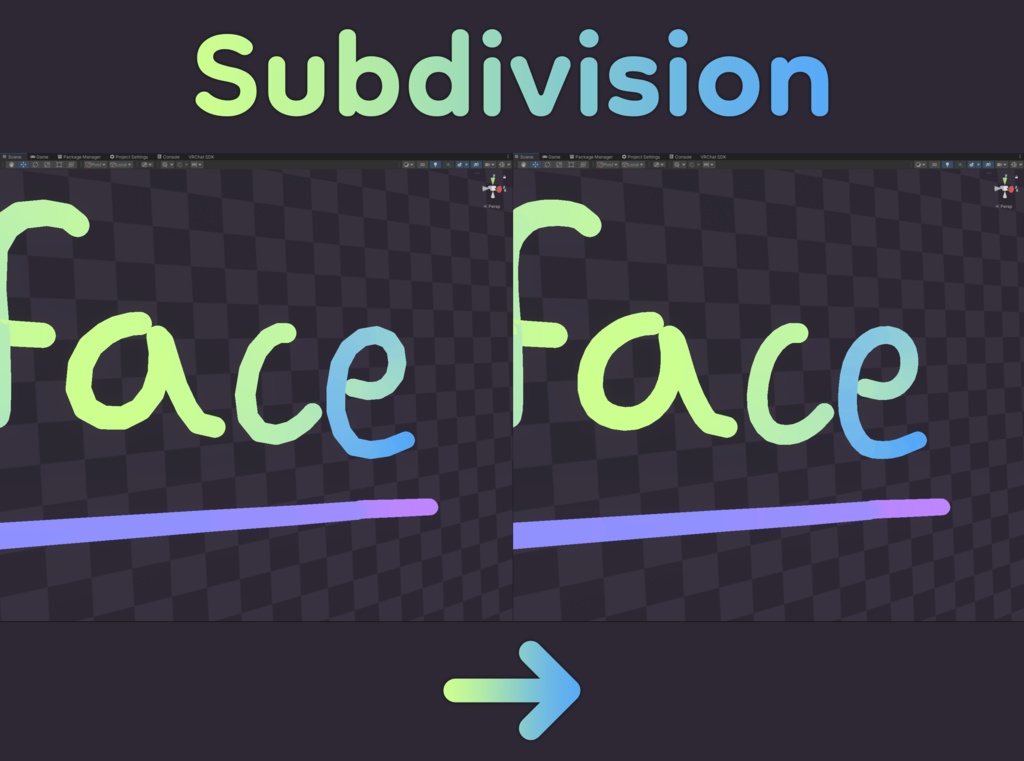
■ VRCMarker Pro Customizable Drawing Prefab for VRChat Worlds ▪ 🔗 Try it out in VRChat: https://vrchat.com/home/world/wrld_bd718520-e6ab-434b-a070-ee35b42f0d5f ▪ ✨ Features - Adjustable colors, radius, smoothing - Dynamic line radius based on trigger pressure - Custom 3D line renderer for PC, Quest and IOS - Light Volumes - Late join sync - Per line segment eraser - Undo - Line Subvidision (Now avaliable on all platforms) - Gradients - Write on surface - Desktop hotkeys - Json export ▪ 📝 Setup - Download and import the Unity package. The imported assets end up in the Packages folder (Not assets) - Import TMP essentials if you havent already (Open Menu Item "Window > TextMeshPro > Import TMP Essential Resources") - Drag & Drop the marker prefab into your scene and adjust settings Drawing On Surfaces - Set "Collision Layers" on the marker to a new special layer - Create a GameObject with a primitive collider (Sphere, Box, Capsule or Convex Mesh Collider) set to that layer and enable "Is Trigger" - When a Marker enters a collider, it sets it as a target and draws at the closest point on its surface - Once the Marker moves outside the range, it continues drawing normally - Refer to the included example scene for additional information ▪ 🛠️ Changelog [4.1.2] - 2026-6-25 - Color and radius are now stored per point, when adjusted in settings previous lines keep their existing color and radius - It is also possible to change color and radius while drawing - Dynamic radius based on trigger pressure - Subdivision is now available on all platforms - Refactored the line renderer shader with slightly improved billboarding math - Light Volumes for the line renderer - More settings in the UI - Adjustable gradient length - Light Volumes intensity - Added a new toggle for the UI with right trigger up - The exported data format has now changed, since there is no longer a global color and radius, every position has them bit packed in .w instead. - Data is now a 32bit Vector4 instead of Vector3 - No more difference between a gradient and solid color because gradients are evaluated and packed right away [4.0.3] - 2026-5-30 - Added a fallback shader for the line renderer for cases when udon sharp fails to apply the right shader [4.0.2] - 2026-4-17 - Fixed bounds min and max string names mismatch for marker import [4.0.1] - 2026-1-11 - Improved collision detection and setup - Fixed null exceptions when markers game objects are disabled by default - Added radius to exported json [4.0.0] - 2025-12-25 - Complete rewrite - In-game customization - More desktop hotkeys - Removed vertex count limits and overwriting - Colored tooltips with more information - The geometry subdivision shader is now 3 times faster - Improved anti-aliasing - Writing on screen now works with any FoV setting - Reduced vram usage, the position texture is now dynamically resized like a list instead of a fixed constant size - Reduced mesh memory by using 16bit indices and multiple submeshes instead of one 32bit submesh for the line renderer - Holding erase now shows duration progress - Added distance culling - Fog can now affect the line renderer - Late join sync is now on by default - Export drawings in json ▪ Techical Details This prefab doesn’t use the unity line renderer component. It is a custom line renderer built with Udon and Shaders. This allows for more flexibility so things like dynamic subdivision and per segment erasing is possible. The eraser can erase any point and intersection tests are done on the GPU. All of the data is stored in a texture, once it is erased it leaves empty unused space. A defragmentation pass is also implemented in order to compact the texture. Remote smoothing is entierly shader based, using precalculated timestamps when line segments should appear. Json Format - "version" Version number - "createdAt" ISO 8601 in UTC - "boundsMin", "boundsMax" Axis-aligned bounding box - "data" 32 bits per channel Vector4 array, bytes encoded as Base64 string, line breaks marked with (0,0,0,0). Position is stored in XYZ components while W stores bit packed color and radius Json Example --- JSON --- { "version": "4.1.2", "createdAt": "2026-06-16T19:13:47.5341250Z", "boundsMin": [ 0.1863171, 0.8104832, -0.2732814 ], "boundsMax": [ 0.4189235, 1.095035, -0.003031671 ], "data": "AAAAAAAAAAAAAAAAAAAAAJtbmD6iun4/rHAxvv9BHh6bW5g+orp+P6xwMb7/QR4e7UOaPj9Kej/XBCy+/0EeHqKRnD6Zr3U/lr0ovv9BHh6YkZ8+vkdwP0oFJ77/QR4eCrmhPvuKbD+8aCa+/0EeHv7Voj4dmmo/Kw0mvv9BHh6PoKI+4AJrP2VQJr7/QR4ef6SgPpS+bT9AzyO+/0EeHqSOnj7h1G8/hckdvv9BHh7145w+JAtxP9MAF77/QR4exAicPmMgcT/fLxG+/0EeHrP3mz6SA3A/VeYLvv9BHh7pd5w+XSNuP1doB77/QR4eqHWdPvrgaz+BywS+/0EeHjtsnj6zBmo/v7wDvv9BHh6mfp4+RuNpP4WoA77/QR4eAAAAAAAAAAAAAAAAAAAAAJbflT65OXI/RQLTvf9BHh4LvZY+UOdwP24Q1L3/QR4e0s6YPv78bT8Vudi9/0EeHtYQmz6PCWs/zsrfvf9BHh4KhZw+bhVpP+rh473/QR4eAAAAAAAAAAAAAAAAAAAAACiYkj5Gw3c/OI/Tvf9BHh4=" } Unpacking Color and Radius --- C --- // returns linear color in .rgb and radius in meteres in .w static const float kRadiusScale = 0.0001; float4 UnpackColorAndRadius(float w) { uint packed = asuint(w); uint4 value; value.r = packed & 0xFFu; value.g = (packed >> 8u) & 0xFFu; value.b = (packed >> 16u) & 0xFFu; value.a = (packed >> 24u) & 0xFFu; float4 result = value / 255.0; result.w *= (kRadiusScale * 255.0); return result; } ▪ Terms of use Personal Under the **Personal License**, you are permitted to: - Create modifications of the asset. - Upload the asset and its modifications to both personal public and private worlds. However, the following actions are **prohibited**: - Reselling the asset on its own. - Including the asset in any world package for sale or distribution. Commercial Under the **Commercial License**, you are permitted to: - Include the asset in world packages for sale, provided that the total price of the world package is **higher than the original price of the asset**. - Upload the asset to other users’ accounts. The following restrictions apply: - Redistribution of the asset by itself, either in its original form or as a modification, is strictly prohibited. - Any asset sold or transferred under this license retains the same rights and restrictions as a personal license for the recipient. The package contents for both licences is identical.