

フォントを一括置き換えするやつ #NiAkaDev
- 通常価格ダウンロード商品¥ 500
- にあちゃん応援価格(内容は同じです)ダウンロード商品¥ 800
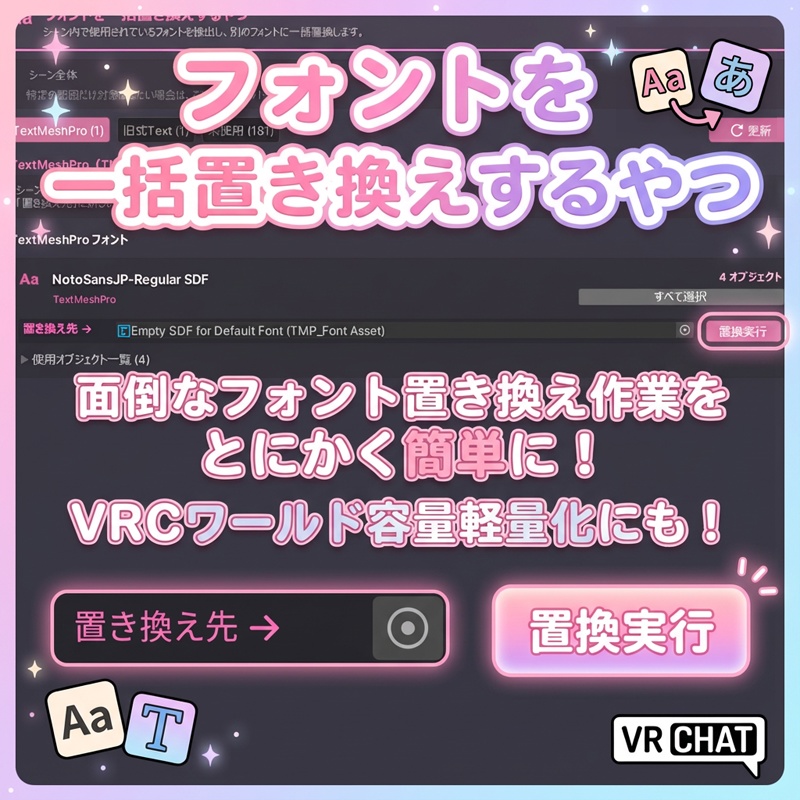
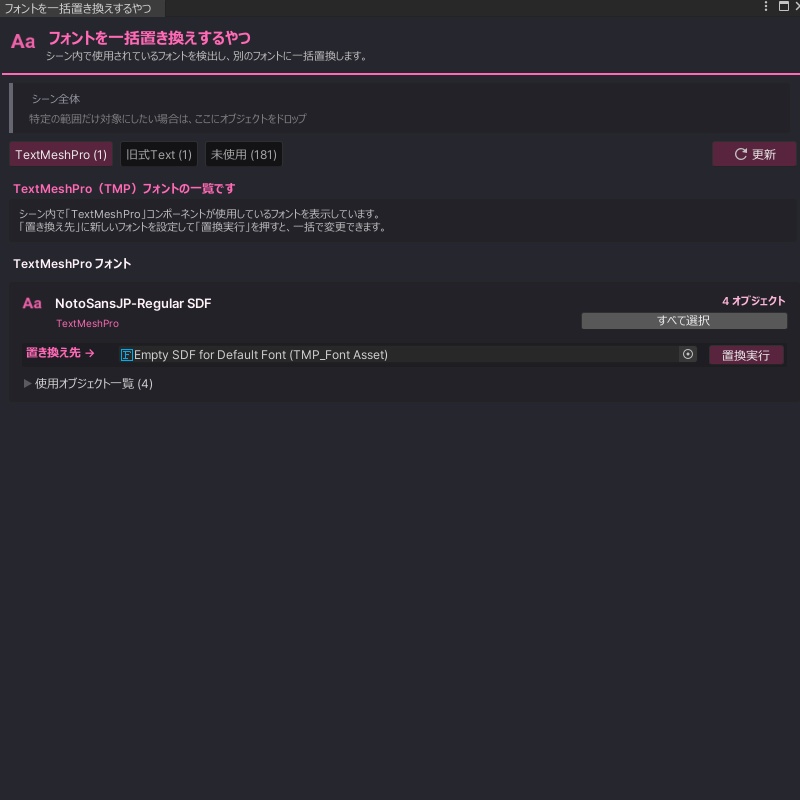
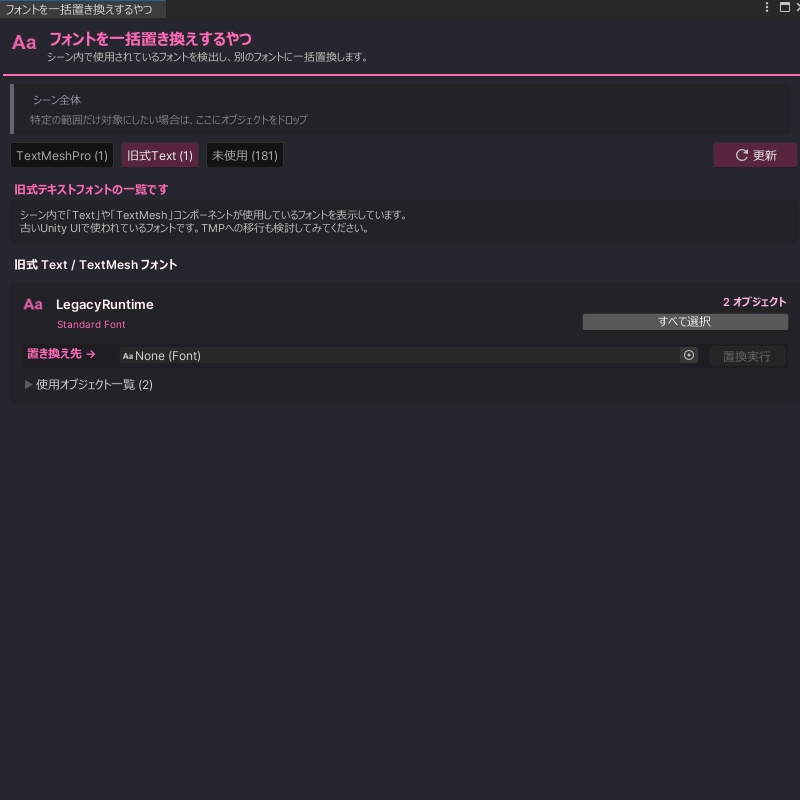
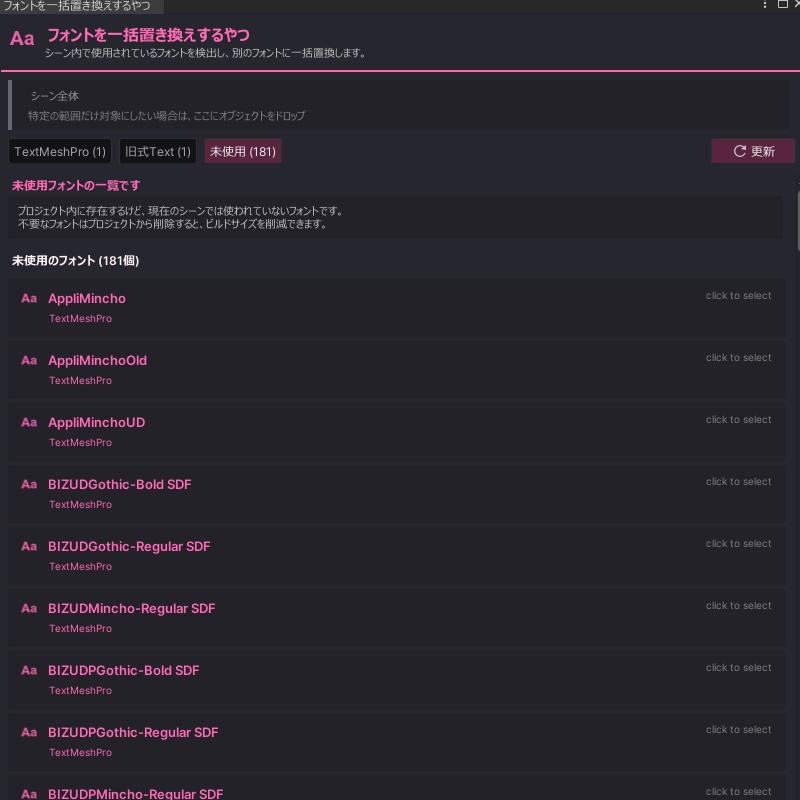


Multi Font Usage Explorer -フォント一括管理・置換ツール- プロジェクト内のフォント使用状況を一目で把握し、一括で整理・置換できるUnityエディタ拡張です。 TextMeshProとLegacy Textの両方に対応しており、「どのオブジェクトがどのフォントを使っているか」をリスト化して可視化します。 ・フォントの統一作業 ・不要なフォントの洗い出し ・特定プレハブ内のフォント一括変更 などに使えます。 シーン全体だけでなく、GameObjectをドラッグ&ドロップして特定のUI階層だけを対象に絞り込むこともできます。 購入者専用ページからダウンロードできるZIPには、VCC / ALCOMへ購入者専用のVPMリポジトリを登録するショートカットと、.unitypackage版が入っています。ショートカットをダブルクリックするだけで、リポジトリが追加されます。URLを手で入力する必要はありません。 BOOTHショップ「NiAka堂」 https://niaka.booth.pm/ 不具合報告やご要望はX(Twitter): @niaka3vrc までお気軽にどうぞ。ハッシュタグ #NiAkaDev での活用報告もお待ちしています! Inspect and manage font usage across your Unity project. This editor extension supports both TextMeshPro and Legacy Text components, listing which objects are using which fonts. Use it for unifying fonts, identifying unused fonts in a scene, or batch-changing fonts across specific prefabs. Drag and drop a GameObject to limit the search scope to that hierarchy instead of the whole scene. The ZIP downloadable from the purchaser-only page bundles a shortcut that registers the purchaser-only VPM repository with VCC or ALCOM, plus a .unitypackage edition. Double-clicking the shortcut adds the repository, so you never have to type the URL by hand. BOOTH shop NiAka: https://niaka.booth.pm/ For bug reports or feature requests, please contact me via X(Twitter): @niaka3vrc.
■ 機能一覧 / Features
◆ スマート検出 TextMeshPro / Textコンポーネントを自動検出します。 ◆ 一括置換 指定したフォントを使っている箇所を、すべて別のフォントへ一括で変更できます。 ◆ 使用状況リスト フォントごとに、そのフォントを使っているオブジェクトを一覧表示します。一覧から選択することもできます。 ◆ 範囲指定モード 特定のGameObjectをドラッグ&ドロップすると、その階層内だけを操作の対象にできます。 ◆ 未使用チェック プロジェクトにはあっても、シーンで使われていないフォントを検出します。 ◆ 多言語UI 日本語 / 英語 / 韓国語 / 中国語の表示切り替えに対応しています。 ◆ Smart Detection Automatically detects TextMeshPro and Text components. ◆ Batch Replacement Replace all instances of a specific font with another in one step. ◆ Usage Visualization Lists objects currently using specific fonts and allows you to select them directly. ◆ Scoped Search Drag and drop a specific GameObject to limit operations to that hierarchy only. ◆ Unused Font Detection Identifies fonts that exist in the project but are not currently used in the active scene. ◆ Multilingual UI Supports interface switching between Japanese, English, Korean, and Chinese.
■ 使い方 / How to Use
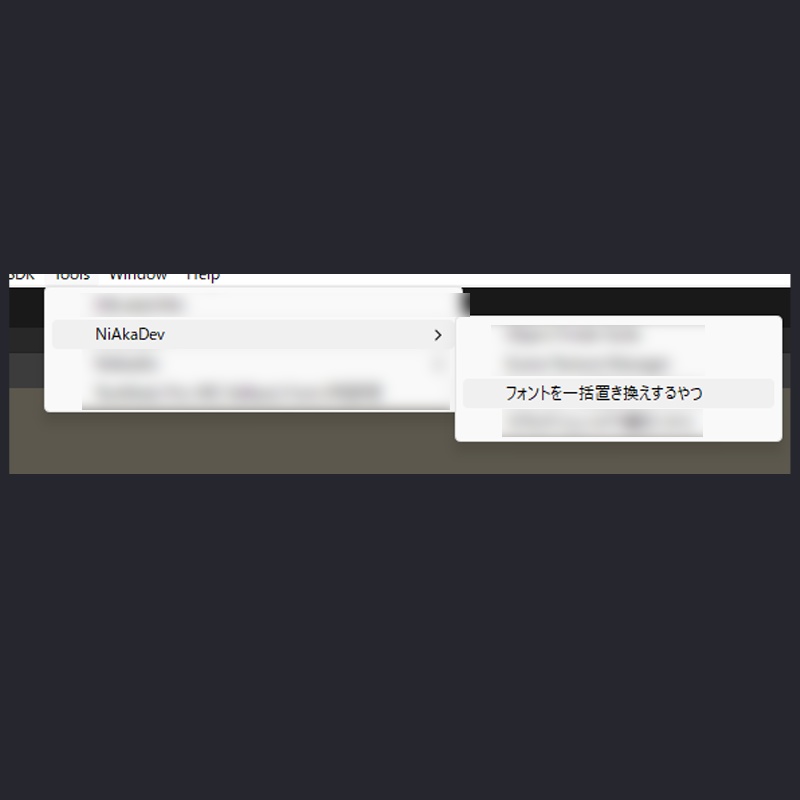
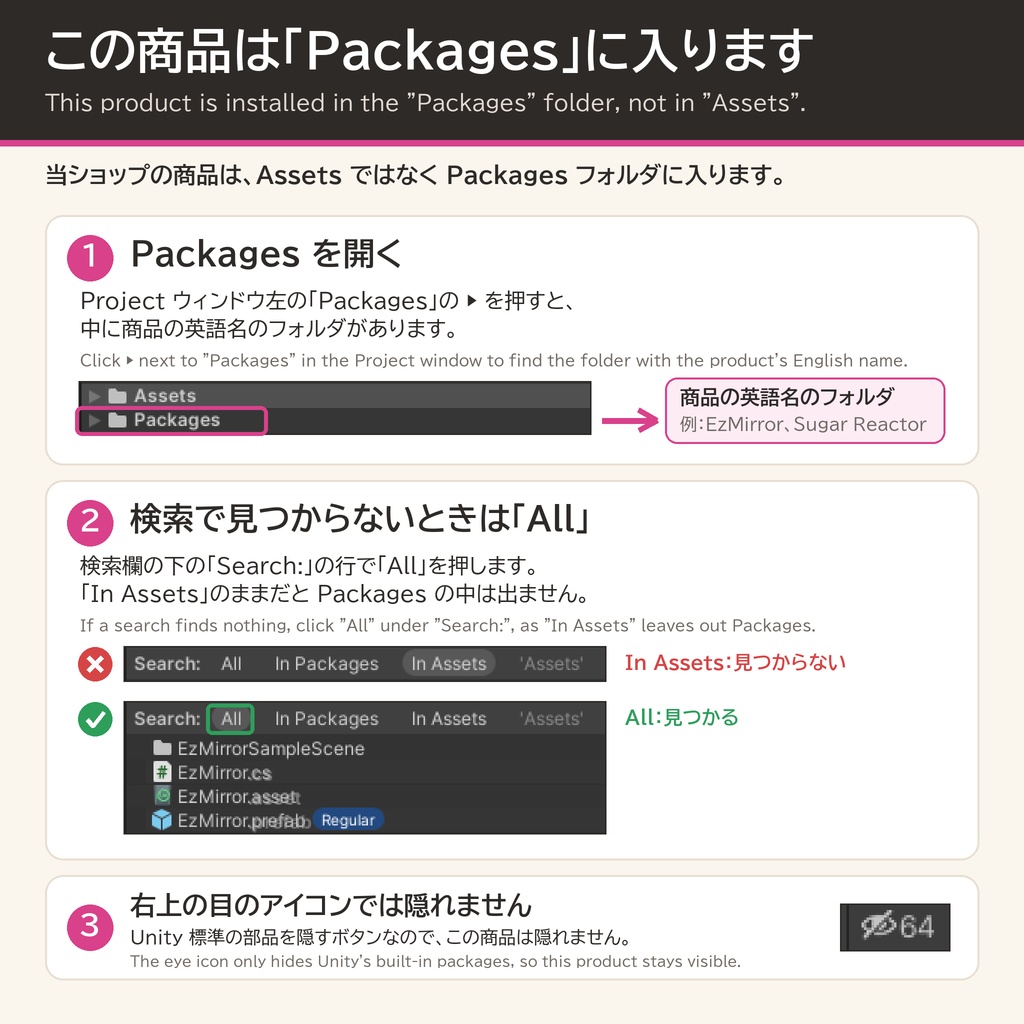
【導入方法】 購入後、BOOTHのダウンロードページに表示される案内から購入者専用ページへ進み、ZIPをダウンロードしてください。 ZIPには次の2つが入っています。 - VCC / ALCOMへ購入者専用リポジトリを追加するショートカット - .unitypackage版 推奨はVPMリポジトリ経由です。ショートカットをダブルクリックするとVCC / ALCOMが開き、リポジトリが追加されます。 あとはVCC / ALCOMでMultiFontUsageExplorerをプロジェクトへ追加してください。URLを手で入力する必要はありません。 (VCC / ALCOMが入っていない環境では、ショートカットを開いても何も起きません) .unitypackageを直接インポートすることもできますが、依存関係や更新管理のため、通常はVPMリポジトリ経由をおすすめします。 更新版が出たときはVCC / ALCOMに表示されるので、その画面から更新できます。.unitypackage版は自動で更新されません。 ※ どちらか一方だけを導入し、同じプロジェクトへ重複して追加しないでください。 ※ 1.1.0以前の.unitypackageから入れ替える場合は、先にAssets/NiAka/Tools/MultiFontUsageExplorerフォルダを削除してください。同じスクリプトが2つ存在すると、メニューが重複して登録されます。 【基本の流れ】 メニューバーの「Tools > NiAkaDev > フォントを一括置き換えするやつ」を開く [TMP / 旧式 / 未使用TMP / 未使用旧式] タブで使用状況を確認 変更したいフォントのカードにある「置き換え先」スロットに新フォントを設定 [実行] ボタンを押すと、対象コンポーネントが一括で書き換わります 取り消したい場合はCtrl+Zで一括操作全体を元に戻せます GameObjectをウィンドウへドラッグ&ドロップすると、その階層内だけを対象にできます [Install] After purchase, open the purchaser-only page from the link on your BOOTH download page and get the ZIP. The ZIP contains two items. - A shortcut that adds the purchaser-only repository to VCC or ALCOM - The .unitypackage edition Installing through the VPM repository is recommended. Double-click the shortcut and VCC or ALCOM opens with the repository added. Then add MultiFontUsageExplorer to your project from VCC or ALCOM. You never have to type the URL by hand. (The shortcut does nothing if VCC or ALCOM is not installed.) You can import the .unitypackage directly, but the VPM repository is usually the better choice for dependency and update management. New versions show up in VCC or ALCOM, so you can update from that window. The .unitypackage edition does not update itself. * Install one of the two, and do not add both to the same project. * When replacing a 1.1.0 or earlier .unitypackage, delete the Assets/NiAka/Tools/MultiFontUsageExplorer folder first. Two copies of the same script register the menu entry twice. [Steps] Open "Tools > NiAkaDev > フォントを一括置き換えするやつ". Check the [TMP / Legacy / Unused TMP / Unused Legacy] tabs to see the current status. Assign a new font to the "Replace With" slot on any font card you wish to change. Click [Execute] to batch replace the target components. Press Ctrl+Z once to undo the whole batch. Drag and drop a GameObject onto the window to limit the operation to that hierarchy.
■ 動作確認環境 / Tested Environment
・Unity 2022.3.22f1 ・Editor専用ツール(ビルドや実行時の動作には影響しません) ・VRChat SDKには依存しません 導入は、VCC / ALCOMに購入者専用リポジトリを追加する方法と、同梱の.unitypackageをインポートする方法があります。 VPMリポジトリから導入しておくと、更新版が出たときにVCC / ALCOMの画面から更新できます。 --- Unity 2022.3.22f1 Editor-only tool. It does not affect builds or runtime behavior. It does not depend on the VRChat SDK. You can install it by adding the purchaser-only repository to VCC or ALCOM, or by importing the bundled .unitypackage. Installing from the VPM repository lets you update from VCC or ALCOM when a new version is released.
■ 利用規約 / Terms of Service
正確な条件は、同梱のPackages/com.niaka.multi-font-usage-explorer/LICENSE.txtを参照してください。 概要 - 購入者は、ご自身のUnityプロジェクト(VRChatのワールド / アバター制作を含む)で使用できます。 - 商用、非商用の制作、受注案件で利用できます。 - ご自身のプロジェクトであれば、数の制限なく導入できます。 - 本パッケージの全部または一部を、購入していない相手へ再配布することはできません。 - 購入者専用ページ、そのZIP、購入者専用リポジトリのURLを他人へ共有することはできません。 - 購入していないクライアントや共同制作者へ、本パッケージを含んだプロジェクトを引き渡すことはできません。完成物を納品してください。 - 単体での販売、再許諾、アップロード、ミラー、抜き出した素材の再配布はできません。 - NFT、暗号資産、関連するWeb3製品には利用できません。 本ツールはプロジェクト内のフォント参照を書き換えます。一括置換の前にバックアップまたはコミットを取ってください。 本アセットの使用によるトラブル・損害について、作者は責任を負いかねます。 UnityやSDKのアップデートにより仕様変更が生じた場合は、可能な範囲でサポートします。ただし、完全な動作保証はいたしかねます。 --- [Terms of Service] See Packages/com.niaka.multi-font-usage-explorer/LICENSE.txt for the complete terms. The English terms in that file are authoritative. Summary: - Buyers may use the package in their own Unity projects, including VRChat world and avatar projects. - Commercial, non-commercial, and paid client work are allowed. - Install it in as many of your own projects as you need. - Do not redistribute the package, in whole or in part, to anyone who has not purchased it. - Do not share the purchaser-only page, its ZIP, or the purchaser-only repository URL. - Do not hand over a project containing the package to a client or collaborator who has not purchased it. Deliver the finished work instead. - Do not sell, sublicense, upload, mirror, or redistribute extracted parts of the package. - Do not use the package with NFTs, cryptocurrency, or related Web3 products. This tool rewrites font references in your project. Back up or commit your work before running a batch replacement. The author is not responsible for any trouble or damage caused by the use of this asset. While support may be provided where possible for changes caused by Unity or SDK updates, full operation is not guaranteed.
■ 更新履歴 / Change Log
■ 1.2.0(2026/08/28) ・配布形態をVPMパッケージへ変更 (購入者専用リポジトリをVCC / ALCOMへ登録して導入できます) ・購入者専用ページのZIPに、リポジトリ追加用ショートカットと.unitypackage版を同梱 ・1.1.0以前の.unitypackageから入れ替える場合は、Assets/NiAka/Tools/MultiFontUsageExplorerを削除してから導入してください (同じスクリプトが2つあるとメニューが重複します) ・説明書をREADME.txt、利用条件をLICENSE.txtに統合 ■ 1.1.0(2026/03/06) ・GUIStyleをキャッシュし、エディタ描画の負荷を軽減 ・「未使用」タブを「未使用TMP」「未使用旧式」の2タブに分割 ・フォントカードのフォント名をクリックすると、プロジェクト内でそのアセットが選択・ハイライトされるように変更 ・フォントが未設定(None)のコンポーネントを検出・表示し、一括でフォントを割り当てられる機能を追加 ・一括置換・一括割り当てをCtrl+Z一回で元に戻せるように変更 ■ 1.0.1(2025/12/02) ・LegacyRuntimeを選択した場合に一覧へ何も表示されない問題を修正 ■ 1.0.0(2025/12/01) ・初回リリース --- Change Log ■ 1.2.0 (2026/08/28) ・Switched distribution to a VPM package (register the purchaser-only repository in VCC or ALCOM) ・The purchaser-only ZIP now bundles a repository shortcut and the .unitypackage edition ・When replacing a 1.1.0 or earlier .unitypackage, delete Assets/NiAka/Tools/MultiFontUsageExplorer before installing (two copies of the script register the menu twice) ・Merged the guide into README.txt and the terms into LICENSE.txt ■ 1.1.0 (2026/03/06) ・Cached GUIStyle instances to reduce editor rendering overhead ・Split the Unused tab into Unused TMP and Unused Legacy ・Clicking a font name on a card now selects and highlights that asset in the Project view ・Added detection of components with no font assigned (None), with batch font assignment ・Batch replace and batch assign can now be undone with a single Ctrl+Z ■ 1.0.1 (2025/12/02) ・Fixed an issue where nothing was displayed in the list when LegacyRuntime was selected ■ 1.0.0 (2025/12/01) ・Initial release