
【After Effects スクリプト】 Bowl Wobble
- ダウンロード商品¥ 500
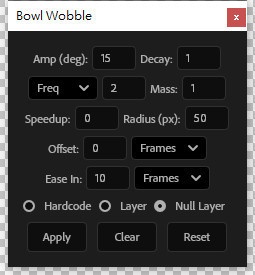


Bowl Wobble – 説明 Bowl Wobble は、ボウル(または同様の円底オブジェクト)を置いた後の物理的な揺れ アニメーションをシミュレートするために設計された Adobe After Effects 用スクリプトです。 インストール場所 – ファイルを After Effects の Scripts UI フォルダーに配置します。例: Windows: C:\Program Files\Adobe\Adobe After Effects \<バージョン>\Support Files\Scripts\ScriptUI Panels macOS: /Applications/Adobe After Effects \<バージョン>/Scripts/ScriptUI Panels 以下に各 UI オブジェクトの説明を示します。 Amp (deg) – 初期傾斜振幅(単位:度)。ボウルが最初にどれだけ激しく揺れるかを決めます。 推奨範囲:5 〜 30。正の値が大きいほど初期傾斜が激しくなります。 Decay – 振幅の減衰速度を決定します(数値が大きいほど早く止まります)。 推奨範囲:0.1 〜 2。値が高いほどアニメーションは速く安定し、低いほど揺れが長く続きます。 頻度モード – Freq – 初期周波数を手動で設定(Hz)。推奨範囲:1 〜 5。 Gravity – 重力と半径から自動的に周波数を計算(物理シミュレーション)。 推奨範囲:1 〜 20(地球標準は約 9.81)。 Speedup – 周波数加速係数。時間経過とともに周波数が増えるかどうかを決めます。 推奨範囲:0 〜 1。0 は周波数が一定、正の値は徐々に周波数が上がります(摩擦変化のシミュレーション)。 Radius (px) – ボウル底の半径(ピクセル)。リフト高さや円周方向の変位に影響し、 Gravity モードでも周波数計算に使用されます。 推奨範囲:10 〜 100。0 に設定すると変位・リフトがなくなり、単に傾くだけになります。 Mass – オブジェクトの質量。実効減衰率に影響します。 推奨範囲:0.5 〜 5。質量が大きいほど減衰が遅くなり、揺れが長く続きます。 Offset – 時間オフセット。正の値はアニメーション開始を遅らせ、負の値は早めます。 Seconds – 秒単位で指定。 Frames – フレーム単位で指定(自動的に秒へ変換)。 推奨範囲:‑10 〜 10。 Controller Hardcode – 値を直接エクスプレッションに書き込む機能。 Layer – 選択したレイヤーにスライダーコントローラを追加し、すべてのパラメータをリアルタイムで調整できます。 Null Layer – 空のヌルレイヤーをコントローラとして作成し、同様にすべてのパラメータを即座に調整できます。 Apply – アニメーションを選択したすべてのレイヤーに適用します。 「On Layer」を選んだが対象レイヤーが対応していない場合は警告が表示されます。 Clear – 選択レイヤーのエクスプレッションを削除し、 名前が BowlWobble_Controller で始まるコントローラーレイヤーをすべて削除します。 Reset – すべてのパラメータをデフォルト値に戻し、設定を保存します。 使用上の注意 – 対象レイヤーは 3D レイヤーである必要があります。 GLB モデルの場合、アンカーポイントはボウル底の中心に配置してください。 Bowl Wobble 說明 Bowl Wobble 是一款 Adobe After Effects 腳本, 專為模擬碗(或類似圓底物體)放置後的物理搖擺動畫而設計。 安裝位置:將檔案放入 After Effects 的 Scripts UI 資料夾, 例如:Windows: C:\Program Files\Adobe\Adobe After Effects [版本]\Support Files\Scripts\ScriptUI Panels macOS: /Applications/Adobe After Effects [版本]/Scripts/ScriptUI Panels 以下逐一說明每個 UI 物件: 1. Amp (deg):初始傾斜幅度(單位:度)。 決定碗一開始搖擺的劇烈程度。 範圍建議:5-30。正值越大,初始傾斜越劇烈。 2. Decay: 決定振幅衰減的速度(越高越快停止)。 範圍建議:0.1-2。值越高,動畫越快穩定;值越低,搖擺持續越久。 3. 頻率模式。 Freq:手動設定初始頻率 (Hz),範圍建議 1-5。 Gravity:使用重力和半徑自動計算頻率(物理模擬),範圍建議 1-20(地球標準 9.81)。 4. Speedup: 頻率加速因子。決定頻率是否隨時間增加。 範圍建議:0-1。0 表示頻率恆定;正值讓頻率逐漸加快(模擬摩擦變化)。 5. Radius (px): 碗底半徑(單位:像素) 影響抬升高度和圓周位移,也用於 Gravity 模式計算頻率。 範圍建議:10-100。設為 0 則無位移/抬升,只傾斜。 6. Mass:物體質量。影響有效衰減率。 範圍建議:0.5-5。質量越大,衰減越慢,搖擺持續越久。 7. Offset:偏移單位,正值延後動畫開始;負值提前開始。 Seconds:以秒為單位。 Frames:以影格為單位(自動轉換為秒)。 範圍建議:-10 到 10。 8. 控制器 Hardcode:直接將值寫入 expression。 Layer:將滑桿控制器加在選取圖層上,可即時調整所有參數 Null Layer:建立空物件圖層作為控制器,可即時調整所有參數。 9. Apply: 應用動畫到所有選取圖層。如果選擇 On Layer 但圖層不支援,會跳出警示。 Clear:清除選取圖層的 expression,並刪除所有 BowlWobble_Controller 開頭的控制器圖層。 Reset:重設所有參數為預設值,並儲存設定。 使用注意事項: 選取圖層需為 3D 圖層。 GLB 模型錨點應在碗底中心。 Bowl Wobble – Description Bowl Wobble is an Adobe After Effects script designed specifically to simulate the physical wobbling animation of a bowl (or any similarly rounded object) after it has been placed. Installation location – place the file in After Effects’ Scripts UI folder, e.g.: Windows: C:\Program Files\Adobe\Adobe After Effects \<version>\Support Files\Scripts\ScriptUI Panels macOS: /Applications/Adobe After Effects \<version>/Scripts/ScriptUI Panels Below is a breakdown of each UI element: Amp (deg) – Initial tilt amplitude (degrees). Determines how violently the bowl starts to swing. Recommended range: 5 – 30. Larger positive values produce a stronger initial tilt. Decay – Controls how quickly the amplitude damps (higher = stops faster). Recommended range: 0.1 – 2. Higher values make the motion settle quickly; lower values keep the wobble going longer. Frequency mode – Freq – Manually set the starting frequency (Hz). Recommended range: 1 – 5. Gravity – Frequency is calculated automatically from gravity and radius (physical simulation). Recommended range: 1 – 20 (Earth’s standard ≈ 9.81). Speedup – Frequency acceleration factor. Determines whether frequency increases over time. Recommended range: 0 – 1. 0 = constant frequency; positive values gradually speed up the frequency (simulating changing friction). Radius (px) – Radius of the bowl bottom (pixels). Affects lift height and circular displacement, and is also used in the Gravity mode to compute frequency. Recommended range: 10 – 100. Setting it to 0 disables displacement/lift; the bowl only tilts. Mass – Object mass. Influences effective damping rate. Recommended range: 0.5 – 5. Larger mass yields slower decay, so the wobble lasts longer. Offset – Time offset. Positive values delay the start of the animation; negative values start it earlier. Seconds – Offset expressed in seconds. Frames – Offset expressed in frames (automatically converted to seconds). Recommended range: ‑10 to 10. Controller Hardcode – Writes the values directly into the expression. Layer – Adds slider controllers to the selected layer for real‑time adjustment of all parameters. Null Layer – Creates an empty (null) layer as a controller, allowing instant tweaking of all parameters. Apply – Applies the animation to all selected layers. If “On Layer” is chosen but the layer does not support it, a warning will appear. Clear – Removes expressions from the selected layers and deletes any controller layers whose names start with BowlWobble_Controller. Reset – Restores all parameters to their default values and saves the settings. Usage notes – The target layers must be 3‑D layers. For GLB models, the anchor point should be positioned at the center of the bowl’s base. 使用此檔案產生的任何問題均由使用者自行承擔風險與責任,下載即視為同意。 Any problems caused by the use of this file are at your own risk and responsibility. 【免責事項】 お客様は、自らの責任において、素材をダウンロードし、これを使用することに同意します。 素材の利用によってお客様に何らかの損害が発生したとしても、損害賠償義務及びその他一切の責任を負いません 不具合等により生じたいかなる損害に関しましては一切責任を負いませんのでご了承ください。