
【Blenderアドオン】Clean Addon Installer (自動有効化機能付き)
- 無料ダウンロード商品¥ 0
- 支援用ダウンロード商品¥ 100
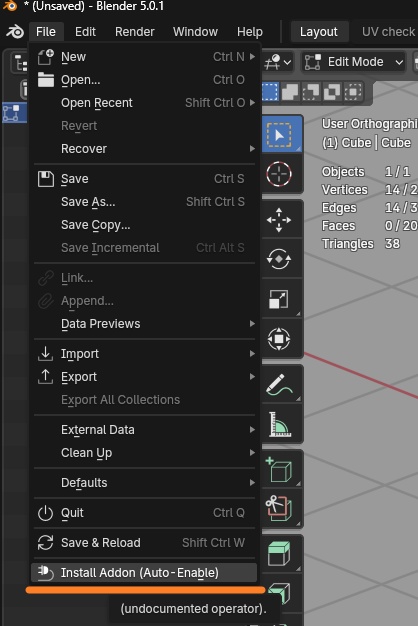
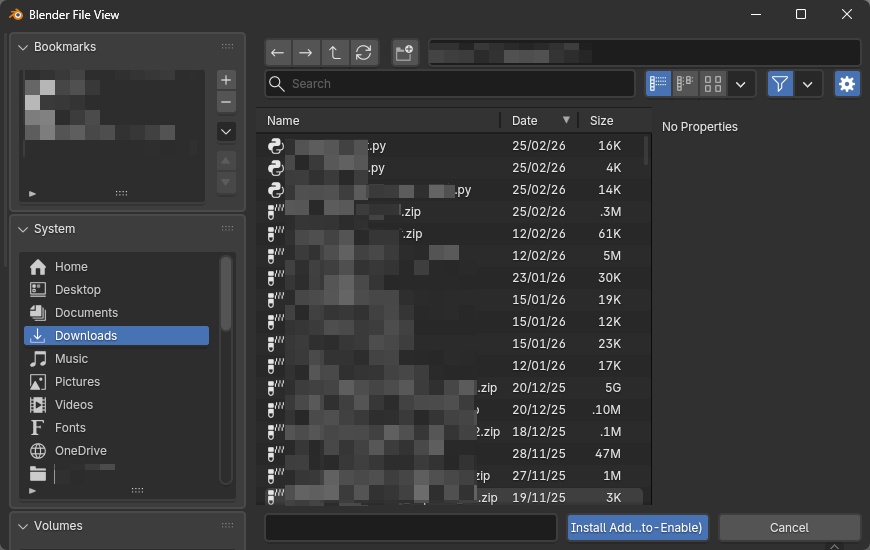


Blenderのプラグイン導入時に、大量のフォルダをスクロールする手間を省く超軽量ツールです。
ーーーーーーーーーーーーーーーーーーーー
■ 内容紹介
・フォルダを自動で非表示にし、.pyと.zipファイルのみを表示します。 ・ファイルを選ぶだけで、インストールから有効化、設定保存まで全自動で完了します。 ・バックグラウンド処理ゼロ。Blenderの動作に一切影響を与えません。 ・Fileメニューの最下部に専用ボタンが追加され、すぐにアクセス可能です。
▼ 使い方
1.通常の手順で本アドオンをインストールし、有効化します。 2.Fileメニューに追加された「Install Addon (Auto-Enable)」をクリックします。 3.フォルダのないクリーンな画面で、導入したいプラグインを選ぶだけです。
▼ 動作環境
Blender 5.0 以降
▼ 利用規約
・商用、非商用問わずご自由に利用いただけます。 ・本データの再配布および販売は禁止します。
ーーーーーーーーーーーーーーーーーーーー
🌍 English
An ultra-lightweight add-on that saves you from scrolling through endless folders when installing Blender plugins. ・Automatically hides folders and displays only .py and .zip files. ・Fully automated: Installs, enables, and saves preferences with just one click. ・Zero background processes. Absolutely no impact on Blender's performance. ・Adds a quick-access button to the bottom of the File menu. ▼ How to Use 1.Install and enable this add-on normally. 2.Click "Install Addon (Auto-Enable)" at the bottom of the File menu. 3.Select your desired plugin from the clean, folder-free window. ▼ Compatibility Blender 5.0 or later ▼ Terms of Use ・Free for personal and commercial use. ・Redistribution or resale of this add-on is strictly prohibited.
ーーーーーーーーーーーーーーーーーーーー
Update informations
[20260226: v1.3] Add smart detection for Legacy Addons and Blender 5.0 Extensions [20260225: v1.1] Release