

Avatar Mesh Hider
- ダウンロード商品¥ 800
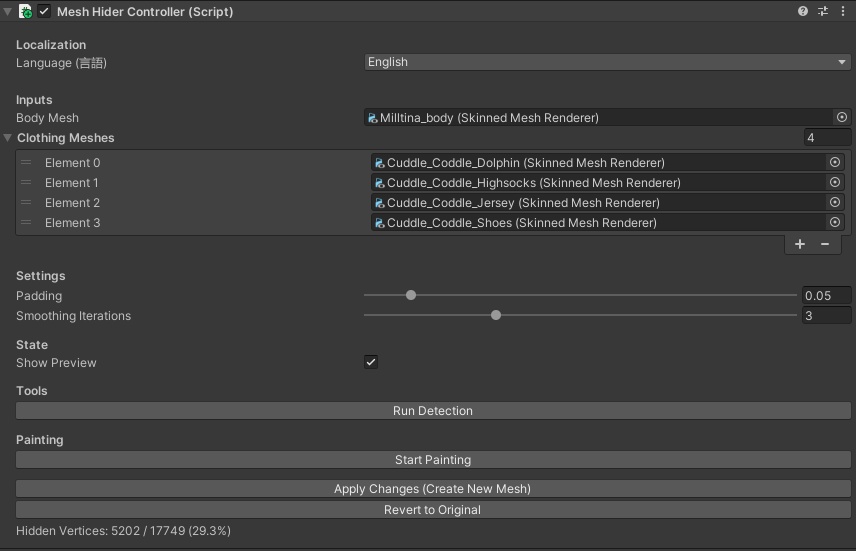
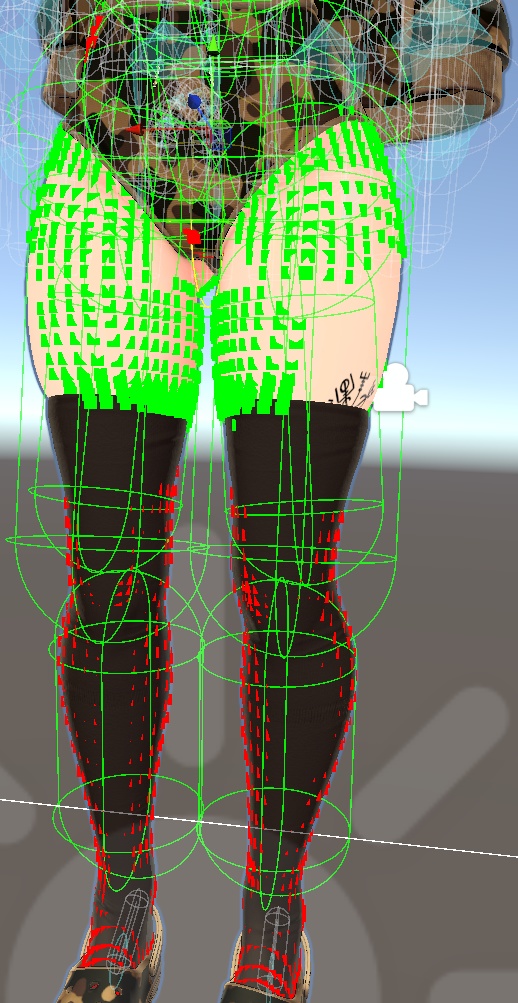


AvatarMeshHider - Automatic Body Mesh Optimization AvatarMeshHider is a simple Unity Editor tool for VRChat avatar creators. It automatically detects and deletes the body mesh vertices that are hidden underneath clothing. This helps reduce your avatar's polygon count without needing to use Blender or manually paint masks. It preserves all your blendshapes, bone weights, and UVs. ### Features * **Automatic Detection**: Uses raycasting to find which parts of the body are covered by clothes. * **Smart Smoothing**: Automatically keeps a safe buffer of vertices around clothing seams so you don't get gaps when the avatar moves. * **Manual Painting**: Fix any mistakes by painting directly on the mesh in the Unity Scene view. * **Non-Destructive**: Generates a new mesh asset and keeps your original safe. You can revert at any time. * **English & Japanese UI**: Toggle language directly in the inspector. ### How to use 1. Add the `MeshHiderController` component to your avatar. 2. Drag in your Body Mesh and Clothing Meshes. 3. Click **Run Detection**. 4. (Optional) Paint to fix any areas (Hold Ctrl to Delete, Shift to Keep). 5. Click **Apply Changes**. ### Requirements * Unity 2022.3 LTS (Tested on VRChat SDK projects) * **Burst** and **Mathematics** packages (These are usually installed by default in Unity or VRChat projects). --- AvatarMeshHider - 自動素体メッシュ軽量化ツール AvatarMeshHiderは、VRChatアバター制作者向けのUnityエディタ拡張ツールです。衣服の下に隠れている素体のメッシュを自動的に検出し、削除します。 Blenderを使ったり、手動でマスクを描いたりすることなく、アバターのポリゴン数を削減できます。ブレンドシェイプ、ウェイト、UVはすべて維持されます。 ### 特徴 * **自動検出**: レイキャストを使用して、服に隠れている部分を自動的に計算します。 * **スマートなスムージング**: 衣服の境界付近の頂点を自動的に保護し、アバターが動いたときに隙間ができないようにします。 * **手動ペイント**: Unityのシーンビューで直接ペイントして、削除エリアを微調整できます。 * **非破壊編集**: 新しいメッシュアセットを生成するため、元のデータは安全に残ります。いつでも元に戻せます。 * **日本語・英語対応**: インスペクターで言語を切り替えられます。 ### 使い方 1. アバターに `MeshHiderController` コンポーネントを追加します。 2. 素体メッシュ(Body Mesh)と衣服メッシュ(Clothing Meshes)をセットします。 3. **Run Detection**(検出実行)をクリックします。 4. (任意)ペイントで修正します(Ctrl長押しで削除、Shift長押しで保持)。 5. **Apply Changes**(変更を適用)をクリックします。 ### 動作環境 * Unity 2022.3 LTS (VRChat SDKプロジェクトで動作確認済み) * **Burst** および **Mathematics** パッケージ(通常、UnityやVRChatプロジェクトにはデフォルトでインストールされています)。