
Blendshape Transfer Tool for Unity
- ダウンロード商品¥ 800
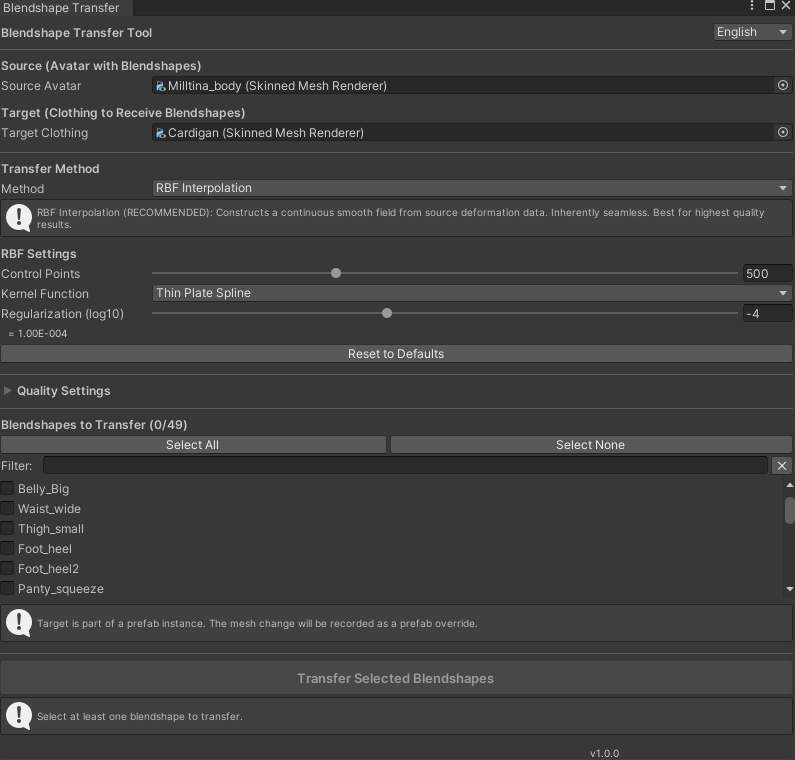

Stop fighting with clipping and manual weight painting. The Blendshape Transfer Tool copies blendshapes (shape keys) from your base avatar to any clothing mesh in seconds, preserving perfect seams and smooth deformations. ### ✨ Key Features RBF Interpolation (New!): State-of-the-art transfer method that creates a seamless, smooth deformation field. No hard edges, no polygon snapping—just perfect, organic movement. One-Click Quality: Choose from "Fast", "Normal", "High", or "Ultra" presets. The tool automatically handles complex settings like Laplacian smoothing and source subdivision for you. Seam Welding: Automatically detects and fixes split vertices at UV seams, preventing those annoying "cracks" in your clothing textures when blendshapes activate. Weighted Multi-Vertex: For loose-fitting items like skirts and capes, use the weighted method to blend movement from multiple body parts for a softer, more natural look. Bilingual UI: Fully localized interface in English and Japanese. ### 🚀 How It Works 1. Drag & Drop: Assign your Source Avatar and Target Clothing. 2. Select: Pick the blendshapes you want to copy (e.g., `Breathing`, `Chest_Big`, `vrc.v_aa`). 3. Transfer: Click "Transfer" and watch it work. The tool creates a new mesh asset and automatically applies it to your clothing renderer. ### 📦 What's Included BlendshapeTransferWindow: The main editor interface. BlendshapeTransferEngine: The core mathematical engine (RBF, Barycentric, Inverse-Distance Weighting). Full Source Code: Customize it if you need to. ### 🔧 Requirements * Unity 2019.4 or later (Tested on 2019.4.31f1 & 2022.3). * VRChat SDK (Optional, but recommended for VRChat avatars). * Works with any SkinnedMeshRenderer (Humanoid or Generic). ### 🇯🇵 日本語 (Japanese) **アバターの表情、体型、呼吸アニメーションをあらゆる衣装に瞬時に転送。** クリッピングや手動のウェイトペイントとの戦いは終わりです。**Blendshape Transfer Tool** は、ベースアバターからあらゆる衣装メッシュにブレンドシェイプ(シェイプキー)を数秒でコピーし、完璧な継ぎ目と滑らかな変形を維持します。 #### 主な機能 * **RBF補間 (新機能!)**: 最先端の転送方法により、継ぎ目のない滑らかな変形フィールドを作成します。硬いエッジやポリゴンのスナップはなく、完璧で有機的な動きを実現します。 * **ワンクリック品質設定**: 「高速」「通常」「高」「最高 (Ultra)」のプリセットから選択できます。ラプラシアン平滑化やソース再分割などの複雑な設定はツールが自動的に処理します。 * **シーム溶接**: UVシームでの分割頂点を自動的に検出し修正することで、ブレンドシェイプが動作した際の衣装テクスチャの「割れ」を防ぎます。 * **重み付き複数頂点**: スカートやケープなどのゆったりしたアイテムには、複数の身体部位からの動きをブレンドする重み付き方法を使用し、より柔らかく自然な見た目を実現します。 * **バイリンガルUI**: **英語**と**日本語**の完全ローカライズされたインターフェース。 #### 使い方 1. **ドラッグ&ドロップ**: 転送元アバターと転送先衣装を割り当てます。 2. **選択**: コピーしたいブレンドシェイプを選択します(例: `Breathing`, `Chest_Big`, `vrc.v_aa`)。 3. **転送**: 「転送」をクリックします。ツールは新しいメッシュアセットを作成し、自動的に衣装レンダラーに適用します。 ---
