
【LIve2D】厨二病の手・俺の目が疼く・・・【VtubeStudio】
- ダウンロード商品¥ 800
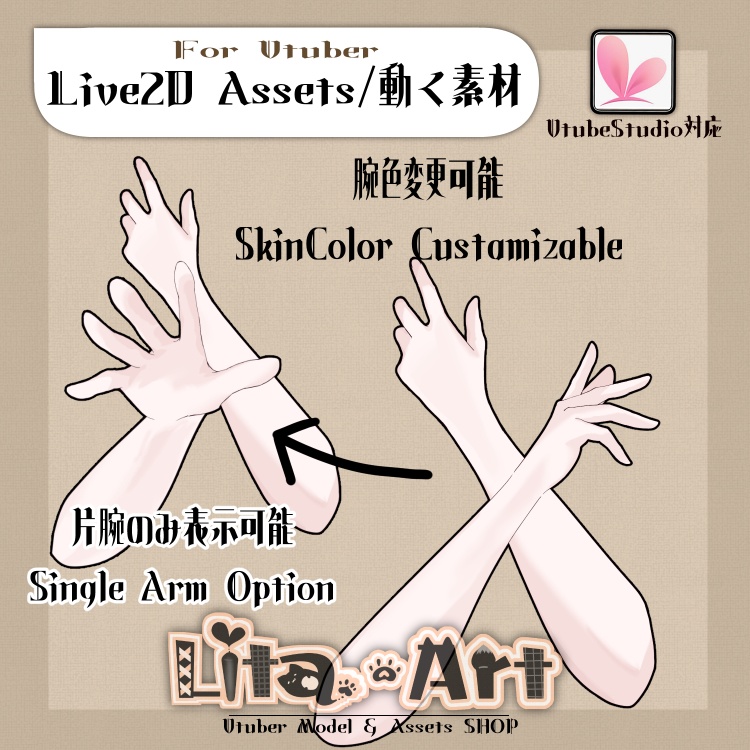

VTube Studio・nizima LIVE対応。腕を交差させたポーズから片手を差し出すポーズに切り替えられるLive2D腕素材です。左右の腕は個別に非表示にでき、腕の色も調整できます。 モデルZIPを解凍し、VTube Studioでは「0312_chunibyou」フォルダをアイテムとして追加します。nizima LIVEでは「0312_chunibyou.model3.json」をLive2Dアイテムとして読み込みます。 Ctrl+1 手を差し出す/Ctrl+2 右腕非表示/Ctrl+3 左腕非表示/Ctrl+0 リセット 【利用規約】個人・商用利用、配信や収益化動画、自分で使うための改変が可能です。クレジットは任意です。著作権はLitaに帰属します。元データ・改変データの再配布や転売、AI学習やNFTへの転用、公序良俗に反する用途は禁止です。 利用規約 https://lita-art.net/terms-and-condition/ 設定ガイド https://lita-art.net/how-to-set-up/ お問い合わせ https://lita-art.net/contact-form/ Compatible with VTube Studio and nizima LIVE. Switch from crossed arms to a reaching hand, hide either arm, and adjust the skin tone. Unzip the model archive. Add the 0312_chunibyou folder as an item in VTube Studio, or import 0312_chunibyou.model3.json as a Live2D item in nizima LIVE. Ctrl+1 Reach pose · Ctrl+2 Hide right arm · Ctrl+3 Hide left arm · Ctrl+0 Reset Personal and commercial use, including monetized streams and videos, is allowed. You may edit the asset for your own use. Credit is optional and copyright remains with Lita. Redistribution or resale of original or modified files, AI training, NFT use, and use contrary to public order or morality are prohibited. Terms of use: https://lita-art.net/terms-and-condition/ Setup guide: https://lita-art.net/how-to-set-up/ Contact: https://lita-art.net/contact-form/ 毎週腕素材をリリースしている腕素材屋さんです。 ぜひ配信のネタにしてください! ⭐︎Lita公式サイト⭐︎ https://lita-art.net/
VTube Studio・nizima LIVE対応 / Compatible with VTube Studio and nizima LIVE
☆★☆★☆★☆★☆★☆★☆★☆★☆ キーバインド設定//Keybind setting 🎮 【Ctrl+1】手を差し出す//Hand Reach Pose 🎮 【Ctrl+2】右腕OFF// Right Arm OFF 🎮 【Ctrl+3】左腕OFF//Left Arm OFF 🎮 【Ctrl+0】リセット//Reset Expression ☆★☆★☆★☆★☆★☆★☆★☆★☆★☆★☆★☆ ーーーーーーーーーーーー
✅ 商用利用・編集可能ですが、著作権は放棄していません。 ✅ クレジット表記は任意です。 ✅ ご利用の際は、下記URL記載の 利用規約 に同意したものとみなします。 🔗 https://lita-art.net/terms-and-condition/ ⚠️ 成人向けコンテンツへの使用規制はしていません。 常識の範囲内でご使用ください。 ーーーーーーーーーーーー Litaのアイテムは、表情ファイルエディター、またはアートメッシュでの色調整が可能です。(表情ファイルエディタからは一部できないものもあります。初期の作品のほとんどはアートメッシュからの色変更になります!) 表情ファイルエディタから可能な場合は、colorと書いてあるパラメータが存在します。そのパラメータをいじって色変更して遊んでみてください! 色変更パラメータ: Color1 – 乗算明暗 Color2 – 乗算カラー Color3 – スクリーン明暗 Color4 – スクリーンカラー 設定方法の詳細はこちらをご覧ください! 日本語 🔗 https://lita-art.net/2026/01/26/how-to-change-color/ English 🔗 https://lita-art.net/2026/01/26/how-to-chage-color/ ーーーーーーーーーーーー 質問・ご相談はDMにて受付中! お気軽にご連絡ください✨ 🔹 LitaのX(Twitter): https://x.com/LitaVtuber 🔹 Litaのホームページ: https://lita-art.net/ ーーーーーーーーーーーー ✅ Commercial use and editing are permitted, but I do not waive my copyright. ✅ Credit notation is optional. ✅ By using this product, you are deemed to have agreed to the Terms of Sale listed at the URL below. 🔗https://lita-art.net/terms-and-condition/ ⚠️ There are no restrictions on use in adult-oriented (NSFW) content. Please use within the bounds of common sense. ーーーーーーーーーーーー Lita’s items can be color-adjusted either through the Expression File Editor or directly via ArtMesh. (Some items cannot be adjusted from the Expression File Editor. Most early works require color changes through ArtMesh.) If the item supports adjustment in the Expression File Editor, there will be a parameter labeled “Color.” Try modifying that parameter to change the colors and have fun experimenting! Color change parameters: Color1 – Multiply Brightness Color2 – Multiply Color Color3 – Screen Brightness Color4 – Screen Color For more details on the setup method, please check here! Japanese 🔗 https://lita-art.net/2026/01/26/how-to-change-color/ English 🔗 https://lita-art.net/2026/01/26/how-to-chage-color/ ーーーーーーーーーーーー Questions and consultations are accepted via DM! Feel free to contact me ✨ 🔹 Lita's X (Twitter): https://x.com/LitaVtuber 🔹 Lita's Website: https://lita-art.net/