
Illustrator Companion
- Illustrator Companion (WinApp)ダウンロード商品¥ 0
- Illustrator Companion EX (WinApp)ダウンロード商品¥ 1,000
- Software License Agreementダウンロード商品¥ 0
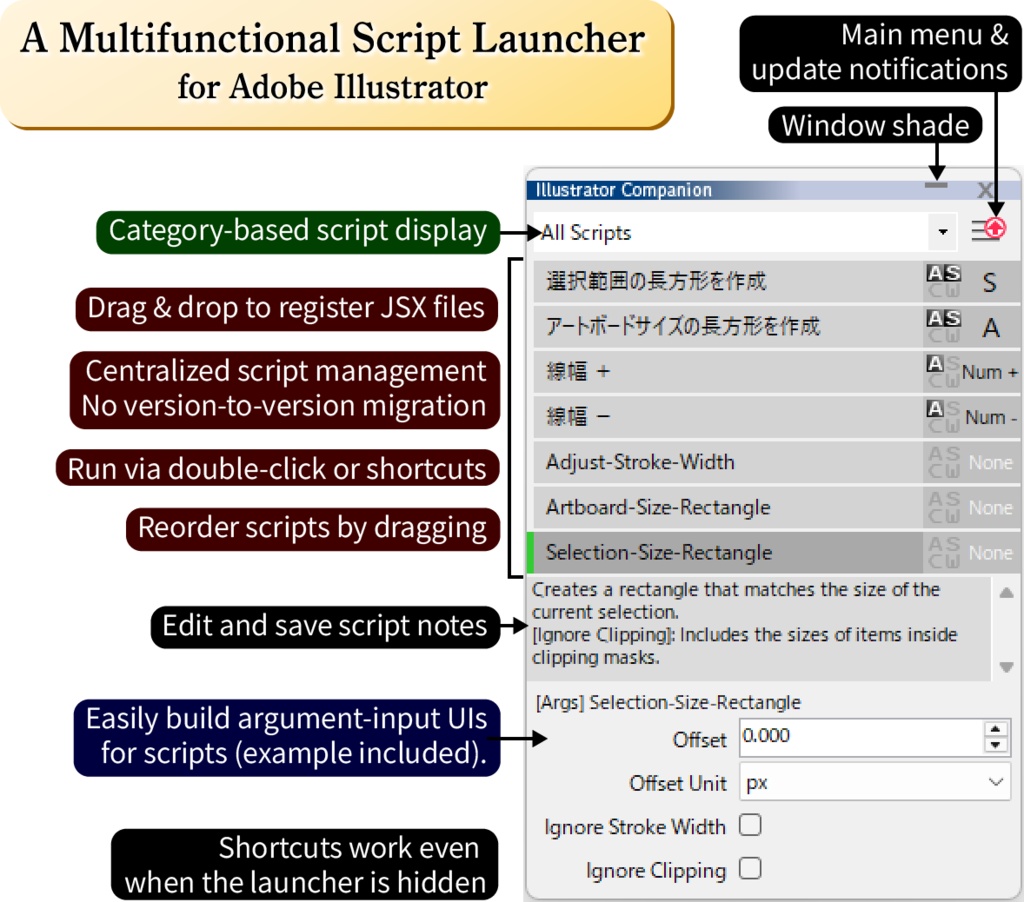


A script launcher and workflow-assist tool for Adobe Illustrator on Windows. You can register JSX scripts by dragging and dropping them into the launcher, and run them via shortcuts or by double-clicking. 日本語ページはこちら(The Japanese page is available here) https://gyonisostudio.booth.pm/items/8084566 ※配布アプリデータは同じものです(日英両対応) * The distributed app data is identical in both versions (the app supports English and Japanese).
【v1.0.0 Key changes in this update】
・Added many new Illustrator enhancement options ・Added features for duplicating, renaming, and editing scripts in external apps ・Various minor fixes and improvements ...and more ▼ View full changelog ▼ https://github.com/gyoni0030/IllustratorCompanion_VerCheck/blob/main/CHANGELOG.en.md About updates: You can safely delete the old version folder. Your settings and registered scripts are stored separately and will be preserved.
【Features】
■Easy drag‑and‑drop script registration Scripts are centrally managed by the launcher. No migration needed when switching Illustrator versions or moving to a new PC. ■Run scripts with keyboard shortcuts Supports modifier key + main key, or main key alone (without interfering with text input). ■Keep the launcher completely hidden You can run shortcuts even while the launcher is fully hidden, so it never takes up workspace. ■Pass arguments to scripts Add simple tags in comments to generate input UI automatically. ■Optional helper utilities for Illustrator Convenient assistive functions you can turn on or off at any time. ■Add notes and related URLs to each script Store memos describing script behavior. Attach a related URL and open it directly from the launcher. ■Automatic update checks
【How to Use】
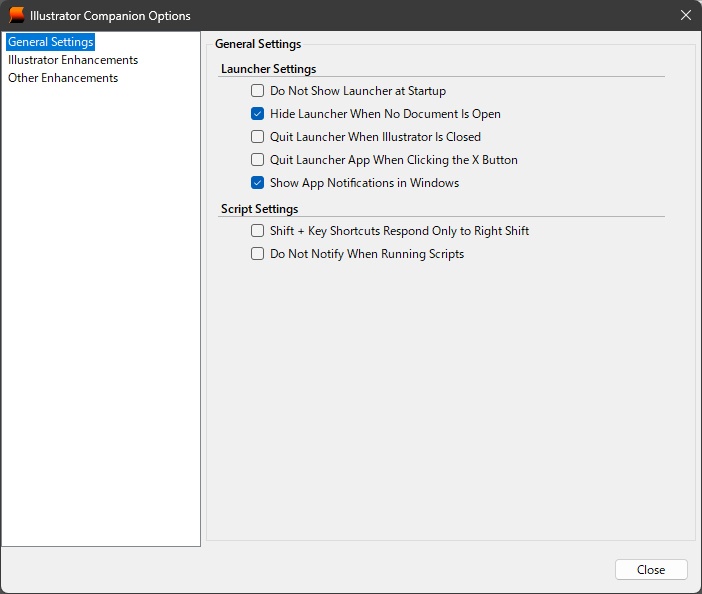
When the app starts, the launcher panel appears in front of Illustrator. If Illustrator is not running, the app waits in the notification area. * On first launch, Windows SmartScreen may display a message saying "Windows protected your PC." If this appears, click “More info” → “Run anyway” to proceed. This is normal behavior, and the application is safe to use. * If the app does not start and shows a message saying ".NET is required," you need the .NET Desktop Runtime (version 8 or later). Please refer to the "System Requirements" section below. ■Registering Scripts: Drag and drop JSX files into the launcher ・Scripts are copied into the app’s save folder. ・If you update the original script, dropping it again will overwrite the copy. ・You can open the save folder in Explorer from the main menu. ■Running Scripts: Double-click a script name or use its shortcut key. ■Script Menu: Right-click a script name to assign shortcuts, set categories, edit notes, and more. ■Hiding the Launcher: Use the title-bar buttons to toggle visibility ・The [-] button toggles window-shade mode (title bar only). ・The [X] button hides the launcher to the notification area (the app does not quit). * To show the launcher again, use the notification-area icon. ■Main Menu: Click the [≡] button at the top right to access options, exit the app, and more. ■Notification-Area Icon (may be hidden): Double-click to show the hidden launcher. Right-click to open the menu, including the option to exit the app.
【System Requirements】
Windows 10 / 11 .NET Desktop Runtime (version 8 or later) Adobe Illustrator 2025 or later recommended (Designed to work with earlier versions such as 2024 and before, but these environments are not available for verification.) * A user has reported that it works in the 2021 version. This application requires the Microsoft .NET Desktop Runtime (version 8 or later). If the application starts normally, the required .NET Desktop Runtime is already installed. If you see a message saying that ".NET is required" and the application does not start, please open the following Microsoft official page and click "Run desktop apps" to install the runtime: https://dotnet.microsoft.com/en-us/download/dotnet/10.0/runtime
【About the EX Edition】
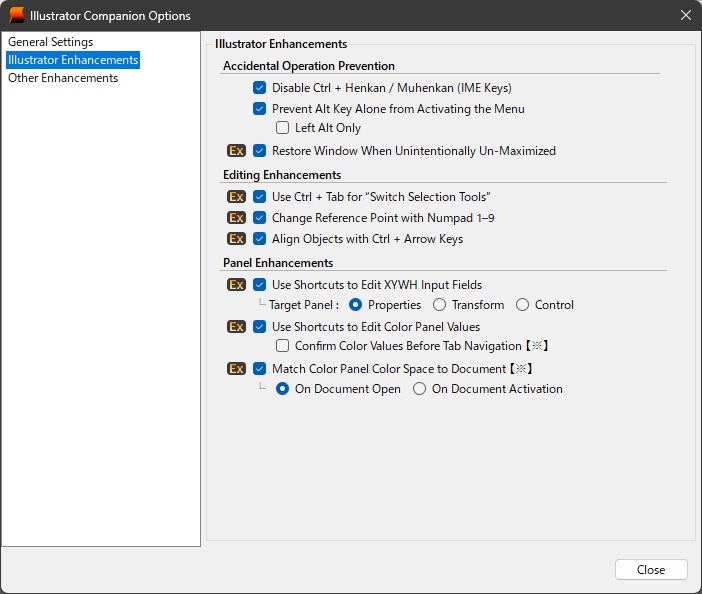
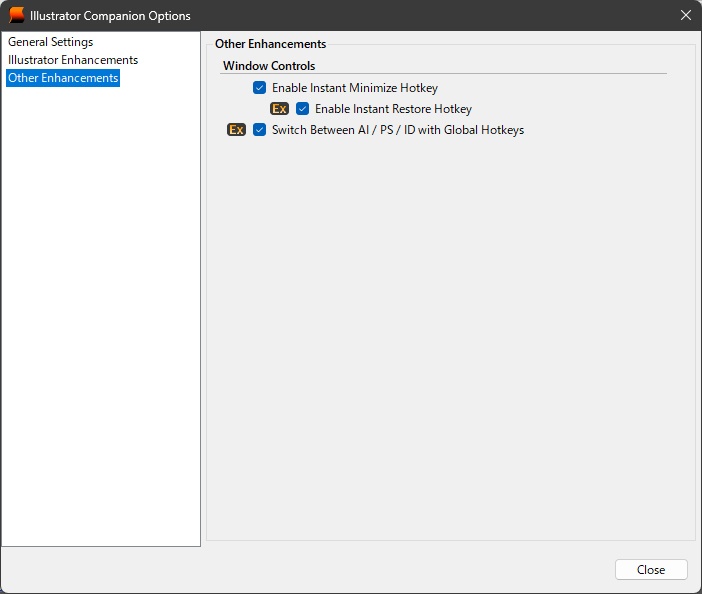
The core launcher features are the same as in the standard edition, but the EX edition adds several convenience features. ・Change the reference point using the numeric keypad ・Use Ctrl + Arrow Keys as alignment shortcuts ・Shortcuts to focus the caret on each XYWH input field ・Use Ctrl + Tab to switch selection tools ・Global hotkeys to switch between running AI / PS / ID ・Automatically restore the Illustrator window if it becomes un‑maximized on its own. All EX features can be tried in the standard edition, so if you find them helpful, please consider purchasing the EX edition.
【Official Site】
https://sites.google.com/view/gyonisostudio/ic_en
【Privacy and Security】
- This application runs locally on your device. - This application does not collect or transmit any personal information. - This application does not modify the system registry or make changes that affect system settings. - This application may access GitHub to check for updates or retrieve related information. - External communication occurs primarily for update checking purposes. For more details, please refer to the privacy policy below: https://github.com/gyoni0030/IllustratorCompanion_VerCheck/blob/main/PrivacyPolicy.md