
【OBS歌枠向け】声の聞きやすさを整えるVST3プラグイン|NT-U GLOSS(Windows 11)
- ダウンロード商品¥ 3,000
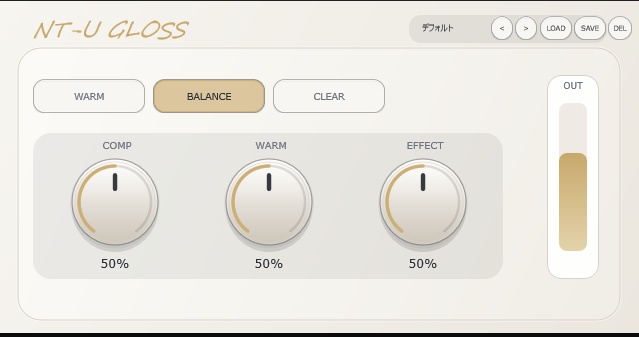
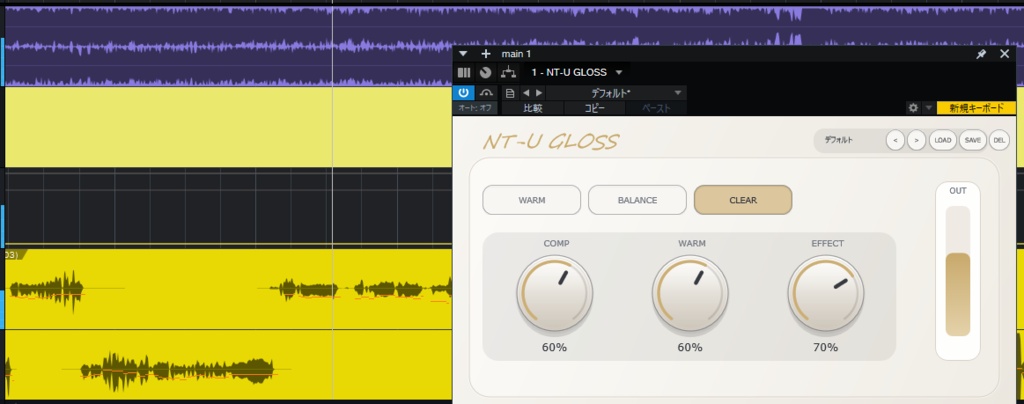
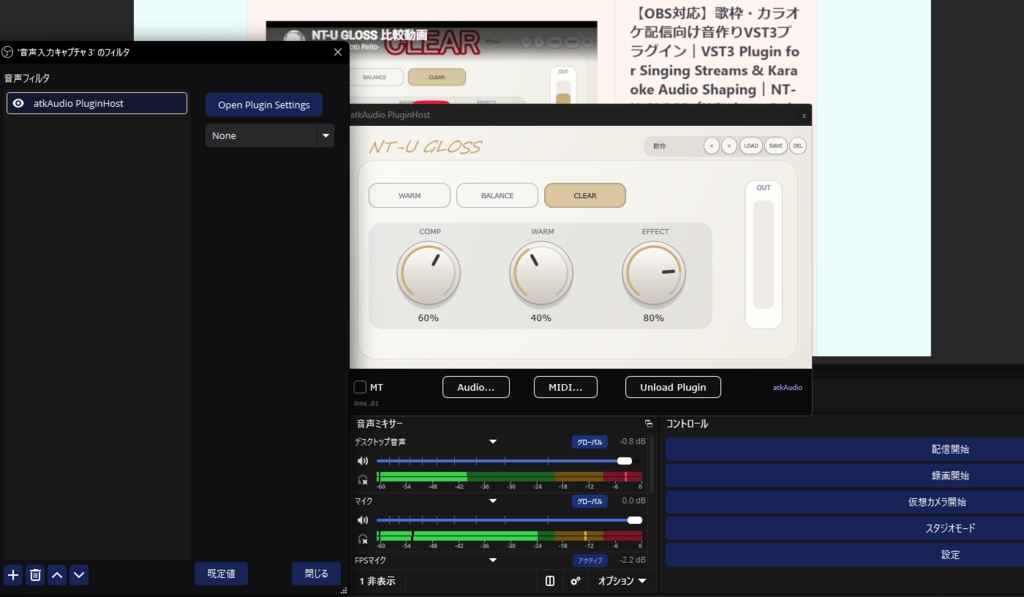


🎤 歌枠で「声が埋もれる」「音が平たい」と感じる方へ このページはNT-U GLOSS Full版の販売ページです。Lite版は別売です。 NT-U GLOSSは、OBSでの歌枠・カラオケ配信を想定したWindows向けVST3プラグインです。別途VST3対応ホストを介して、歌声の聞こえ方・前への出方・明るさなどを調整するための音作りプラグインです。 ・Full:¥3,000 — COMP / WARM / EFFECTを調整 ・Lite:¥500 — WARM / BALANCE / CLEARから選択 複雑な音作りを避けたい方はLite版、声やマイクに合わせて細かく調整したい方はFull版をご確認ください。 ※OBSで使用するには、別途VST3対応ホスト(例:atkAudioPlugin for OBS)が必要です。 ※効果の感じ方は声質・マイク・音声設定によって異なります。 ✅ v1.1:導入方法・英語マニュアルの不具合を修正
Full版とLite版の違い
このページはNT-U GLOSS Full版の販売ページです。Lite版は別売です。 ・Full:¥3,000 COMP / WARM / EFFECTの各コントロールで、声やマイク環境に合わせて調整できます。 ・Lite:¥500 WARM / BALANCE / CLEARの3スタイルから選ぶシンプル版です。 購入前に、必要な調整範囲と動作環境をご確認ください。 Lite版: https://nt-u-studio.booth.pm/items/8525091
Full版の特徴
・歌枠・カラオケ配信の声を聞き取りやすく調整しやすい設計 ・声のこもり感や刺さり感を整えやすいコントロール ・Full版はCOMP / WARM / EFFECTを調整可能 ・配信前でも扱いやすいシンプルな画面 ・本製品のプリセットを保存・読み込みできます(対応ホストや設定により操作は異なります) ・ループバックを使用する構成では、音声経路に応じた設定が必要です。声と伴奏を混ぜた信号に適用すると、両方に処理がかかります。
こんな方におすすめ
・OBSで歌枠・カラオケ配信をしている ・歌声の聞き取りやすさや明るさを調整したい ・音作りを一から細かく設計するより、少ない操作で整えたい ・配信ごとに呼び出せる設定を作りたい ・Liteの3スタイルでは足りず、Fullで細かく調整したい
動作環境
・対応OS:Windows 11 ・Windows 10:動作未確認 ・macOS / Linux:非対応 ・形式:VST3(x64) ・OBSで使用するには、別途VST3対応ホスト(例:atkAudioPlugin for OBS)が必要です ・OBS標準の「VST 2.xプラグイン」フィルターでは本製品を読み込めません。 ・導入概要:NT-U GLOSSをインストール → OBS用VST3ホストを導入 → ホストで本製品を読み込み → 音声を確認
免責事項・注意事項
動作・効果について ・本製品はWindows 11向けのVST3(x64)プラグインです。 ・OBSでの使用を想定していますが、すべての環境での動作を保証するものではありません。 ・配信・モニター時の遅延や映像との同期は、本製品の処理に加え、VST3ホスト、オーディオ機器、バッファ設定、OBSの設定、ループバックなどの音声経路によって変わります。すべての環境で同じ結果になることを保証するものではありません。 ・購入前に、記載の動作環境と必要ソフトの要件をご確認ください。追加ホストが動作することだけでは、本製品を含む構成での動作や遅延を確認したことにはなりません。 ・PC環境、OBS設定、他のプラグインやソフトウェアとの組み合わせにより、動作や表示に差が出る場合があります。 ・将来のOSや関連ソフトウェアのアップデートにより、互換性が変わり、動作しなくなる場合があります。 ・声質、マイク、録音・配信環境により、効果の感じ方には個人差があります。 ・購入前に、atkAudioPlugin for OBS等のVST3対応ホストを利用できることをご確認ください。 利用範囲 ・本ライセンスは、購入者本人1名が本プラグインを使用するためのものです。購入者本人による配信・動画制作で利用でき、収益化の有無は問いません。 ・1ライセンスを複数人で共有することはできません。複数人が使用する場合は、利用者ごとにライセンスが必要です。 ・本プラグインの配布ファイルおよびその改変物の再配布・転載・再販売は禁止します。この禁止は、本プラグインで処理した音声を含む配信・動画の公開を妨げません。 ・楽曲、伴奏音源、映像など、第三者の権利に関する許諾は本ライセンスに含まれません。 ・適用法令または適用される第三者ライセンスにより認められる場合を除き、リバースエンジニアリング、逆コンパイル、逆アセンブルその他これらに類する解析を禁止します。 返金・損害 ・本商品はダウンロード商品です。購入者都合による返品・返金は受け付けていません。 ・配布ファイルの破損や、商品説明に適合しない不具合などがある場合は、BOOTHのショップメッセージからご連絡ください。状況を確認し、修正版の提供や代金返還など、BOOTHの規約および適用法令に従って対応します。 ・本製品の使用または使用不能によって生じた損害については、適用法令に従って責任を負います。 ・これらの条件は、法令上認められる購入者の権利を制限するものではありません。
Full and Lite Versions
This page is for NT-U GLOSS Full. The Lite version is sold separately. ・Full: ¥3,000 Adjust COMP / WARM / EFFECT to fine-tune the sound for your voice and microphone setup. ・Lite: ¥500 Choose from three fixed styles: WARM, BALANCE, and CLEAR. Please check the feature differences and system requirements before purchasing. Lite version: https://nt-u-studio.booth.pm/items/8525091
Full Version Features
・Designed to make vocals easier to hear in singing streams and karaoke broadcasts ・Controls for shaping muddiness and harshness in the voice ・The Full version lets you adjust COMP / WARM / EFFECT ・A simple interface for adjustments before streaming ・Presets can be saved and loaded for this product (operation may vary by host and settings) ・When using a loopback setup, the required configuration depends on the audio path. If the plugin processes a mixed vocal-and-accompaniment signal, both are affected.
Who This Is For
・You stream singing or karaoke with OBS ・You want to adjust vocal clarity or brightness ・You prefer a small number of controls over designing a chain from scratch ・You want settings that can be recalled for each stream ・The three Lite styles are not enough and you want the finer controls in Full
System Requirements
・Supported OS: Windows 11 ・Windows 10: not tested ・macOS / Linux: not supported ・Format: VST3 (x64) ・OBS requires a separate VST3-compatible host such as atkAudioPlugin for OBS ・The standard OBS “VST 2.x Plug-in” filter cannot load this VST3 product. ・Setup overview: install NT-U GLOSS → install a VST3 host for OBS → load this product in the host → monitor the audio
Disclaimer & Terms of Use
Operation and Effects ・This product is a VST3 (x64) plugin for Windows 11. ・It is designed for use with OBS, but operation in all environments is not guaranteed. ・Latency and video/audio sync can vary depending on the plugin processing, VST3 host, audio equipment, buffer settings, OBS settings, and loopback routing. The same result is not guaranteed in every environment. ・Before purchasing, review the listed system requirements and required software. A working additional host alone does not confirm that the complete setup including this product will work or meet your latency needs. ・Performance and display may vary depending on your PC environment, OBS settings, and other software or plugins. ・OS/software updates may change compatibility and may cause the product to stop working. ・Results vary depending on your voice, microphone, and recording/streaming environment. ・Please confirm that a VST3-compatible host such as atkAudioPlugin for OBS can be used in your environment before purchasing. License and Usage ・This license is for one individual purchaser to use the plugin. The purchaser may use it in their own streams and videos, whether monetized or not. ・One license may not be shared by multiple people. Each user needs their own license. ・Redistribution, reposting, resale, or distribution of the plugin files or modified versions is prohibited. This does not restrict publishing streams or videos containing audio processed with the plugin. ・Permissions for third-party music, accompaniment, video, or other materials are not included. ・Reverse engineering, decompiling, disassembling, and similar analysis are prohibited except where permitted by applicable law or an applicable third-party license. Refunds and Liability ・This is a downloadable product. Returns or refunds for buyer’s remorse are not accepted. ・If the distributed files are corrupted or the product does not conform to its description, please contact the seller through BOOTH messages. The seller will review the situation and respond with a repair, replacement, or refund in accordance with BOOTH’s terms and applicable law. ・The seller is responsible for damages arising from use or inability to use the product as required by applicable law. ・These terms do not limit rights granted to buyers by applicable law.
