
Token Checker for Claude Code / Codex|Claude Code / Codex の残り使用量を見える化
- ダウンロード商品¥ 300
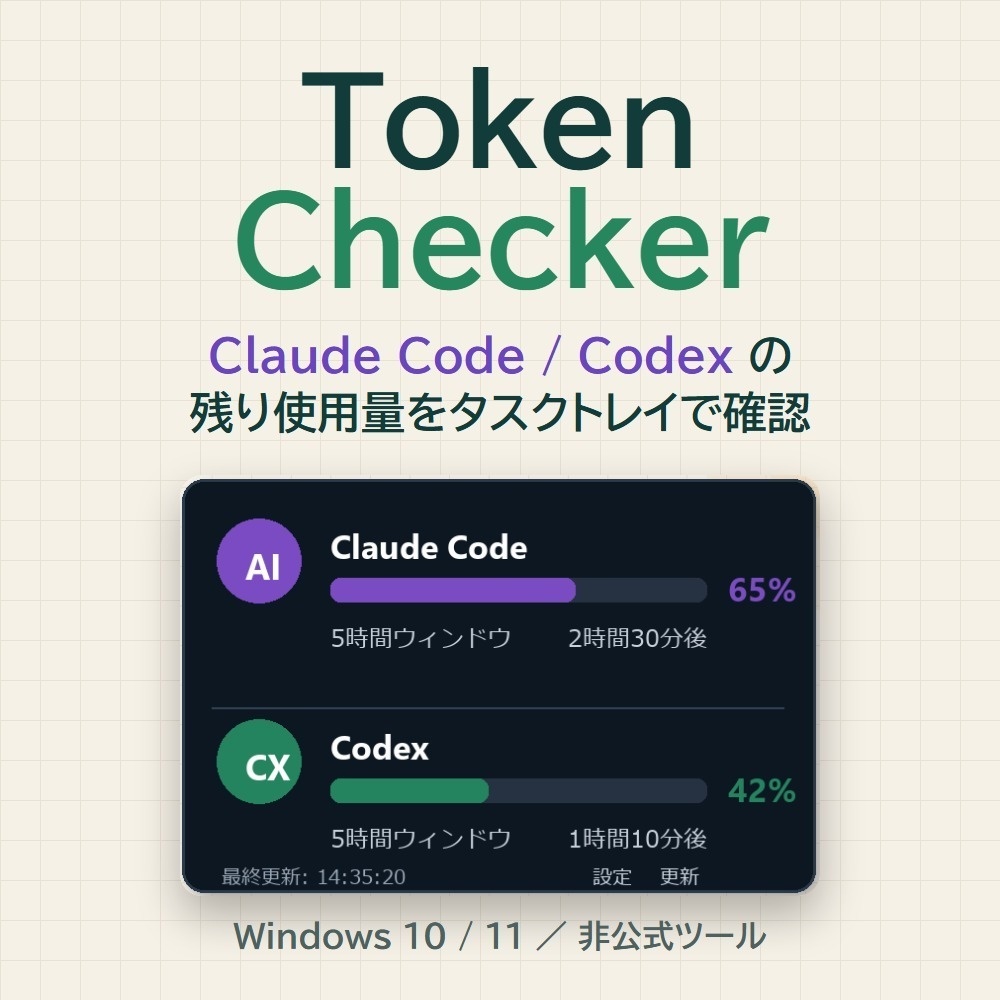
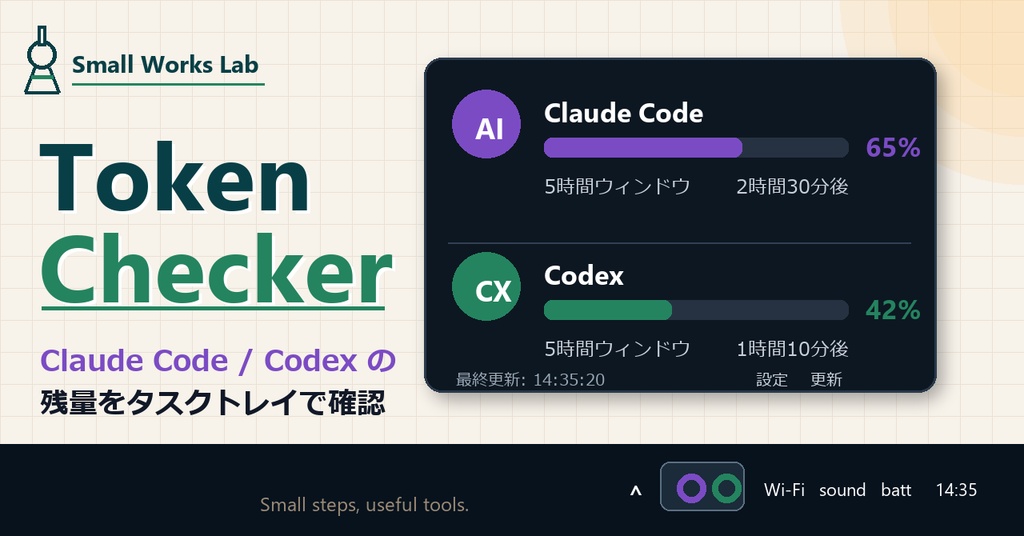


Token Checker for Claude Code / Codex は、Claude Code と Codex の使用状況を Windows のタスクトレイから確認するための小さな常駐ツールです。 作業中に「あとどれくらい使えるか」を確認したい人向けに、Claude Code / Codex の残量を色つきのアイコンと通知でざっくり見られるようにしました。 できることは、使用状況の確認、5時間ウィンドウ / 週次ウィンドウの残量表示、タスクトレイ常駐、残量低下時の通知、更新間隔の設定です。 Windows 10 / 11 向けです。Claude Code または Codex にログイン済みの環境で使います。Claude Code / Codex のどちらか片方だけでも使えます。 このツールは Claude Code / Codex の認証ファイルを読み取ります。そのため、ソースコードを公開しています。購入前に中身を確認できます。 https://github.com/Creator-HA/token-checker このツールは公式ツールではありません。Claude Code / Codex 側の仕様変更により、予告なく動作しなくなる可能性があります。Windows SmartScreen やウイルス対策ソフトで警告が出る場合があります。 買い切りの小さなツールとして提供しているため、個別サポート、導入代行、個別環境での動作確認、個別改修は行っていません。 【English summary】 Token Checker for Claude Code / Codex is a small Windows tray app for people who use Claude Code and Codex for long work sessions. It is not an official Claude Code, Codex, Anthropic, OpenAI, or ChatGPT tool. It may stop working if those services change their authentication or usage APIs. This is not a full analytics dashboard or a cost analysis tool. It is a small task tray utility for quickly checking usage status while you work. Made for: - Windows users - Claude Code users - Codex users - People who often work with AI coding agents for long sessions - People who want a small tray app to reduce usage-limit anxiety
【できること】
- Claude Code の使用状況を確認 - Codex の使用状況を確認 - 5時間ウィンドウ / 週次ウィンドウの残量を表示 - タスクトレイに常駐 - 残量が少なくなったら通知 - 更新間隔を設定可能 - Windows 起動時の自動起動に対応
【こんな人向け】
- Claude Code をよく使う人 - Codex をよく使う人 - AIエージェントで長めの作業をしている人 - 作業中に残量や制限が気になる人 - Windows で小さく常駐する確認ツールがほしい人
【動作環境】
- Windows 10 / 11 - Claude Code または Codex にログイン済みであること - インターネット接続 Claude Code / Codex のどちらか片方だけでも使えます。 インストールされていないサービスは「未インストール」と表示されます。
【内容物】
- TokenChecker.exe - 使い方ガイド.md - 安全性について.md - SHA256.txt v0.2の変更点:ログに記録するファイルパスから、Windowsユーザー名を含む部分を除去しました。
【使い方】
1. ZIPを展開します 2. TokenChecker.exe を任意のフォルダに置きます 3. TokenChecker.exe をダブルクリックします 4. タスクバー右下のトレイアイコンから「使用率を確認」を開きます インストール作業は不要です。
【安全性について】
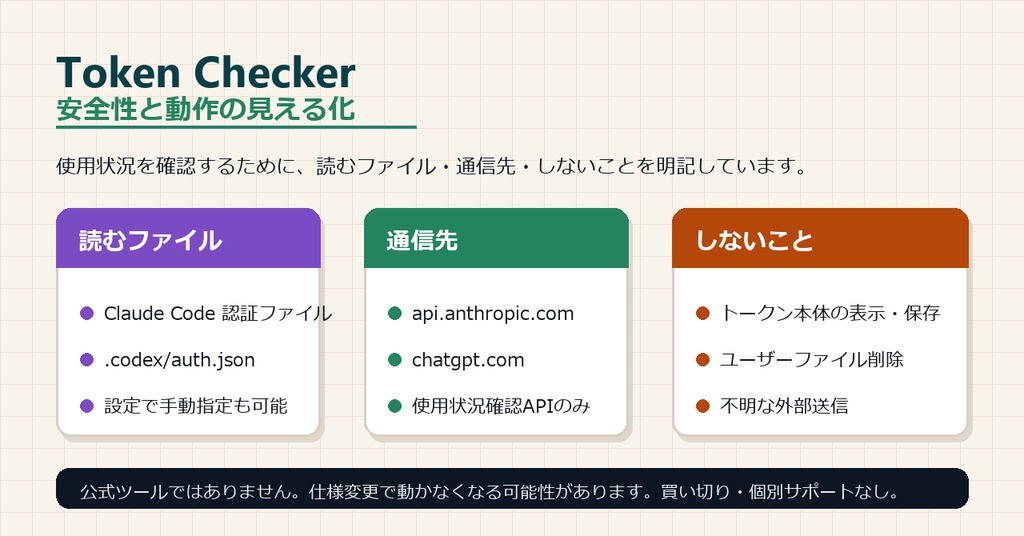
このツールは、Claude Code / Codex の使用状況を確認するために、ローカルPC内の認証ファイルを読み取ります。 読み取り候補: - Claude Code: .claude 配下の認証ファイル - Codex: .codex\auth.json 読み取った認証情報は、Claude / ChatGPT 側の使用状況確認APIに問い合わせるために使います。 読み取った認証トークンを、ログファイルに書き出すことはありません。 通信先: - api.anthropic.com - chatgpt.com ファイルの削除、任意のコマンド実行、上記2つ以外への外部送信は行いません。 【ソースコードを公開しています】 認証ファイルを読み取るツールである以上、中身が見えないままでは判断できないと考え、ソースコードを公開しています。 https://github.com/Creator-HA/token-checker どのファイルを読み、どこへ送信し、何をログに書いているかを、購入前に確認できます。 【ファイルが改ざんされていないか確認する方法】 同梱の SHA256.txt に、TokenChecker.exe のハッシュ値を記載しています。 PowerShell で次のコマンドを実行し、表示された値が SHA256.txt の値と一致すれば、配布時から変更されていないファイルです。 Get-FileHash .\TokenChecker.exe -Algorithm SHA256 【Safety notes】 This app reads local authentication files only to check your Claude Code / Codex usage status. Possible local files read by the app: - Claude Code: authentication files under .claude - Codex: .codex\auth.json The credentials are used to request usage information from the related services. Network destinations: - api.anthropic.com - chatgpt.com What this app does NOT do: - It does not display your authentication token. - It does not save your authentication token to logs. - It does not run arbitrary commands. - It does not delete user files. - It does not send your credentials to unrelated third-party services. Source code is publicly available: https://github.com/Creator-HA/token-checker Because this is a Windows EXE made by an independent creator, Windows SmartScreen or antivirus software may show a warning. Please only use it if you are comfortable with that risk.
【注意事項】
- 本ツールは Claude Code / Codex の公式ツールではありません - Claude / Codex 側の仕様変更により、予告なく動作しなくなる可能性があります - Windows の SmartScreen やウイルス対策ソフトで警告が出る場合があります - タスクマネージャー上で TokenChecker.exe (2) のように表示される場合がありますが、トレイアイコンが1つだけであれば正常です - 買い切り商品のため、個別サポートは行っていません
【よくある質問】
Q. タスクマネージャーに TokenChecker.exe (2) と出ます A. PyInstaller の onefile 形式で作成しているため、タスクマネージャー上では2つ表示される場合があります。 トレイアイコンが1つだけ表示され、設定画面や通知が1つだけ動いていれば正常です。 Q. 2回起動したらどうなりますか? A. 多重起動防止を入れているため、すでに起動している状態で再度起動するとメッセージが表示され、追加起動はされません。 Q. 認証情報は送信されますか? A. Claude / Codex の使用状況を取得するため、各サービスの使用状況確認APIへの問い合わせに認証情報を使います。 それ以外の目的で認証情報を外部送信するツールではありません。 Q. 動かなくなった場合は? A. Claude Code / Codex 側で再ログインし、Token Checker の「今すぐ更新」を押してください。 それでも動かない場合は、Claude / Codex 側の仕様変更の可能性があります。 【FAQ in English】 Q. Is this an official tool? A. No. This is an independent tool made by Small Works Lab. It is not affiliated with Anthropic, OpenAI, Claude Code, Codex, or ChatGPT. Q. Why does it read local authentication files? A. It needs local authentication information to request usage status from Claude Code / Codex related services. It uses that information only for usage checking. Q. Why does Task Manager show TokenChecker.exe (2)? A. The app is packaged with PyInstaller onefile. Depending on Windows Task Manager, the loader process and the app process may appear separately. If you see only one tray icon and one settings window, this is expected. Q. Is there individual support? A. No. This is a buy-once digital product. Individual setup support, consulting, custom fixes, or direct support are not included.
【バージョン】
v0.2
【制作者】
Small Works Lab 副業未経験の会社員が、AIエージェントと相談しながら小さなデジタル商品を作る実験をしています。