
【FREE / 無料】Code Eraser【Donations are welcome / 寄付歓迎】
- Free / 無料ダウンロード商品¥ 0
- Donate / 寄付(The content is the same as the free version / 無料版と中身は同じです)ダウンロード商品¥ 100
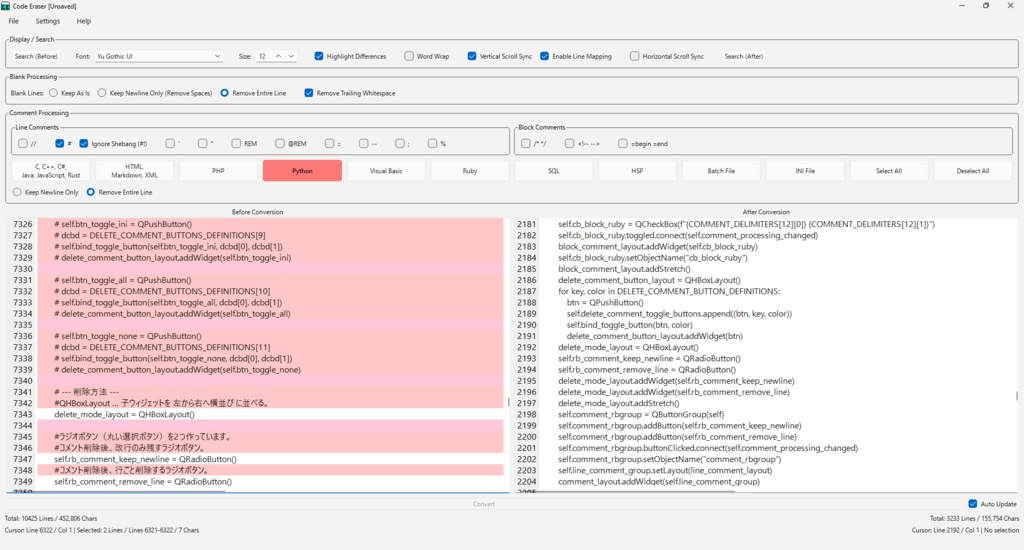
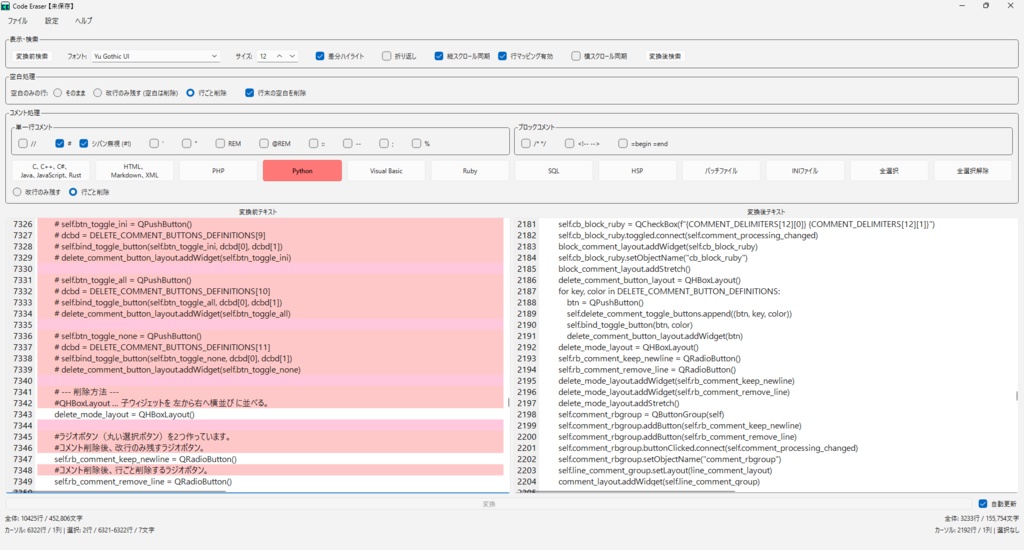
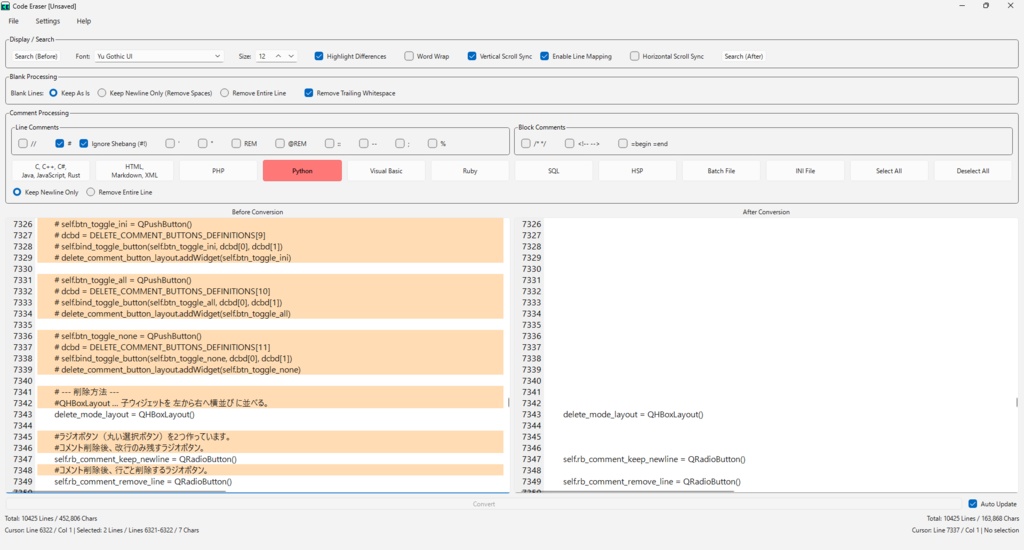
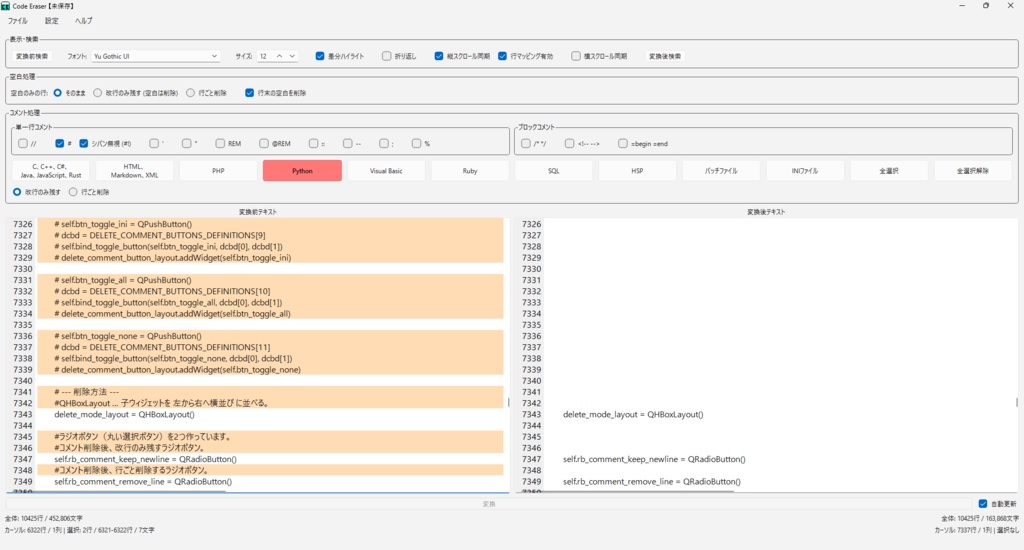



This software is primarily designed to remove comments and whitespace from code. It also features highlighted differences between the original and converted text, as well as scroll synchronization. Additionally, it supports both English and Japanese. このソフトウェアは、コードのコメントアウトやスペース等の削減を主としたソフトです。 その他に変換前テキストと変換後テキストの差分ハイライト、スクロール同期ができます。 また、英語、日本語に対応しています。
README.txt(Part)
==================================================================================================== Code Eraser ==================================================================================================== ---------------------------------------------------------------------------------------------------- Important ---------------------------------------------------------------------------------------------------- Please make sure to read IMPORTANT.txt. ---------------------------------------------------------------------------------------------------- Overview ---------------------------------------------------------------------------------------------------- This software is primarily designed to remove comments and whitespace from code. It also features highlighted differences between the original and converted text, as well as scroll synchronization. Additionally, it supports both English and Japanese. ---------------------------------------------------------------------------------------------------- Main Features ---------------------------------------------------------------------------------------------------- - Comment removal (Supports "//", "#" (shebang can be excluded), "'", """, "REM", "@REM", "::", "--", ";", "%", "/* */", "<!-- -->", "=begin =end") - Language-specific comment removal presets for one-click configuration ("C", "C++", "C#", "Java", "JavaScript", "Rust", "HTML", "Markdown", "XML", "PHP", "Python", "Visual Basic", "Ruby", "SQL", "HSP", "Batch File", "INI file") - Blank-line handling - Remove trailing whitespace on lines (e.g. "foobarbaz ") - Diff highlighting between "Before Conversion" and "After Conversion" text - Synchronized scrolling between "Before Conversion" and "After Conversion" text - Character and line counts for the whole document, selection, etc. - Unsaved text backup - Automatic saving of Code Eraser settings - English and Japanese UI - Text search - Save text - Font and font size settings ---------------------------------------------------------------------------------------------------- System Requirements ---------------------------------------------------------------------------------------------------- OS: Windows 10 (64-bit), Windows 11 (64-bit) ---------------------------------------------------------------------------------------------------- Installation ---------------------------------------------------------------------------------------------------- Once you extract it to any location, installation is complete. ---------------------------------------------------------------------------------------------------- Uninstallation ---------------------------------------------------------------------------------------------------- Delete the entire folder to uninstall. ---------------------------------------------------------------------------------------------------- Notes ---------------------------------------------------------------------------------------------------- Adding, modifying, or deleting folders and files under the "code_eraser" folder, deleting anything other than folders and files that are allowed to be deleted, or deleting folders and files while Code Eraser is running may cause unexpected behavior, so please do so at your own risk. Multiple instances can be launched, but "status.log" may not be recorded correctly. Also, because settings are shared through a single "settings_ce_*_*_*.json" file, if you launch additional instances of Code Eraser, the settings of the last operated Code Eraser may be reflected. ---------------------------------------------------------------------------------------------------- Remarks ---------------------------------------------------------------------------------------------------- If the software does not start, please try uninstalling Code Eraser and installing it again. ---------------------------------------------------------------------------------------------------- Disclaimer ---------------------------------------------------------------------------------------------------- The author assumes no responsibility for any troubles or damages caused by the use of this software. ---------------------------------------------------------------------------------------------------- Version History ---------------------------------------------------------------------------------------------------- Ver.1.8.0 - Corrections to the English translation. Ver.1.7.1 - Added and revised comments in the source code. Ver.1.7.0 - Changed log saving so logs are written in batches every second, instead of saving to the log file on every entry. Ver.1.6.0 - Window behavior fixes. Ver.1.5.0 - Corrections to the English translation. Ver.1.4.0 - Fixed display of the "Blank Processing" group. Ver.1.3.0 - Menu bar fixes. Ver.1.2.0 - Window behavior fixes. Ver.1.1.0 - Layout changes to the "Comment Processing" group on the main window. Ver.1.0.0 - Initial release. ---------------------------------------------------------------------------------------------------- Contact ---------------------------------------------------------------------------------------------------- E-Mail: yonroku46464646@gmail.com ---------------------------------------------------------------------------------------------------- Author ---------------------------------------------------------------------------------------------------- YonRoku ---------------------------------------------------------------------------------------------------- Copyright ---------------------------------------------------------------------------------------------------- © 2026 YonRoku ---------------------------------------------------------------------------------------------------- License ---------------------------------------------------------------------------------------------------- Described in LICENSE.txt
README_JA.txt(一部)
==================================================================================================== Code Eraser ==================================================================================================== ---------------------------------------------------------------------------------------------------- 重要 ---------------------------------------------------------------------------------------------------- 必ずIMPORTANT_JA.txtをお読みください。 ---------------------------------------------------------------------------------------------------- 概要 ---------------------------------------------------------------------------------------------------- このソフトウェアは、コードのコメントアウトやスペース等の削減を主としたソフトです。 その他に変換前テキストと変換後テキストの差分ハイライト、スクロール同期ができます。 また、英語、日本語に対応しています。 ---------------------------------------------------------------------------------------------------- 主な機能紹介 ---------------------------------------------------------------------------------------------------- ・コメント削除 (「//」、「#(シバン除外可能)」、「'」、「"」、「REM」、「@REM」、「::」、「--」、 「;」、「%」、「/* */」、「<!-- -->」、「=begin =end」) ・言語ごとのコメント削除プリセットボタンでのコメント削除の一括設定 (「C」、「C++」、「C#」、「Java」、「JavaScript」、「Rust」、「HTML」、 「Markdown」、「XML」、「PHP」、「Python」、「Visual Basic」、「Ruby」、 「SQL」、「HSP」、「バッチファイル」、「INIファイル」) ・空白のみの行の処理 ・「hogefugapiyo 」のような行末の空白を削除 ・「変換前テキスト」、「変換後テキスト」の差分ハイライト表示 ・「変換前テキスト」、「変換後テキスト」のスクロール同期 ・全体や選択範囲等の文字数、行数の表示 ・未保存のテキストバックアップ ・Code Eraserの設定内容の自動保存 ・英語、日本語表示対応 ・テキスト検索 ・テキスト保存 ・テキストのフォント、フォントサイズ指定 ---------------------------------------------------------------------------------------------------- 動作環境 ---------------------------------------------------------------------------------------------------- OS:Windows 10(64bit)、Windows 11(64bit) ---------------------------------------------------------------------------------------------------- インストール方法 ---------------------------------------------------------------------------------------------------- 任意の場所に解凍したらインストール完了です。 ---------------------------------------------------------------------------------------------------- アンインストール方法 ---------------------------------------------------------------------------------------------------- フォルダごとゴミ箱に入れればアンインストール完了です。 ---------------------------------------------------------------------------------------------------- 注意事項 ---------------------------------------------------------------------------------------------------- 「code_eraser」フォルダ下の、フォルダ、ファイルの追加、変更や、 削除可能なフォルダ、ファイル以外の削除、 Code Eraser起動中のフォルダ、ファイルの削除は、 予期せぬ動作の原因になる場合がありますので自己責任にてお願いします。 複数起動可能ですが、「status.log」が正しく記録されない場合があります。 また、「settings_ce_*_*_*.json」一つのファイルで設定内容を共有している状態のため、 追加でCode Eraserを起動した場合、最後に操作したCode Eraserの設定内容が反映される場合があります。 ---------------------------------------------------------------------------------------------------- 備考 ---------------------------------------------------------------------------------------------------- ソフトが起動しない場合は、Code Eraserのアンインストール後、 再びインストールすることをお試しください。 ---------------------------------------------------------------------------------------------------- 免責事項 ---------------------------------------------------------------------------------------------------- 本データの利用によって生じたトラブル、損害等について一切の責任を負いかねます。 ---------------------------------------------------------------------------------------------------- バージョン変更履歴 ---------------------------------------------------------------------------------------------------- Ver.1.8.0 - 英訳の修正。 Ver.1.7.1 - ソースコードのコメントの加筆修正。 Ver.1.7.0 - ログファイルを逐一保存してしまうので、1秒ごとにまとめてログを保存するよう変更。 Ver.1.6.0 - ウィンドウの動作の修正。 Ver.1.5.0 - 英訳の修正。 Ver.1.4.0 - 「空白処理」グループの表示の修正。 Ver.1.3.0 - メニューバーの修正。 Ver.1.2.0 - ウィンドウの動作の修正。 Ver.1.1.0 - メインウィンドウの「コメント処理」グループのレイアウト変更。 Ver.1.0.0 - 初版完成。 ---------------------------------------------------------------------------------------------------- 連絡先 ---------------------------------------------------------------------------------------------------- E-Mail:yonroku46464646@gmail.com ---------------------------------------------------------------------------------------------------- 作者 ---------------------------------------------------------------------------------------------------- YonRoku ---------------------------------------------------------------------------------------------------- コピーライト ---------------------------------------------------------------------------------------------------- © 2026 YonRoku ---------------------------------------------------------------------------------------------------- ライセンス ---------------------------------------------------------------------------------------------------- LICENSE.txtに記述
LICENSE.txt
==================================================================================================== Code Eraser ==================================================================================================== ---------------------------------------------------------------------------------------------------- License ---------------------------------------------------------------------------------------------------- This application uses the Python, Qt framework. Copyright © Python Software Foundation. Dual licensed under the PSF License Version 2 and the Zero-Clause BSD license. See https://docs.python.org/3/license.html for details. Copyright © The Qt Company Ltd. Licensed under the LGPLv3. For the full text of the licenses, please refer to the following URLs: https://docs.python.org/3/license.html https://www.gnu.org/licenses/lgpl-3.0.html
IMPORTANT.txt
==================================================================================================== Code Eraser ==================================================================================================== ---------------------------------------------------------------------------------------------------- Important ---------------------------------------------------------------------------------------------------- Before extracting, make sure that the SHA512 hash value of ce.zip matches the hash value in SHA512HASH.txt. Command example: certutil -hashfile C:\ce.zip SHA512 Open Command Prompt, enter the above command following the example, and run it to verify the hash value.
IMPORTANT_JA.txt
==================================================================================================== Code Eraser ==================================================================================================== ---------------------------------------------------------------------------------------------------- 重要 ---------------------------------------------------------------------------------------------------- 必ずce.zipのSHA512ハッシュ値が SHA512HASH.txtのハッシュ値と同等か確認してから解凍してください。 コマンド例: certutil -hashfile C:\ce.zip SHA512 コマンドプロンプトを開き、上記コマンド例に倣い入力、実行をするとハッシュ値を確認できます。
SHA512HASH.txt
Code Eraser Ver.1.8.0 279fcd38c159ed534de939267de09f40ca97664d6b98ea9297acfa4c2916d30b53a839737e920e2141cfc9b4ea38c7587bf9688ce40c309e17051cb1768ca047