

スカイボックス・サーフェスシェーダー / Skybox Surface Shader【Unity Built-in RP】
- ダウンロード商品¥ 800
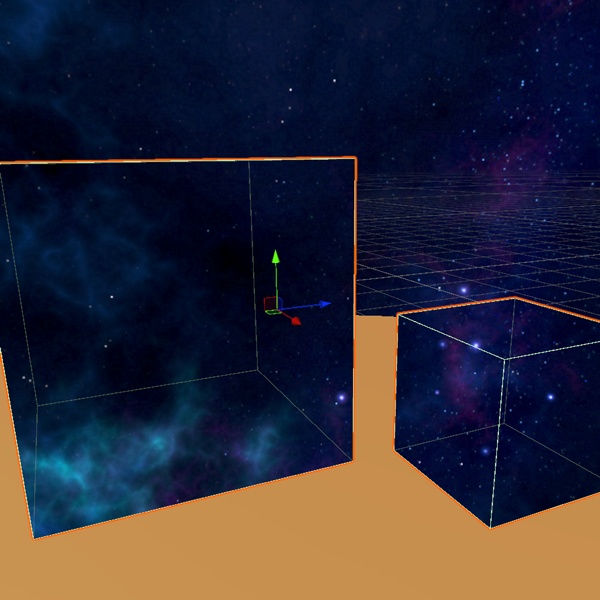

# スカイボックス・サーフェスシェーダー 🌌 **Skybox Surface Shader - Unity Built-in Shader** あらゆるサーフェスに空を描画 * 「あらゆるメッシュを、あなたのスカイボックスと完璧につながる空へ。」 * 「天井、ドーム、フェイクウィンドウをあなたの空と自動的に一致。」 * 「あなたのスカイボックスを、あらゆるサーフェスに。手動でのテクスチャ設定は不要。」 テクスチャを手動で複製することなく、空が広がる天井、無限に続く窓、または地平線を映すミラーを作りたいですか? Skybox Surface Shaderは、シーンのスカイボックス(PanoramicまたはCubemap)を任意のメッシュへ自動的にコピーするBuilt-inシェーダーと同期スクリプトです。`Perfect Match`を有効にするだけで、サーフェスがシーンの実際の空とシームレスに一致し、どこまでも続く景色のような錯覚を作り出します。 ## なぜ使うのか? * 壁や天井に一般的なマテリアルを使用すると、シーンのスカイボックスとうまく一致せず、視覚的な没入感が損なわれることがあります。 * スカイボックスのテクスチャ、回転、Exposure、Tint設定を手動で同期するのは手間がかかり、設定ミスも起こりやすくなります。 * Reflection Probeはパフォーマンス負荷が高くなる場合があり、求めている無限の空のような表現を得られないことがあります。 * シェーダーコードを一行も書くことなく、空が広がる天井、無限に続く窓、空を反射するサーフェスを作成できます。 ## 📦 パッケージ内容 * `SkyboxOnlySurface.shader` — すべての機能を備えたスカイボックス・サーフェスシェーダー * `SkyboxOnlySurfaceSync.cs` — シーンの`RenderSettings.skybox`と自動同期 * すぐに使用できるサンプルマテリアル * セットアップ手順とクイックスタートガイドを含む詳細なREADME * VRChatワールド、ゲーム、動画、その他のプロジェクトで使用可能な商用ライセンス ## ✨ 機能 * **Auto Sync** — シーンのスカイボックスのテクスチャ、HDR設定、Tint、Exposure、Rotationを自動的に同期。 * **Perfect Match** — ガラスエフェクトを無効にしたWindowモードで、Panoramicスカイボックスとほぼピクセル単位で一致。 * **2つのレンダリングモード** — Windowモードではサーフェス越しに空を表示し、Mirrorモードでは空を反射。 * **Panoramic & Cubemap対応** — シーンで使用されているスカイボックスのタイプを自動検出し、それに合わせて動作。 * **オプションのビジュアルエフェクト** — ガラスのような見た目を作る`Edge Glow`と`Darken Edges`を搭載。 * **Inner Face対応** — ドーム、球体、閉鎖された環境の内側から見た場合でも正しく表示。 * **Built-in Render Pipeline対応** — Unity 2019+およびUnity 2022 LTSをサポート。 * **通常のUnityプロジェクトでも使用可能** — VRChat SDKや追加パッケージは不要。 ## 🚀 クイックスタート * `Lighting > Environment`でスカイボックスを設定。 * `Skybox Only Surface`マテリアルを任意のメッシュに適用。 * 同じGameObjectに`SkyboxOnlySurfaceSync`を追加。 * `Perfect Match`を有効にすれば準備完了です。 ## ❓ FAQ **URPまたはHDRPで動作しますか?** * いいえ。このアセットはBuilt-in Render Pipeline専用に設計されています。 **VRChat SDKは必要ですか?** * いいえ。Built-in Render Pipelineを使用しているあらゆるUnityプロジェクトで動作します。 **VRChatワールドで商用利用できますか?** * はい。付属のライセンスに基づき、商用利用が許可されています。 **スカイボックスのテクスチャを手動で設定する必要がありますか?** * いいえ。`SkyboxOnlySurfaceSync`を使用し、`Perfect Match`を有効にすると、セットアップは自動的に処理されます。 **WindowモードとMirrorモードの違いは何ですか?** * Windowモードでは、開口部や透明なサーフェス越しに見ているように空を表示します。 * Mirrorモードでは、サーフェスの法線に基づいて空を反射します。 **`.unitypackage`を再販売または再配布できますか?** * いいえ。商用プロジェクトを含む完成したプロジェクト内でアセットを使用することはできますが、元ファイルの再配布、再販売、共有は禁止されています。 ## 📋 必要環境 Unity Built-in RP · LightingにSkyboxを設定 · URP/HDRP非対応 --- eng --- 🌌 Skybox Surface Shader - Unity Built-in Shader Paint the Sky on Any Surface - "Turn any mesh into a perfect slice of your skybox." - "Ceilings, domes, and fake windows that match your sky — automatically." - "Your skybox, on any surface. Zero manual texture setup." Want an open-sky ceiling, an infinite window, or a mirror that reflects the horizon — without manually duplicating textures? Skybox Surface Shader is a Built-in shader and synchronization script that automatically copies your scene's skybox (Panoramic or Cubemap) onto any mesh. Simply enable Perfect Match and the surface will align seamlessly with the scene's actual sky, creating the illusion of an endless view. Why Use It? - Generic materials on walls and ceilings often fail to match the scene's skybox, reducing visual immersion. - Manually syncing skybox textures, rotation, exposure, and tint settings is tedious and easy to get wrong. - Reflection probes can be costly in performance and may not provide the desired infinite-sky illusion. - Create open-sky ceilings, infinite windows, and sky-reflecting surfaces without writing a single line of shader code. 📦 Package Contents - SkyboxOnlySurface.shader — Fully featured skybox surface shader - SkyboxOnlySurfaceSync.cs — Automatically syncs with your scene's RenderSettings.skybox - Example material ready for immediate use - Detailed README with setup instructions and quick start guide - Commercial license for use in VRChat worlds, games, videos, and other projects ✨ Features - Auto Sync — Automatically synchronizes the scene skybox texture, HDR settings, tint, exposure, and rotation. - Perfect Match — Window mode with glass effects disabled provides a near pixel-perfect match with Panoramic skyboxes. - Two Rendering Modes — Window mode displays the sky through the surface, while Mirror mode reflects the sky. - Panoramic & Cubemap Support — Automatically detects and adapts to the skybox type used in the scene. - Optional Visual Effects — Includes Edge Glow and Darken Edges for a glass-like appearance. - Inner Face Support — Works correctly when viewed from inside domes, spheres, and enclosed environments. - Built-in Render Pipeline Compatible — Supports Unity 2019+ and Unity 2022 LTS. - Works in Standard Unity Projects — No VRChat SDK or additional packages required. 🚀 Quick Start - Configure your skybox in Lighting > Environment. - Apply the Skybox Only Surface material to any mesh. - Add SkyboxOnlySurfaceSync to the same GameObject. - Enable Perfect Match and you're ready to go. ❓ FAQ Does it work with URP or HDRP? - No. This asset is designed exclusively for the Built-in Render Pipeline. Do I need the VRChat SDK? - No. It works in any Unity project using the Built-in Render Pipeline. Can I use it commercially in VRChat worlds? - Yes. Commercial use is permitted under the included license. Do I need to manually configure the skybox texture? - No. When using SkyboxOnlySurfaceSync with Perfect Match enabled, the setup is handled automatically. What's the difference between Window and Mirror modes? - Window mode displays the sky as if you're looking through an opening or transparent surface. - Mirror mode reflects the sky based on the surface normals. Can I resell or redistribute the .unitypackage? - No. You may use the asset in your final projects, including commercial projects, but redistribution, resale, or sharing of the original files is not permitted. 📋 Requirements Unity Built-in RP · Skybox set in Lighting · Not compatible with URP/HDRP