

レッドファイアケープ / Red Fire Cape【VRChat・VRCFury対応・PC専用】
- ダウンロード商品¥ 1,300
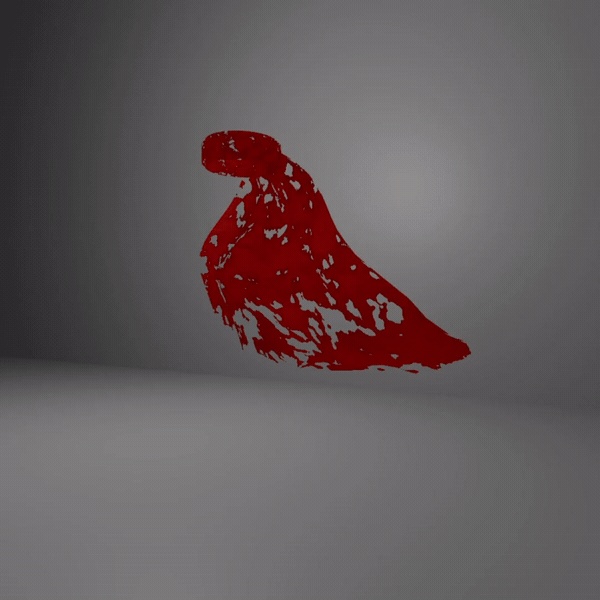

VRChat用のアニメーション付き炎のマントとお揃いのスカーフ。カスタムシェーダー、VRCFuryトグル対応。あらゆるHumanoidアバターで使用できます。 デザインのインスピレーション:このマントは2つの象徴的なスタイルからインスピレーションを得ています — Spawn(DC Comics / Image Comics)のドラマチックに流れるマントと、Final Fantasy VII: Dirge of CerberusのVincent Valentineのダークで炎をまとったような美学です。英雄的でありながら威圧感も感じられる、大胆な赤い炎のマントを目指してデザインしました。 商品説明 ドラマチックな赤い炎のマントと、それにマッチする円筒型の炎のスカーフで、あなたのアバターに命を吹き込みましょう — VRChat PC版向けに制作されています。 このパックではカスタムアニメーション炎シェーダーを使用しており、両方のアイテムに生きた炎のような表現を与えます。上部はしっかりとした布地として表示され、端に向かうにつれて揺らめく炎へと溶け込んでいきます。マントにはPhysBones付きのアーマープレートも含まれており、動きに合わせて自然に揺れます。 セットアップはVRCFuryで簡単に行えます。Prefabをアバターにドラッグし、Neckボーンにリンクして、ビルド&アップロードするだけです。CapeFireエクスプレッションメニューからスカーフとマントをそれぞれ個別にオン/オフできるため、ワールド内で自由にスタイルを組み合わせることができます。 あらゆるHumanoid VRChatアバターで使用できます。ベースモデルは必要ありません。 機能 炎のマント — アニメーション付きディゾルブ、赤/黒のトゥーンシェーディング、アーマー部分のPhysBones 炎のスカーフ(cachecol) — 円筒の周囲を流れる炎のエフェクト カスタムシェーダー — CapeFire と CapeFireCylinder(Inspectorからカラー、速度、ディゾルブなどを調整可能) VRCFury対応 — Armature Link + 保存済みExpression Menuトグル CapeFireメニュー — ScarfとCapeを個別にオン/オフ可能 統合Prefab — RedFireCape.prefabを配置するだけですぐに使用可能 ユニバーサルフィット — Neckボーンにリンクすることで、あらゆるアバターで使用可能 ReadMe + License 付属 収録内容 RedFireCape.prefab — 統合された親Prefab(推奨) Scarf.prefab — 炎のスカーフのみ Cape.prefab — 炎のマントのみ FBX meshes — ソースモデル Materials — 設定済みの炎用マテリアル Shaders — 完全なカスタムシェーダーファイル Textures — エフェクト用グラデーションテクスチャ Documentation — ReadMe.txt + License.txt 必要環境 VRChat SDK3が導入されたUnityプロジェクト VRCFury インストール済み PC / Desktop版 VRChatへのアップロード 重要 — PC版のみ(Quest / Mobile) このパックでは、VRChat Mobile(Quest/Android)ではサポートされていないカスタムシェーダーを使用しています。 PCユーザーには完全な炎のエフェクトが表示されます。Mobileユーザーにはシェーダーが正しく表示されません(ピンク表示 / 非表示 / フォールバック表示)。 これはVRChatプラットフォーム側の制限であり、不具合ではありません。Questへの対応は含まれていません。 ライセンス(商品ページ用の短縮版) 個人利用および商用利用可能(アバター、コミッション) 自分のアバター向けの改変可能 元ファイルの再配布禁止、単体アセットとしての再販売禁止 完全な利用規約はLicense.txtをご確認ください --- eng --- Animated fire cape and matching scarf for VRChat. Custom shaders, VRCFury toggles, works on any humanoid avatar. Design inspiration: This cape draws from two iconic looks — the dramatic flowing cape of Spawn (DC Comics / Image Comics) and the dark, fiery aesthetic of Vincent Valentine from Final Fantasy VII: Dirge of Cerberus. The goal was a bold red fire cape that feels heroic and menacing at the same time. ## Product description Bring your avatar to life with a dramatic red fire cape and a matching cylindrical fire scarf — built for VRChat on PC. This pack uses custom animated fire shaders that give both pieces a living flame look: solid fabric at the top, dissolving into flickering fire toward the edges. The cape includes armor plates with PhysBones for subtle motion as you move. Setup is simple with VRCFury: drag the prefab onto your avatar, link to the Neck bone, build, and upload. A CapeFire expression menu lets you toggle the scarf and cape on or off independently — perfect for mixing looks in-world. Works on any humanoid VRChat avatar. No base model required. --- ## Features - Fire cape with animated dissolve, toon red/black shading, and armor PhysBones - Fire scarf (cachecol) with fire that rolls around the cylinder - Custom shaders — `CapeFire` and `CapeFireCylinder` (tweak colors, speed, dissolve, and more in the Inspector) - VRCFury ready — Armature Link + saved expression menu toggles - CapeFire menu — separate on/off toggles for Scarf and Cape - Combined prefab — drop in `RedFireCape.prefab` and go - Universal fit — works on any avatar when linked to the Neck bone - ReadMe + License included --- ## What's included - RedFireCape.prefab — Combined parent prefab (recommended) - Scarf.prefab — Fire scarf only - Cape.prefab — Fire cape only - FBX meshes — Source models - Materials — Pre-configured fire materials - Shaders — Full custom shader files - Textures — Gradient textures for the effect - Documentation — ReadMe.txt + License.txt --- ## Requirements - Unity project with VRChat SDK3 - VRCFury installed - PC / Desktop VRChat upload --- ## Important — PC only (Quest / Mobile) This pack uses custom shaders that are not supported on VRChat Mobile (Quest/Android). PC users see the full fire effect. Mobile users cannot see the shader correctly (pink/missing/fallback). This is a VRChat platform limitation, not a bug. Quest support is not included. --- ## License (short version for listing) - Personal and commercial use allowed (avatars, commissions) - Modifications allowed for your avatars - No redistribution of the raw files or resale as a standalone asset - Full terms in `License.txt`