

BB's Library Manager
- ダウンロード商品¥ 0
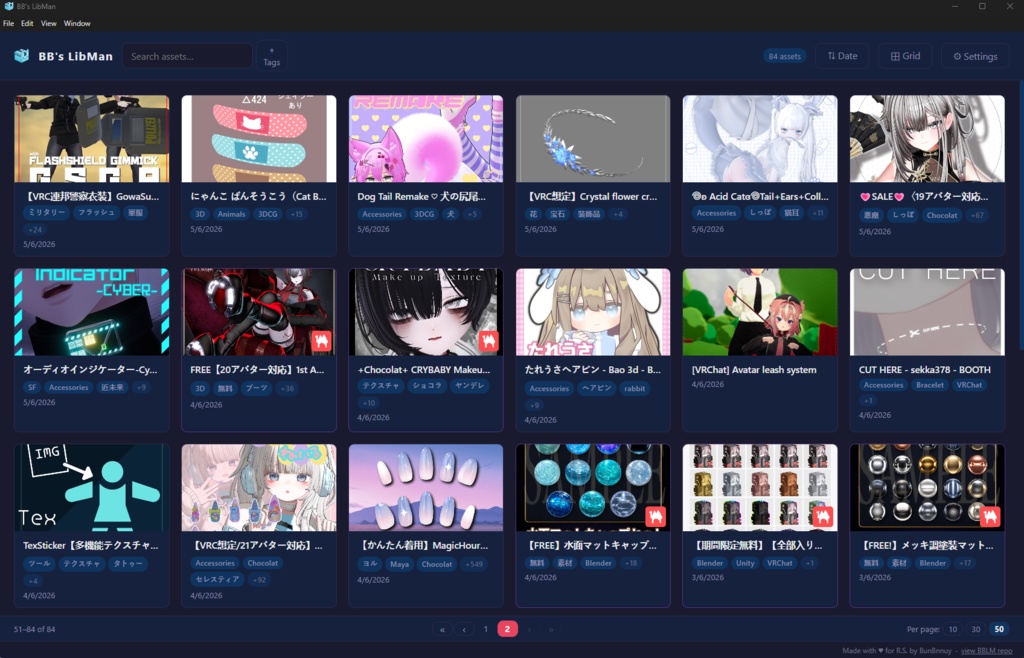


BB's LibMan A desktop library manager for 3D models, VRChat avatars, and game assets — with deep Booth integration. Features 🗂 Library Browse all imported assets with thumbnail previews Switch between Grid, List with thumbnail, and Compact (no thumbnail) view modes Search assets by name and sort by date or alphabetically Pagination — configurable page size (10, 30, or 50 items per page) Asset counter in the toolbar showing total count, with a hover breakdown of local vs Booth items Modified cards glow briefly to highlight which asset was just changed or added 🏷 Tag System Assets can have multiple tags — local assets get tags from the import dialog, Booth items get them from their database When scraping a Booth URL, all item tags are fetched automatically from the Booth JSON API Tag filter — click the ⌖ Tags button to open a searchable tag panel; select one or more tags to filter the library (AND logic) Click any tag pill on a card to instantly filter by that tag Tags are editable at any time from the Edit dialog with autocomplete suggestions 📥 Importing Assets Downloads Monitor — watches your downloads folder and automatically opens the import dialog when a supported file is detected Drag & Drop — drag a file onto the window to choose between two actions: Add New Asset (left zone) — opens the import dialog Add to Existing Asset (right zone) — hover for 500ms to activate card drop targets, then drop the file directly onto any card to add it to that asset's folder without any dialog URL Scraping — paste a Booth URL to automatically fetch the asset name, tags, and thumbnail via the Booth JSON API; other sites use HTML scraping Thumbnails are downloaded and transcoded to 500×500 PNG at import time 🛍 Booth Library Manager Integration Connect your local Booth Library Manager database to display all your Booth purchases alongside your own imported assets Booth items show their original thumbnails with a Booth badge overlay Booth item tags are read directly from the BLM database (booth_item_tag_relations) Clicking a Booth item opens its local download folder (if configured) Hide individual Booth items independently of your local library 🆓 Booth Free Items A dedicated tab that automatically scans Booth.pm for ¥0 VRChat items: Smart detection — visits each item page and checks all variation prices, so items that are partially free (e.g. "¥0 – ¥300") are caught even when the listing shows a non-zero price Price range display — shows the full price range when an item has both free and paid tiers Paginated list — thumbnail, name, and price shown in a clean 20-item paginated list; click any row to open the item on Booth One-click download — the Download button triggers the full download flow internally (no browser tab opens); a Booth login window appears automatically the first time if needed, and the session is remembered for all future downloads "In Library" detection — if an item is already in your BBLM library the button is automatically grayed out with "✔ In Library" text, updating live as downloads complete Enable / disable toggle — turn the entire Free Items feature on or off without losing your settings Auto-scan — configure an interval (1–24 hours) to scan automatically in the background, or trigger a manual scan at any time Configurable depth — set how many listing pages to scan (default 5, max 20) Polite scraping — 3–5 second random delay between item page requests to avoid overloading Booth's servers 🔍 Library Scanner A utility tab for discovering assets already on your disk that haven't been imported yet: Folder scan — pick any folder and scan it recursively for archives and Unity packages Paginated results — found files listed 10 at a time with archive name, contained files, and full path One-click import — import any discovered file directly into BBLM without leaving the tab Copy All — copy the full list of found paths to the clipboard in one click Progress bar — real-time scan progress shown while scanning large folder trees Cancellable — stop a long scan at any time Update notes: v1.2.1 🛍 Booth Card Polish Moved the Booth source badge from the bottom-right to the bottom-left of the card thumbnail Added a hover-only ↗ open origin link button in the bottom-right corner — click it to open the item's original listing in your browser without leaving the app Checkout the github repository: https://github.com/BunBnnuy/BBLM