

ALManager
- 通常版ダウンロード商品¥ 500
- 支援(中身は変わりません)ダウンロード商品¥ 800

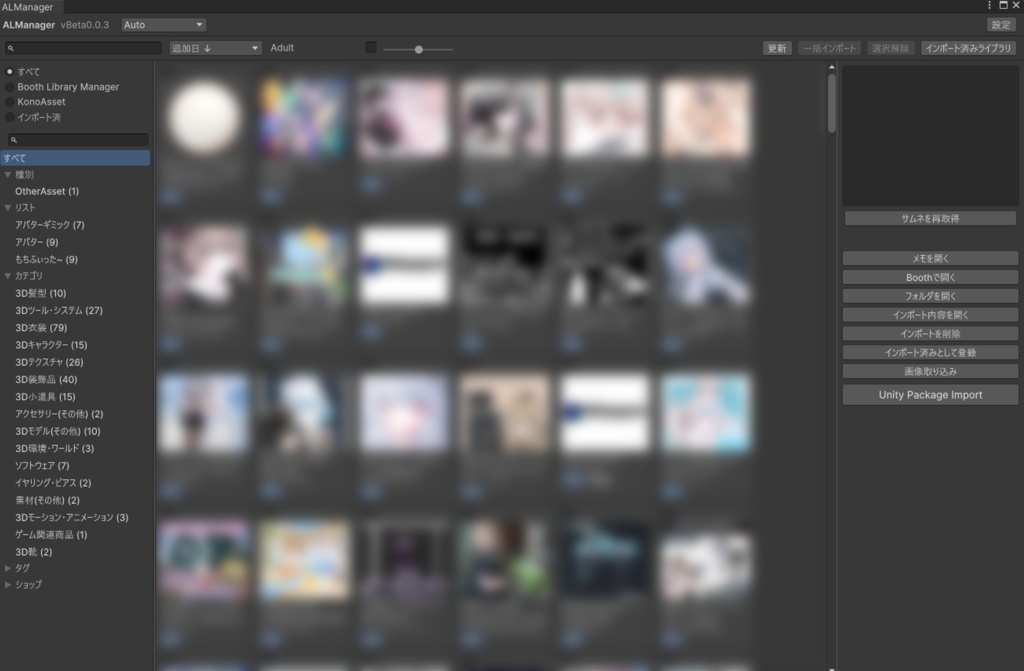


BOOTH Library Manager & KonoAssetのライブラリを、Unityのウィンドウひとつで。 BOOTHで買ったアセット、どこに入れたか探すのが大変ですよね…。 フォルダを開いて、zipを解凍して、.unitypackageを探して、ダブルクリックして…。数が増えるほど、この作業がめんどくさい。 Booth Library Manager等があっても、結局unitypackageをD&D、そしてインポートされたファイルを探し出さないといけません。 ALManagerは、BOOTH Library Manager(BLM)とKonoAssetに登録済みのアセットを、UnityのEditorウィンドウひとつから一覧・検索して、.unitypackageをワンクリックで現在のプロジェクトに取り込める統合ビューアです。 しかも完全読み取り専用。BLM / KonoAsset の元データには一切書き込みません。安心してそのまま使えます。 質問及び不具合報告などのサポートはX(https://x.com/regu56)のDMにて承ります。ただし、エラーなどの場合は初めからエラー文も送ってください。 感想をXで#reguCreate と共にポストしていただけますと励みになります! Manage your BOOTH Library Manager and KonoAsset libraries all from a single Unity window. It’s a hassle to figure out where you put the assets you bought on BOOTH, isn’t it…? Opening folders, unzipping files, searching for the .unitypackage, double-clicking it… The more assets you have, the more tedious this process becomes. Even with the BOOTH Library Manager, you still have to drag and drop the .unitypackage and then track down the imported files. ALManager is an integrated viewer that lets you browse and search for assets registered with BOOTH Library Manager (BLM) and KonoAsset—all from a single Unity Editor window—and import .unitypackage files into your current project with a single click. Plus, it’s completely read-only. It doesn’t write to the original data in BLM or KonoAsset at all. You can use it with complete peace of mind.
主な機能 / Key Features
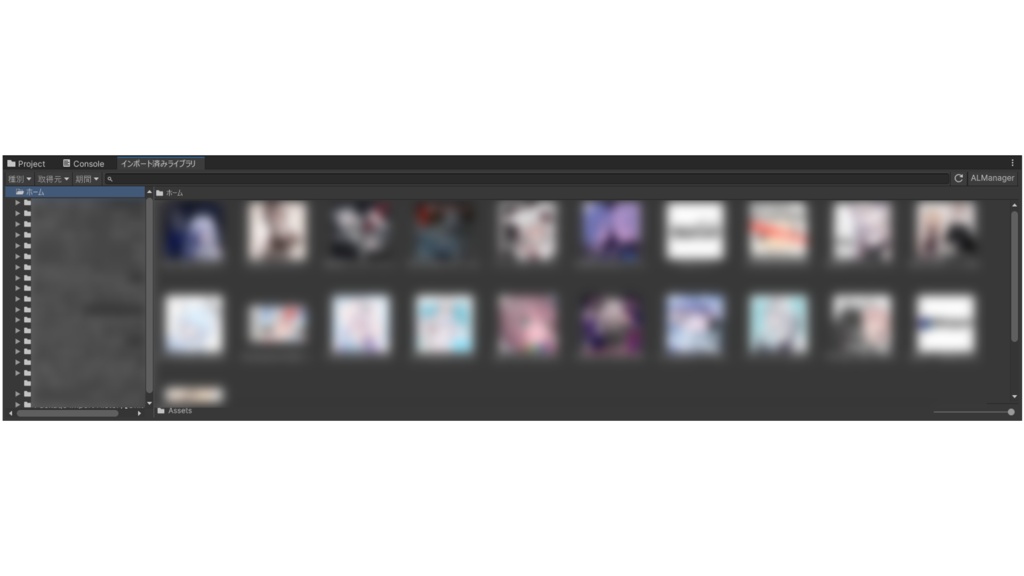
ライブラリ統合表示・検索 ■ BLM と KonoAsset を 1 ウィンドウに統合表示(左=ソース/フィルタ、中央=サムネグリッド、右=詳細の 3 ペイン、幅はドラッグ調整&記憶) ■ 検索・並び替え(追加日/名前/公開日)・サムネイルサイズ 3 段階 ■ ファセットフィルタ:種別・リスト・カテゴリ・タグ・ショップ/作者(件数表示つき) ■ サムネイル自動表示(BLM はリモート取得+キャッシュ、KonoAsset はローカル画像) ■ Adult 表示トグル/重複表示の優先(両方・KonoAsset 優先・BLM 優先) ワンクリック Import / One-Click Import ■ ローカルの .unitypackage をワンクリックで取り込み ■ パッケージ選択:複数パッケージは個別選択/「すべてインポート」 ■ 一括(バッチ)インポート:チェックで複数商品をまとめて取り込み ■ zip / rar 内の .unitypackage にも対応 ■ 取り込み内容のツリープレビュー/商品フォルダ内の画像の取り込み インポート済みライブラリ管理 / Imported Library Management ■ インポート履歴:取り込んだ内容の確認・削除(削除前にツリープレビュー) ■ 一括検出:ダウンロード済みで未登録の商品を全走査し、プロジェクト内のアセットを履歴へ一括登録(初回に自動提案) ■ インポート済みライブラリウィンドウ:Unity 標準の Project 風に閲覧・整理 保存されたサムネイルでカード表示し、その商品に対応するパス表示を自動構築 - 型フィルタ(Texture / Audio / Animation 等)・取得元フィルタ・期間フィルタ(1/7/30 日)・検索 - 右クリックで 開く/実ファイルへ移動/名前変更/複製/削除/移動/新規作成 - F2・Ctrl+D・Ctrl+C/V・Delete、ドラッグ&ドロップ、Ctrl+ホイールで拡縮 設定・その他 / Settings & More ■ BLM data.db / KonoAsset データフォルダのパス表示・手動指定 ■ サムネイルキャッシュの保存先変更・削除、取得速度調整(同時数 1〜8・間隔 0〜2 秒) ■ 日本語 / English 対応(Auto でシステム言語に自動追従、いつでも切替) Unified Library & Search ■ Integrates BLM and KonoAsset into a single window (3-pane layout: left = Source/Filter, center = Thumbnail Grid, right = Details; window width can be adjusted by dragging and is saved) ■ Search and sort by (Date Added / Name / Publication Date) and 3 thumbnail size levels ■ Facet filters: Type, List, Category, Tag, Shop/Author (with count display) ■ Automatic thumbnail display (BLM fetches remotely and caches; KonoAsset uses local images) ■ Adult content display toggle / Duplicate display priority (Both, KonoAsset priority, BLM priority) One-Click Import ■ Import local .unitypackage files with a single click ■ Package Selection: Select multiple packages individually / “Import All” ■ Batch Import: Check boxes to import multiple items at once ■ Supports .unitypackage files inside zip/rar archives ■ Tree preview of import contents / Import images from item folders Imported Library Management ■ Import History: View and delete imported items (tree preview before deletion) ■ Full Scan: Scans all downloaded but unregistered assets and registers them in the project’s asset history in one go (automatically suggested on first use) ■ Imported Library Window: Browse and organize assets in a style similar to Unity’s standard Project view - Type filters (Texture / Audio / Animation, etc.), source filters, time period filters (1/7/30 days), and search - Right-click to Open / Go to File / Rename / Duplicate / Delete / Move / Create New - F2, Ctrl+D, Ctrl+C/V, Delete, drag-and-drop, and Ctrl+mouse wheel to zoom Settings & More ■ Display or manually specify the path to the BLM data.db and KonoAsset data folders ■ Change or delete the thumbnail cache location; adjust retrieval speed (number of simultaneous retrievals: 1–8; interval: 0–2 seconds) ■ Japanese / English support (Auto mode automatically follows the system language; switch between languages at any time)
導入 & 起動 / Installation & Launch
1. 配布された .unitypackage を Unity プロジェクトにインポート 2. Unity メニューの Window ▸ ALManager を開く 3. BLM / KonoAsset がインストール済みなら、ライブラリが自動で読み込まれます !!重要!! ALManager は BOOTH Library Manager および/または KonoAsset の保存データを読み取ります。少なくとも一方をインストールし、アセットを登録・ダウンロードした状態でご利用ください。 BOOTH Library Managerの商品は初回にBoothサーバーと通信を行い、サムネのキャッシュを行います。 (%LOCALAPPDATA%\ALManager\thumb-cache) 1. Import the distributed .unitypackage into your Unity project. 2. Open Window ▸ ALManager from the Unity menu. 3. If BLM / KonoAsset are installed, your library loads automatically. !! Important !! ALManager reads data saved by BOOTH Library Manager and/or KonoAsset. Please install at least one of them and register/download assets first.
動作環境 / Verified Environment
■ Unity 2022.3 系(検証:2022.3.22f1) ■ Windows の Unity Editor 専用 ■ 追加の外部パッケージ不要(SQLite は Windows 同梱の winsqlite3.dll を使用) ■ 参照先: BoothLibraryManager %APPDATA%\pm.booth.library-manager\data.db KonoAsset %LOCALAPPDATA%\dev.konoasset.app\preference.json (データフォルダ手動指定も可) Unity 2022.3.x (verified on 2022.3.22f1) Windows Unity Editor only No extra packages required (uses Windows' bundled winsqlite3.dll)
利用規約 / Terms of Use
・ご返金はBOOTHのシステム上できません。 ・アバター、衣装は商品に含まれません。 ・本製品の再配布、自作発言を禁止します。 ・政治的、宗教的なご利用を禁止します。 ・AI学習等へのご利用を禁止します。 ・本製品を使用することで発生した、いかなる損害について当方は一切の責任を負いません。 ・本ソフトウェアは現状有姿で提供されます。 ・Refunds are not available through the BOOTH system. ・Avatars and costumes are not included in this product. ・Redistribution of this product and claiming it as your own creation are prohibited. ・Use for political or religious purposes is prohibited. ・Use for AI training or similar purposes is prohibited. ・We assume no liability whatsoever for any damages arising from the use of this product. ・This software is provided “as is.”
ライセンス / License
https://ambitious-leader-505.notion.site/p/3934a43d8694807b9207f0f105363617?pvs=25
Q&A
Q. Booth Library Manager と KonoAsset、両方入れていないと使えませんか? A. いいえ。どちらか一方だけでも動作します。両方あれば統合して表示します。 Q. 元のライブラリのデータが壊れたりしませんか? A. 壊れません。両ソースは読み取り専用です。書き込むのは Unity へのインポート・サムネキャッシュ・独自のインポート履歴のみです。 Q. Mac でも使えますか? A. WindowsのUnity Editor専用です。 Q. 追加でパッケージのインストールは必要ですか? A. 不要です(rar 内パッケージの展開時のみ外部ツールが必要で、その際は案内が出ます)。
更新履歴 / Changelog
2026-07-05 v1.0.0: リリース 2026-07-12 v1.0.1: BOOTH Library Manager に手動登録したアイテム(BOOTH 商品に紐付かないアイテム)が一覧に表示されなかった問題を修正 2026-07-05 v1.0.0: release 2026-07-12 v1.0.1: Fixed an issue where items manually registered in BOOTH Library Manager (items not linked to BOOTH products) were not displayed in the list.