
BakeFix(加算ベイク)Tool
- BakeFix_Fastダウンロード商品¥ 280
- BakeFix_Plusダウンロード商品¥ 280
- BakeFix_Proダウンロード商品¥ 280
- BakeFix_v1.00(ALL/全種類)ダウンロード商品¥ 620
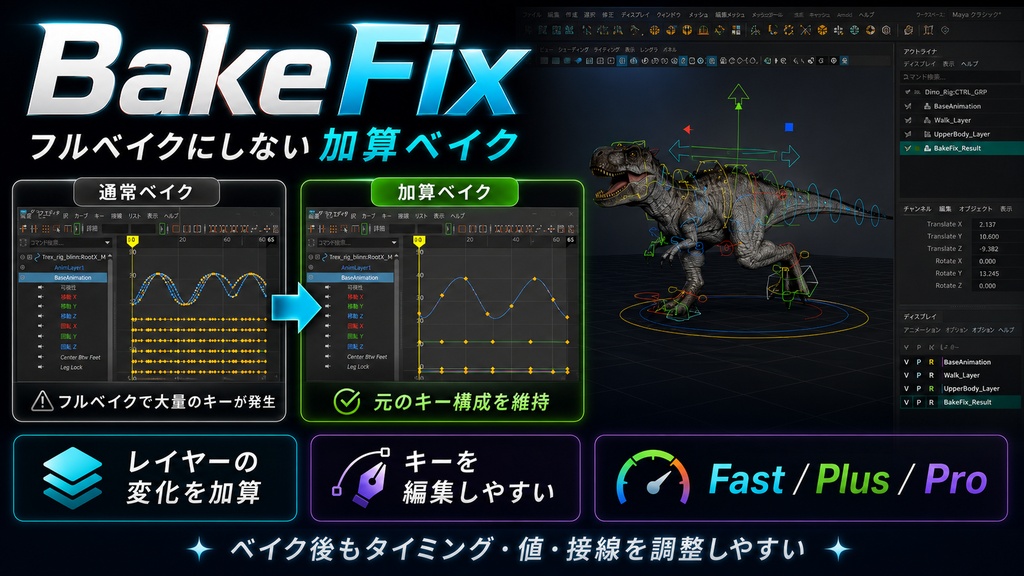
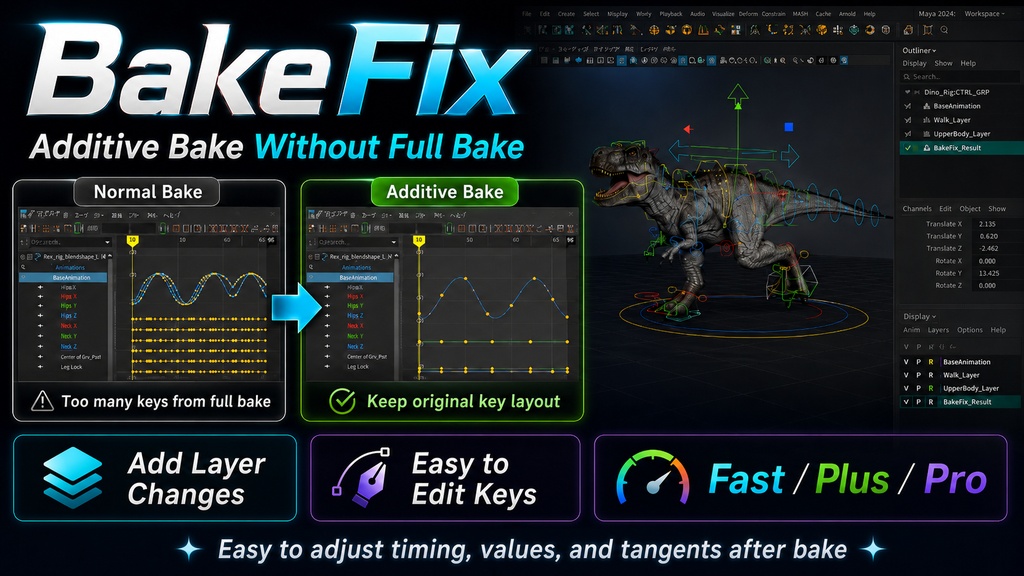


【BakeFix Fast / Plus / Pro の使い方】 このツールは、Mayaのアニメーションをフルベイクにせず、元のキー構成を維持したまま加算ベイクする機能です。 通常のベイクでは、Playback Range内に1フレームごとのキーが作成されます。 BakeFixでは、元から存在しているキーの位置を基準に、アニメーションレイヤーなどで変更された動きを加算します。 そのため、ベイク後も大量のキーで埋まらず、タイミング・値・接線を調整しやすい状態を維持できます。 【インストール方法】 1. ダウンロードしたZIPファイルを展開します。 2. Mayaで、BakeFixを登録したいシェルフを開きます。 3. install_BakeFix.py をMayaの画面上にドラッグ&ドロップします。 4. 開いているシェルフにFast・Plus・Proの3つのボタンが追加されます。 5. 追加されたボタンから、それぞれのBakeFixを実行できます。 インストール後は、Pythonファイルを再度ドラッグ&ドロップする必要はありません。 【基本の流れ】 1. 加算ベイクしたいコントローラーやオブジェクトを選択します。 2. Playback Rangeをベイクしたい範囲に設定します。 3. Fast・Plus・Proの中から、目的に合ったボタンを押します。 4. 「ベイク完了」と表示されたら処理完了です。 アニメーションレイヤーを選択している場合は、処理中のみBaseAnimationへ切り替わります。 処理が完了すると、実行前に選択していたアニメーションレイヤーへ戻ります。 最初からBaseAnimationを選択している場合は、そのまま実行されます。 【BakeFix Fast】 3種類の中で、最も処理が速いバージョンです。 数値が変動したカーブは、カーブ全体にベイク結果が加算されます。 実行後、数値が変動したカーブの接線はオート接線になります。 数値が変動していないカーブは、元のキーと接線へ戻ります。 ・処理速度を優先したい場合 ・多数のコントローラーをまとめて処理したい場合 ・ベイク後に自分でカーブを調整したい場合 に向いています。 【BakeFix Plus】 処理速度と精度のバランスを取ったバージョンです。 数値が変動したカーブは、カーブ全体にベイク結果が加算されます。 加算されたカーブは、ベイク時の接線角度を維持した状態で完了します。 数値が変動していないカーブは、元のキーと接線へ戻ります。 ・オート接線へ変更したくない場合 ・ベイク時のカーブ形状を維持したい場合 ・速度と精度のバランスを取りたい場合 に向いています。 【BakeFix Pro】 3種類の中で、最も高精度なバージョンです。 FastとPlusは変更があったカーブ全体を加算しますが、Proは変更があったキーだけを加算します。 元のキーと同じ値になっているキーは、元のキーと元の接線へ戻ります。 値が変わったキーだけが、ベイク時の値と接線角度を維持した状態で残ります。 ・変更されたキーだけを反映したい場合 ・元のキーと接線をできるだけ維持したい場合 ・処理速度より精度を優先したい場合 に向いています。 【3種類の違い】 処理速度は、Fast、Plus、Proの順で速くなります。 Fast > Plus > Pro 精度は、Pro、Plus、Fastの順で高くなります。 Pro > Plus > Fast Fast:変更されたカーブ全体を加算し、オート接線で完了します。 Plus:変更されたカーブ全体を加算し、ベイク時の接線角度を維持します。 Pro:変更されたキーだけを加算し、変更されていないキーは元の状態へ戻します。 【実行後の状態】 ・元のキー構成を維持したまま加算ベイクされます。 ・フルベイクのような1フレームごとのキーになりません。 ・ベイク後もキー、値、接線を編集できます。 ・実行前のオブジェクト選択が維持されます。 ・実行前のアニメーションレイヤー選択へ戻ります。 ・グラフエディタの拡大率と表示範囲が維持されます。 ・Ctrl+Zを1回押すと、BakeFix実行前の状態へ戻せます。 【注意点】 ・必ず、加算ベイクしたいコントローラーやオブジェクトを選択してから実行してください。 ・ベイク範囲はPlayback Rangeを基準にします。 ・元のキーが一切ない属性やカーブには、動きは加算されません。 ・BakeFixは、元からキーが存在している箇所を基準に加算します。 ・キーがない属性にも動きを反映したい場合は、BakeFixを実行する前に元キーを作成してください。 ・キー数や選択数が多い場合は、処理に時間がかかることがあります。 ・Fastは、数値が変動したカーブの接線がオート接線になります。 ・Plusは、数値が変動したカーブ全体にベイク時の接線が残ります。 ・Proは、数値が変動したキーだけにベイク時の値と接線が残ります。 【How to Use BakeFix Fast / Plus / Pro】 BakeFix is a Maya tool that performs additive baking while keeping the original keyframe layout instead of creating a full bake. A normal bake creates a key on every frame within the Playback Range. BakeFix adds animation layer changes to the existing keyframe positions, keeping the curve easier to edit after baking. This allows you to continue adjusting the timing, values, and tangents without filling the Graph Editor with unnecessary keys. 【Installation】 1. Extract the downloaded ZIP file. 2. In Maya, open the shelf where you want to add BakeFix. 3. Drag and drop install_BakeFix.py onto the Maya window. 4. Fast, Plus, and Pro buttons will be added to the currently open shelf. 5. You can run each BakeFix version from the added buttons. You do not need to drag and drop the Python file again after installation. 【Basic Workflow】 1. Select the controllers or objects you want to bake. 2. Set the Playback Range. 3. Click Fast, Plus, or Pro depending on the result you need. 4. The process is complete when “Bake Complete” appears. If an animation layer is selected, BakeFix temporarily switches to BaseAnimation while running. After completion, the previously selected animation layer is selected again. If BaseAnimation is already selected, the process runs without changing the layer selection. 【BakeFix Fast】 Fast is the fastest version. Curves with changed values are baked as complete curves. After execution, the tangents of changed curves are converted to Auto tangents. Curves without value changes are restored to their original keys and tangents. Fast is suitable when processing speed is the priority. 【BakeFix Plus】 Plus balances processing speed and accuracy. Curves with changed values are baked as complete curves. The baked curves keep the tangent angles created during the bake. Curves without value changes are restored to their original keys and tangents. Plus is suitable when you want to preserve the baked curve shape without converting it to Auto tangents. 【BakeFix Pro】 Pro is the most accurate version. While Fast and Plus apply the result to an entire changed curve, Pro applies the result only to changed keys. Keys with the same value as the original are restored to their original values and tangents. Only changed keys keep the baked values and tangent angles. Pro is suitable when preserving the original keys and tangents is more important than processing speed. 【Version Differences】 Processing speed: Fast > Plus > Pro Accuracy: Pro > Plus > Fast Fast: Applies changes to the full curve and finishes with Auto tangents. Plus: Applies changes to the full curve and keeps the baked tangent angles. Pro: Applies changes only to changed keys and restores unchanged keys to their original state. 【Notes】 ・Select the controllers or objects you want to process before running BakeFix. ・The bake range is based on the Playback Range. ・Attributes or curves without any existing keys will not receive additive animation. ・BakeFix adds changes only where original keys already exist. ・If you want animation to be added to an unkeyed attribute, create original keys before running BakeFix. ・Processing may take longer when many keys or objects are selected. ・Fast converts the tangents of changed curves to Auto tangents. ・Plus keeps the baked tangents on changed curves. ・Pro keeps baked values and tangents only on changed keys.
利用規約
著作権 (C) 2026 [Haru_Motionwork] 全著作権所有 本スクリプトの無断販売および再配布は禁止されています。 他人への配布を目的とした本スクリプトのコピーも禁止です。 個人や業務での使用を目的としたスクリプトの改変は許可されています。 本スクリプトは商業利用や業務利用が可能です。 本ソフトウェアは「現状のまま」で提供され、明示または黙示を問わず いかなる保証も伴いません。本ソフトウェアの利用、改変、または 規約違反による再配布に起因する問題や損害について、著者は責任を負いません。