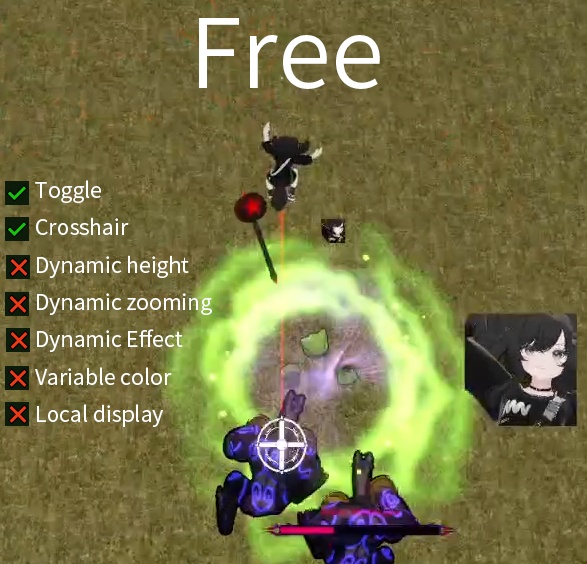
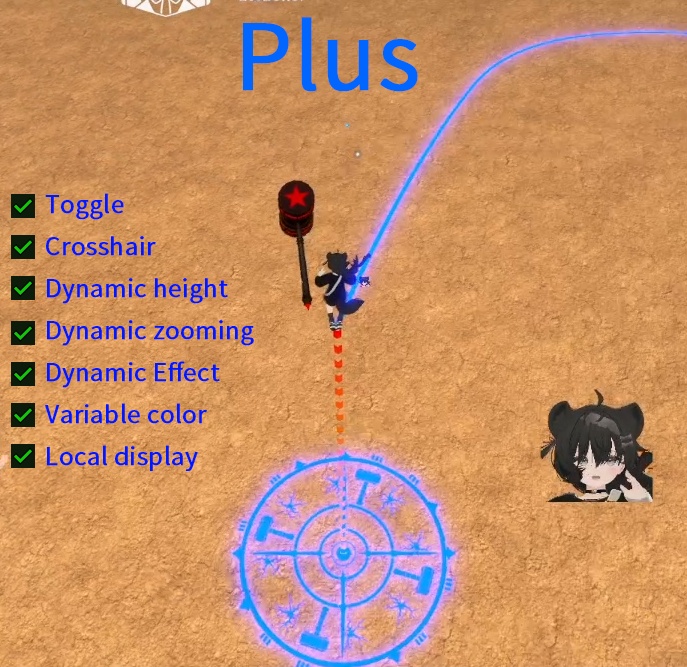
[VRChat Ecliptica] Hammer Landing Marker / 落槌位置マーカー / 落槌点位标记
- Hammer Landing Marker Freeダウンロード商品¥ 0
- Hammer Landing Marker Plusダウンロード商品¥ 300
![[VRChat Ecliptica] Hammer Landing Marker / 落槌位置マーカー / 落槌点位标记](https://booth.pximg.net/dd446cf0-1474-4954-972e-3a068b0e0308/i/8635946/8448ff34-0334-4498-95fd-d803ca3b6069_base_resized.jpg)
![[VRChat Ecliptica] Hammer Landing Marker / 落槌位置マーカー / 落槌点位标记](https://booth.pximg.net/dd446cf0-1474-4954-972e-3a068b0e0308/i/8635946/bf9c09b0-cc39-4ab0-848a-1cbbd8ef7ce3_base_resized.jpg)
![[VRChat Ecliptica] Hammer Landing Marker / 落槌位置マーカー / 落槌点位标记](https://booth.pximg.net/dd446cf0-1474-4954-972e-3a068b0e0308/i/8635946/5d6e9deb-8bfd-4925-a16c-5db235de2461_base_resized.jpg)
# [VRChat Ecliptica] Hammer Landing Marker / 落槌位置マーカー / 落槌点位标记 ## 日本語 VRChat の Ecliptica 向け、落槌位置を見やすく表示するための補助ギミックです。 落槌地点を地面マーカーや射線エフェクトで確認しやすくします。 本商品はアバター本体ではありません。 Ecliptica で落槌ギミックを使用する方向けの追加ツールです。 ### Free版 - ON / OFF 切り替え - 地面クロスマーカー - パーティクル射線による位置表示 ### Plus版 Free版の機能に加えて、以下の機能が利用できます。 - マーカー色の調整 - 複数人で使用する際、自分のマーカーを見分けやすくします - Local Only 切り替え - 他人に見せたくない場合、自分だけに表示できます - 動的な地面マーカー - 高度に応じたマーカーの上昇 - 一部ワールドでマーカーが地面に埋もれて見えにくくなる問題を軽減します - 高度に応じたマーカーの拡大 - 高い位置からでも落槌地点を確認しやすくします - カラフルな高度軸ラインと回転エフェクト - 落槌時の演出感を高め、周囲のプレイヤーにも位置や状態を伝えやすくします ### 導入 - VRChat SDK3 Avatar 用 - Modular Avatar を使用します - Prefab をアバターに配置して使用してください ### 注意・トラブルシューティング - 本ギミックは VRC Raycast コンポーネントの機能に依存しています。 地面マーカーが地面に沿わない場合は、VRChat SDK の更新をお試しください。 - ゲーム内でマーカーの回転・拡縮が動作しない場合は、Modular Avatar の更新で改善する可能性があります。 - Unity Editor 上で直接テストする場合、回転や拡縮が正しく反映されないことがあります。 基本的には、アップロード後に VRChat 内で確認することを推奨します。 - Unity Editor 上で動作確認したい場合は、`Hammer Landing Marker` という Animator Controller を Avatar の Animator に割り当ててから Gesture Manager を起動してください。 Avatar 側の Animator に VRC Raycast 用のパラメーターが存在し、Unity 実行時に VRC Raycast と Animator の接続が行われるためです。 --- ## English A helper gimmick for VRChat Ecliptica users that makes the hammer landing point easier to see. It displays the landing position with ground markers, particle rays, and visual effects. This product is not an avatar. It is an add-on tool for users who use the hammer landing mechanic with Ecliptica. ### Free Version - ON / OFF toggle - Ground cross marker - Particle ray position indicator ### Plus Version Includes all Free Version features, plus: - Marker color adjustment - Helps distinguish your marker when multiple players are using it - Local Only toggle - Show the marker only to yourself when you do not want others to see it - Dynamic ground marker - Height-based marker lift - Helps reduce cases where the marker is hidden by the ground in some worlds - Height-based marker scaling - Makes the landing point easier to see from higher positions - Colorful height axis line and rotation effects - Adds impact feedback and makes the landing position/status easier for others to notice ### Setup - For VRChat SDK3 Avatars - Uses Modular Avatar - Place the included Prefab on your avatar ### Notes / Troubleshooting - This gimmick depends on the VRC Raycast component. If the ground marker does not stick to the ground correctly, please try updating your VRChat SDK. - If the marker does not rotate or scale correctly in-game, updating Modular Avatar may solve the issue. - When testing directly in Unity Editor, rotation and scaling may not work correctly. Uploading the avatar and testing in VRChat is recommended. - If you still want to test it in Unity Editor, assign the Animator Controller named `Hammer Landing Marker` to the Avatar’s Animator, then start Gesture Manager. This is because the Avatar Animator contains parameters defined by VRC Raycast, and the connection between VRC Raycast and Animator is established during Unity play mode. --- ## 中文 这是一个面向 VRChat Ecliptica 落槌玩家的落点辅助标记工具。 它可以通过地面标记、粒子射线和动态视觉效果,让落槌位置更容易被自己和周围玩家确认。 本商品不是 Avatar 本体。 适用于使用 Ecliptica 落槌玩法的玩家。 ### 免费版 - 开关 - 地面准星图案 - 粒子射线定位 ### Plus 付费版 包含免费版功能,并追加以下功能: - 颜色调节 - 多人同时使用时,更容易区分自己的标记 - 仅本地生效开关 - 不想让他人看到时,可设置为仅自己可见 - 动态地面准星 - 根据玩家高度抬升地面定位贴图 - 缓解部分场景中贴图被地面遮盖的问题 - 根据玩家高度放大地面定位贴图 - 高处落槌时,也能更清楚地看见落点 - 彩色高度轴线与旋转动效 - 提高落槌时的打击感,也让其他玩家更容易感知落槌位置和状态 ### 导入说明 - 适用于 VRChat SDK3 Avatar - 使用 Modular Avatar - 将 Prefab 放置到 Avatar 内即可使用 ### 注意事项 / 问题排查 - 本插件依赖 VRC Raycast 组件功能。 如果出现准星图案不贴地面的问题,请尝试更新 VRChat SDK 版本。 - 如果游戏内准星图案不旋转、不缩放,更新 Modular Avatar 版本可能可以解决。 - 直接在 Unity 中测试时,旋转和缩放可能不会生效。 建议直接上传到 VRChat 后进行确认。 - 如果坚持在 Unity 中测试,请将名为 `Hammer Landing Marker` 的 Animator Controller 拖到 Avatar 的 Animator 上,再启动 Gesture Manager 进行测试。 原因是 Avatar 的 Animator 中带有 VRC Raycast 定义的参数,Unity 运行后这些参数才会在 VRC Raycast 和 Animator 之间建立连接。
【v1.1 Update アップデート 更新】
Plus版に、回転エフェクトの ON / OFF 切り替えを追加しました。 回転する地面マーカーが苦手な方や、照準の妨げになると感じる方のために、回転表示を自由に有効 / 無効 にできるようになりました。 Added an ON / OFF toggle for the rotating marker effect in the Plus version. Some users may find the rotating ground marker distracting or feel that it affects aiming. You can now choose whether to enable or disable the rotation effect. Plus 版添加了旋转动效开关。 有些玩家可能不喜欢旋转动效,或觉得它会影响瞄准。现在可以自行选择是否开启地面标记的旋转效果。
【利用規約 / Terms of Use / 利用规约】
【日本語】 ・本作品の再配布、共有、転売を、いかなる形式でも禁止します。 ・本作品を違法行為、権利侵害、または他者の権利・利益を著しく損なう目的で使用することを禁止します。 ・本作品はダウンロード商品のため、購入後の返金はお受けできません。 ・本作品の使用によって生じた損害、トラブル、紛争、その他の問題について、作者は一切の責任を負いません。 【English】 ・Redistribution, sharing, or resale of this product in any form is prohibited. ・Using this product for illegal activities, infringement, or any purpose that seriously harms the rights or interests of others is prohibited. ・Due to the nature of downloadable products, refunds cannot be provided after purchase. ・The creator assumes no responsibility for any loss, damage, dispute, or other issue resulting from the use of this product. 【中文】 ・禁止以任何形式二次分发、共享或转售本作品。 ・禁止将本作品用于违法、侵权或严重损害他人权益的用途。 ・本作品为下载类型商品,购买后恕不退款。 ・因使用本作品而产生的任何损失、纠纷或其他问题,作者不承担任何责任。