[VRChat Avatar Gimmick] Blue Line Scan Effect ブルーラインスキャンエフェクト
- ダウンロード商品¥ 1,000
![[VRChat Avatar Gimmick] Blue Line Scan Effect ブルーラインスキャンエフェクト](https://booth.pximg.net/dd446cf0-1474-4954-972e-3a068b0e0308/i/8718107/a6f17bb3-bdb1-4159-baf9-dbbb3c77386a_base_resized.jpg)
![[VRChat Avatar Gimmick] Blue Line Scan Effect ブルーラインスキャンエフェクト](https://booth.pximg.net/dd446cf0-1474-4954-972e-3a068b0e0308/i/8718107/a6a6f11e-37e0-405f-a0c8-d473c63e1922_base_resized.jpg)
![[VRChat Avatar Gimmick] Blue Line Scan Effect ブルーラインスキャンエフェクト](https://booth.pximg.net/dd446cf0-1474-4954-972e-3a068b0e0308/i/8718107/b1bcc1ac-d6d3-4733-bdb4-fba25a6bce24_base_resized.jpg)
# [VRChat Avatar Gimmick] Blue Line Scan Effect / ブルーラインスキャンエフェクト • 現在、Xにてリポスト抽選キャンペーンを開催中です! https://x.com/jackens_x/status/2088490398067142791 World版をご購入済みの方は、BOOTHメッセージよりご連絡ください。Avatar版をプレゼントいたします。 World版とAvatar版のブルーラインエフェクトを、こちらのWorldで体験できます。https://vrchat.com/home/world/wrld_d57e7327-8971-4938-868c-b1d6e8cb73c0
## VRChatアバター用 ブルーライン・スキャンフリーズエフェクト
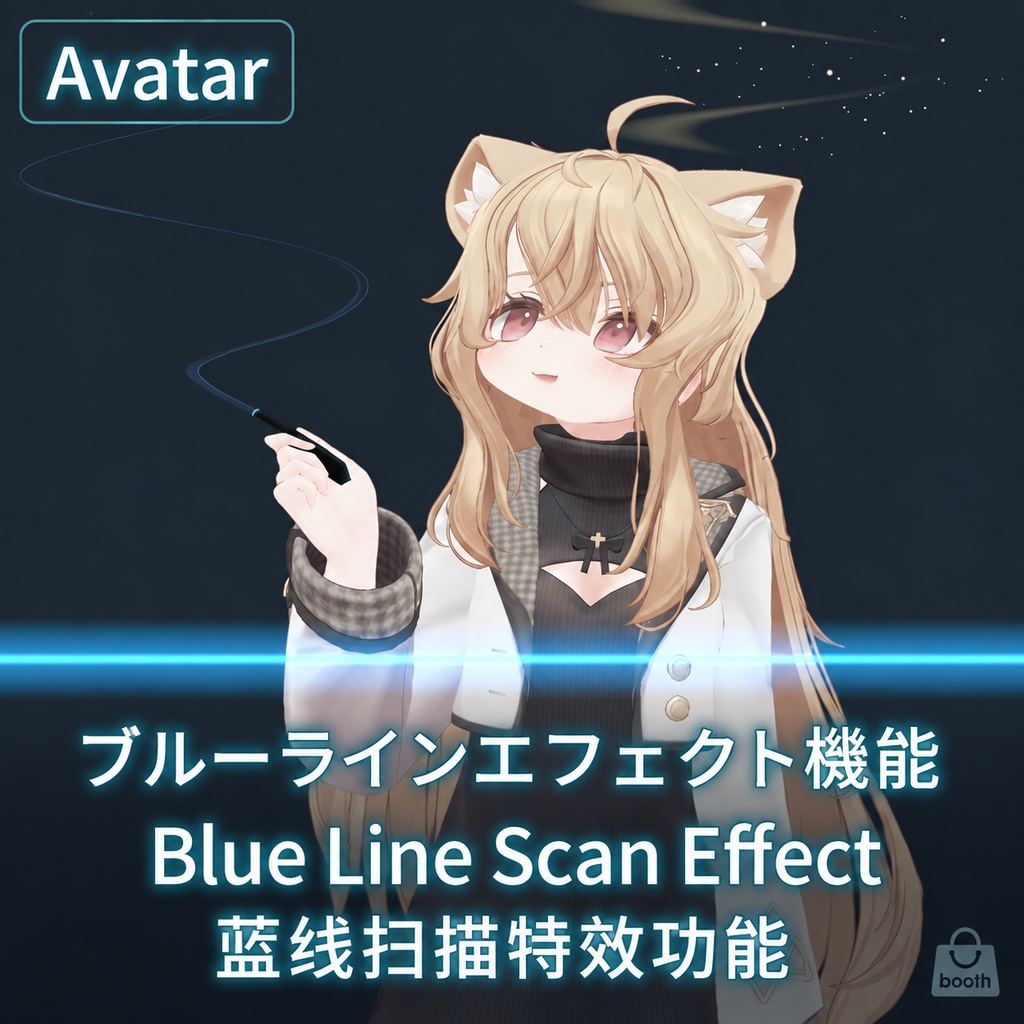
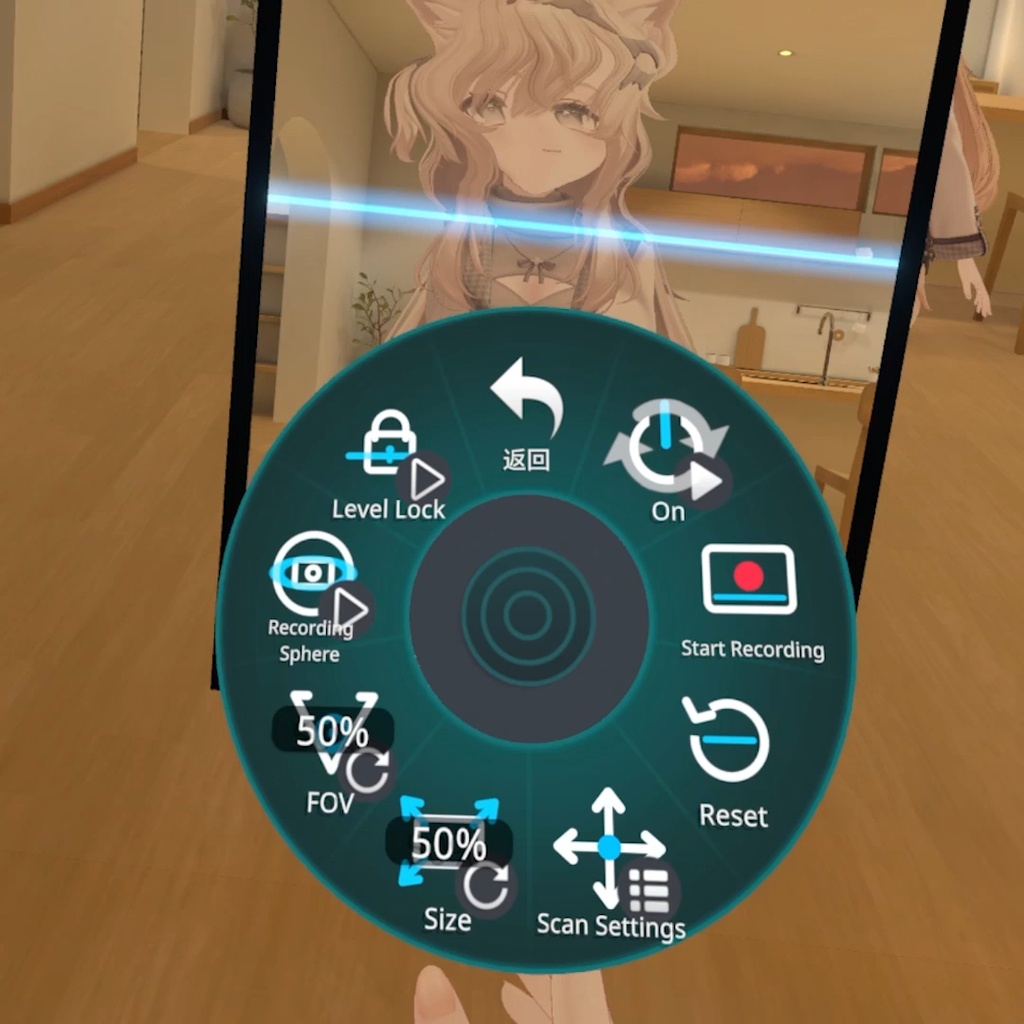
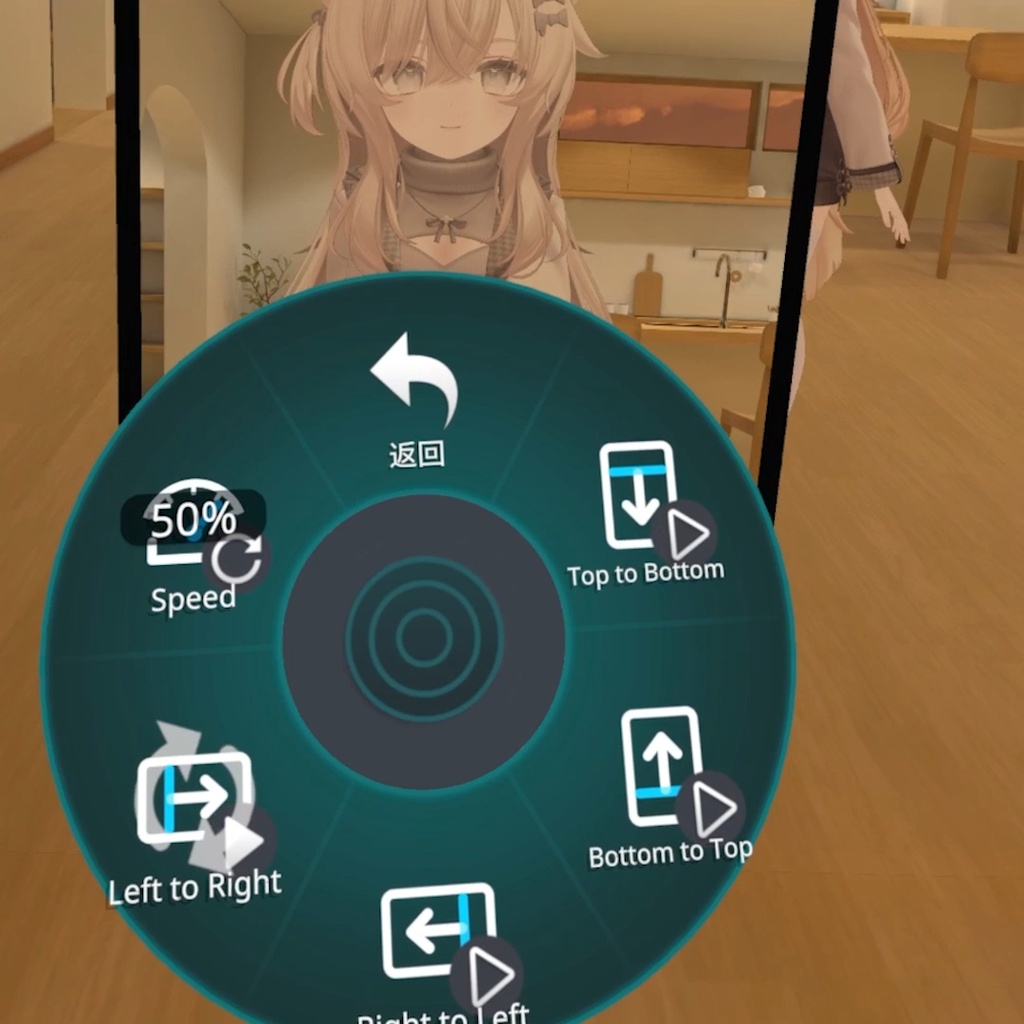
Blue Line Scan Effectは、VRChatアバターに導入できるカメラギミックです。 ギミックをオンにすると、プレイヤーの正面にスクリーンが出現します。録画を開始すると青い走査線が画面上を移動し、通過した領域を一列ずつ固定します。異なる瞬間の動きを1枚の映像に残せるため、自撮り、アバターのモーション展示、動くオブジェクトを使った表現、風景撮影、VRChatカメラでの動画収録などに使用できます。 ## 主な機能 - ラインスキャン・フリーズ:走査線が通過した領域を順番に固定し、異なる時間の動きを1枚の映像に残します。 - 4方向スキャン:上から下、下から上、右から左、左から右の4方向に対応します。 - スキャン速度調整:1回のスキャン時間を約5~40秒の範囲で調整できます。初期値は約20秒です。 - 両面表示:スクリーンの表裏どちらからでも映像を確認できます。 - 自撮り用ミラー表示:被写体側の画面は鏡のように左右反転し、背面側は風景撮影に適した通常表示になります。 - スクリーンサイズ調整:スマートフォン程度のサイズから全身鏡クラスまで連続的に調整できます。初期値は中サイズです。 - FOV調整:初期値は60°で、約0~120°の広い範囲を調整できます。近距離の自撮りから広角撮影まで対応します。 - ワールド固定:手を離した後もギミックはワールド空間に固定され、プレイヤーを追従しません。 - VRアクティブグラブ:手がグラブ可能範囲に入ると、フレームが黒から青に変化します。範囲内でFistジェスチャーを行ったときだけグラブし、掴んだ瞬間の相対位置と回転を保ったまま移動できます。トリガーやグリップのアナログ値は使用せず、Fistのまま近づけただけでは自動的にグラブしません。 - PCでの再配置:`On (Friend Only)`を入れ直すたびにスクリーンがプレイヤーの正面へ再召喚され、デスクトップモードでも簡単に位置を調整できます。 - 水平ロック:`Level Lock`をオンにすると、ピッチと左右の傾きを補正した後、グラブ中および設置後も水平な撮影姿勢を維持します。 - 録画用スフィア:VRChatカメラ用のRecording Sphereを個別に表示できます。案内表示の内側にVRChatカメラを入れると、合成済みのスキャン映像を直接撮影できます。 - 左右眼表示への配慮:録画用スフィアには外側の表示球とカメラ配置ガイドがあり、VRで左右の目に異なる映像が見えることによる不快感を軽減します。 - Skyboxと遠景撮影:メインカメラはSkyboxを描画し、Far Clip Planeは1000に設定されています。 - リモート初期化処理:後からアバターを読み込んだ他プレイヤーに対して、カメラを再初期化する処理を備えています。 - 安全な初期状態:ギミックは初期状態で非表示です。`On (Friend Only)`パラメーターは保存されないため、ワールド移動やアバター再読み込み時に顔の前へ突然表示されません。 ## メニュー - `On (Friend Only)`:Blue Lineギミックの表示/非表示を切り替えます。オンにするたびに正面へ再召喚されます。 - `Start Recording`:ラインスキャン録画を開始します。スキャン中にもう一度押すと現在のスキャンを中断し、ボタンを離した時点で先頭から再開します。 - `Reset`:現在のスキャン結果を消去し、リアルタイム映像へ戻します。 - `Scan Settings`:4方向のスキャン方向とスキャン速度を設定します。 - `Size`:スクリーンサイズを連続的に調整します。 - `FOV`:撮影視野を連続的に調整します。 - `Recording Sphere`:録画用スフィアの表示/非表示を切り替えます。 - `Level Lock`:水平ロックのオン/オフを切り替えます。 ## 技術仕様 - 映像解像度:1200 × 1600(縦3:4)。 - メイン映像アンチエイリアス:4x MSAA。 - 初期FOV:60°。 - FOVパラメーター範囲:約0~120°。 - スキャン時間:約5~40秒。 - スキャン方向:4種類。 - カスタムパラメーター:11個。 - Expression Parameters:同期パラメーター11個、合計39ビット。 - FXアニメーションレイヤー:8レイヤー。 - 導入方式:Modular Avatar対応のドラッグ&ドロップ式Prefab。 - 使用コンポーネント:VRChat Avatar Constraints、Contacts、Camera、Custom Render Texture。 - Udonは使用しません。World側への追加スクリプト導入も不要です。 ## 導入要件 - VRChat Avatars 3.0。 - VRChat SDK - Avatars。 - Modular Avatar。 - 本製品はPC版VRChat向けです。Quest / Androidはサポート対象外です。 `BlueLineScanEffect.prefab`をアバターのHierarchyへ配置してアップロードしてください。メニュー、パラメーター、FX ControllerはModular Avatarによって自動的に統合されます。 ## 使用上の注意 - 水平方向の名称は、自撮り用ミラー面から見た結果を基準にしています。スクリーン背面から見ると、左右のスキャン方向は反対に見えます。 - 動くオブジェクトを撮影する場合は、走査線が通過している間もオブジェクトを動かし続けると、時間差のあるラインスキャン効果が分かりやすくなります。 - 極端なFOV、大きなスクリーンサイズ、複雑なWorldでは描画負荷が増える場合があります。アバターや使用環境に合わせて調整してください。 - VRChatの仕様上、本ギミックのカメラ映像を確認できるのは、フレンド関係にあるプレイヤー同士のみです。フレンドではないプレイヤーからは、スクリーンが黒く表示されます。 - 同じWorld内で複数のプレイヤーが本製品、または同種のカメラギミックを同時に使用すると、映像が互いに干渉する場合があります。自分のスクリーンに、別のプレイヤーが使用しているギミックのカメラ映像が表示されることがあります。 - 本ギミックを使用・配置した後に、別のプレイヤーがあなたのアバターを読み込んだ場合やWorldへ参加した場合、現在のスクリーンの位置はそのプレイヤー側へ同期されません。 - 短時間に何度も掴んで離す操作を繰り返すと、プレイヤー間でスクリーンの位置や回転にずれが生じる場合があります。その場合は、メニューの`On (Friend Only)`を一度オフにしてから再度オンにすると、スクリーンが再配置され、同期状態をリセットできます。 - 本製品に含まれるのはBlue Line Scan Effect関連データのみです。展示用アバター、World、デモモデルは付属しません。 ## 利用規約 制作者:jackens ・本作品の再配布、共有、転売を、形式を問わず禁止します。 ・本作品を、法令違反、権利侵害、または第三者の権利・利益を著しく損なう用途に使用することを禁止します。 ・本商品はダウンロード商品です。購入後の返金には対応しておりません。 ・本作品の使用によって生じたいかなる損害、トラブル、その他の問題についても、制作者は一切の責任を負いません。
## Blue Line Scan Freeze Effect for VRChat Avatars
Blue Line Scan Effect is a camera gimmick designed for VRChat avatars. When enabled, a screen appears in front of the player. Start recording and a blue scan line moves across the image, freezing each area line by line as it passes. The resulting image combines motion from different moments in time, making the effect suitable for selfies, avatar motion showcases, moving-object experiments, scenery, and video recording with the VRChat camera. ## Main Features - Line-by-line scan freeze: Each area is frozen as the scan line passes, preserving motion from different moments in a single image. - Four scan directions: Top to bottom, bottom to top, right to left, and left to right. - Adjustable scan speed: One scan can take approximately 5–40 seconds. The default is approximately 20 seconds. - Double-sided display: The camera image is visible from both sides of the screen. - Mirrored selfie view: The side facing the subject is mirrored for intuitive selfie framing, while the rear side remains unmirrored for scenery and general filming. - Adjustable screen size: Continuously adjustable from approximately phone-sized to full-length-mirror scale. The default is medium. - Adjustable FOV: Defaults to 60°, with an approximate range of 0–120° for close-up selfies and wide-angle framing. - World-space placement: After release, the gimmick remains fixed in world space instead of following the player. - Active VR grabbing: The frame changes from black to blue when a hand enters grabbing range. A grab is triggered only by making the Fist gesture while in range, and the screen preserves the relative position and rotation from the moment it was grabbed. Trigger and grip analog values are not used, and approaching while already holding a Fist gesture will not grab automatically. - PC recall: Turning `On (Friend Only)` off and on respawns the screen in front of the player, making repositioning practical in Desktop Mode. - Level lock: Enabling `Level Lock` first corrects pitch and roll, then keeps the screen level while it is held and after it is placed. - Recording Sphere: A dedicated sphere for the VRChat camera can be toggled separately. Place the VRChat camera inside the marked area to record the composited scan image directly. - Stereo comfort layer: The Recording Sphere includes an outer viewing sphere and camera placement guide to reduce discomfort caused by different images being shown to each eye in VR. - Skybox and distant scenery: The source camera renders the Skybox and uses a Far Clip Plane of 1000. - Remote initialization handling: The camera is reinitialized for players who load the avatar later, improving remote visibility. - Safe default state: The gimmick starts hidden, and the `On (Friend Only)` parameter is not saved. It will not unexpectedly appear in front of the player after changing worlds or reloading the avatar. ## Menu Controls - `On (Friend Only)`: Shows or hides the Blue Line gimmick. Each activation recalls it in front of the player. - `Start Recording`: Starts a line-scan recording. Press it again during a scan to discard the current pass and restart from the beginning when the button is released. - `Reset`: Clears the current scan result and returns to the live camera view. - `Scan Settings`: Selects one of four scan directions and adjusts scan speed. - `Size`: Continuously adjusts the screen size. - `FOV`: Continuously adjusts the camera field of view. - `Recording Sphere`: Shows or hides the recording sphere. - `Level Lock`: Enables or disables level locking. ## Technical Specifications - Image resolution: 1200 × 1600, portrait 3:4. - Main image anti-aliasing: 4x MSAA. - Default FOV: 60°. - FOV parameter range: Approximately 0–120°. - Scan duration: Approximately 5–40 seconds. - Scan directions: 4. - Custom parameters: 11. - Expression Parameters: 11 synced parameters using 39 bits in total. - FX animation layers: 8. - Installation: Drag-and-drop prefab using Modular Avatar. - Components used: VRChat Avatar Constraints, Contacts, Camera, and Custom Render Texture. - No Udon or additional World-side scripts are required. ## Requirements - VRChat Avatars 3.0. - VRChat SDK - Avatars. - Modular Avatar. - This product is designed for PC VRChat. Quest / Android is not supported. Place `BlueLineScanEffect.prefab` in the avatar hierarchy and upload the avatar. Modular Avatar automatically merges the menu, parameters, and FX Controller. ## Usage Notes - Horizontal direction names are based on the result seen from the mirrored selfie side. The left and right scan directions appear reversed when viewed from the rear side of the screen. - For a clearly visible temporal scan effect, keep the subject or object moving while the scan line passes over it. - Extreme FOV values, large screen sizes, and complex worlds can increase rendering load. Adjust the settings for the avatar and environment in use. - Due to VRChat's camera visibility restrictions, the camera image from this gimmick is visible only between players who are friends. Players who are not friends will see a black screen. - If multiple players use this product or similar camera gimmicks in the same World, their camera images may interfere with one another. For example, your screen may display the camera image from another player's gimmick. - If another player loads your avatar or joins the World after you have already activated and positioned the gimmick, the current screen position will not be synchronized to that player. - Repeatedly grabbing and releasing the screen in quick succession may cause its position or rotation to differ between players. If this occurs, turn `On (Friend Only)` off and then on again to respawn the screen and reset its synchronization state. - This product contains only the assets related to Blue Line Scan Effect. The demonstration avatar, world, and demo models are not included. ## Terms of Use Creator: jackens - Redistribution, sharing, or resale of this work in any form is prohibited. - Use of this work for illegal or infringing purposes, or in ways that seriously harm the rights or interests of others, is prohibited. - This is a downloadable digital product. Refunds are not available after purchase. - The creator assumes no responsibility for any loss, dispute, or other issue arising from the use of this work.
## VRChat Avatar 蓝线逐行扫描定格特效
Blue Line Scan Effect 是一款可安装在 VRChat Avatar 上的相机道具。 开启道具后,屏幕会出现在玩家身前。启动录制后,蓝色扫描线会沿画面移动,并将经过的区域逐行冻结,最终形成一张包含不同时间片段的扫描影像。适合用于自拍、角色动作展示、动态物体实验、风景拍摄,以及配合 VRChat 相机进行视频录制。 ## 主要功能 - 逐行扫描定格:扫描线经过的区域会依次冻结,在同一张画面中保留不同时间点的动作。 - 四种扫描方向:支持从上到下、从下到上、从右到左、从左到右。 - 扫描速度调节:单次扫描时间约为5~40秒,默认约20秒,可放慢后观察逐行冻结过程。 - 双面显示屏:屏幕正反两面都可查看,不必绕到指定一侧才能确认画面。 - 自拍镜像显示:面向被拍摄玩家的一侧采用镜像画面,操作感受接近镜子;背面保持正常方向,方便拍摄风景。 - 屏幕尺寸调节:可从接近手机的尺寸连续放大到等身镜级别,默认使用中等尺寸。 - FOV调节:默认60°,提供约0~120°的大范围调整,可在近距离自拍和广角取景之间切换。 - 世界空间放置:松开道具后会停留在世界空间,不会持续跟随玩家移动。 - VR主动抓取:手部进入可抓取范围时,屏幕边框会由黑色变为蓝色;只有在范围内主动做出握拳手势才会触发抓取,并保持抓取瞬间的相对位置与旋转进行移动。不再读取扳机键或握持键的模拟数值,保持握拳靠近也不会自动吸附。 - PC重新召回:每次重新打开`On (Friend Only)`,屏幕都会刷新到玩家身前并朝向玩家,方便桌面玩家重新调整位置。 - 水平锁定:开启`Level Lock`后,会先修正俯仰与左右倾斜,再在抓取和放置过程中保持水平拍摄。 - 录制球:可单独开启用于 VRChat 相机拍摄的Recording Sphere。将 VRChat 相机放入提示区域,即可直接拍摄合成后的扫描画面。 - 双目舒适处理:录制球带有外层观察球和相机放置提示,减少 VR 双眼看到不同内容时产生的不适。 - 天空盒与远景拍摄:主相机包含Skybox,远裁剪距离为1000,可用于拍摄较远的场景内容。 - 远端初始化处理:针对其他玩家后加载 Avatar 的情况,加入相机重新初始化流程,以改善远端画面可见性。 - 安全的默认状态:道具默认隐藏,`On (Friend Only)`参数不保存,切换世界或重新加载 Avatar 时不会直接出现在脸前。 ## 菜单功能 - `On (Friend Only)`:显示或隐藏 Blue Line 道具;每次打开都会重新召回到身前。 - `Start Recording`:开始一次逐行扫描录制。扫描过程中再次按下会中断当前扫描,松开按钮后从头开始新一轮录制。 - `Reset`:清除当前扫描结果并恢复实时画面。 - `Scan Settings`:选择四种扫描方向并调整扫描速度。 - `Size`:连续调整屏幕尺寸。 - `FOV`:连续调整拍摄视野范围。 - `Recording Sphere`:显示或隐藏录制球。 - `Level Lock`:开启或关闭水平锁定。 ## 技术规格 - 画面分辨率:1200 × 1600,纵向3:4。 - 主画面抗锯齿:4x MSAA。 - 默认FOV:60°。 - FOV参数范围:约0~120°。 - 扫描时间范围:约5~40秒。 - 扫描方向:4种。 - 自定义参数:11个。 - Expression Parameters:11个同步参数,共占用39 bit。 - FX动画层:8层。 - 安装方式:Modular Avatar一键拖入式预制体。 - 使用组件:VRChat Avatar Constraints、Contacts、Camera、Custom Render Texture。 - 不使用Udon,不需要在World中安装额外脚本。 ## 安装要求 - VRChat Avatars 3.0。 - VRChat SDK - Avatars。 - Modular Avatar。 - 本产品面向PC版VRChat制作。Quest / Android平台不在支持范围内。 将`BlueLineScanEffect.prefab`放入Avatar层级并上传即可。菜单、参数和FX Controller会通过Modular Avatar自动合并。 ## 使用说明与注意事项 - 水平方向名称以自拍镜像面看到的结果为准。从屏幕背面观看时,扫描的左右方向会相反。 - 录制动态物体时,物体需要在扫描线经过期间持续移动,才能明显看到不同时间点被逐行保留下来的效果。 - 极端FOV、较大的显示尺寸和复杂场景会增加渲染负担,请根据Avatar和使用场景调整。 - 受VRChat相机可见性规则限制,只有互为好友的玩家才能看到本特效的相机画面。非好友玩家看到的屏幕将显示为黑屏。 - 同一世界中有多名玩家同时使用本产品或同类相机道具时,画面可能互相冲突。例如,你的屏幕可能显示其他玩家道具相机拍摄的画面。 - 在你已经开启并放置道具后,如果其他玩家才加载出你的Avatar,或在此后才加入当前世界,道具屏幕的当前位置不会同步到该玩家一侧。 - 短时间内快速、反复地抓取和放下屏幕,可能导致不同玩家看到的位置或旋转出现偏差。遇到这种情况时,可将菜单中的`On (Friend Only)`关闭后重新开启,使屏幕重新生成并重置同步状态。 - 本产品仅包含Blue Line Scan Effect相关资源,不包含展示用Avatar、World或演示模型。 ## 利用规约 制作者:jackens ・禁止以任何形式二次分发、共享或转售本作品。 ・禁止将本作品用于违法、侵权或严重损害他人权益的用途。 ・本作品为下载类型商品,购买后恕不退款。 ・因使用本作品而产生的任何损失、纠纷或其他问题,制作者不承担任何责任。