
VRoid Custom Item Slot Changer
- ダウンロード商品¥ 300
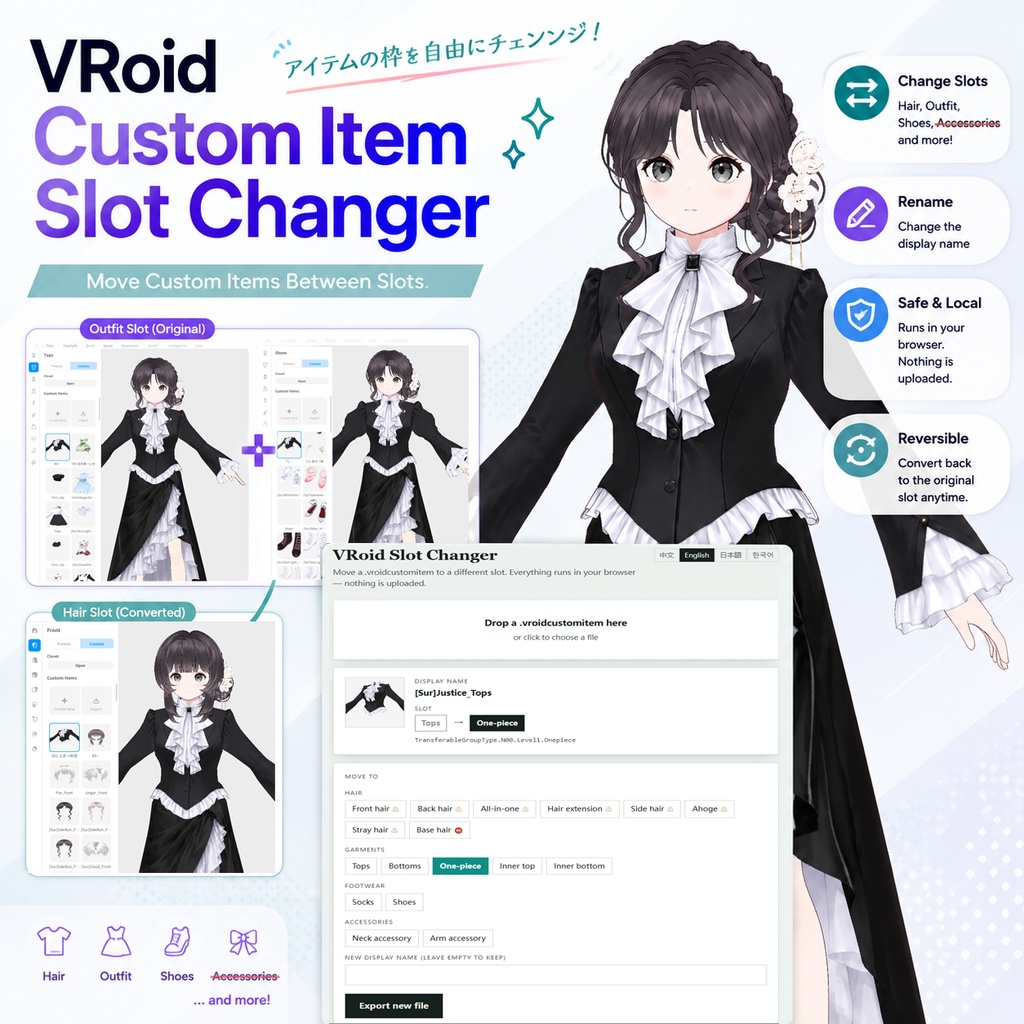

VRoid Studio の .vroidcustomitem の枠(スロット)を変更できるブラウザツールです。 「この髪を別のヘアー枠に入れたい」 「この衣装を別の衣装枠として使いたい」 そんなときに、Custom Item の所属枠を変更できます。 ------------------------------ Change the slot of a .vroidcustomitem directly in your browser. Want to move a hair item to a different hair slot? Need to place a clothing item in another clothing slot? This tool lets you change the slot information of VRoid Studio Custom Items without changing their geometry, textures, or materials.
✨ 主な機能 / Features
- .vroidcustomitem の枠を変更 - ヘアー → 別のヘアー枠 - 衣装 → 別の衣装枠 - ヘアー ↔ 衣装 - くつ・くつした、ーなどにも対応 - 表示名の変更 - 変換後は新しい内部 ID を生成 - 元ファイルを残したまま使用可能 - 元の枠へ戻すことも可能 - 形状・テクスチャ・マテリアルは変更しません - ブラウザ上で動作し、ファイルはアップロードされません - 日本語 / English / 中文 / 한국어 に対応 ------------------------------ - Change .vroidcustomitem slot - Hair → other hair slots - Clothing → other clothing slots - Hair ↔ Clothing - Shoes / Socks - Rename the display name - Generate fresh internal IDs - Keep the original file - Reversible slot changes - Geometry, textures and materials are untouched - Runs entirely in your browser — nothing is uploaded - Supports English / 日本語 / 中文 / 한국어
✦ 使い方 / How to use
0. ZIPファイルを解凍して、HTMLファイルを開いてください。 1. .vroidcustomitem をブラウザにドラッグ&ドロップ 2. 移動先の枠を選択 3. 必要なら表示名を変更 4. 「新しいファイルを書き出す」 5. VRoid Studio の 「カスタムアイテムをインポート」 から読み込む 処理はすべてブラウザ内で行われ、ファイルは外部へアップロードされません。 ------------------------------ 0. Extract .zip file, run .html 1. Drop a .vroidcustomitem into the tool 2. Select the destination slot 3. Optionally change the display name 4. Export the new file 5. Import it into VRoid Studio using Import Custom Item
動作環境 / Requirements
Chrome / Edge / Firefox 113+ / Safari 16.4+
⚠️ 変換前にご確認ください / Important
すべての枠への変換が、VRoid Studio 上で完全に同じように編集できることを意味するわけではありません。 特に、 ヘアー ↔ 衣装 などの変換では、着用・表示・物理・VRM 出力は正常でも、VRoid Studio の編集パネルが元の枠と一致しなくなる場合があります。 また、ベースヘアーへの変換は物理プレビュー中や終了時に VRoid Studio がフリーズする場合があります。 ツール内では、こうした組み合わせに ⚠ / ⛔ を表示し、選択時に具体的な注意事項を確認できるようにしています。 変換前に必ず元のモデル・ファイルをバックアップしてください。 ------------------------------ Some slot conversions have limitations inside VRoid Studio. For example, moving hair into a clothing slot can affect the editing panel, while moving an item into Base Hair can cause VRoid Studio to freeze during physics preview. These cases are marked with ⚠ / ⛔ in the tool so you can check the consequences before converting. Please back up your original files before use.
⚠️ 利用上の注意 / Usage Guidelines
本ツールは、ご自身が制作・所有している、または改変の許可を得ているファイルに使用してください。 他者が制作した有料モデル・衣装・アイテム等を、本ツールで改変して再配布・再販売することを推奨するものではありません。 本ツールは .vroidcustomitem の所属枠を変更するだけであり、第三者の商品の利用規約・著作権・再配布条件を変更するものではありません。 各商品の利用規約をご確認のうえ、許可されている範囲でご利用ください。 ------------------------------ This tool is intended for files that you created yourself, own, or have permission to modify. Please do not use this tool to modify paid models, clothing, accessories, or other assets created by others for the purpose of redistributing or reselling them. Changing an item's slot with this tool does not change the original creator's terms of use, copyright, or redistribution permissions. Please check the terms of use of the original asset and use this tool only within the permissions granted by its creator.
⚠️ 免責事項 / Disclaimer
本ツールは pixiv / VRoid Studio の非公式ツールです。 公式コード・公式素材は使用しておらず、pixiv / VRoid Studio とは関係ありません。 使用前に必ずバックアップを行ってください。 本ツールの使用によって発生したモデルの破損・データ消失等について、作者は責任を負いません。 ------------------------------ This is an unofficial tool and is not affiliated with pixiv or VRoid Studio. It does not contain any official code or assets. Please back up your files before using the tool. The author is not responsible for any damage to models, data loss, or other issues resulting from the use of this tool