

N.GameObjectMemo VRChat / Unity向け 軽量GameObjectメモ
- 通常版ダウンロード商品¥ 0
- 支援版ダウンロード商品¥ 500
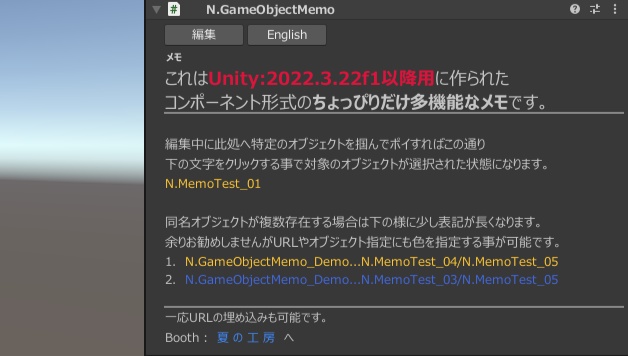
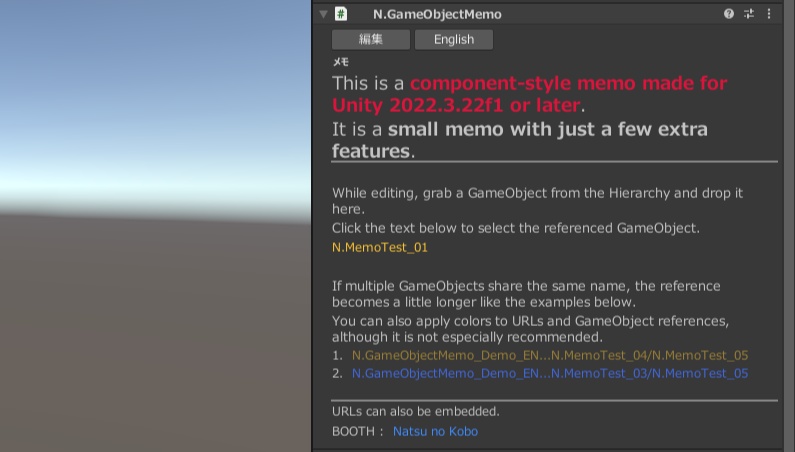


アバター改変やワールド製作時に、 「このGameObject、何の設定だったっけ?」 「関連するObjectがHierarchyのどこにあるか分からない」 「参考URLを別の場所から探すのが面倒」 …という時の為の、 ちょっぴりだけ多機能なメモ。 GameObjectへ直接メモを付けられるだけでなく、 URLや他GameObjectへのジャンプもInspector上から利用可能。 特に、 HierarchyからGameObjectをメモ欄へ掴んでポイするだけで <t=...>を自動生成出来ます。 同名GameObjectが存在する場合は、自動でHierarchy Pathを使用します。 ▶主な機能 - GameObjectへのメモ - 日本語 / English Inspector - 太字 / 下線 - 文字色 / 文字サイズ - URLリンク - GameObjectジャンプ - Hierarchy Path指定 - GameObject Drag & Dropによる参照自動生成 - 同名GameObjectの自動判定 - 長いHierarchy Pathの短縮表示 - 複数GameObjectの同時編集 - 編集内容の破棄 - VRChat SDK IEditorOnly - VRChat実行時の常駐処理なし ▶より管理し易く! <b>太字 <u>下線 <c=ColorCode>色文字 <s=150%>文字サイズ [テキスト](URL)テキストへのURL埋め込み <t=ObjectName> <t=/Root/Child/Object> 編集モード中にHierarchy上のGameObjectをメモ欄へドロップすると、 <t=ObjectName>を自動生成。 同名Objectが存在する場合は、 <t=/Root/.../Object>のように自動生成します。 ▶対応環境 - Unity 2022.3.22f1 以降を想定 - VRChat SDK導入済みプロジェクト - Ver1の開発環境:Unity 2022.3.22f1 ▶内容物 - N.GameObjectMemo 本体 - Demo Prefab - EN / JP Readme - 利用規約 ▶注意 本ツールはUnity Editor上で使用する制作補助ツールです。 Unity / VRChat SDKの将来的な仕様変更による互換性を保証するものではありません。 重要なプロジェクトでは導入前にバックアップを推奨します。 通常版と支援版で内容物に変化はありません。 ー ー ー ー ー ー ー ー ー ー ー ー ー ー ー When customizing avatars or creating worlds, have you ever thought: “Wait, what was this GameObject used for again?” “Where in the Hierarchy was that related Object?” “Finding that reference URL somewhere else is annoying…” N.GameObjectMemo is a small memo tool with just a few extra features made for situations like these. You can attach notes directly to GameObjects, while also using clickable URLs and jump links to other GameObjects directly from the Inspector. One of its main features is that you can simply grab a GameObject from the Hierarchy and drop it onto the memo field to automatically generate a <t=...> reference. If multiple GameObjects share the same name, a Hierarchy Path will be used automatically. ▶ Main Features Add memos directly to GameObjects Japanese / English Inspector Bold / Underline Text color / Text size URL links GameObject jump links Hierarchy Path references Automatic reference generation via GameObject Drag & Drop Automatic detection of duplicate GameObject names Compact display for long Hierarchy Paths Multi-GameObject editing Discard edited changes VRChat SDK IEditorOnly support No resident runtime processing in VRChat ▶ Easier Organization <b> Bold <u> Underline <c=ColorCode> Text color <s=150%> Text size [Text](URL) Embed a URL into text <t=ObjectName> <t=/Root/Child/Object> While in Edit Mode, dropping a GameObject from the Hierarchy onto the memo field will automatically generate: <t=ObjectName> If multiple Objects share the same name, a reference such as: <t=/Root/.../Object> will be generated automatically instead. ▶ Supported Environment Designed for Unity 2022.3.22f1 or later Requires a project with the VRChat SDK installed Ver1 development environment: Unity 2022.3.22f1 ▶ Included Files N.GameObjectMemo Demo Prefab EN / JP README Terms of Use ▶ Notes This tool is a production utility intended for use inside the Unity Editor. Compatibility with future changes to Unity or the VRChat SDK is not guaranteed. For important projects, creating a backup before importing this tool is recommended. There is no difference in content between the Standard Edition and the Support Edition.