

【VRM改変ツール】VRMBoneEditor~VRMにボーンを追加して揺らしてくれるツール~
- 試用版ver.1.17.2(全ファイル書き出し不可)ダウンロード商品¥ 0
- 有料版 / Standard(ver.1.17.2 Windows・HTML同梱)ダウンロード商品¥ 2,000
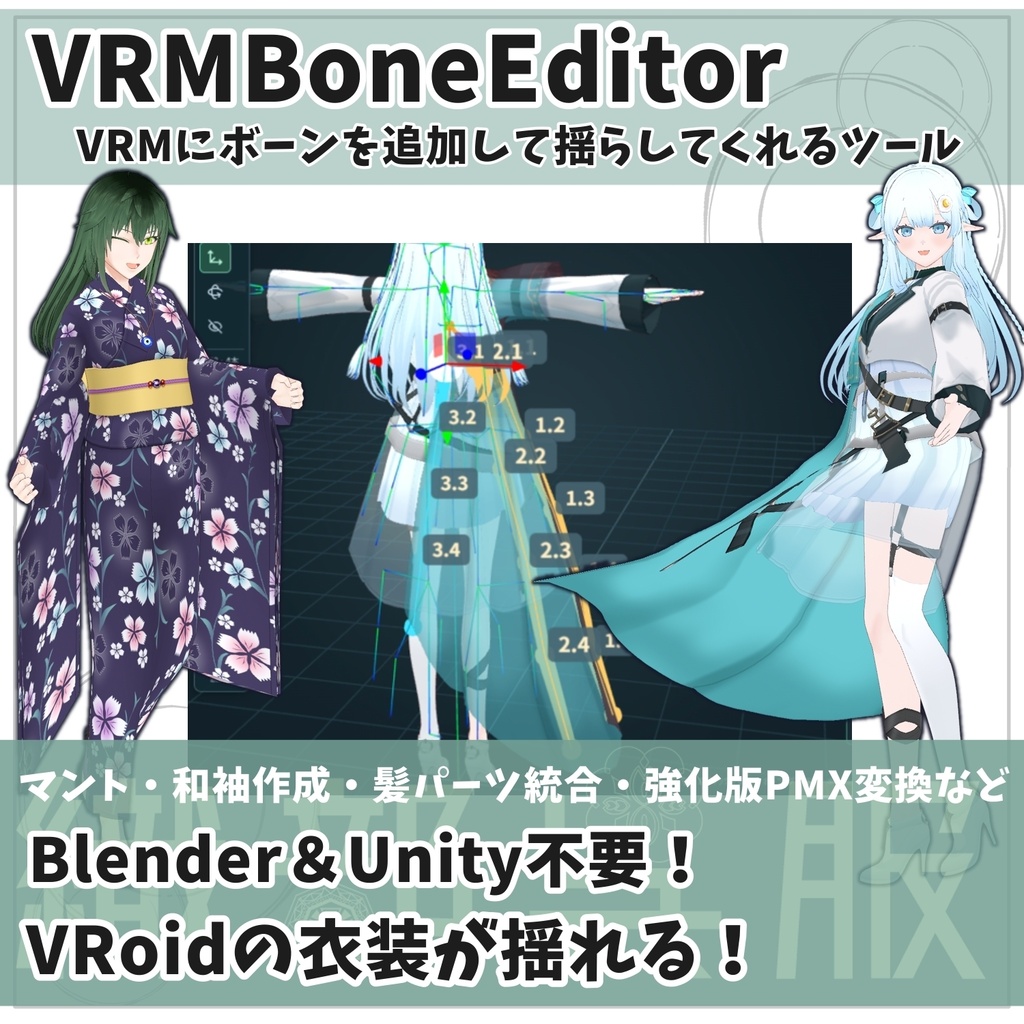
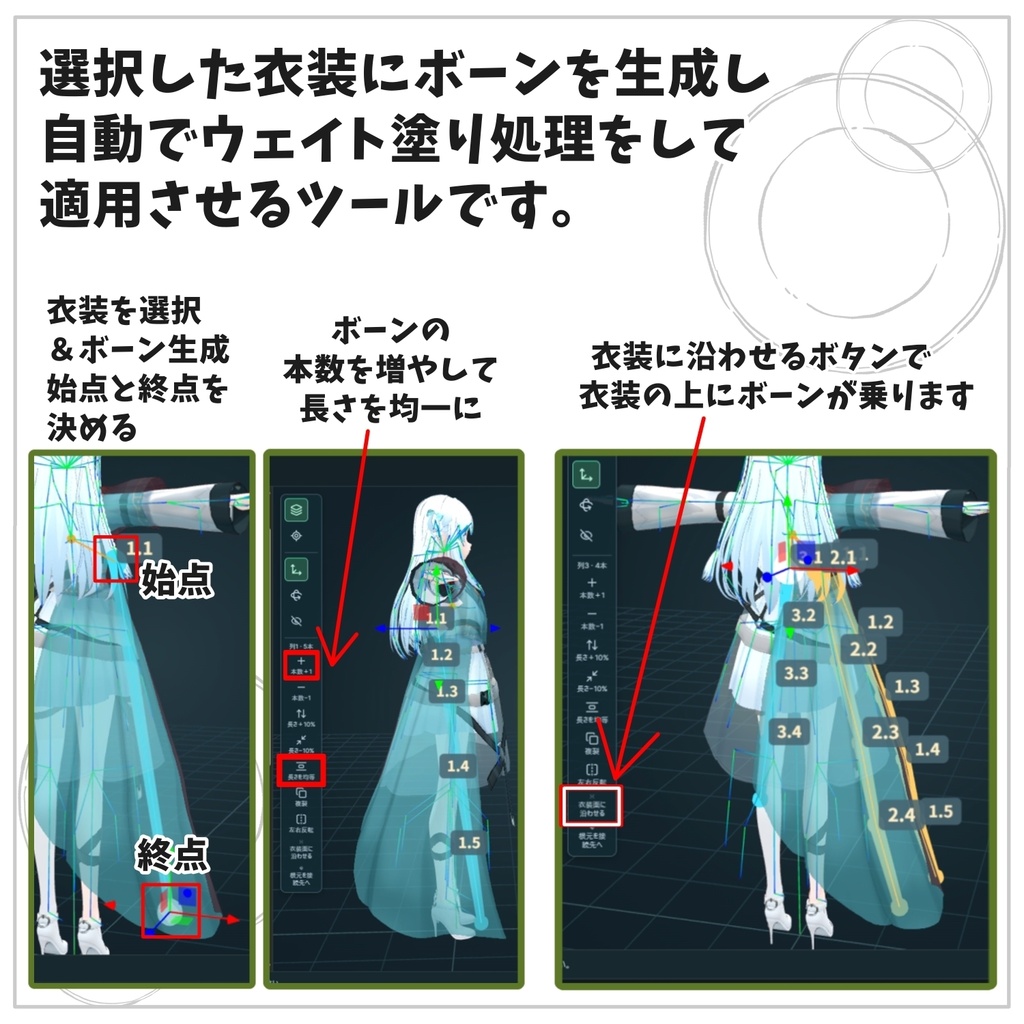
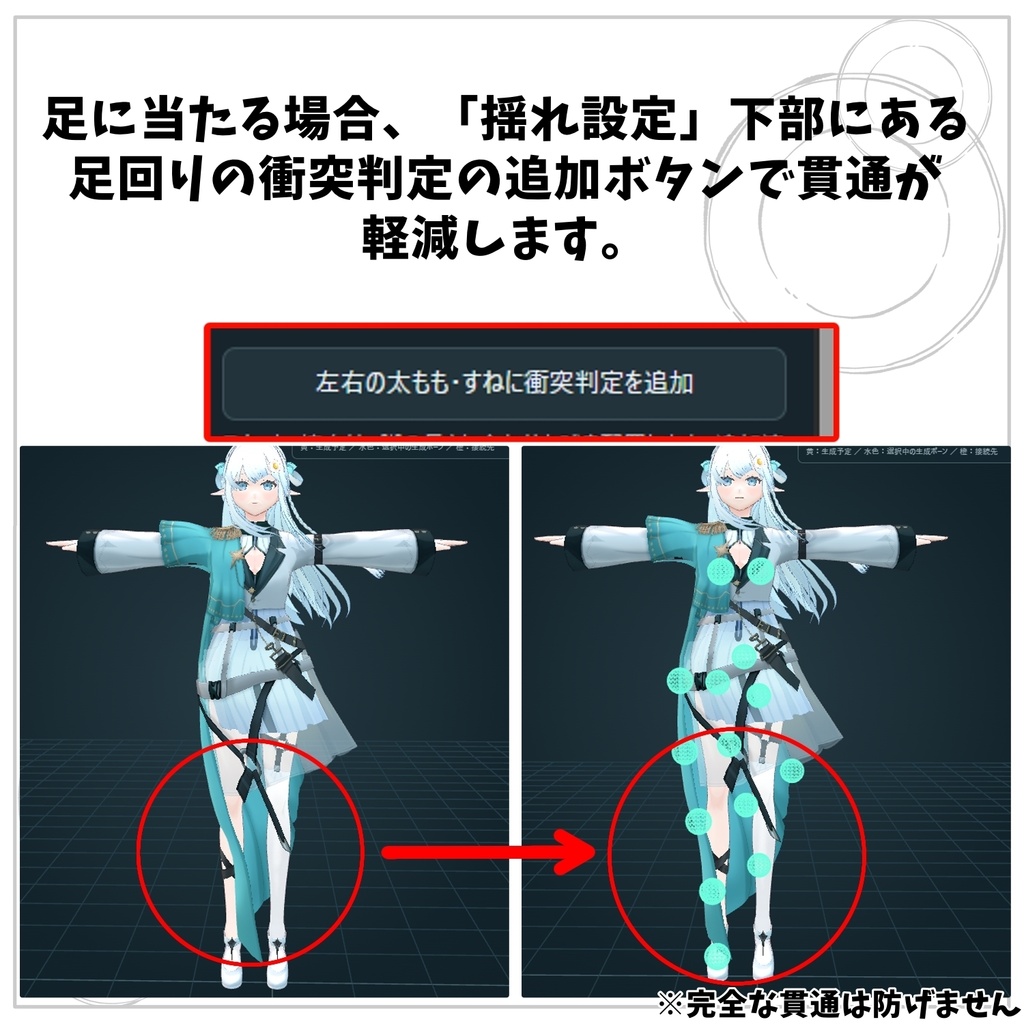
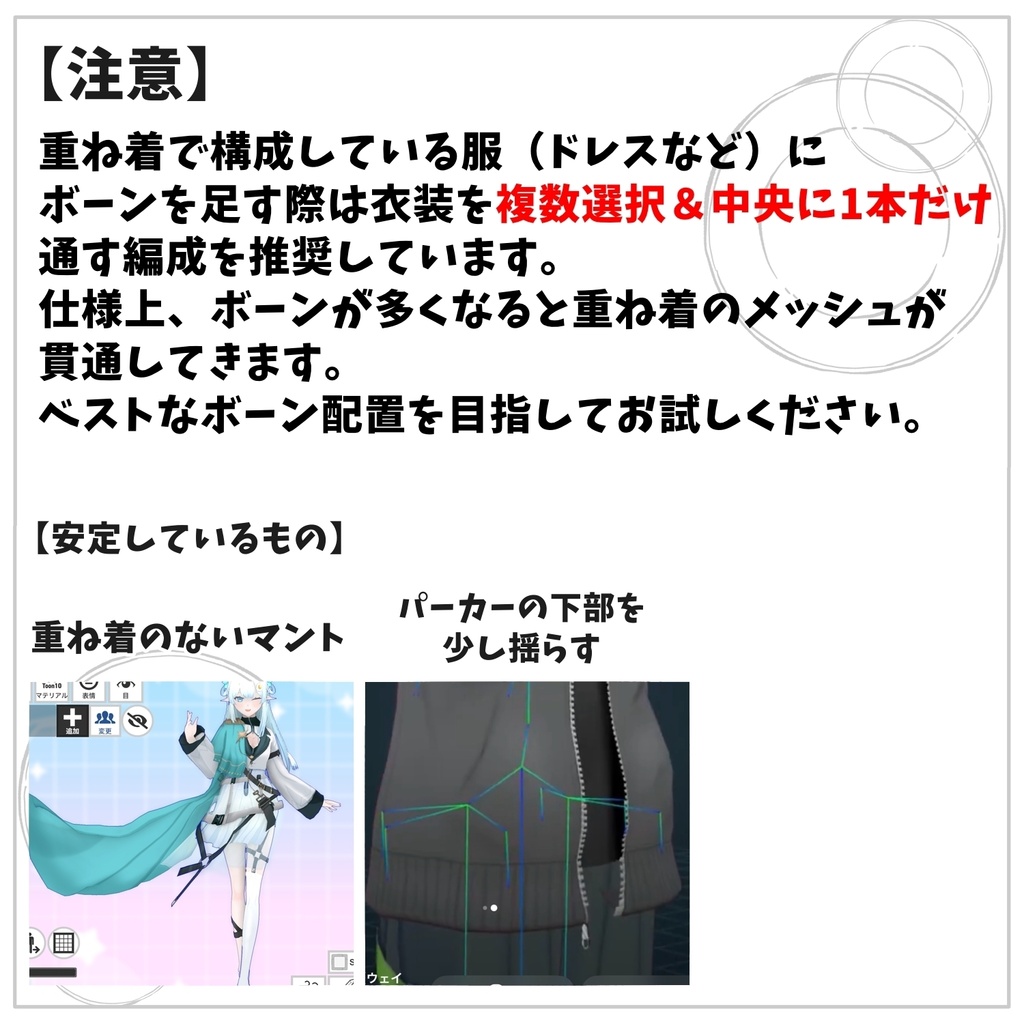
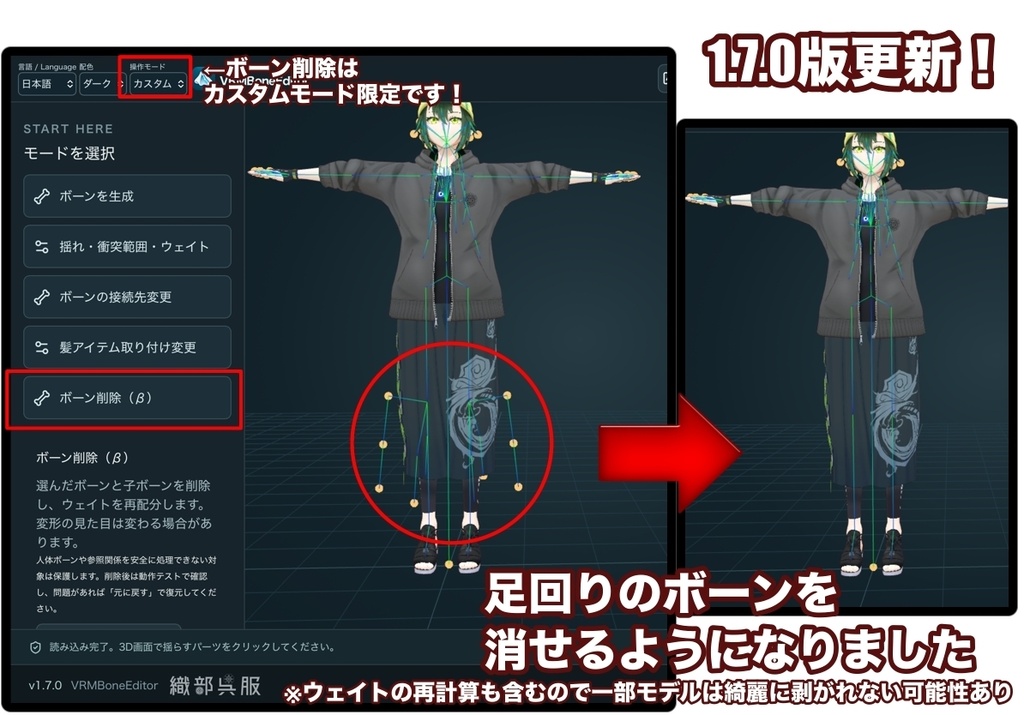
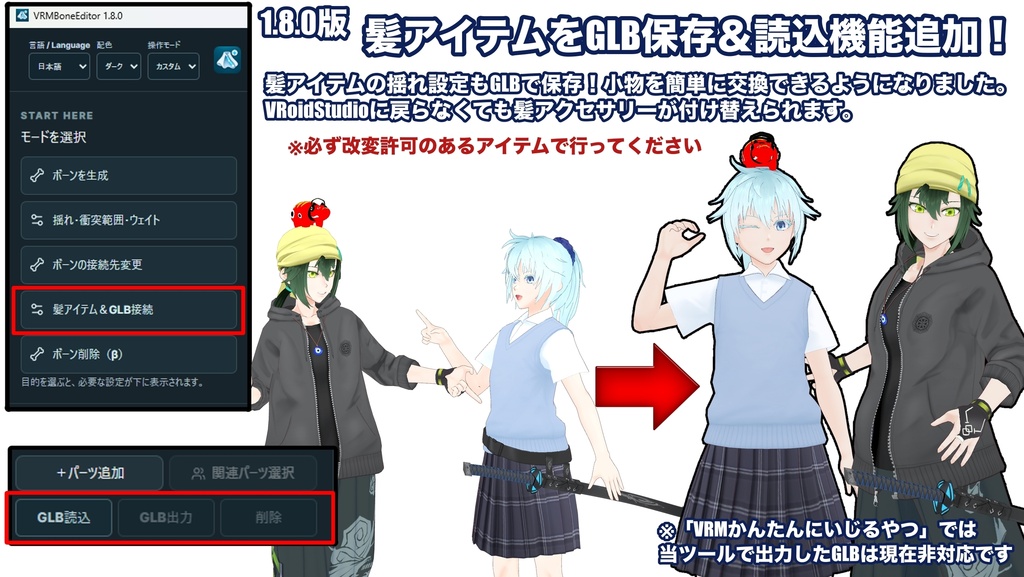
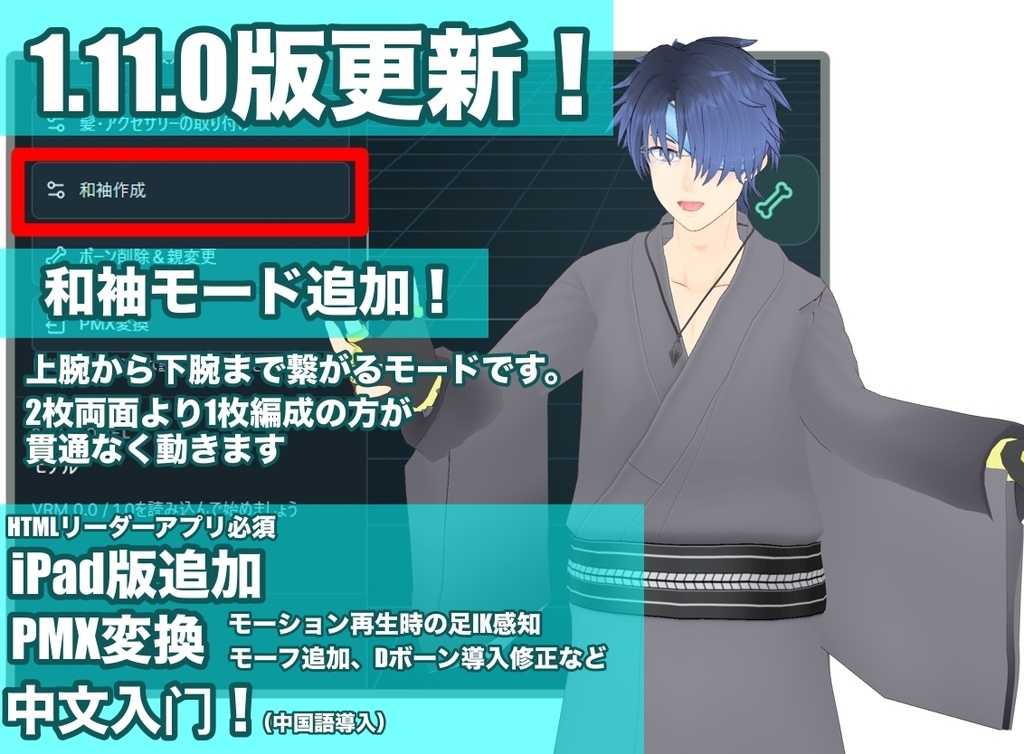

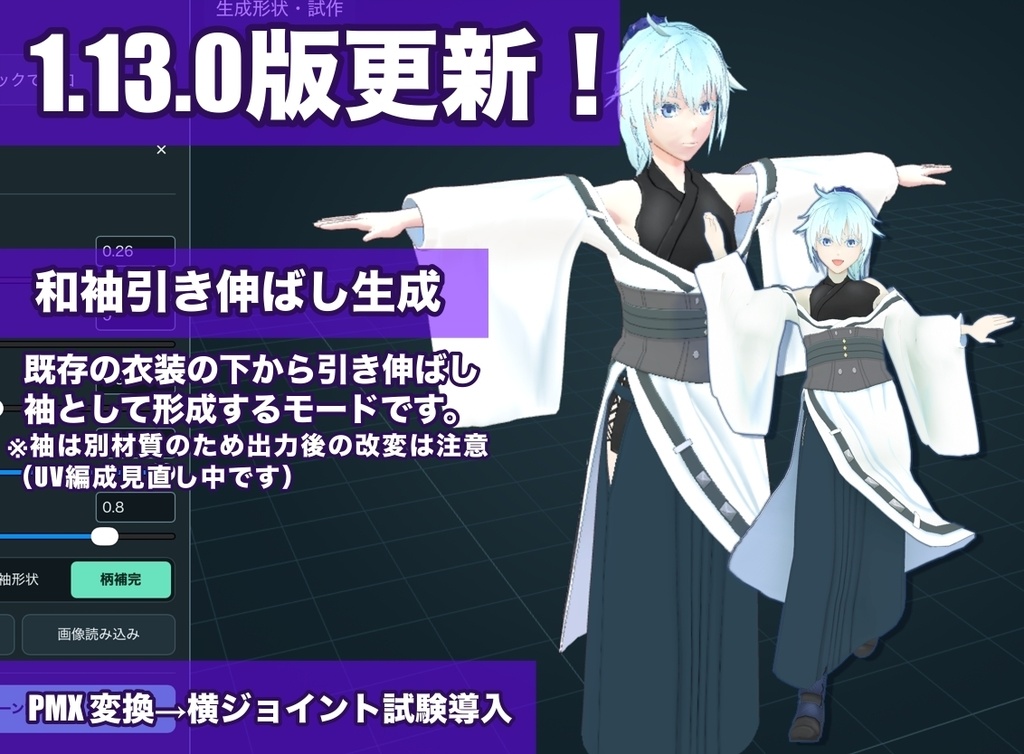


【商品紹介|VRMBoneEditor】 VRMBoneEditorは、衣装・髪・小物にボーンを追加し、揺れや変形を調整できるVRM編集ツールです。 「簡単/カスタム」のモードを選んで、ボーンの配置からウェイト・揺れの調整まで行えます。 対応形式はVRM 0.0/1.0です。表示言語は日本語・英語・簡体字中国語、画面はライト・ダークに加え、テーマやアクセントをカスタムできます。 ■ 主な機能 ・並列/台形/円形でのまとめて配置、1本ずつのボーン追加 ・ボーン配置データ(.vbe)の保存・読み込み ・ボーンの接続先変更、髪・アクセサリーの取り付け、GLBの読み込み・出力 ・取り付けやボーン削除の適用前プレビュー(1画面/2画面) ・揺れ・衝突範囲の調整、腰・太腿・膝・すね・足の衝突範囲の追加 ・生成ボーン/既存ボーンのウェイト編集、手塗り・ぼかし・左右ミラー・なめらか調整・コピー&ペースト ・CoatSkirt/skirt/生成ボーンなどの削除、全ボーンを除いた造形のGLB保存 ・IKやVRMAのループ再生による動作確認 ・生成ボーンの揺らす範囲「全体/一部/追従」の比較プレビュー ・和袖の生成・引き延ばし、透過PNGの柄補完・スタンプ(移動/拡縮/回転・左右同時配置) ・VRM 0.0/1.0からPMX 2.0への変換、VMDによる動作確認 ・移動減衰/回転減衰/回転ばねの調整、物理設定のJSON保存 ■ 動作環境・ご購入前に Windows版はWindows 10/11(64bit)に対応しています。WebView2 RuntimeとWebGL2が動く環境が必要です。初回インストール時には、インターネット接続が必要になる場合があります。 動作の快適さは、PCの性能やモデルの複雑さによって異なります。ご購入前に無料試用版を使い、お使いのPCでモデルの表示と操作をご確認ください。 試用版はChrome/Edgeで開くブラウザ版です。PMX変換のプレビューは利用できますが、VRM・各種GLB・VBE配置・PMX ZIP・物理JSONの保存/共有はできません。モデルは別途ご用意ください。 ■ これまでの出力で動作確認したアプリ・コンテンツ VRoid Hub/VRChat/cluster/VRM Posing Desktop/VRM Live Viewer ※袖のUV拡張テストについてVRoid Hub/cluster/ポージングでの読み込み報告を受けています。すべての出力条件で確認済みという意味ではありません。すべてのモデル・環境での互換性を保証するものではなく、使用先でも動作をご確認ください。 ■ 内容物(1.17.2) Windowsフォルダー:Setup.exe、導入案内 Mac-iPad-HTMLフォルダー:単体HTML、環境別の起動・保存案内 日・英・中の取扱説明書、不具合報告案内、更新履歴、LICENSE、third-party-notices.txt ■ MacのHTML版 Macでは通常、追加のHTMLリーダーを使わずに、保存したHTMLをSafariで開けます。 ただし、本ツールの起動・編集・保存はMac実機では検証していません。Macでの動作を保証するものではありません。 ■ iPad版の使い方と注意 JavaScript・WebGLに対応したHTMLリーダー系アプリが必要です。「ファイル」アプリでHTMLをタップするだけでは動作しません。 HTMLeditor/HTMLViewerでの動作報告はありますが、同名のアプリを含め、すべての環境での動作を保証するものではありません。 ZIPを展開し、Mac-iPad-HTMLフォルダー内のHTMLを対応アプリで開いてください。 書き出し用ファイルの準備後に「保存する」を押します。共有に対応する環境では「ファイルに保存」を選び、共有できない場合はダウンロードをご利用ください。実機での保存先・拡張子・再読み込みをご確認ください。 アプリを閉じると編集状態が失われる場合があるため、こまめに保存してください。大きなモデルでは、メモリ不足でアプリが終了する場合があります。詳しくは同梱の案内をご確認ください。 ■ 起動・更新 Windows版をインストールするには、ZIPを展開してSetup.exeを実行してください。インストール後はスタートメニューから起動できます。 更新時はアプリを終了し、最新版のSetup.exeを実行してください。 ■ 保存データについて .vbeには、ボーンの配置と自動ウェイト計算用の設定を保存します。VRM本体や手塗りした頂点ウェイトは含みません。 すべてのボーンを除いた造形は、GLBで保存します。マテリアルは、MToonを保持するか、標準マテリアルへ変換するかを選べます。 読み込んだVRMAは動作確認用で、VRMには保存されません。元のモデルを保管し、編集・書き出し後の動作をご確認ください。 PMXはテクスチャを含むZIPで保存します。ZIPを展開してからMMDで読み込んでください。 VRMの見た目や物理の完全な再現は保証しません。モデルやモーションによっては、スカートの細かな振動や、透過部分・輪郭の違いが残る場合があります。PMXの出力後はMMDでもご確認ください。 読み込んだVMDは動作確認用で、PMXには含まれません。 ■ サポート 不具合やご質問は、BOOTHメッセージでご連絡ください。使用バージョン、操作手順、エラー文や画像を添えていただけると助かります。 個別のモデル・衣装そのもののサポートは対象外です。 エラー文や提供可能なモデルをChatGPT等で調べると、原因の手がかりが得られる場合があります。この方法の利用は任意で、解析結果だけでは原因を断定できません。 モデルの利用規約や権利、個人情報の有無、提供先の条件を確認し、共有する範囲はご自身の責任で判断してください。 お問い合わせに再現手順や解析結果も添えていただけると、より的確な修正に役立ちます。モデルを提供できない場合もご相談いただけます。
【今後の検討】
マント作成は独立した試作で検証を継続します。正式版への追加時期は未定です。
VRMBoneEditor 1.17.2
Version 1.17.2 — 2026/10/18 Improved identification and verification of distribution files. Controls, save formats and offline use are unchanged. Download the latest ZIP, close the Windows editor and run Setup.exe, or open the new standalone HTML. The trial cannot export files.
【更新状況】
■ 最新版 1.17.2(2026/10/18) 配布ファイルの識別情報と確認方法を整えました。操作方法や保存形式は変わらず、引き続きオフラインで使えます。 最新版を再ダウンロードし、Windowsはアプリを終了して新しいSetup.exeを実行してください。HTML版は新しいファイルを開いてください。 ■ 過去の主な更新 ・1.17.1:和袖スタンプのテクスチャ崩れ・ベイク画質と処理負荷を改善。柄スライダー後の停止、複数列・グループの拡縮、和袖のUndo/Redoを修正しました。iPad実機で動作確認OKのご報告をいただいています。 ・1.17.0:和袖の透過PNG・スタンプ編集と左右同時配置、ボーン生成の2段階操作・列一覧を追加。PMXの生成スカート用横ジョイントを標準/形状維持から選べるようにしました。 ・1.16.0:アイテム管理・GLB作品情報、配色、和袖・iPadプレビューを改善。PMXの脚・足首のDボーンウェイトと向きを修正しました。 詳しくは同梱の更新履歴・取扱説明書をご確認ください。
【利用規約・Terms of Use】
■ 作成したデータ 本ツールで編集したVRMや、自作のボーン配置データ(.vbe)は、個人・商用利用、配布・販売に利用できます。元のモデル・衣装・素材・他者の配置データの利用規約を守ってください。 出力したGLBアイテムを販売できるのは、元のアイテムを制作した本人に限ります。販売用のGLBを出力する際は、ご自身の製作者名を記入してください。 製作者名の有無にかかわらず、他人が制作したアイテムを自作と偽り、製作者名を記載して販売・再配布することは禁止します。 他者のアイテムや配置データを、元データの利用規約に反して販売・再配布することは禁止します。本ツールでの編集・出力や製作者名の記載によって、第三者のデータを販売・再配布する権利が得られるわけではありません。 作品への本ツールのクレジット表記は任意です。 ■ ツール本体 本バージョンには、同梱のMIT Licenseが適用されます。 利用・改変・再配布・販売等は、その条件に従って行えます。再配布時は所定の著作権表示とライセンス文を保持してください。 本案内はMIT Licenseによる許可を制限するものではありません。 ■ 第三者製のプログラム等 第三者製ライブラリ等には、それぞれのライセンスが適用されます。 同梱のthird-party-notices.txtおよび各ライセンスをご確認ください。 ■ 動作・免責 本ツールはOpenAIのCodexを用いて制作しています。開発環境やサービスの変更等により、開発・更新を停止する場合があります。継続的な更新や機能追加を保証するものではありません。 すべてのモデル・環境での動作や、他アプリとの互換性を保証するものではありません。元データを保管し、出力したファイルは使用先でも動作を確認してください。 出力データの権利、販売・再配布に関するトラブルは、出力・販売・再配布を行った利用者の責任で対応してください。法令で認められる範囲で、これらのトラブルおよび本ツールの使用による損害について、ツールの提供者は責任を負いません。詳細は同梱のLICENSEをご確認ください。 ■ Created Data VRMs edited with this tool and original bone-placement files (.vbe) may be used, distributed or sold for personal or commercial purposes. Follow the terms of the original models, outfits, assets and any third-party placement data. Only the person who created the original item may sell an exported GLB item. When exporting a GLB for sale, please enter your own creator name. Whether or not an item already has a creator name, falsely claiming another person's item as your own, adding a false creator name and selling or redistributing it is prohibited. Selling or redistributing third-party items or placement data in violation of their original terms is prohibited. Editing, exporting or adding a creator name with this tool does not grant rights to sell or redistribute third-party data. Credit to this tool in your creations is optional. ■ Software This version is provided under the included MIT License. Use, modification, redistribution and sale are permitted subject to its conditions. Retain the required copyright and license notices when redistributing. This notice does not restrict permissions granted by the MIT License. ■ Third-Party Components Third-party libraries and other components remain subject to their respective licenses. Please refer to third-party-notices.txt and the included license documents. ■ Compatibility & Disclaimer This tool was developed using OpenAI's Codex. Development and updates may stop due to changes in the development environment or services. Continued updates and new features are not guaranteed. Operation with every model or environment, and compatibility with other applications, are not guaranteed. Keep the original data and test exported files in the applications where you intend to use them. Users who export, sell or redistribute data are responsible for resolving disputes concerning its rights, sale or redistribution. To the extent permitted by law, the tool provider is not liable for such disputes or damages arising from use of this tool. See the included LICENSE for details.