
【Windows】 LiteCalc 軽量電卓アプリ
- ダウンロード商品¥ 0
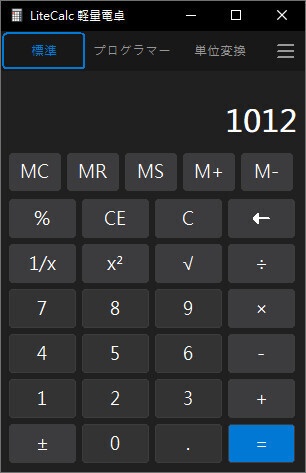
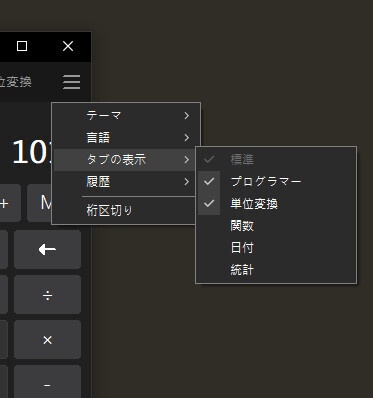


LiteCalc(軽量電卓) インターネット接続不要、権限も一切不要 メモリ使用量はWindows標準の電卓より3分の2削減! Windows 7 ~ Windows 11 に対応。純粋な Win32 API で実装しており(MFC/.NET に非依存)。 標準モードでは任意精度の 10 進演算(BigDecimal)を使用し、さらに以下のモードを提供します: 工学(科学)モード(三角関数・対数・べき乗・階乗・π/e・Deg/Rad/Grad)、プログラマーモード (10/16/8/2 進数、ビット演算、ワード幅)、単位変換モード、日付計算モード (2 つの日付の差、日付への日数の加減)、統計モード(リスト、n/Σx/x̄/Σx²/標本および母標準偏差)。 タブ(モードバー)はマウスでドラッグして並べ替えることができます。右上のハンバーガーメニューにある 「タブの表示」グループでは、各タブの表示/非表示を選択できます(標準タブは常に表示され、解除できません)。 並び順とチェック状態は設定ファイルに保存され、次回起動時に復元されます。ハンバーガーメニューからは、 テーマの切り替え(システムに従う/ライト/ダーク)、言語の切り替え(システムに従う/英語/繁体字中国語/日本語)、 桁区切り表示(既定はオフ)の設定も可能で、計算履歴の表示/消去もできます。 コピー(Ctrl+C)/貼り付け(Ctrl+V)と右クリックメニューに対応しています。貼り付けたテキストは キー入力として順番にシミュレートされます(Windows の電卓と同じ動作)。たとえば 2*6*5-41 を 貼り付けて「=」を押すと 19 が得られます。 LiteCalc (Lightweight Calculator) No internet connection required, and no permissions needed. Memory usage is reduced by two-thirds compared to the Windows built-in calculator. Supports Windows 7 through Windows 11, built with pure Win32 API (no dependency on MFC/.NET). Standard mode uses arbitrary-precision decimal arithmetic (BigDecimal), and offers an Engineering (Scientific) mode (trigonometric functions, logarithms, powers, factorials, π/e, Deg/Rad/Grad), a Programmer mode (base 10/16/8/2, bitwise operations, word width), a Unit Conversion mode, a Date Calculation mode (difference between two dates, add/subtract days), and a Statistics mode (list, n/Σx/x̄/Σx², sample and population standard deviation). Tabs (mode bar) can be reordered by dragging with the mouse. The "Show Tabs" group in the hamburger menu at the top right lets you choose which tabs to display (the Standard tab is always shown and cannot be hidden). Both the order and the checkbox states are saved to the settings file and restored on next launch. The hamburger menu can also switch themes (follow system/light/dark), languages (follow system/English/Traditional Chinese/Japanese), and digit grouping (off by default), as well as view/clear the calculation history. Supports Copy (Ctrl+C) / Paste (Ctrl+V) and context menus; pasted text is simulated as sequential keystrokes (matching the Windows Calculator's behavior) — for example, pasting 2*6*5-41 and pressing equals yields 19.