
glTF Bridge for Maya — glTF / GLB 書き出し・読み込みプラグイン
- ダウンロード商品¥ 3,000
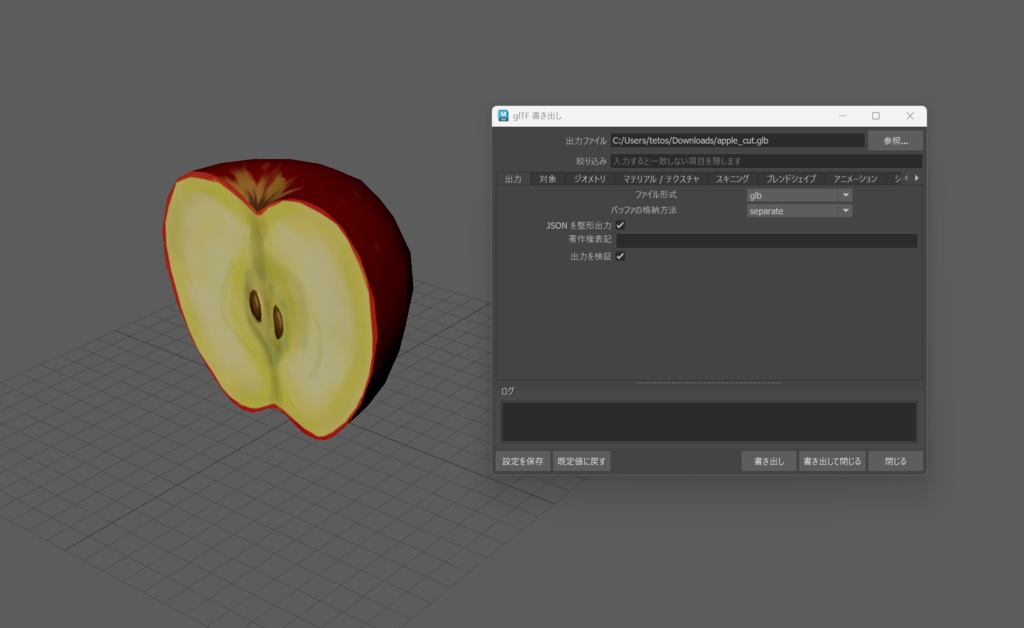
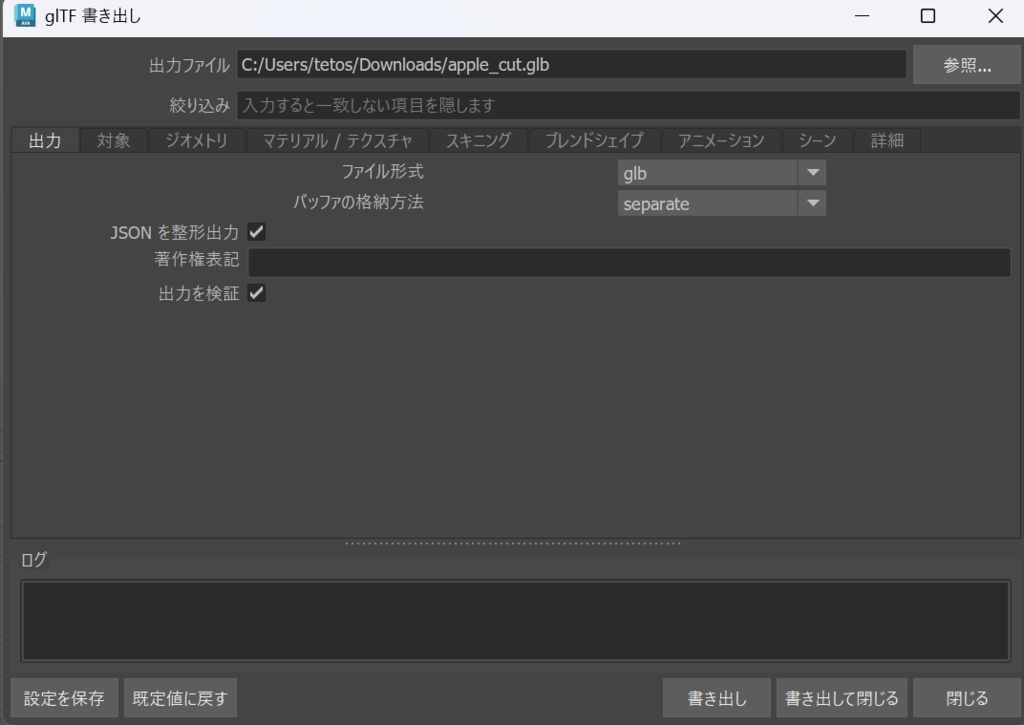


■ MayaでglTF / GLBをインポート/エクスポートできるようにするプラグインです。 メッシュ・マテリアル・テクスチャ・スキニング・ブレンドシェイプ・アニメーション・カメラ・ライトを、ビューポートの見た目とタイムラインの動きに可能なかぎり近い形で変換します。 Unity / Unreal / Blender / three.js / Babylon.js / VRM 系ツールなど、 glTF を読めるあらゆる環境へ受け渡せます。 ■ 主な機能 【ジオメトリ】 ・ソフト / ハードエッジ、UV セット、頂点カラー、法線、タンジェント ・スムースメッシュプレビューの状態を反映して書き出し ・インスタンスの共有、非表示ノードの扱いを選択可能 【マテリアル / テクスチャ】 ・standardSurface / aiStandardSurface / lambert / blinn / phong に対応 ・メタリック・ラフネス・オクルージョンの自動パッキング ・法線マップ(bump2d / aiNormalMap を解決) ・透明度は実際のピクセルを検査して OPAQUE / MASK / BLEND を自動判定 ・テクスチャの埋め込み / 参照 / リサイズを選択可能 ・KHR 拡張 15 種に対応(ior / specular / transmission / volume / clearcoat / sheen / anisotropy / iridescence / unlit / texture_transform ほか) 【スキニング / ブレンドシェイプ】 ・skinCluster をバインドポーズごと正確に変換 ・ブレンドシェイプのターゲット名を保持 【アニメーション】 ・毎フレームのサンプリングによるベイク方式のため、 コンストレイント・IK・エクスプレッション・モーションパスもそのまま再現されます ・複数クリップの書き出しに対応 ・可視性アニメーションにも対応 ・キー削減機能つき(許容誤差内でのみ間引き) 【読み込み(インポート)】 ・.gltf / .glb を Maya へ読み込み ・分割された頂点を再結合するため、そのまま編集できるメッシュになります ・法線からソフト / ハードエッジを復元 ・埋め込みテクスチャを sourceimages へ自動展開 ・skinCluster / blendShape / アニメーションカーブを再構築 ・三角形からクワッドを復元するオプションつき ■ 導入 Windows は INSTALL.bat をダブルクリックするだけです。macOS / Linux 向けの install.sh、Maya へドラッグ&ドロップする install.mel も同梱。OneDrive 配下の ドキュメントフォルダにも対応しています。 ■ 使い方 ・File > Export All... / Export Selection... のファイル形式から ・File > Import... から .gltf / .glb をそのまま ・専用ダイアログ(書き出し 72 項目 / 読み込み 29 項目の全設定) ・Python API(gltfExporter.export() / gltfExporter.import_file()) ・MEL コマンド(glTFExport / glTFImport) ・mayapy によるバッチ処理 日本語・英語の README とオプション全項目の一覧表を同梱しています。 ■ 動作環境 ・Maya 2022 以降を想定 / 動作確認は Maya 2027 で実施しています ・Python 3、PySide6(Maya 2025 以降)または PySide2(Maya 2022〜2024)※すべて Maya 同梱 ・追加の依存ライブラリなし(numpy があれば画像処理が速くなりますが、任意です) ■ 制限事項(ご購入前に必ずお読みください) ・Draco 圧縮には対応していません(gltf-transform 等での後処理をご検討ください) ・NURBS / サブディビジョンサーフェスは、ポリゴンに変換してから書き出してください ・UDIM / タイルテクスチャは glTF に相当機能がないため、最初のタイルのみ出力します ・エリアライトはポイントライトで近似、アンビエントライトは出力しません ・ブレンドシェイプのインビトウィーン / 組み合わせターゲットは glTF が表現できません ・glTF は三角形しか保持しないため、読み込んだメッシュは三角化された状態になります (クワッド復元オプションはありますが、元のトポロジと完全一致はしません) ・動作確認は Maya 2027 のみです。他バージョンでの動作は保証いたしかねます デジタル商品の性質上、ご購入後の返品・返金はお受けできません。 ■ ライセンス ・個人・商用問わずご利用いただけます ・本プラグインで書き出したデータの利用に制限はありません ・プラグイン本体の再配布・転売、改変版の配布は禁止します ・ソースコードの改変は購入者ご本人の利用範囲に限り可能です ・詳細は同梱の LICENSE.txt をご確認ください ■ 更新履歴 1.3.0 glTF / GLB の読み込みに対応 1.2.0 透明度判定の改善、可視性・不透明度アニメーションの修正 1.0.0 公開 ────────── ■ glTF / GLB import and export for Maya Writes glTF 2.0 / GLB and reads it back in: meshes, materials and textures, skinning, blend shapes, animation, cameras and lights, reproducing what the viewport shows and what the timeline plays. Works with Unity, Unreal, Blender, three.js and anything else that reads glTF. ■ What it handles Export: soft/hard edges, UV sets, vertex colours, normals, tangents, smooth mesh preview, instancing. standardSurface / aiStandardSurface / lambert / blinn / phong, metallic-roughness-occlusion packing, normal maps and 15 KHR extensions. Transparency is decided from the actual pixels, so OPAQUE / MASK / BLEND is chosen correctly instead of guessed. skinCluster keeps its bind pose, and animation is baked frame by frame, so constraints, IK, expressions and motion paths all come through. Import: split vertices are welded back for an editable mesh, soft/hard edges rebuilt from the normals, textures extracted, and skinCluster, blendShape and animation curves reconstructed. ■ Installation and usage Double-click INSTALL.bat on Windows (install.sh for macOS / Linux, or drag install.mel into Maya). No extra libraries needed. Use it from File > Export All / Export Selection, File > Import, a dialog with all 72 export and 29 import settings, or Python, MEL and mayapy. Maya 2022 or newer expected. ■ Limitations (please read before buying) No Draco compression (post-process with gltf-transform). Convert NURBS and subdivision surfaces to polygons first. UDIM exports the first tile only; area lights become point lights, ambient lights are skipped. Blend shape in-betweens and combination targets cannot be expressed in glTF, and glTF stores triangles only, so imported meshes arrive triangulated. Tested on Maya 2027; other versions are not guaranteed. Returns and refunds cannot be accepted after purchase. ■ License Free for personal and commercial use, with no restrictions on the data you export. Redistribution and resale are prohibited. See LICENSE.txt.
