

Optimize Your Project
- Freeダウンロード商品¥ 0
- Supportダウンロード商品¥ 100
- Super Supportダウンロード商品¥ 500
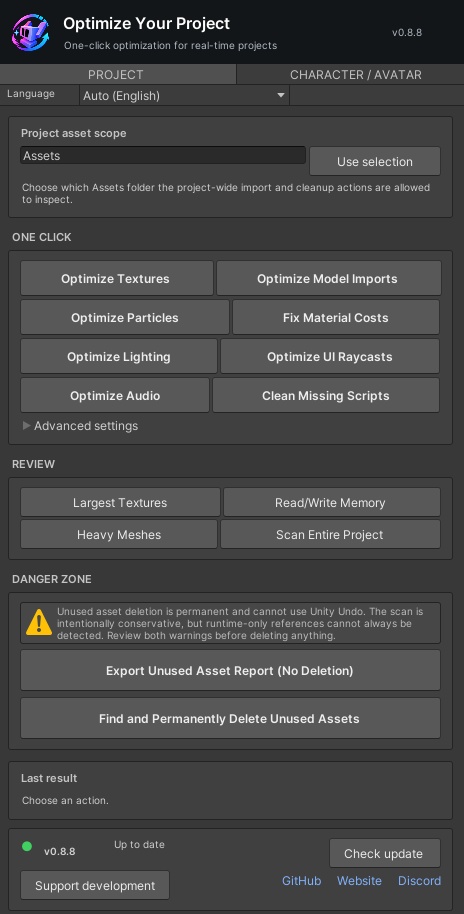
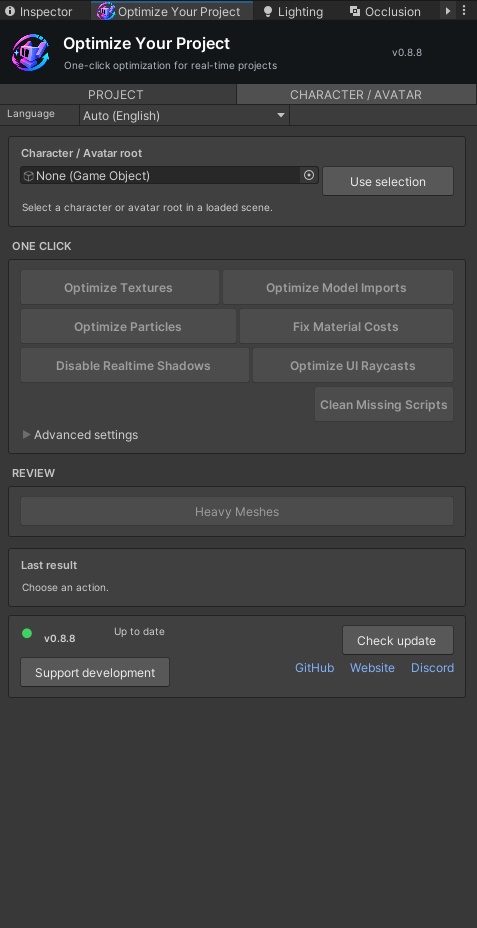


# FISHHWB VR Optimizer v0.8.8 | Free Unity & VRChat Optimisation Tool ## English ### Optimise Your Unity Project with FISHHWB VR Optimizer **FISHHWB VR Optimizer** is a free Unity Editor optimisation and diagnostic tool designed for VRChat avatar creators, world builders, and Unity game developers. Inspect your project, identify potential optimisation opportunities, and manage supported asset settings from one convenient editor window. Whether you're working on a VRChat avatar, a Unity world, or a larger game project, VR Optimizer helps make asset optimisation easier to manage. ### Features - **World, Avatar & Project Workflows:** Choose the type of content you want to work with and access the relevant optimisation tasks. - **Texture Optimisation:** Preview and apply maximum texture size limits for PC, Android/Meta Quest, and iOS. - **Texture Compression Checks:** Identify uncompressed textures and review platform-specific compression settings. - **Particle System Optimisation:** Optimise particle systems in the loaded scene or on a selected avatar, with Unity Undo support. - **Mesh Inspection:** Inspect mesh information and preview mesh compression changes for selected imported models. - **Lighting Inspection:** Review scene lights and identify potential optimisation opportunities. - **Avatar Material Inspection:** Inspect avatar materials as part of your optimisation workflow. - **Finding Filters:** Filter results by All, Critical, or Warning to focus on relevant findings. - **GitHub Release Checking:** Check for newer releases and use the in-tool update option when available for Git URL installations. ### Requirements - Unity 2021.3 LTS or newer. - VRChat SDK not required. - A Unity project. ### How to Install **Recommended: Unity Package Manager** 1. Open your Unity project. 2. Open Window → Package Manager. 3. Click the + button and choose Add package from git URL. 4. Paste the following URL: `https://github.com/dedzedofficial/VR-Optimizer.git` 5. Allow Unity to install the package. 6. Open FISHHWB → VR Optimizer from the Unity menu. **Alternative: Manual Installation** Download the package files and place them in your Unity project's: `Packages/com.fishhwb.vr-optimizer` Then open FISHHWB → VR Optimizer. ### How to Get the Latest Version The official GitHub repository is the recommended place to find the latest development and release information: https://github.com/dedzedofficial/VR-Optimizer For the easiest installation and update workflow, add the package to Unity using the Git URL above. Use the tool's release-checking and update functionality when available. You can also check the official releases page for published downloads: https://github.com/dedzedofficial/VR-Optimizer/releases The BOOTH download may not always match the latest GitHub version, so check the repository when looking for updates. ### Important Information FISHHWB VR Optimizer helps inspect project assets and manage supported optimisation settings. Review changes before applying them and test your project on the intended platform. The tool does not edit original source images, automatically decimate meshes, or guarantee a specific performance improvement. Created by **FISHHWB | Ded Zed**. --- ## 日本語 ### 無料 Unity・VRChat 最適化ツール **FISHHWB VR Optimizer** は、VRChat のアバター制作者、ワールド制作者、Unity ゲーム開発者向けの無料 Unity Editor 最適化・診断ツールです。 プロジェクト内のアセットを確認し、最適化できる項目を調べ、対応する設定をひとつのウィンドウから管理できます。 ### 主な機能 - **World・Avatar・Project 対応:** 作業対象を選択し、関連する最適化タスクを実行。 - **テクスチャ最適化:** PC、Android/Meta Quest、iOS 向けの最大テクスチャサイズをプレビューして適用。 - **テクスチャ圧縮チェック:** 非圧縮テクスチャを検出し、プラットフォーム別の圧縮設定を確認。 - **パーティクル最適化:** シーン内または選択したアバターのパーティクル設定を最適化。Unity Undo に対応。 - **メッシュ確認:** メッシュ情報を確認し、インポート済みモデルのメッシュ圧縮設定をプレビュー。 - **ライト確認:** シーン内のライトを確認し、最適化の候補を探すために活用。 - **アバターマテリアル確認:** アバターのマテリアルを確認。 - **検出結果の絞り込み:** All、Critical、Warning で結果を整理。 - **GitHub アップデート確認:** 新しいリリースを確認し、対応する Git URL インストールではツール内から更新。 ### 動作環境 - Unity 2021.3 LTS 以降。 - VRChat SDK 不要。 - Unity プロジェクトが必要です。 ### インストール方法 Unity Package Manager を開き、**Add package from git URL** を選択して、以下の URL を入力してください。 `https://github.com/dedzedofficial/VR-Optimizer.git` インストール後、Unity のメニューから **FISHHWB → VR Optimizer** を開きます。 手動インストールの場合は、パッケージを `Packages/com.fishhwb.vr-optimizer` に配置してください。 ### 最新版の入手方法 最新版の情報は公式 GitHub リポジトリをご確認ください。 https://github.com/dedzedofficial/VR-Optimizer 公開済みのリリースは以下から確認できます。 https://github.com/dedzedofficial/VR-Optimizer/releases BOOTH の配布ファイルが最新版とは限らないため、更新時は GitHub もご確認ください。 ### 注意事項 本ツールはアセットの確認と対応する最適化設定の管理を支援します。変更前に内容を確認し、対象プラットフォームで動作テストを行ってください。 元の画像ファイルの編集やメッシュの自動削減は行わず、特定のパフォーマンス向上を保証するものではありません。 制作:**FISHHWB | Ded Zed**