

[VRCHAT] Visor
- ダウンロード商品¥ 1,100
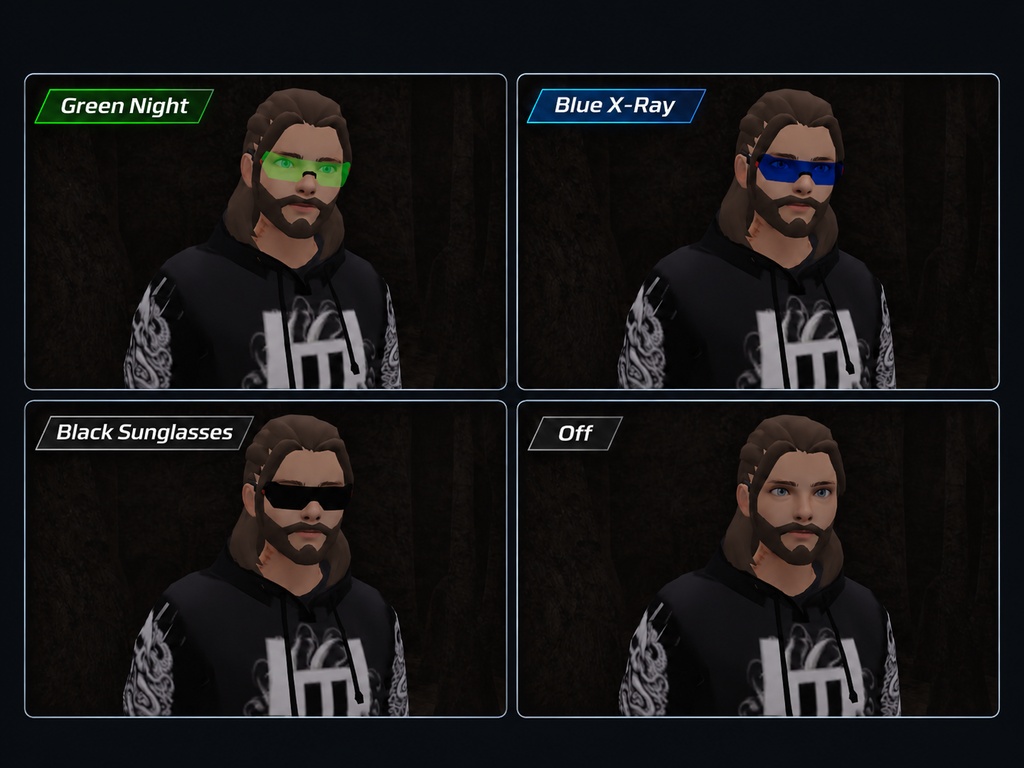


# X-Ray & Night Vision Visor | VRChat Avatar Accessory Enhance your VRChat experience with this **X-Ray & Night Vision Visor**, a simple drag-and-drop avatar accessory featuring two vision modes! Designed for easy installation, simply drag the visor onto your avatar in Unity and enjoy a new way of seeing the world. ### Features - **Night Vision:** See dark environments with a green-tinted night vision effect. - **X-Ray Vision:** Highlight visible geometric edges and outlines in blue for a wireframe-style view. - **Drag & Drop:** Easy to add to your existing avatar. - **Customisable:** Adjust brightness, colours, sensitivity and effect strength. - **Avatar Friendly:** Designed to work as a wearable accessory. - **PC VRChat Support:** Built for PC avatars. ### Installation 1. Import the asset into your Unity avatar project. 2. Drag the visor prefab onto your avatar. 3. Position and scale it as needed. 4. Configure the shader settings and upload your avatar! ### Important Notes - PC VRChat only. Not Quest compatible. - X-Ray highlights visible geometry but cannot reveal objects behind walls or every individual mesh triangle. - X-Ray relies on camera depth information, so results may vary between worlds. - VRChat SDK and a compatible Unity avatar project are required. **Created by DedZedOffishal** *Simple setup. Two vision modes. A whole new perspective.* --- # X-Ray & Night Vision Visor | VRChatアバター用アクセサリー **X-Ray & Night Vision Visor** で、VRChatの世界を新しい視点から楽しもう! 2種類のビジョンモードを搭載した、ドラッグ&ドロップで簡単に導入できるアバター用アクセサリーです。 Unityでアバターに追加するだけで、暗い場所での視界補助や、ワイヤーフレーム風の視覚エフェクトを楽しめます。 ### 主な機能 - **ナイトビジョン:** 暗い環境を緑色の暗視エフェクトで見やすくします。 - **X-Rayビジョン:** 表示されているオブジェクトの形状や輪郭を青色のワイヤーフレーム風エフェクトで強調します。 - **ドラッグ&ドロップ対応:** Unityで簡単にアバターへ追加できます。 - **カスタマイズ可能:** 明るさ、色、感度、エフェクトの強さを調整できます。 - **アバター対応:** 装着型アクセサリーとして設計されています。 - **PC版VRChat対応:** PCアバター向けに制作されています。 ### 導入方法 1. Unityのアバタープロジェクトにアセットをインポートします。 2. バイザーのPrefabをアバターにドラッグ&ドロップします。 3. 必要に応じて位置とサイズを調整します。 4. シェーダーの設定を調整し、アバターをアップロードします! ### 注意事項 - PC版VRChat専用です。Questには対応していません。 - X-Rayモードは表示されている形状や輪郭を強調するもので、壁の向こう側にあるオブジェクトや、すべてのポリゴンの三角形を表示するものではありません。 - X-Rayモードはカメラの深度情報を使用するため、ワールドによって効果が異なる場合があります。 - VRChat SDKおよび対応するUnityアバタープロジェクトが必要です。 **制作:DedZedOffishal** *簡単導入。2つのビジョンモード。新しい視点でVRChatを楽しもう!*